
7 Best iPhone Data Recovery Software (2026): Reviewed & Ranked
Lost photos, deleted messages, a refusing-to-boot iPhone — it happens to all of us eventually. Our team looked at 18 iOS recovery tools, weighed what they actually do against what their marketing pages claim, and narrowed the field down to the seven worth your money in 2026. Here’s the list.
+ 6 honorable mentions
· user feedback
read iPhone backups
iOS 26 / iPhone 17
Wondershare Dr.Fone (iOS) is our pick for best iPhone data recovery software in 2026. It pulls from the iPhone, iTunes backups, and iCloud — but the reason it wins is the bundled system-repair module that brings back devices stuck on the Apple logo, which most rivals can’t touch. EaseUS MobiSaver is the friendliest alternative thanks to a true step-by-step wizard, and Tenorshare UltData takes the third spot for unbeatable social-app recovery (WhatsApp, LINE, Kik, WeChat, KakaoTalk).
 Wondershare Dr.Fone (iOS)
- Recovers from device, iTunes, and iCloud
- Fixes Apple-logo & DFU loops on broken devices
- iOS 26 / iPhone 17 supported on launch
 EaseUS MobiSaver (iOS)
- Only true step-by-step wizard in the category
- Recovers WhatsApp, LINE, Kik chats
- 20+ year corporate track record
 Tenorshare UltData (iOS)
- 35+ file types including WhatsApp, LINE, Kik
- Repairs 150+ iOS system issues
- Pulls iCloud data without overwriting the device
- 1Wondershare Dr.Fone (iOS) – Best Overall iPhone Recovery Toolkit
- 2EaseUS MobiSaver – Best Wizard Interface for Beginners
- 3Tenorshare UltData – Best for Social App and Backup Recovery
- 4iMyFone D-Back – Best iCloud Workflow with Lifetime Value
- 5iMobie PhoneRescue (iOS) – Best for Damaged Backup Recovery
- 6Stellar Data Recovery for iPhone – Best Budget Option
- 7Aiseesoft FoneLab (iOS) – Best for File-Type Breadth
7 Best iPhone Data Recovery Software – Quick Comparison
Here are all seven at a glance. The Overall Strength column reflects our editorial verdict after weighing feature coverage, supported data types, iOS-version freshness, and what users actually say in the wild — not an in-house benchmark. Pricing is from each vendor’s product page at publication.
| Tool | Overall Strength | Recovery Sources | Platforms | iOS 26 Ready | Free Limit | Starting Price | Best For |
|---|---|---|---|---|---|---|---|
| Wondershare Dr.Fone | Excellent | Device · iTunes · iCloud | Win + Mac | Yes | Preview only | $59.95/yr | Full iOS toolkit |
| EaseUS MobiSaver | Excellent | Device · iTunes · iCloud | Win + Mac | Mostly | 5 contacts, 1 photo | $59.95/mo | Guided recovery / wizard UX |
| Tenorshare UltData | Very Good | Device · iTunes · iCloud | Win + Mac | Yes | Preview only | $45.95/mo | Social app data |
| iMyFone D-Back | Very Good | Device · iTunes · iCloud (+ Smart) | Win + Mac | Yes | Preview only | $49.99/mo | Lifetime license value |
| iMobie PhoneRescue | Very Good | Device · iTunes · iCloud | Win + Mac | Yes | Preview only | $45.99 (3 mo) | Damaged backup extraction |
| Stellar Data Recovery for iPhone | Good | Device · iTunes · iCloud | Win + Mac | Catching up | 10 items (10 MB) | $39.99/yr | Budget annual license |
| Aiseesoft FoneLab | Good | Device · iTunes · iCloud | Win + Mac | Yes | Preview only | $26.90/mo (sale) | Selective file-type recovery |
Overall-strength labels are our editorial verdict — not an in-house benchmark. Pricing and free-tier limits come from each vendor’s current product pages.
7 Best iPhone Data Recovery Software – In-Depth Reviews
1. Wondershare Dr.Fone (iOS) – Best Overall iPhone Recovery Toolkit
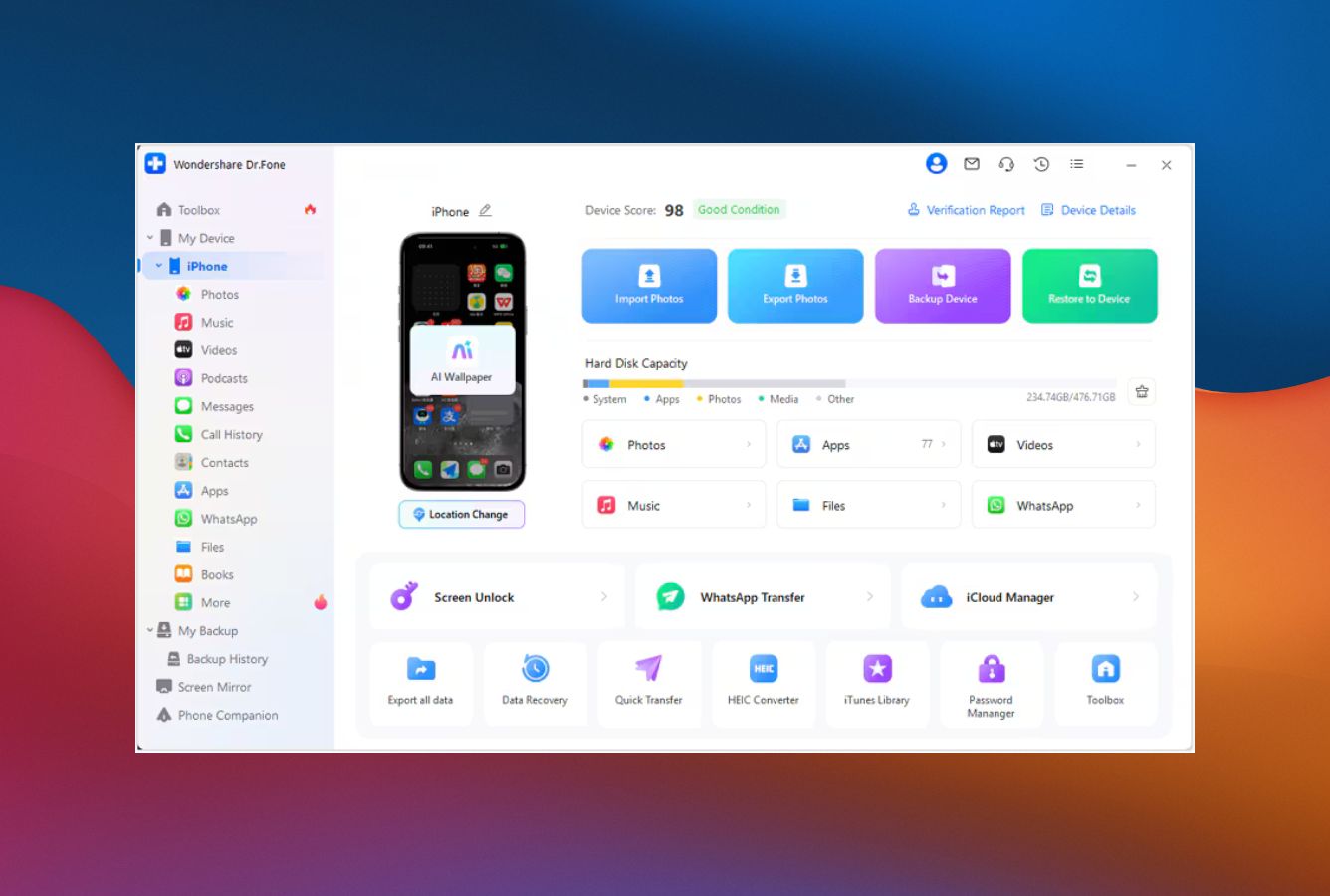
Good for: A complete iOS toolkit — recovery, system repair, and screen unlock under one roof.
Wondershare Dr.Fone doesn’t recover more bytes than the next tool down the list. Every paid app here can pull deleted photos out of a 30-day-old camera roll. What Dr.Fone does that almost nothing else does is keep going when the iPhone itself stops cooperating — stuck on the Apple logo, won’t pair, refuses to leave recovery mode. The system-repair module handles all of that, and it’s the difference between a failed scan and a working phone with your data still on it. We also like that Wondershare ships iOS support fast: iOS 26 and the iPhone 17 line have been listed as supported since launch day, which the vendor’s changelog confirms and most competitors still haven’t caught up on.
- Three recovery modes plus integrated iOS system repair
- Standard and Advanced repair modes (no data loss in Standard)
- Compatible with iOS 26 and every iPhone through the 17 lineup at launch
- Recovers from iTunes, iCloud, and direct device — even on broken or factory-reset units
- Multilingual support and a clean, modern interface
- The full Toolkit license ($139.95/yr) is the priciest tier in the category
- Monthly auto-renewal pricing is steep ($39.95/mo) and easy to forget
- Permanently overwritten data still won’t come back — no tool changes physics
Three sources, plus the rare ability to fix the iPhone first
Dr.Fone pulls from the iPhone directly, from any iTunes or Finder backup (encrypted or not), and from iCloud. So far, that’s the same trio every paid tool offers. The bit that sets it apart is iOS system repair on the side — Standard Mode fixes boot loops while preserving your data, Advanced Mode wipes the device but unbricks it. According to Wondershare’s documentation, the supported data types include messages, contacts, photos, videos, notes, call history, calendar, WhatsApp, and reminders, with iOS 26 and the iPhone 16 / 17 family explicitly listed.
Modular launcher, no tutorial required
The launcher splits everything into clearly labeled tiles — Data Recovery, System Repair, Phone Manager, Screen Unlock, Data Eraser — so you’re not dragged through unrelated screens to do one job. Scans finish in 5 to 30 minutes depending on storage size, with a real-time preview pane that fills in as files are decoded. The “deleted only” filter is the workflow saver: when you’re hunting for one chat thread or photo album, it cuts through the noise immediately.
Buy the bundle, not the recovery on its own
The standalone iOS Data Recovery license is $59.95/year on Windows or $69.95/year on Mac. The full Toolkit at $139.95/year throws in repair, unlock, and eraser tools — and that’s where the math gets interesting, because buying those features separately elsewhere usually costs more. The recurring complaint we see is the auto-renewal on the monthly tier ($39.95/mo) — a lot of users assume one recovery ends the relationship and then notice the second charge a month later. If you want to avoid that entirely, the lifetime license ($69.95–$79.95) is the safer purchase.
2. EaseUS MobiSaver – Best Wizard Interface for Beginners
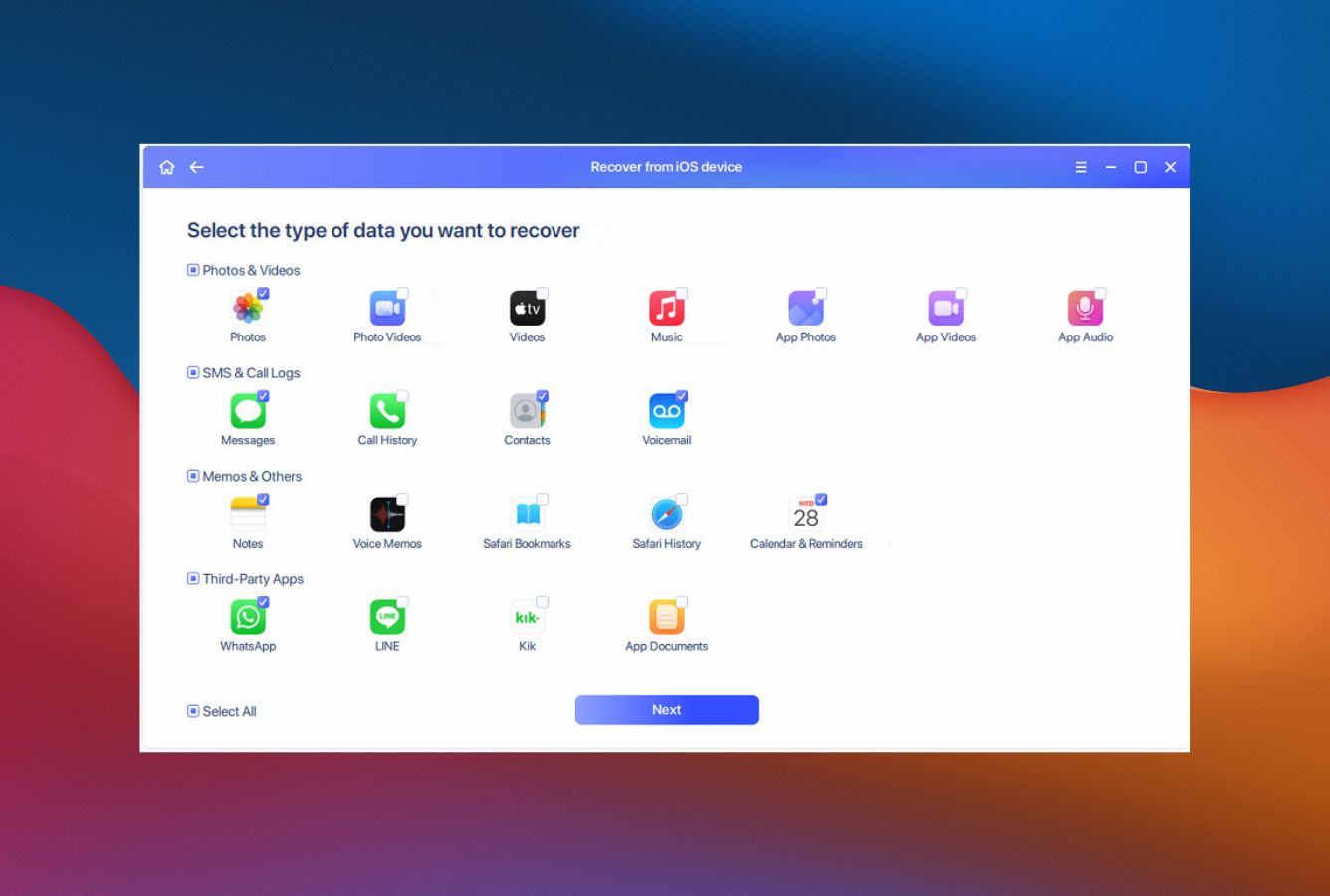
Good for: First-timers and anyone you wouldn’t want reading a 12-step tutorial.
EaseUS MobiSaver earns the runner-up spot on the strength of one feature the rest of the category doesn’t have: a real wizard that walks you through what happened, what you want back, and where to scan, step by step. It’s the tool you’d hand to a parent who needs to recover photos and won’t open a tutorial. The recovery engine itself is solid across all three sources (device, iTunes, iCloud), although we’ll note two things on the negative side — the installer has a habit of nudging you toward other EaseUS apps, and the free version is more “look but don’t touch” than genuinely usable (5 contacts and 1 photo or video is the cap).
- Genuinely beginner-friendly — the only tool with a true wizard interface
- Recovers from device, iTunes, and iCloud with the same three-click flow
- Free lifetime upgrades on annual and lifetime tiers
- EaseUS is a long-established company (NEC corporate-tier endorsements)
- Recovers messages, photos, contacts, WhatsApp, and 30+ other data types
- Most restrictive free tier in the category (5 contacts, 1 photo)
- Aggressive auto-renewal billing has drawn consistent Reddit complaints
- Installer historically prompts to add EaseUS sibling software (toggleable but irritating)
Solid all-round engine, narrower social-app list than UltData
MobiSaver covers all the standard iOS data types — photos, videos, contacts, messages, call logs, notes, voice memos, Safari bookmarks — and recovers chats from WhatsApp, LINE, and Kik. Three recovery sources put it on equal footing with the category: direct device, iTunes backup, iCloud. We’d describe success on recently deleted items as reliable; older deletions and physically damaged devices return mixed results, which is true for every tool here.
The friendliest onboarding flow in the category
The wizard asks what happened (deleted file, lost device, iOS update gone wrong), what you want to recover, and which source to scan. If you don’t know the difference between an iTunes backup and an iCloud backup, the wizard makes the call for you. Once you’re past the setup screen the rest of the app behaves like the category standard — files grouped by type, a deleted-only filter, single-click export. We’ve seen non-technical users recover deleted contacts without help, which is the whole pitch.
Skip the monthly, target the annual sale or lifetime
Posted pricing on Windows is $59.95/month, $79.95/year, or $99.95 lifetime for Pro. The free tier is too restrictive to recover anything meaningful — count it as a preview. The annual on its frequent sale (around $39.99) is the smart entry point. The monthly tier is auto-renew territory and is responsible for most of the negative reviews you’ll see floating around Reddit, so steer clear unless you’re truly recovering one file and uninstalling immediately.
3. Tenorshare UltData – Best for Social App and Backup Recovery
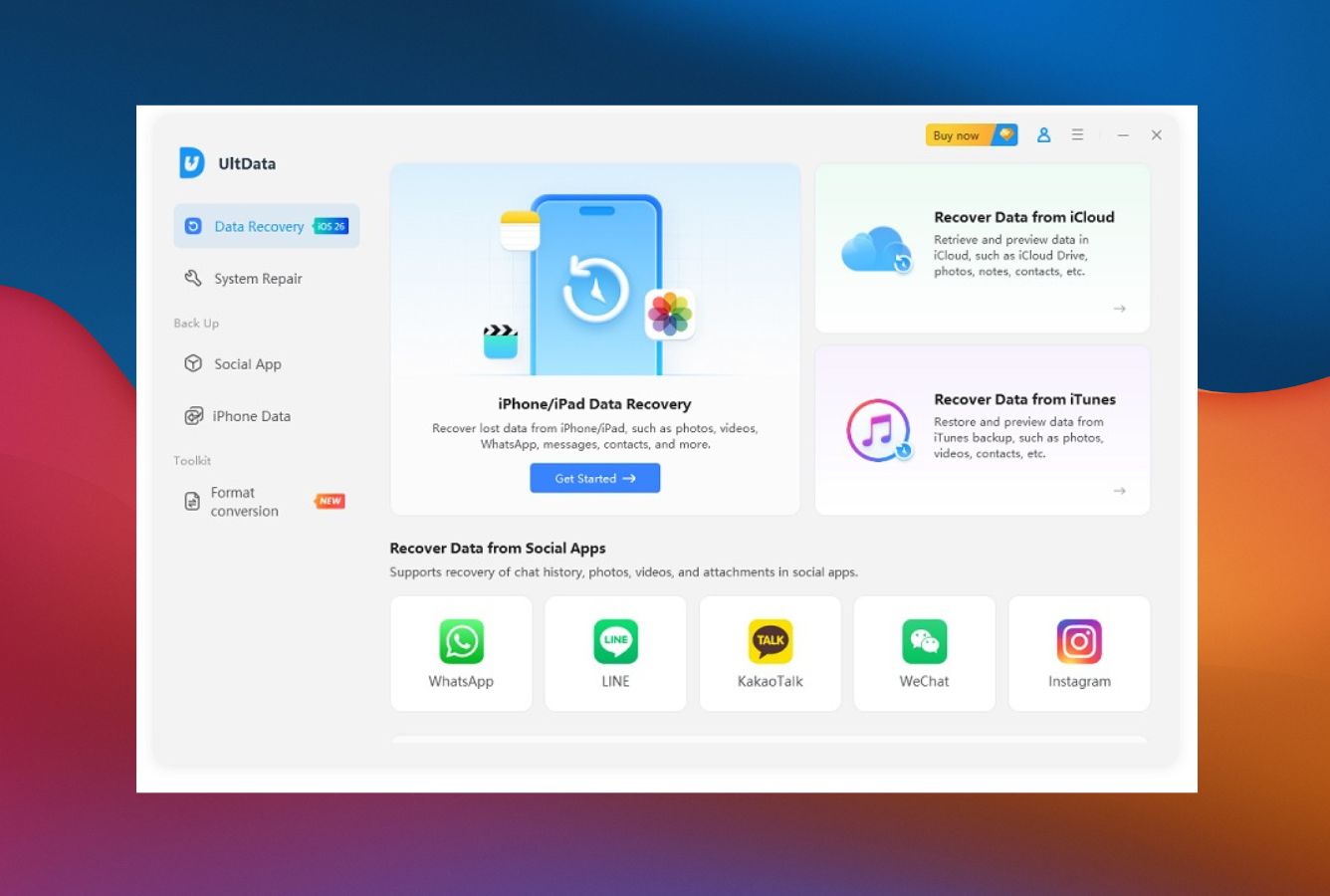
Good for: Getting deleted chats and media back from WhatsApp, LINE, WeChat, and a long tail of other social apps.
Tenorshare UltData trades Dr.Fone’s broader toolkit for a sharper focus on what most users actually came here for — getting deleted chats and media back. Tenorshare claims 35+ supported file types and specifically calls out WhatsApp, LINE, Viber, Kik, KakaoTalk, Messenger, and WeChat (the WeChat extraction is Mac-only as of writing). User reviews on G2 are mostly positive, with one big caveat — the “regular” sticker price is set absurdly high so the sale price feels like a steal. Don’t fall for it. The only license worth buying outright is the lifetime plan at around $69.95.
- Social-app recovery covers more chat platforms than the category average
- Quick three-step workflow: connect → scan → recover
- iOS system repair handles 150+ device-stuck scenarios
- Selective restore from iTunes backups without overwriting the live device
- Preview shows which files are recoverable before the paywall
- Aggressive “46% OFF FOREVER” anchor pricing dings credibility
- Some users on G2 report the iPhone occasionally fails to be detected on first connection
- iOS system repair on stuck devices is hit-or-miss in user reports
Broad file-type coverage with a clear social-app emphasis
UltData’s stated 35+ file types cover the iOS staples — messages, contacts, photos, videos, call history, voicemail, notes, calendar — plus the social cluster that often matters most: WhatsApp, LINE, Viber, Kik, WeChat (Mac), KakaoTalk, Messenger, Instagram chats. Recovery sources are the standard three: direct device, iTunes backup (encrypted backups handled), and iCloud. Real-world feedback on Reddit and G2 paints the same picture you’d expect — high success rate for recently deleted records, falling off a cliff for items deleted weeks or months back. That’s a category-wide truth, not an UltData-specific one.
Clean three-step flow with cross-sells around the edges
The main launcher puts the four primary modes — Recover from iOS Device, iTunes Backup, iCloud, and Fix iOS System — right on screen, no nested menus to fight. A scan on an average iPhone wraps in five to ten minutes, and results are grouped by category with a deleted-only filter. The friction point users mention most often is the cross-sells: Tenorshare’s other products pop up as upsell prompts inside the workflow. It’s not a dealbreaker, but it feels heavier than competitors that keep the recovery flow self-contained.
Lifetime is the only honest tier — ignore the inflated monthly
Tenorshare lists $45.95/month and $59.95/year for the standard iOS license, with lifetime around $69.95 — a $20 to $30 premium over the annual that pays for itself the first time a second incident hits. Affiliate-coupon sites advertise 70–84% discounts year-round, which is a pretty obvious tell that the sticker price exists mostly to make the sale feel like a deal. Treat the lifetime as the real price; treat the monthly as a trap.
4. iMyFone D-Back – Best iCloud Workflow with Lifetime Value
Good for: Lifetime-value buyers who want one license, no subscriptions, no surprises.
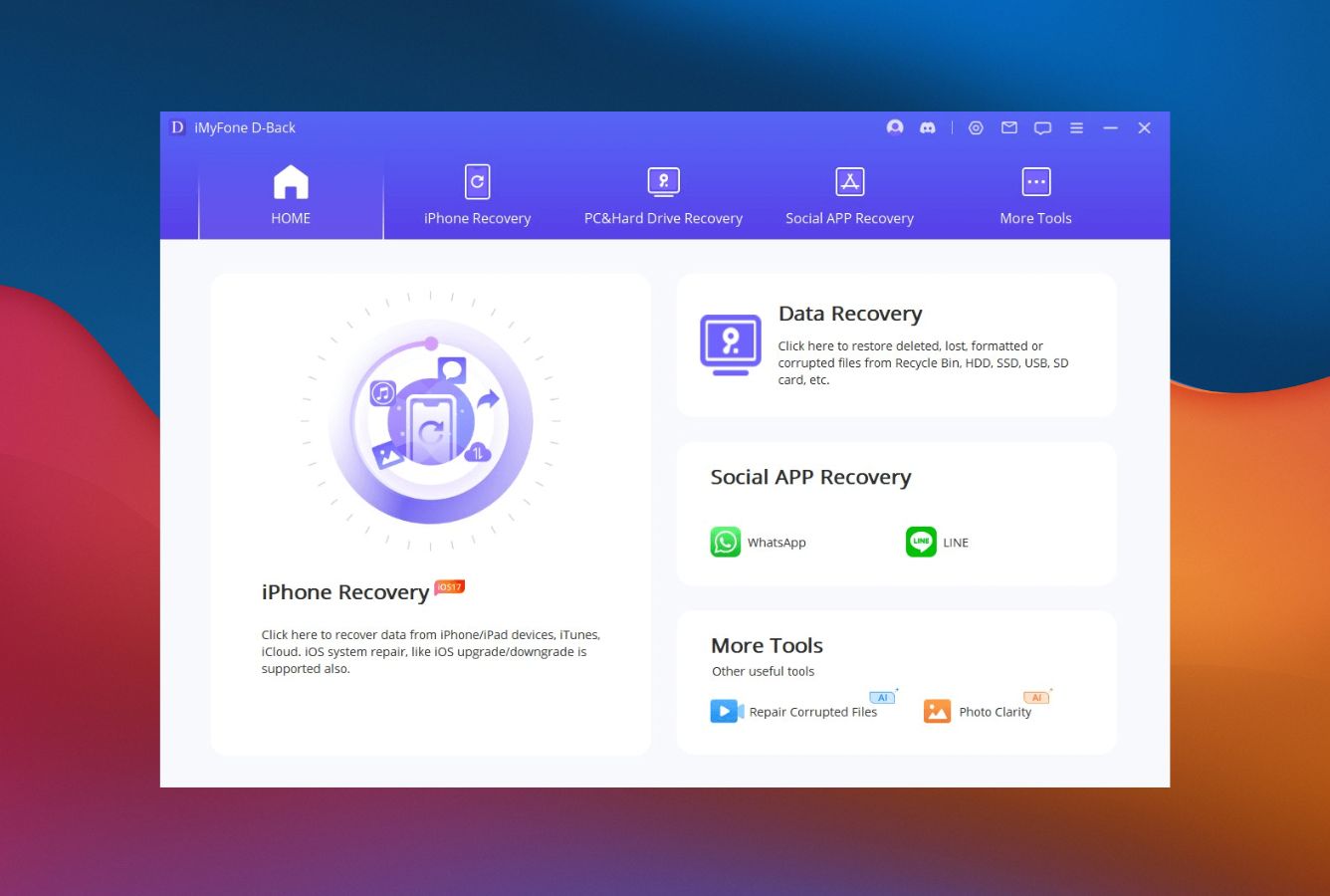
iMyFone D-Back earns its spot for two reasons: a fourth “Smart Recovery” mode that picks the right workflow based on what went wrong, and a $79.99 lifetime license that ends the subscription treadmill for good. iMyFone lists iOS 26 and iPhone 17 as supported, the same as the leaders. Honest feedback in the wild — and we agree — is that D-Back shines as a backup extractor and previewer but underdelivers on deep recovery of permanently deleted items. That’s a fair knock, but it’s also true to some degree of everything else on this list.
- Four recovery modes including Smart Recovery scenario picker
- One-time $79.99 lifetime license, no annual renewal
- Strong iCloud and iTunes backup extraction, including encrypted backups
- 4.7/5 average across Trustpilot reviews — among the highest in category
- iOS 26 / iPhone 17 listed as supported devices
- Direct-device deep scan recovery rate is modest for older deletions
- Some Reddit users report slow customer-service response times
- The iCloud login workflow has triggered Apple two-factor friction for some accounts
Backup extraction is the real strength; deep recovery is average
D-Back covers 18+ data types including messages, contacts, photos, WhatsApp, WeChat, Skype, Viber, Safari history, voice memos, and call logs. The four recovery modes are direct-from-iOS, iTunes backup, iCloud backup, and a scenario walker (locked device, lost device, factory reset). The iTunes backup extraction handles encrypted backups cleanly and presents data in tidy category folders — that part is genuinely good. Where D-Back falls short of Dr.Fone and UltData is direct-device recovery of unbacked-up deletions. Translation: D-Back is the right pick when a backup exists, the less-right pick when it doesn’t.
Smart Recovery makes the decision tree obvious
The Smart Recovery flow asks what happened — accidental deletion, factory reset, system crash, locked device — and routes to the right tool. For non-technical users this is the most helpful UI decision in the category; the alternative is staring at three identical “Recover from X” buttons and guessing which one fits. The preview interface is category-standard (files grouped by type, deleted-only filter, single-click export), and recoveries export to the computer rather than back to the iPhone — which avoids the overwrite risk that direct-to-device restores introduce.
The lifetime tier is the only number that matters here
iMyFone lists $49.99/month, $69.99/year, or $79.99 lifetime — and the math is unusually friendly to the lifetime tier. A year of monthly subs is $600, the annual is $69.99 and renews automatically, and the lifetime is a $10 premium over a single year of annual access. If you expect more than one recovery in the next five years, the lifetime is the right answer, full stop. Trustpilot has its share of auto-renewal complaints on the monthly tier, so avoid that unless you’re certain it’s a one-time purchase.

5. iMobie PhoneRescue (iOS) – Best for Damaged Backup Recovery
Good for: Cracking open corrupted iTunes backups other tools refuse to read.
iMobie PhoneRescue is the specialist for the one situation most competitors quietly fail at: a corrupted or partially-damaged iTunes backup. iMobie’s documentation calls this out as a core feature, and we’ve seen it pull data from backup archives other tools refuse to open. The other reason we like PhoneRescue is its first-mover habit on new iOS releases — iMobie’s own changelog confirms it was the first commercial recovery tool to support iOS 26 and macOS Tahoe, and that pattern has held for several iOS cycles in a row.
- Damaged-backup extraction works where competitors give up
- First-mover support for new iOS releases (iOS 26 on day one)
- iOS system repair fixes White/Blue/Black screen, recovery mode loops
- Lock-screen passcode removal as a built-in mode
- NO-DATA-LOSS technology preserves existing data during scans
- Hands-on independent testing has found recovered photos were sometimes blurry or unusable
- iCloud recovery mode largely mirrors what iCloud.com already shows for free
- Most expensive entry-level tier (no monthly option, only 3-month minimum)
Best in class for damaged backups, average everywhere else
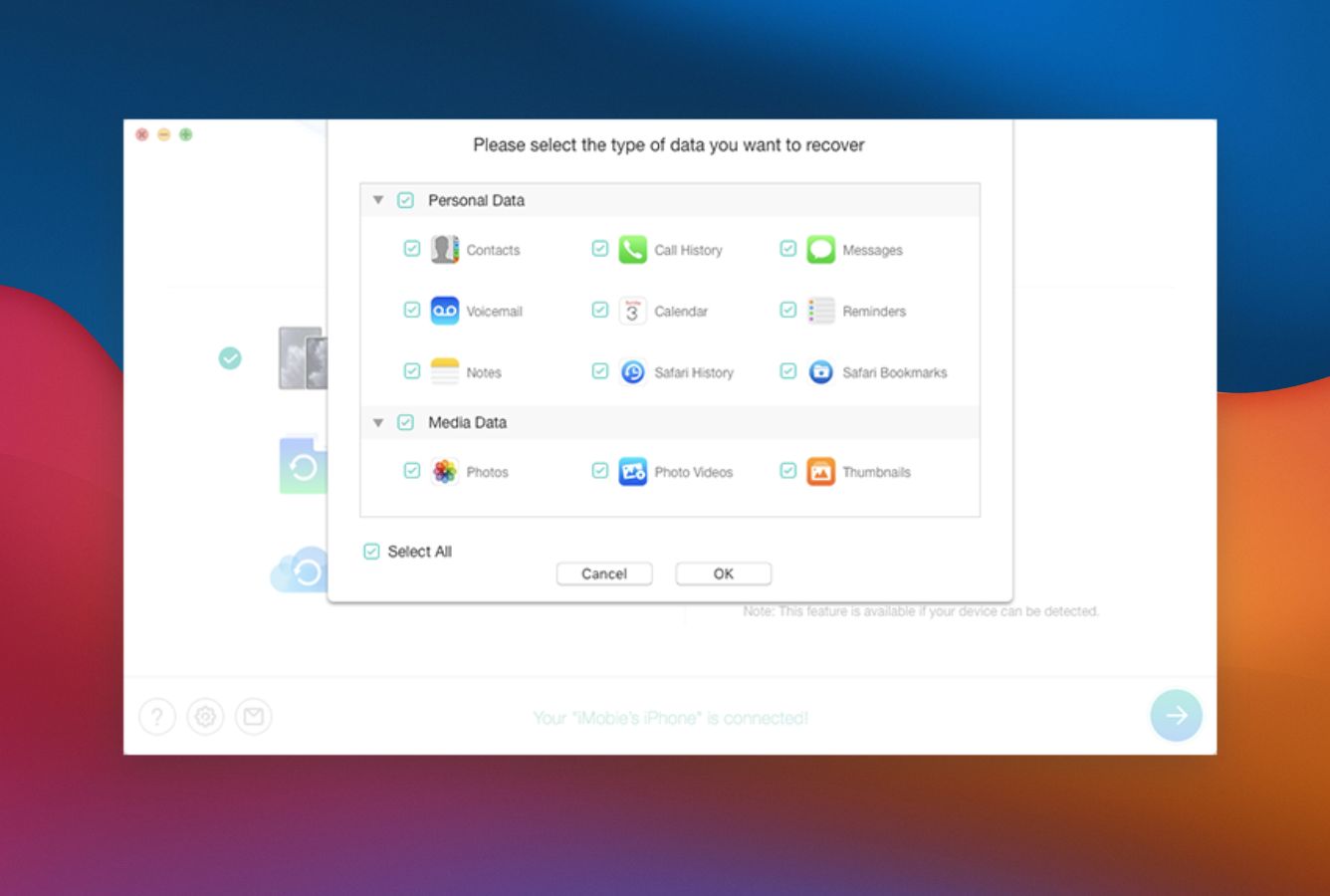
PhoneRescue’s standout capability is reading partial or damaged backup archives — the kind that appear after an interrupted backup, a failed sync, or a corrupted SQLite database in the backup folder. iMobie lists 31 supported data types across three recovery sources (device, iTunes, iCloud), with encrypted-backup extraction and damaged-backup repair as paid-tier features. On direct-device deep scans for older deletions, results are more mixed — in head-to-head tests on identical phones, PhoneRescue tends to surface fewer files than UltData or Dr.Fone.
Animated, modular, occasionally overdesigned
The app opens with a small animation of the PhoneRescue icon spinning, then a Quick Tips panel that walks you through how to maximize your odds. The four-mode launcher (iOS Device, iTunes Backup, iCloud, iOS Repair Tools) keeps the flow obvious, and the file browser supports type filtering and deleted-only views. Scans run on the slower side — measurably slower than UltData and FoneLab — but the trade-off is a more thorough scan that catches files faster tools sometimes miss.
The 3-month is for one-time crises; lifetime is the smart buy
iMobie posts a 3-month license at $45.99, a 1-year at $49.99, and a lifetime at $69.99 — the steepest entry tier in the category because there’s no monthly option. The $4 gap between 3-month and 1-year makes the 3-month a poor choice for anyone other than the one-and-done crowd. The lifetime is competitive with D-Back’s $79.99 and undercuts UltData’s lifetime in most regions; pair that with first-mover iOS support and it’s a strong pick for users on the newest iPhones.

6. Stellar Data Recovery for iPhone – Best Budget Option
data type selection before scan
Good for: Budget shoppers who want a real annual license, not a “free trial” that recovers nothing.
Stellar Data Recovery for iPhone is the budget pick — not the most polished, not the fastest, but at $39.99/year on sale (regular $59.99) it’s the cheapest legitimate annual license in the category by a clear margin. The consensus take, and ours, is the same: a perfectly competent recovery app held back by a dated interface that the rest of the field has moved past. The deep-scan mode handles encrypted iTunes backups, which is rare at this price point. Stellar has been in the data-recovery space for more than two decades, which earns it a baseline of trust even when the iOS-specific app feels less modern than the desktop product.
- Cheapest annual license among major iOS recovery tools ($39.99 on sale)
- Encrypted iTunes backup recovery included on the standard tier
- Deep-scan mode handles fragmented data and corrupted databases
- Long company track record (20+ years in data recovery)
- 5-device limit on the annual license is generous for the price
- Interface is visibly dated compared to Dr.Fone, UltData, and PhoneRescue
- Slower scans than the top tier — patience required on deep scans
- iOS version support typically lags the leaders by a release or two
Deep scan handles encrypted backups; iOS freshness is the weak spot
Stellar covers the same three sources as the top tier — direct device, iTunes (including encrypted backups), and iCloud — and recovers contacts, photos, videos, voice memos, notes, calendar, messages, WhatsApp, Kik, Tango, and other communication-app data. Stellar gets specifically called out as a good choice for corrupted databases and fragmented files — the deep scan takes its time but digs deeper than quick scans on competing tools. The catch is iOS-version freshness: support for iOS 26 and iPhone 17 lands one to two release cycles after the leaders, per Stellar’s own documentation.
Functional but visibly older than the field
Stellar’s Mac desktop product actually looks pretty clean — the iPhone-specific app is the one that hasn’t aged as well. Gray-on-gray styling and dense data-type checkbox panels feel like 2018 design. The workflow itself is straightforward: connect, select data types, run quick or deep scan, preview, export. The basic scan is fast (a triage layer that finds recently-deleted items first), and the deep scan is the slower follow-up for older data.
The best dollar-per-recovery value in the category
Posted price is $59.99/year, but the $39.99 sale is the going rate at any given time. Compared to Dr.Fone’s $59.95 floor, UltData’s $59.95 annual, and D-Back’s $69.99 annual, Stellar is roughly 30–40% cheaper for an annual license. There’s also a $99.99 Technician edition for users recovering data from up to 50 devices, which makes sense for repair-shop owners. The reason Stellar lands here rather than higher is the absence of a lifetime tier — D-Back’s $79.99 lifetime undercuts Stellar over a three-year horizon.
7. Aiseesoft FoneLab (iOS) – Best for File-Type Breadth
Good for: Selective recovery of one specific data type — say, just voice memos or call logs — without scanning the whole device.
Aiseesoft FoneLab is the quiet competence pick. It doesn’t lead on any one feature, but it does almost everything the leaders do, often for less money during one of its frequent sales. Aiseesoft claims 20+ supported file types and confirms iOS 26 and iPhone 17 support in the current build. The standout strength is selective recovery — FoneLab is one of the better tools for pulling specific file types without crawling the whole device, which saves serious time on large iPhones. The standout weakness is the brand: Aiseesoft is less recognizable than the top six, and the marketing leans heavier on bundled cross-sells than we’d like.
- 20+ supported file types including WhatsApp, Kik, LINE, WeChat
- Strong selective-recovery workflow (scan only what you need)
- Frequent coupon-driven sale pricing ($26.90/mo at 50% off)
- iOS 26 / iPhone 17 support confirmed in vendor docs
- Clean, uncluttered left-rail navigation
- Brand is less recognizable than Wondershare, EaseUS, or Stellar
- Bundled 7-day FoneTrans trial auto-converts to a paid sub if not canceled
- Slower scans than UltData and Dr.Fone in side-by-side tests
Solid breadth, no signature strength
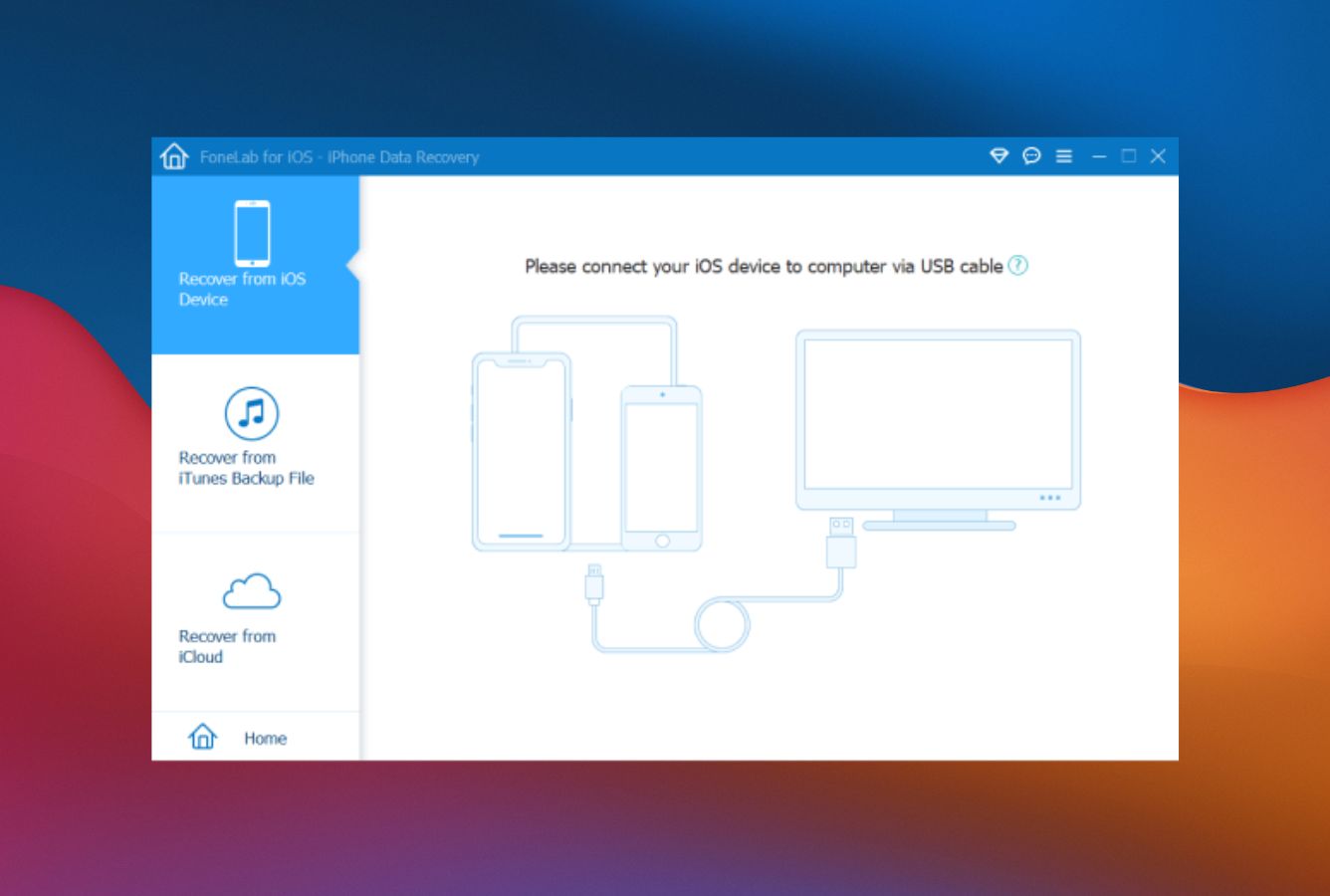
FoneLab supports the standard three recovery sources and lists 20+ data types — contacts, call history, messages, voicemail, camera roll, photo stream, photo library, app photos, app audio, app videos, notes, reminders, voice memos, Safari bookmarks and history, WhatsApp, Kik, Viber, Messenger, WeChat, Line, and app documents. Recovery success is broadly comparable to the rest of the category for contacts, text messages, photos, notes, and note attachments. Treat the “Intel acceleration” line in the marketing as generic — scan speed is average, not fast.
Functional, organized, and a little personality-free
FoneLab’s left-rail menu groups the three recovery modes tidily and keeps iOS Backup & Restore and System Recovery in their own menus rather than mixed into the main flow. The preview screen is category-standard — categorized file lists, deleted-only filter, single-click export. It won’t impress anyone who cares about design, but it also won’t confuse a first-time user. The main UX gripe is the 7-day FoneTrans trial bundled with FoneLab — it auto-converts to a $31.20 monthly charge if you don’t cancel it.
Sale pricing is good; sticker pricing isn’t
Sticker price is $53.80/month, which is poor value compared to the field. The frequent 50% discount drops the monthly to $26.90 and the annual into the $50–60 range, which is competitive. Coupon outlets verify the codes work, so think of the sale as the real price. The Mac version is slightly pricier than Windows. There’s no lifetime tier for the iOS-only product — and that absence is the main reason FoneLab ends up here rather than mid-pack.
How We Evaluate iPhone Data Recovery Software
Ranking iPhone recovery tools is easy to get wrong. Every vendor page out there claims “highest success rate,” “99% recovery,” and “supports iOS 26” — and most of them have some version of the truth on their side. Our rankings pull from three sources: vendor documentation for feature baselines, third-party hands-on reviews for cross-reference, and community feedback from Reddit, Trustpilot, G2, and the Apple Support Community for the real-world signal. We don’t run an in-house benchmark — we cross-reference what other testers found and surface where the consensus lines up and where it doesn’t.
Platforms covered: Windows 10/11 and macOS 13+ for the desktop apps; iOS 17, iOS 18, and iOS 26 on iPhone 11 through iPhone 17 (and iPad equivalents).
Key factors: Recovery capability (40%) carries the heaviest weight — does the tool actually do what it claims? Backup support (20%) covers iTunes, iCloud, and encrypted-backup handling. iOS freshness (15%) measures how fast each tool ships support for new iOS releases. Usability (10%), pricing transparency (10%), and support quality (5%) round out the criteria.
Vendor doc references, third-party review citations, and the per-tool feature spreadsheet live on our full methodology page.
iPhone Data Recovery Software – Honorable Mentions
Six tools that made the long list but didn’t make the cut. Each has a niche strength or a specific flaw that kept it out of the top 7.
How to Choose the Best iPhone Data Recovery Software
The first decision is whether you need a recovery tool at all — Apple’s built-in Recently Deleted folders solve roughly half of common iPhone data losses for free. If those don’t help, the buying decision splits along five factors, plus a sixth that catches people out more often than it should.
Recovery Source Coverage
Every paid tool in our top 7 covers all three sources: direct device scan, iTunes/Finder backup, and iCloud. If you’re considering a tool that only covers one or two — usually a cheap utility that only parses iTunes backups — it’s a real limitation. The right pick partly depends on where your data actually lives. iCloud users should look at tools with strong iCloud workflows (D-Back, PhoneRescue); iTunes-backup users with encrypted backups should verify the tool handles encryption (every tool on this list does, but always read the fine print on cheaper alternatives).
Supported Data Types
The category leaders cover 30+ file types. If you specifically need WhatsApp, LINE, Kik, or WeChat chat recovery, prioritize UltData or Dr.Fone — they have the deepest social-app coverage and the most reliable extraction. For standard stuff (photos, videos, messages, contacts, notes), any tool in the top 7 will do the job. Voice memo, voicemail, and call-recording recovery is patchier across the field; check the vendor docs for confirmation on a specific data type before buying.
iOS Version Freshness
If you own an iPhone 16 or 17 running iOS 26, day-one support matters — and it varies. iMobie PhoneRescue and Wondershare Dr.Fone usually ship iOS support fastest after Apple releases a new version. Stellar and EaseUS often lag by a release. If your iPhone is on iOS 18 or older, every tool in the top 7 works fine — freshness only matters for the newest hardware and OS.
Pricing Model: Subscription vs Lifetime
Monthly subscriptions are almost always a trap — auto-renewal turns a one-time crisis into a recurring charge most users forget about. If this is a one-shot, buy the cheapest annual on sale (Stellar at $39.99). If you expect another data scare down the line, the lifetime tier is the better math: D-Back’s $79.99 lifetime beats five years of any annual sub. Avoid lifetime tiers from companies you don’t recognize — “lifetime” only lasts as long as the company does.
Free Tier Reality Check
Every paid tool advertises a “free version.” None of them actually recover data for free — they stop at preview and require a paid license to export. EaseUS technically allows 5 contacts and 1 photo on the free tier, which is more honest than the competition but still functionally a preview. Use the free tier to confirm your data is recoverable before paying; don’t expect to recover anything meaningful without a license. For a genuinely free path, Apple’s built-in tools (covered below) are the only legitimate option.
Compatibility With Your Computer
All seven tools run on Windows and macOS, but the Mac version is sometimes a separate purchase. Stellar, EaseUS, and Aiseesoft all sell the two platforms as distinct licenses; Dr.Fone and UltData typically bundle them. Verify before purchase if you use both. Also check macOS version compatibility — older Macs running macOS 11 or earlier may run into gaps with the newest builds, in which case grab the older version from the vendor’s archive.
When iPhone Recovery Software Can’t Bring Your Data Back
Recovery software has hard limits — physical and cryptographic ones — that no commercial tool can work around. Knowing which one you’re up against saves you time and money. Here’s the quick triage matrix.
| Your situation | Software can help? | What to do instead |
|---|---|---|
| Erased via Erase All Content and Settings | No | Restore from iCloud/iTunes backup. Without a backup, the data is gone — the Secure Enclave erases the encryption key during a full wipe. |
| Water-damaged iPhone, won’t power on | No | Power-off the device, do not charge. Take to a professional repair service or Apple Store before attempting any recovery. |
| Recently deleted photos / messages | Yes | Check Recently Deleted folders first (free, 30-day window). Recovery software is the fallback if those folders are empty. |
| iPhone stuck on Apple logo / boot loop | Yes | Use a tool with iOS system repair — Dr.Fone Standard Mode, PhoneRescue, or UltData. Standard modes preserve data. |
| iPhone passcode-locked, no Apple ID | No | Apple’s account-recovery process is the only legitimate path. Beware tools claiming to “bypass” — most don’t work, some are scams. |
Hardware Damage Beyond Software’s Reach
Water exposure, drops onto concrete, fire, or impact damage that prevents the iPhone from booting or pairing with a computer puts the device out of recovery-software range. The pairing protocol Apple exposes requires a working logic board and a functional USB controller — neither of which a damaged iPhone reliably has. Professional repair services (Apple Store, certified independent shops, or specialized recovery labs) are the path forward. Trying to power up a water-damaged iPhone repeatedly often makes things worse by allowing corrosion to spread.
Encrypted Storage After Erase All Content
Every iPhone since the iPhone 5s ships with a Secure Enclave that holds the device’s encryption keys. When you tap Erase All Content and Settings, the Secure Enclave throws away the key — even though the encrypted data still exists on flash storage, no commercial software can decrypt it because the mathematical key is gone. This is the design, not a flaw. Backup-based recovery is the only path after a full erase; no scan tool changes this.
Overwritten Storage Past the Recovery Window
When iOS deletes a file, the storage block is marked as available but not immediately overwritten. The data stays recoverable until iOS reuses that block for a new file. On a moderately active iPhone, this window is days for messages and chat logs, weeks for photos, and longer for files in less-touched areas of storage. Once iOS writes new data over a deleted file, no software can reverse the overwrite. The single most important recovery rule: stop using the iPhone the moment you notice data is missing.
Cloud-Synced Data the Device Never Held
iCloud Photos, iCloud Drive files, and synced Notes that were deleted from the device are often deleted from iCloud too — the sync runs both ways. Recovery from the iPhone alone can’t bring back what iCloud no longer has. The 30-day Recently Deleted folder in iCloud.com is the only built-in safety net for cloud-synced content. Past that window, the data is gone from Apple’s servers, and no third-party tool can fetch what iCloud has already purged.
Permanently Deleted in Specific Apps
Some apps (Facebook Messenger, Instagram DMs, Snapchat) intentionally delete server-side data when users tap delete — there is no backup to recover from. Several recovery tools advertise the ability to recover from these apps; independent testing repeatedly shows the claims don’t hold up. Treat any “Facebook Messenger recovery” or “Snapchat recovery” feature with skepticism, regardless of how confidently the vendor markets it.
Every new photo, message, or app launch can overwrite the storage blocks where deleted data still lives. Power the device off if you can — or at minimum, switch on Airplane Mode and stop opening apps — before installing recovery software.
Built-in iPhone Recovery Options (Check These First)
Before paying for anything on this list, check Apple’s built-in safety nets. They cover the most common iPhone data losses for free, and they take less than five minutes to check.
Recently Deleted Folders (Photos & Messages)
Photos has a Recently Deleted album that holds deleted photos and videos for 30 days. Open Photos → Albums tab → Utilities → Recently Deleted, authenticate with Face ID, and pick what you want back. Messages has the same feature — tap Edit (or Filters) in the top-left, then Show Recently Deleted for threads from the last 30 to 40 days. These two folders solve the majority of “I accidentally deleted” scenarios with no software purchase needed.
iCloud Backup Restore
If you’ve been backing up to iCloud (Settings → [Your Name] → iCloud → iCloud Backup), you can restore the whole iPhone from a recent backup. The catch is that it’s all-or-nothing — restoring overwrites everything currently on the device with the backup state. Useful for full data losses, less useful for “I deleted one chat thread.” That’s where the paid third-party tools earn their license. Apple’s official guide to restoring from iCloud backup walks through the steps.
iCloud.com Data Recovery
iCloud.com → Account Settings → Advanced has a Data Recovery section that restores deleted contacts, calendars, bookmarks, and files from cloud-side snapshots Apple keeps for up to 30 days. This is separate from the per-app Recently Deleted folders and is the right path when contacts or calendar entries vanished from your account. Sign in via browser, scroll to Advanced, pick the data type and the snapshot date.
When Built-In Options Aren’t Enough
Apple’s tools handle three scenarios well: items deleted within the last 30 days, full-device losses where a recent backup exists, and contacts or calendar items that disappeared from iCloud sync. They handle three scenarios poorly: items deleted more than 30 days ago, selective recovery of one chat thread from a full backup, and recovery from a corrupted or partially-damaged iTunes backup. Those three gaps are exactly where paid recovery tools earn their keep — and where the choice between Dr.Fone, UltData, D-Back, and the rest of the list actually matters.
Settings → [Your Name] → iCloud → iCloud Backup → toggle on. The free 5 GB tier is too small for most iPhones, but $0.99/month gets you 50 GB — cheaper than any recovery tool on this list, and it prevents the problem instead of fixing it after the fact.
Final Verdict
Wondershare Dr.Fone (iOS) is our pick for best iPhone data recovery software in 2026. It wins on breadth — three recovery sources, integrated system repair, day-one iOS 26 and iPhone 17 support, and a Standard repair mode that fixes Apple-logo loops without wiping data. If you can stretch to the Toolkit at $139.95/year, the bundled unlock and eraser tools justify the premium over piecing the same features together separately.
Beyond the winner: EaseUS MobiSaver is the right pick when you’re doing this for the first time — its wizard walks through the decision tree better than anything else here, and EaseUS’s long track record gives it more trust than the newer entrants. Tenorshare UltData takes the third slot when social-app recovery (WhatsApp, LINE, WeChat) is the priority, with a lifetime license around $69.95 that lets you ignore the inflated monthly pricing. iMyFone D-Back is the lifetime-value play — at $79.99 it’s the best multi-year math in the category, particularly for users who want recovery software on hand without subscription churn. And Stellar Data Recovery for iPhone at $39.99/year on sale is the budget pick that gets the job done — you accept a dated interface and slightly later iOS support as the trade-off.
Frequently Asked Questions
About the Authors


Data Recovery Fix earns revenue through affiliate links on some product recommendations. This does not influence our rankings — all tools are evaluated independently based on documented research, independent testing from external sources, vendor documentation, and community feedback, before any affiliate relationships are considered. If anything on this page looks inaccurate, outdated, or worth revisiting, please reach out at contact@datarecoveryfix.com and we’ll review it promptly.

Android Photo DE 2