
DiskGenius Review (2026): All-in-One Disk Toolkit
DiskGenius is a Windows-only all-in-one disk toolkit from YIZHISHU Ltd (Eassos) — originally launched as PartitionGuru in 2010, with 300+ releases since. It bundles four utility classes in one application: data recovery, partition management, disk cloning with OS migration, and disk diagnostics. The current build is v6.1.1.1742, and the licensing is lifetime: $69.90 Standard, $129.90 Professional. This review evaluates that breadth-first positioning honestly — where the consolidation pays off and where dedicated specialists still beat it.
evaluation, user reports
Windows-only
$129.90 Pro
v6.1.1.1742

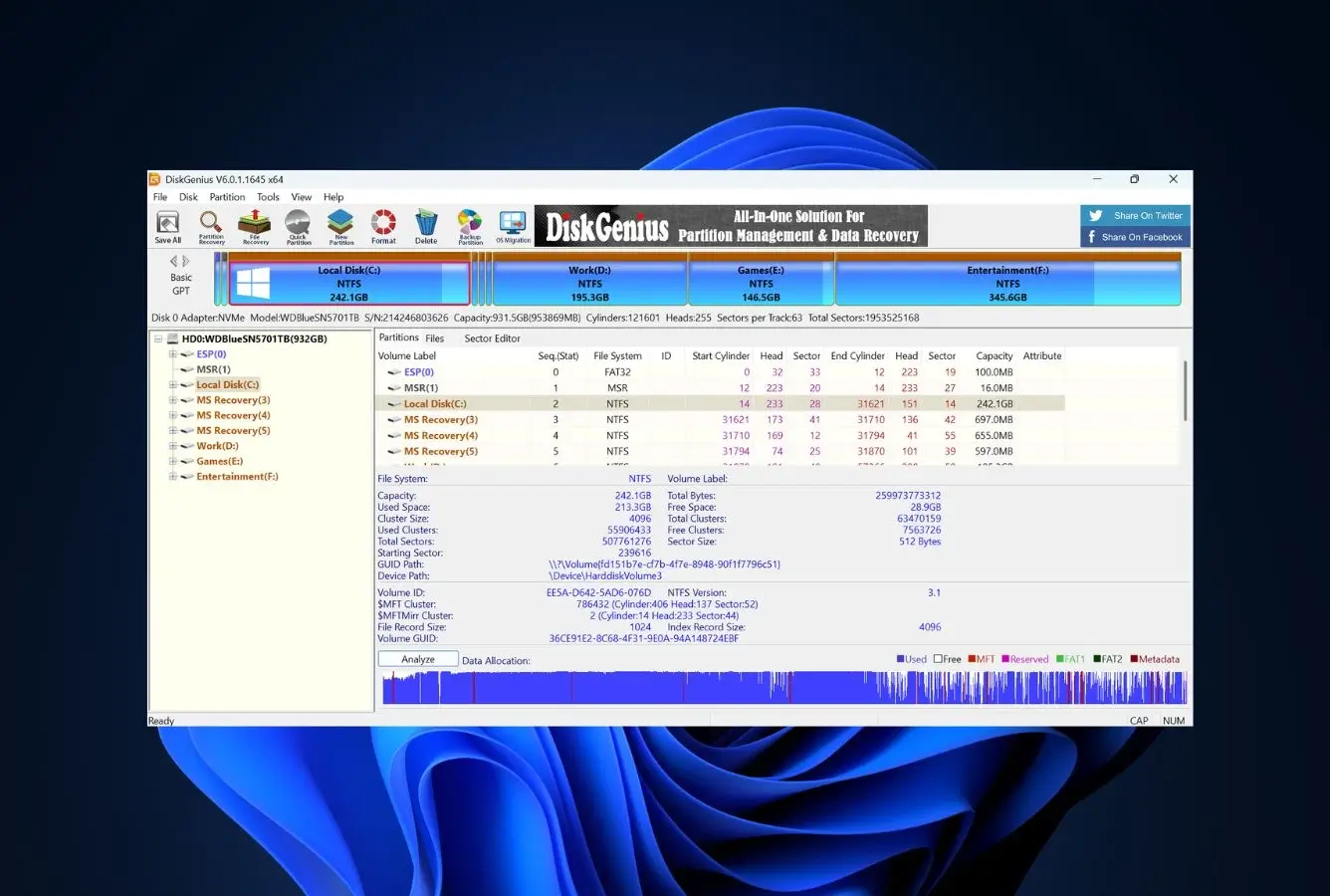
DiskGenius earns its score through breadth, not depth. It genuinely consolidates four utility classes — data recovery, partition management, disk cloning with OS migration, and disk diagnostics — into a single Windows application. Recovery is solid mid-tier on Windows file systems; partition management rivals dedicated tools. The Free edition is genuinely useful for non-recovery use cases (cloning, OS migration, partition work all included at no cost). The trade-offs are real: dated interface, non-standard recovery workflow, no APFS or HFS+ support, and a 64 KB per-file cap on Free recovery that blocks meaningful trial. Right tool for IT professionals and power users who need versatility; wrong tool for users who just need to undelete files.
✓ What We Liked
- Genuine all-in-one — recovery + full partition manager + cloning + OS migration + diagnostics
- Free edition offers full partition management and disk cloning at no cost
- Solid recovery on Windows file systems — NTFS, FAT, exFAT, ReFS
- RAID 0/1/4/5/6/10 + JBOD reconstruction included
- Built-in hex editor and WinPE bootable media for offline recovery
- BitLocker decryption support (Pro edition)
- $69.90 Standard lifetime / $129.90 Pro — competitive for the breadth offered
✕ What We Didn’t
- No macOS file system support (APFS, HFS+) — Windows-only ecosystem
- Free edition recovery capped at 64 KB per file — most restrictive in category
- Dated interface and non-standard recovery workflow (right-click “Copy To” instead of “Recover”)
DiskGenius Alternatives
Brief selection A quick shortlist of top alternative picks based on aggregated independent research. |
Best Alternative

EaseUS Data Recovery Wizard
Best overall · 2 GB free
|

Stellar Data Recovery
Best for photos · 1 GB free
|

Wondershare Recoverit
Best for video · 100 MB free
|
|---|---|---|---|
| Deep scan | ✓ | ✓ | ✓ |
| Formatted drive recovery | ✓ | ✓ | ✓ |
| RAW photo support | Broad | Broad | Limited |
| File repair | ✓ | ✓ | Video only |
| Free tier | 2 GB | 1 GB | 100 MB |
Research Methodology
This review aggregates three evidence types for DiskGenius v6.1.1.1742: vendor documentation (the official product pages, editions comparison, and current installer), independent external evaluation, and verified user feedback from G2, Trustpilot, and SourceForge. Tier assignments (Excellent / Very Good / Good / Fair / Limited / Not supported) reflect the aggregate of that evidence rather than an in-house benchmark — we do not claim independent recovery percentages. For broader Windows recovery comparisons, see our ranking of the best data recovery software for Windows. Full methodology is documented on our How We Test page.
Is DiskGenius Safe?
Yes. DiskGenius is a legitimate software product developed by YIZHISHU Ltd (operating as Eassos Technology Co., Ltd.), a Chinese software company that has been producing disk utilities since 2010. The product was originally launched under the name PartitionGuru before being rebranded as DiskGenius. The company maintains continuous development with 300+ releases by 2023, an active English-language website, multi-language UI support, and email plus support-ticket channels. The vendor claims a global user base of 45 million — a number that’s hard to verify externally but consistent with the tool’s longevity and presence on major download portals.
DiskGenius operates in read-only mode during recovery scanning — recovery operations do not modify source drives. There’s an important caveat unique to DiskGenius: the same application bundles destructive partition tools (format, wipe, resize, delete partitions) alongside non-destructive recovery tools. These features are clearly separated in the interface, but inexperienced users could misclick into a destructive operation when intending to recover data. Always work on copies of important drives when possible, and read each dialog carefully before clicking through. One antivirus engine (Sophos in some scans) may flag DiskGenius as a PUA (potentially unwanted application) due to its low-level disk access capabilities — this is a common false positive among legitimate disk management tools and not an indicator of actual malware. Always download from the official diskgenius.com website; cracked copies from third-party sites are routinely Trojan-laden given DiskGenius’s commercial pricing.
The tool has been on trusted software download portals for 15+ years. The mature company history, continuous update cadence, and adoption among IT professionals worldwide all support the safety assessment.
How to Use DiskGenius
DiskGenius does not use a step-by-step wizard like consumer recovery tools. The interface presents all connected drives, partitions, and disk geometry in a single dense panel — similar to R-Studio’s approach, and similarly unfriendly to first-time users. Recovery requires navigating menus rather than following a guided flow.
Download and install
Download from diskgenius.com. The installer (`DGEngSetup6111742.exe`) is approximately 62 MB. Install on a different physical drive than the one you need to recover from. The Free edition is fully functional for partition management and disk cloning out of the box.
Select drive and start file recovery
Select the target drive or partition in the left panel, then click “File Recovery” in the toolbar. Choose between “Recover Deleted Files” (quick, MFT-based) or “Complete Recovery” (deep signature scan). Click Start. For lost partitions, use “Search Lost Partitions” first to locate the partition before scanning files.
Browse scan results and preview
Results appear in a list view organized by folder structure plus a “By Type” grouping for signature-based finds. Use filters for file type, name, status, or date. Press P to preview files — previews appear in a small panel or separate window. Note: there is no thumbnail grid view for photos, which makes browsing recovered images more tedious than in consumer tools.
Copy recovered files to a destination
Right-click selected files and choose “Copy To” to save them to a destination drive — there is no prominent “Recover” button, which confuses users coming from consumer tools. Always save to a different physical drive than the source. For complex cases (drive won’t boot, OS unavailable), use Tools → Build Bootable USB to create WinPE recovery media and boot the affected machine into the recovery environment.
DiskGenius’s toolbar and right-click menus include both recovery tools (read-only) and partition management tools that can format, wipe, resize, or delete partitions (destructive). When intending to recover data, be careful not to accidentally click a destructive operation — there’s limited undo for those actions. The tool’s defining feature (breadth) is also its defining hazard for inexperienced users.
Who DiskGenius Is For
DiskGenius is built for users who manage disks regularly, not for first-time data loss. Three audiences get clear value:
IT professionals and system administrators who manage partitions across multiple machines, perform drive upgrades, migrate operating systems, repair bad sectors, and occasionally need to recover files — all from one toolkit. The Family ($159.90 / 5 PCs) and Technician ($259.90 / 20 PCs) tiers extend this directly to small consultancies.
Windows power users who build PCs, manage RAID arrays, work with Linux dual-boot systems, regularly clone drives for backup, or run home servers. DiskGenius’s breadth replaces three or four separate utilities, easily justifying the $69.90 Standard or $129.90 Pro lifetime price.
Windows-only users who can ignore the macOS gap. DiskGenius supports NTFS, FAT12/16/32, exFAT, and ReFS thoroughly, plus Linux ext2/3/4 in the Pro edition — but cannot read APFS or HFS+. If your environment is Windows-only this is irrelevant; if you support mixed-OS environments, R-Studio or Disk Drill cover the full spectrum.
DiskGenius is the wrong choice for first-time data loss users seeking a wizard-driven recovery experience, users who only need data recovery (specialist tools beat it on recovery rates), users who need Mac-formatted drive recovery, and users who want a meaningful free recovery trial — the 64 KB cap rules out trial validation.
DiskGenius’s Strengths in Real-World Use
DiskGenius’s strengths cluster around breadth — the genuine consolidation of four utility classes that competitors typically sell as separate tools.
Genuine all-in-one consolidation
This is the defining capability and the rationale for the product. Data recovery (deleted files, formatted drives, lost partitions, RAID 0/1/4/5/6/10/JBOD), partition management rivaling dedicated tools (create, resize, split, merge, MBR/GPT conversion without data loss), backup and restore (disk and partition cloning, OS migration to SSD, image backup), and disk utilities (bad sector repair, S.M.A.R.T. monitoring, hex editor, WinPE bootable media) — all in one $129.90 lifetime application. Buying these as separate dedicated tools would easily run $200–300+.
Free edition that’s actually useful
DiskGenius’s Free edition is unusually generous. Full partition management, disk cloning, OS migration, bad sector scanning, S.M.A.R.T. monitoring, and WinPE bootable media creation are all available at no cost — making DiskGenius worth keeping installed even if you never pay for the recovery tier. The single restriction is the data recovery cap of 64 KB per file, which makes recovery functionally trial-only.
Solid Windows file system recovery with partition awareness
DiskGenius handles Windows file systems competently. NTFS, FAT12/16/32, exFAT, and ReFS are all supported with both quick scan (MFT-based) and complete recovery (signature-based) modes. The unique advantage is its partition-aware approach: the “Search Lost Partitions” feature locates and reconstructs deleted or damaged partitions before scanning them for files — producing recovery results with original directory structures intact rather than as flat lists of unnamed files. Linux file system recovery (ext2/3/4) is included in the Pro edition.
Lifetime licensing with strong long-term TCO
DiskGenius uses lifetime licensing across all paid tiers — no subscription, no annual renewal. Compared to subscription competitors charging $80–100/year, DiskGenius’s lifetime model wins decisively over multi-year ownership: three years of subscription often costs more than the DiskGenius Pro lifetime price. Family ($159.90 / 5 PCs) and Technician ($259.90 / 20 PCs) tiers extend this to small consultancies and IT shops.
Where DiskGenius Falls Short
DiskGenius’s weaknesses cluster around interface design, the macOS gap, and trial-evaluation limitations. Three shortcomings deserve weight in any purchase decision.
Dated interface with non-standard recovery workflow
The interface is the most consistent criticism. Dense panels, no modern grouping or search, no thumbnail grid for browsing recovered photos (preview opens in a small panel via P keystroke), and a non-standard recovery workflow that uses right-click “Copy To” instead of a clear “Recover” button. For first-time recovery users coming from consumer tools, the interface alone is often enough to drive them to alternatives.
No macOS file system support and Windows-only platform
DiskGenius does not support APFS or HFS+ at all. The product is Windows-only — no native macOS or Linux build. For users in mixed-OS environments, this is a meaningful limitation: you cannot use DiskGenius to recover from a Mac-formatted external drive. The tool does support Linux file systems (ext2/3/4) in the Pro edition, but the Mac gap remains. For users who specifically need broad hardware recovery coverage, see our best hard drive recovery software guide.
64 KB free recovery cap blocks meaningful trial
The Free edition’s per-file recovery limit — 64 KB — is the most restrictive among major data recovery tools. Most competitors offer either substantial free recovery quotas (1–2 GB) or genuinely unlimited free recovery for simple cases. At 64 KB, DiskGenius’s Free edition can recover small text files and not much else, meaning users cannot meaningfully verify whether the recovery engine works for their scenario before committing $69.90 or $129.90. This creates real purchase risk.
DiskGenius Capability Summary
How DiskGenius performs capability by capability:
| Capability | Tier | Notes |
|---|---|---|
| Partition management | Excellent | Create, resize, split, merge, format, hide, MBR/GPT conversion — rivals dedicated tools |
| Disk cloning & OS migration | Excellent | Disk + partition cloning, OS migration to smaller SSD with auto-resize — Free edition |
| Free edition value | Excellent | Full partition manager + cloning + OS migration at no cost; only recovery is gated |
| Disk diagnostics & repair | Very Good | Bad sector scan/repair, S.M.A.R.T. monitoring, WinPE bootable media |
| Hex editor | Very Good | Built-in low-level disk editor for advanced users |
| Deleted-file recovery (NTFS) | Very Good | MFT parsing strong; behind dedicated specialists |
| Lost partition recovery | Very Good | “Search Lost Partitions” preserves original directory structure |
| Linux file system recovery (Pro) | Very Good | ext2/3/4 supported in Professional edition |
| BitLocker decryption (Pro) | Very Good | Decrypt and recover from BitLocker-encrypted partitions |
| FAT32 / exFAT recovery | Very Good | Strong on USB and SD card scenarios |
| Recycle Bin recovery | Very Good | Quick scan handles recently emptied files efficiently |
| Long-term value (lifetime) | Very Good | $69.90 / $129.90 lifetime beats subscription alternatives over 2+ years |
| RAID reconstruction | Good | RAID 0/1/4/5/6/10/JBOD; less automatic than parameter-detection tools |
| Formatted-drive recovery | Good | Solid mid-tier; behind dedicated specialists |
| Corrupted-partition recovery | Good | Partition-aware approach helps; rates trail recovery specialists |
| SD card / camera recovery | Good | Common formats handled; no thumbnail browsing makes photo recovery tedious |
| UI & ease of use | Fair | Dense, dated, non-standard recovery workflow |
| Free recovery cap (64 KB/file) | Limited | Most restrictive in category; blocks meaningful trial validation |
| macOS file system support | Not supported | No APFS, no HFS+; Windows-only product |
Tier scale: Excellent / Very Good / Good / Fair / Limited / Not supported.
DiskGenius Cost
DiskGenius uses a tiered lifetime licensing model — no subscriptions, no annual renewals. The Free edition is genuinely useful for partition management, disk cloning, and OS migration but caps recovery at 64 KB per file, which makes meaningful trial recovery impossible.
| Edition | Price | Coverage | Notes |
|---|---|---|---|
| Free | $0 | Full partition management + cloning + OS migration · Recovery capped at 64 KB/file | Genuinely useful for non-recovery use; trial-only for recovery |
| Standard | $69.90 | Free + full file recovery · Lost partition recovery · 1 PC lifetime | The minimum tier for useful recovery |
| Professional | $129.90 | Standard + ext2/3/4 recovery + virtual RAID + BitLocker + advanced features · 1 PC lifetime | The full toolkit; sensible for power users and IT pros |
| Family | $159.90 | Pro features · 5 PCs · lifetime | For households or small consultancies |
| Technician | $259.90 | Pro features · 20 PCs · lifetime · commercial use | For IT shops supporting multiple clients |
All paid licenses are one-time purchases with free lifetime updates. 30-day conditional refund policy. Pricing verified against diskgenius.com, April 2026.
The lifetime model is the headline value play. Against subscription tools, three years of ownership at $80–100/year easily exceeds DiskGenius’s $129.90 Pro lifetime price. Against lifetime competitors like R-Studio at $79.99, the calculation flips — R-Studio is cheaper but recovery-only, while DiskGenius’s higher price buys the partition manager, cloning, and OS migration on top of recovery. For category context, see our ranking of the best data recovery software, and for a free-first approach, our free Windows data recovery software guide.
DiskGenius vs. Competitors (2026)
| Tool | Recovery | Partition mgr | Cloning / OS migration | Mac filesystems | Free recovery | Entry price |
|---|---|---|---|---|---|---|
| DiskGenius ← | Solid mid-tier | Excellent | Yes (Free) | No | 64 KB/file | $69.90 lifetime |
| R-Studio | Excellent | No | No | Yes | 256 KB/file | $79.99 lifetime |
| Disk Drill | Class-leading | No | No | Yes | 100 MB | $89/yr |
| EaseUS DRW | Very Good | No | No | Yes | 2 GB | $99.95/yr |
| MiniTool Power Data Recovery | Very Good | Limited | Separate product | No | 1 GB | ~$99/yr |
| Recuva | Basic | No | No | No | Unlimited | Free / $24.95/yr |
All-in-one consolidation comparison. Aggregated from vendor documentation and independent reviews, April 2026.
Download DiskGenius
Recovery + partition manager + cloning + OS migration. Free edition genuinely useful.
DiskGenius Features & Tools
DiskGenius’s value proposition is breadth. Where most recovery tools focus exclusively on finding and restoring lost files, DiskGenius packages data recovery alongside a full suite of partition management, disk cloning, backup, and diagnostic tools. This makes it particularly appealing to IT professionals and Windows power users.
Four Utility Categories in One Application
DiskGenius bundles capabilities that competitors typically sell as separate products. Here’s the full feature inventory by category.
File System Support Matrix
| File system | Use case | Free | Standard | Pro |
|---|---|---|---|---|
| NTFS / NTFS5 | Windows primary drives | Read/manage | Full recovery | Full recovery |
| FAT12 / FAT16 / FAT32 | Legacy drives, USB, SD cards | Read/manage | Full recovery | Full recovery |
| exFAT | Large SD cards, portable SSDs | Read/manage | Full recovery | Full recovery |
| ReFS | Windows Server, Storage Spaces | Read/manage | Full recovery | Full recovery |
| ext2 / ext3 / ext4 | Linux drives | Limited | Limited | Full recovery |
| HFS+ | Mac legacy drives | Not supported | Not supported | Not supported |
| APFS | Modern Mac drives | Not supported | Not supported | Not supported |
All editions support partition management on all listed file systems. Recovery support varies by edition. Source: vendor documentation, April 2026.
DiskGenius User Reviews
User feedback splits clearly along expertise lines. IT professionals, system administrators, and Windows power users consistently praise DiskGenius’s versatility — particularly for partition management and disk cloning. Consumer users encountering DiskGenius as a first recovery tool often complain about the dated interface, the 64 KB free recovery cap, and difficulty obtaining refunds when recovery doesn’t deliver.
I am an IT Professional and I use this software to repair old Hard Disks which have bad sectors or sometimes I have to create partitions.
It helps with the partitioning disks and recovering the corrupted data also which is the best part — recovered all the lost data.
Disk Genius allowed my team to very quickly partition harddrives and saved a significant amount of time leveraging this tool.
I depend on DiskGenius for archiving data from computers that are going to be refurbished.
I’ve never seen such a fast partition manager. DiskGenius is the best partition management software I’ve ever seen.
The tool is quite powerful but it has a very nasty strategy to get money from you. They advertise as a free tool.
Did not recover data, will not return payment. Price way too high for what it is.
Diskgenious is the best tool for disk optimization and recovery of deleted data.
The pattern is consistent across verified user feedback: IT professionals and Windows power users rate DiskGenius highly for its versatility and breadth at the price point. First-time consumer users frequently encounter friction with the dated interface, the 64 KB free recovery cap, and reports of refund difficulty when recovery doesn’t deliver. The tool was built for IT-style use cases and rewards users who match that profile.
When to Choose Something Else
DiskGenius is strongest as an all-in-one Windows disk toolkit. For other priorities:
Frequently Asked Questions
Is DiskGenius free?+
Is DiskGenius safe to use?+
Can DiskGenius recover files from a formatted drive?+
Does DiskGenius work on Windows 11?+
Does DiskGenius support Mac file systems?+
Is DiskGenius better than Disk Drill?+
Can DiskGenius clone a hard drive?+
Final Verdict
DiskGenius earns its 3.8/5 by offering something no competitor matches at this price: a genuine all-in-one Windows disk toolkit handling data recovery, partition management, disk cloning, OS migration, bad sector repair, hex editing, and WinPE bootable media in a single $129.90 lifetime application. The Free edition is genuinely useful for non-recovery use cases — full partition management and disk cloning at no cost — making DiskGenius worth keeping installed for drive upgrades alone. Solid mid-tier recovery on Windows file systems, exceptional value for the breadth offered, and the right tool for IT professionals and power users who need versatility. The trade-offs are real: dense dated interface, non-standard recovery workflow, no APFS or HFS+ support, and a 64 KB Free recovery cap that prevents meaningful trial validation.
Pick DiskGenius if you’re an IT professional managing partitions across multiple machines, a Windows power user who builds PCs and clones drives regularly, or anyone who needs four utility classes consolidated into one lifetime license. Pick Disk Drill (see alternatives below) if you want the cleanest UX and best recovery rates. Pick R-Studio for professional-grade recovery at $79.99 lifetime with cross-platform filesystem support DiskGenius lacks. Pick Recuva first if your scenario is simple — its unlimited free tier handles most consumer cases. For users primarily evaluating partition management, DiskGenius’s Free edition is one of the best free Windows tools available, regardless of whether you ever pay for the recovery tier.
About the Authors


This site earns revenue through affiliate links when you purchase DiskGenius or other products through our links. This financial relationship has no influence on our tier assignments, methodology, or conclusions — all tools are evaluated independently against the same rubric and the same body of aggregated evidence. If you believe any claim is inaccurate, contact us at contact@datarecoveryfix.com.




