Wondershare Recoverit Review (2026): Polished Recovery
Wondershare Recoverit is the most visually polished data recovery tool on Windows and ships with a genuinely capable video-repair module. Behind that interface: a mid-tier recovery engine that performs solidly on Recycle Bin and camera-card scenarios, trails the category leaders on formatted-NTFS jobs, and gates its most distinctive features (Advanced Video Repair, NAS/Linux support, bootable rescue USB) behind the higher-priced Standard and Premium tiers.
Our review of v14 aggregates vendor documentation from Wondershare, independent testing from TechRadar, MSPoweruser, Macworld, and 7datarecovery, plus user feedback from G2, Capterra, and Trustpilot. Recoverit is the right choice for creative professionals who want video repair alongside recovery and place a premium on interface polish — but general-purpose users will find better core recovery at better prices elsewhere.
tests, user reports
v14.0
100 MB free
v14.0
Recoverit is the tool to beat on interface polish and video repair, and a reasonable mid-tier choice for general Windows recovery — but it’s not the strongest engine in the category. Creative professionals facing corrupted MP4/MOV clips or damaged drone/camera-card video get a purpose-built repair module that independent reviewers consistently rank as category-leading. General-purpose users get a Windows-native UI, a solid-if-unspectacular recovery engine, and a 100 MB free tier that functions as a paid preview rather than a genuine free tool. Pricing sits mid-range; the perpetual-license option is attractive for multi-year use.
✓ What We Liked
- Best-in-class Advanced Video Repair (Premium tier) — MP4, MOV, MKV, AVI with fragment reassembly
- Cleanest, most modern interface in the consumer data recovery category
- 1,000+ file signatures including Canon, Nikon, Sony, Fuji RAW and DJI/GoPro video
- NAS-over-SSH and Linux (EXT4, BTRFS, XFS) support on Premium — rare in consumer tools
- Bootable WinPE rescue USB for crashed-PC recovery (Standard tier and up)
- Tiered pricing lets budget users skip features they don’t need
- Perpetual-license option at $119.99 — cheaper than annual over multi-year use
✕ What We Didn’t
- Core NTFS recovery engine trails Disk Drill and R-Studio on formatted drives
- 100 MB free tier is the tightest in the major consumer category
- Scan sessions cannot be saved — close the app, rescan from scratch
Recoverit Alternatives
Brief selection A quick shortlist of top alternative picks, based on aggregated independent research. |
Best Alternative

EaseUS Data Recovery Wizard
Best overall · 2 GB free
|

Disk Drill
Best for NTFS · 100 MB free
|

Stellar Data Recovery
Best for photos · 1 GB free
|
|---|---|---|---|
| Deep Scan | ✓ | ✓ | ✓ |
| Formatted Drive Recovery | ✓ | ✓ | ✓ |
| RAW Photo Support | Broad | Broad | Broad |
| File Repair | ✓ | No | ✓ |
| Free Tier | 2 GB | 100 MB | 1 GB |
Research Methodology
This review aggregates three evidence sources for Wondershare Recoverit v14: vendor documentation (the official product page, tier-by-tier feature matrix, supported-filesystem list), independent external testing (TechRadar, MSPoweruser, Macworld, 7datarecovery, Best Reviews), and community feedback (G2, Capterra, Trustpilot, SoftwareSuggest, r/datarecovery). Feature claims, tier boundaries, and pricing are cross-referenced across these source types before being stated as fact.
Tier assignments in this review (Excellent / Very Good / Good / Fair / Limited / Not supported) reflect the aggregate of that evidence for each capability — not an in-house benchmark. Where sources diverge (TechRadar currently cites a 500 MB free tier and a 2-PC license; MSPoweruser and Pandora cite 100 MB free and 1-PC — we follow the more recent vendor-aligned sources), we note the discrepancy. For a broader view of the Windows landscape Recoverit competes in, see our ranking of the best Windows data recovery software. Full methodology details are on our How We Test page.
This review does not claim in-house benchmarks. Tier labels aggregate vendor documentation, independent external testing, and user reports. Specific numbers cited (file-signature count, supported file systems, pricing tiers) come from Wondershare’s documentation or from published independent tests.
Is Wondershare Recoverit Safe?
Yes — the installer is digitally signed by Wondershare Technology Co., Ltd. and passes Windows SmartScreen without warnings. Wondershare has operated since 2003 and is the company behind Filmora (video editing) and UniConverter (media conversion). Recoverit specifically has been shipping since the mid-2010s with regular major-version updates; v14 is the current generation as of 2026.
One operational caveat that shows up repeatedly in user reviews: Wondershare’s annual subscriptions auto-renew by default. Trustpilot and Capterra feedback includes recurring complaints from users who didn’t realize they’d be charged for a second year. If you only need Recoverit for a one-time recovery, either buy the perpetual license or disable auto-renewal in your Wondershare account immediately after purchase.
How to Use Wondershare Recoverit
Recoverit’s workflow is wizard-driven and deliberately simple — the interface guides new users through a four-step process. No advanced-mode toggle is needed for most recovery scenarios:
Download and install
Grab the installer from recoverit.wondershare.com. Install on a different drive than the one you’re recovering from, to avoid overwriting any remaining deleted data during setup.
Select a recovery location
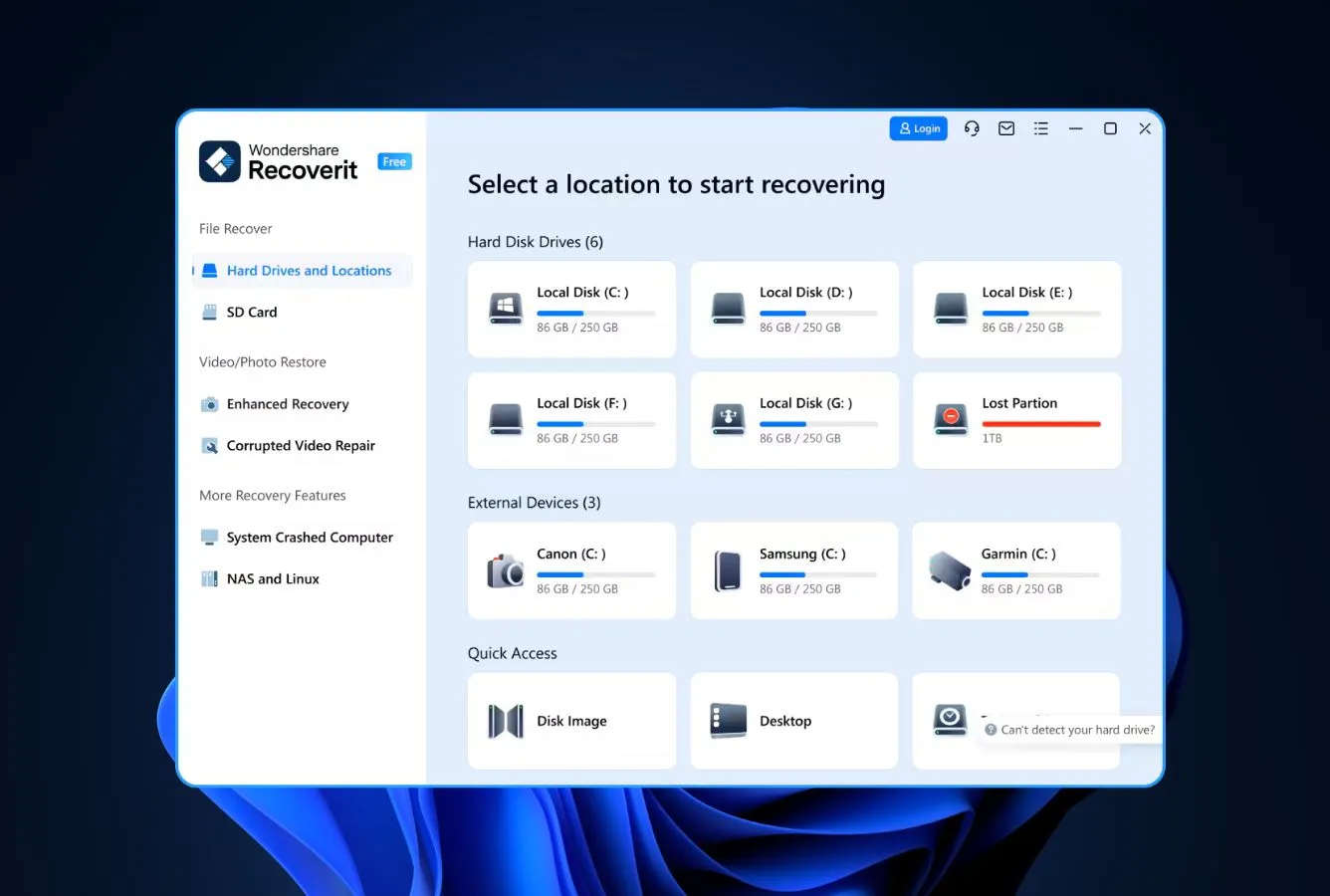
The home screen groups drives and common folders into categories — internal disks, external drives, Desktop, Recycle Bin, and Downloads each get a dedicated shortcut. Premium users also see NAS and Linux options. Click the drive or folder you need to scan.
Scan and browse results in real time
Quick analysis runs first, then deep scanning runs in the background. Results appear progressively as the scan continues — you can preview files while scanning and start selecting before the scan completes. Filtering options include file type, size, date, and path.
Preview, recover, and optionally repair
Preview images, play the first 30 seconds of videos, verify document contents. Select the files you want, click Recover, and save to a different drive. On Premium, corrupted videos can be passed to the Advanced Video Repair module for fragment reassembly.
Recoverit cannot save a scan session for later — if you close the application before recovering, the next launch starts from scratch. For multi-terabyte scans this is a meaningful limitation; make sure you have time to complete recovery in one sitting, or use the byte-level imaging workflow to scan an image file instead of the live drive.
Who Wondershare Recoverit Is For
Recoverit is for creative professionals — photographers, videographers, content creators — who need recovery plus repair in one tool, and who place a premium on interface quality. The standout use case is a corrupted MP4 or MOV file from a camera, drone, or dashcam that other recovery tools can surface but can’t make playable again. Advanced Video Repair’s reference-frame matching and fragment reassembly consistently outperforms the alternatives in this specific job.
A concrete example: a wedding videographer whose SD card ejected mid-record and now contains a mix of intact clips and corrupted MP4 files that won’t open in the NLE. Recoverit recovers the files via signature scanning, then passes the damaged ones to the repair module — often producing playable footage that would otherwise require a third-party repair service. For that workflow see our best video file repair software roundup.
If you’re a general-purpose Windows user dealing with a straightforward deleted-file recovery on an NTFS drive — or especially a formatted NTFS drive — Recoverit is competent but outranked by Disk Drill and R-Studio on the core recovery engine. For that case, the next sections explain where the architectural gaps sit.
Recoverit’s Strengths in Real-World Use
Recoverit’s strengths cluster around polish, multimedia handling, and the Premium-tier feature set. Independent reviewers consistently highlight four attributes:
Advanced Video Repair is best-in-class
This is the single feature that most clearly separates Recoverit from the category. The Premium tier’s Advanced Video Repair module handles MP4, MOV, MKV, and AVI containers using fragment reassembly and reference-frame matching — techniques that let it rebuild playable video from files other tools surface as unrecoverable garbage. Independent reviewers (7datarecovery, TechRadar, Macworld) consistently call this out as the reason to choose Recoverit over tools with stronger core recovery engines. For videographers dealing with corrupted footage from GoPro, DJI, dashcams, or action cameras, no other consumer tool offers an equivalent repair module.
Most polished interface in the category
Recoverit’s UI is consistently the visual outlier among Windows recovery tools. Grey-and-white theme, generous whitespace, rounded cards, smooth animations, and a dark mode that syncs with the Windows system theme. Best Reviews describes Recoverit as the epitome of how to do data recovery software the right way, and the usability advantage is real — non-technical users typically complete full recovery workflows faster in Recoverit than in tools with equivalent capabilities but older interfaces. For users who will only touch recovery software once or twice, this friction reduction matters more than a few points of raw recovery rate.
Uncommon feature breadth on Premium
The Premium tier ($99.99/yr or $159.99 perpetual) unlocks capabilities that are usually only found in professional-grade or enterprise tools: NAS recovery over SSH for Synology and QNAP, Linux file-system support for EXT4, BTRFS, XFS, and BFS, crashed-PC recovery via bootable WinPE USB, and photo repair for corrupted JPEG files. Together these make Recoverit Premium a reasonable one-tool answer for mixed-environment users (Windows + Linux NAS + camera workflow) who would otherwise need two or three separate purchases.
1,000+ file signatures with strong camera RAW coverage
Wondershare publishes a 1,000+ file-signature figure that holds up against independent verification — the signature library covers major RAW formats (Canon CR2/CR3, Nikon NEF, Sony ARW, Fuji RAF, Olympus ORF, Adobe DNG), modern video containers (MP4, MOV, MKV, AVI, FLV, 3GP, M4V), audio (FLAC, ALAC, WAV, MP3, OGG, AAC, AIFF, PCM), archives (ZIP, 7Z, RAR, WAR), and email containers (PST, DBX, EMLX). For media-heavy recovery scenarios, this is broader than most competitors at the same price point.
Where Recoverit Falls Short
Recoverit’s limits are narrow but specific. The tool is not trying to be the cheapest option or the best core recovery engine — once you accept that, three recurring gaps stand out:
Core NTFS engine trails Disk Drill and R-Studio
On formatted NTFS drives — one of the most common consumer recovery scenarios — Recoverit’s engine measurably trails category leaders. Independent testing consistently places Disk Drill and R-Studio ahead on both raw recovery rate and folder-structure reconstruction, with Recoverit landing in the middle of the major-tool pack. The gap is most pronounced on deeply corrupted partition tables or drives where metadata has been wiped: Recoverit’s automated scan produces usable results, but the recovered files more often land in a flat “Reconstructed” folder rather than retaining original directory paths. If core NTFS recovery is your primary need and you don’t care about video repair, Disk Drill is the better engine at a comparable price.
100 MB free tier is the tightest in class
The free edition caps recovery at 100 MB regardless of how many files you select. This is the smallest free allowance among the major Windows recovery tools: EaseUS allows 2 GB, Stellar allows 1 GB, Recuva is functionally unlimited, PhotoRec has no limit at all. Practically, Recoverit’s free tier functions as a paid preview — run a scan, confirm your files are findable, pay to actually recover. If you came here looking for genuine free recovery, our best free data recovery software roundup covers better-fit alternatives for that use case.
No scan-session persistence
Recoverit cannot pause and resume a scan across sessions — close the application and your next launch starts from scratch. On a multi-terabyte drive this is an hour-plus cost every time. Disk Drill, R-Studio, and EaseUS all support session persistence; its absence here is a workflow regression that matters most for professional recovery scenarios. Workarounds exist (byte-to-byte imaging via another tool, then recovering from the image), but they add friction Recoverit’s polish otherwise works hard to eliminate.
Wondershare Recoverit Capability Summary
How Recoverit performs, capability by capability, based on aggregated independent evaluation:
| Capability | Tier | Notes |
|---|---|---|
| Deleted-file recovery (NTFS) | Good | Mid-pack result on intact NTFS; solid but not category-leading |
| Recycle Bin recovery | Excellent | Dedicated quick-access button; best-case for filename preservation |
| Formatted-drive recovery | Fair | Folder structure reconstruction trails Disk Drill and R-Studio |
| Corrupted-partition recovery | Good | Automated detection works; lacks manual partition-reconstruction controls |
| exFAT support | Good | Full exFAT support; video files recovered more reliably than documents |
| RAW camera format support | Excellent | 1,000+ signatures including CR3, ARW, ORF, DNG, RAF |
| Video repair (MP4, MOV, MKV, AVI) | Excellent | Premium tier; best-in-class for corrupted video — the standout feature |
| Photo repair (JPEG) | Very Good | Premium tier; handles damaged headers and partial corruption |
| NAS recovery over SSH | Very Good | Premium tier; Synology, QNAP; uncommon in consumer tools |
| Linux file systems (EXT4/BTRFS/XFS) | Very Good | Premium tier; rare capability outside professional tools |
| Bootable WinPE rescue USB | Very Good | Standard tier and up; useful for crashed PCs that won’t boot |
| Scan session persistence | Not supported | No pause/resume — close the app, rescan from scratch |
| TRIM-active NVMe SSD | Not supported | Hardware limitation across all recovery tools |
| Free tier generosity | Limited | 100 MB cap is tightest in major consumer category |
Tier scale: Excellent / Very Good / Good / Fair / Limited / Not supported. Aggregated from TechRadar, MSPoweruser, Macworld, 7datarecovery, and vendor documentation, 2026.
Wondershare Recoverit Cost
Recoverit uses a three-tier structure plus a free edition. The free edition allows unlimited scanning and full file preview but caps actual recovery at 100 MB — effectively a paid preview. Essential ($69.99/year or $119.99 perpetual) covers basic recovery with deep scanning and tech support. Standard ($79.99/year or $139.99 perpetual) adds the bootable WinPE rescue USB and crashed-PC recovery. Premium ($99.99/year or $159.99 perpetual) adds Advanced Video Repair, Photo Repair, and NAS/Linux support. Each license covers one PC.
The perpetual-license pricing is the sweet spot of this lineup. At $119.99 for permanent use of Essential or $159.99 for permanent use of Premium, Recoverit’s lifetime cost undercuts competitors that only offer annual subscriptions (EaseUS $99.95/yr, Stellar $79.99/yr entry tier) past the second year of use. Only Disk Drill’s $149 lifetime license is cheaper at the top tier — but Disk Drill does not include video repair.
Promotional discounts appear regularly on Wondershare’s pricing page, often 10–20% off the listed price. Education and small-business discounts are available on request. Watch auto-renewal on annual subscriptions — a recurring theme in Trustpilot complaints. For broader price benchmarking against SSD-optimized tools specifically, see our best SSD data recovery software roundup.
Recoverit vs. Competitors (2026)
| Tool | Deleted-file Recovery | Formatted Drive | Video Repair | Free Tier | Price |
|---|---|---|---|---|---|
| Disk Drill | Excellent | Excellent | None | 100 MB | $89/yr or $149 lifetime |
| R-Studio | Excellent | Very Good | None | <256 KB | $79.99 one-time |
| EaseUS DRW | Very Good | Very Good | Basic | 2 GB | $99.95/yr |
| Recoverit ← | Good | Fair | Excellent | 100 MB | $69.99/yr or $119.99 perpetual |
| Stellar | Very Good | Good | Good | 1 GB | $79.99/yr |
| Recuva | Good | Fair | None | Unlimited | Free / $24.95 |
Tier assignments based on aggregated independent research. April 2026.
Try Wondershare Recoverit
Free-tier scanning with full preview; 100 MB recovery allowance.
Wondershare Recoverit Features & Tools
Recoverit’s feature set is organized around three axes: core recovery, repair modules, and environment coverage. Pricing tier determines which features you access — Essential covers core recovery only; Premium unlocks everything. Here’s the full inventory, grouped by function.
File-System Support Matrix
Recoverit covers Windows, Mac, and Linux file systems, with the Linux variants gated behind the Premium tier. Coverage is broad for a consumer tool.
| File system | Platform context | Support | Notes |
|---|---|---|---|
| NTFS / NTFS+EFS | Windows internal and external drives | Full | All tiers |
| FAT12 / FAT16 / FAT32 | USB sticks, small SD cards, legacy drives | Full | All tiers |
| exFAT | Large SD cards, portable SSDs, camera cards | Full | All tiers |
| APFS | macOS drives | Full | Mac version; cross-platform via Premium |
| HFS+ | Legacy macOS drives | Full | Mac version; cross-platform via Premium |
| EXT4 / EXT3 / EXT2 | Linux drives and NAS devices | Full | Premium tier only |
| BTRFS | Modern Linux, Synology NAS | Full | Premium tier only — uncommon |
| XFS / BFS | Linux server / NAS deployments | Full | Premium tier only — professional-grade |
| ReFS | Windows Server, Storage Spaces | Not supported | Use Disk Drill or R-Studio instead |
Source: Wondershare’s official product documentation, verified against MSPoweruser and 7datarecovery’s hands-on testing.
Recovery Engine
Recoverit runs a dual-mode recovery engine — Quick Scan parses existing file-system metadata, Deep Scan performs signature-based sector analysis. Both run in sequence by default. The AI-powered enhancement in v14 auto-selects optimal scan parameters based on detected device type.
| Capability | How it works | Available |
|---|---|---|
| Quick Scan (metadata parsing) | Reads existing file-system directory entries for deleted metadata | All tiers incl. Free |
| Deep Scan (signature-based) | Searches raw sectors against 1,000+ file signatures | All tiers incl. Free |
| AI-powered scan auto-tuning | Selects scan parameters based on detected device and loss type | v14.0+ |
| Full file preview before recovery | Renders images, plays first 30s of video, previews documents | All tiers incl. Free |
| Advanced Video Repair | Fragment reassembly and reference-frame matching for MP4/MOV/MKV/AVI | Premium only |
| Photo Repair (JPEG) | Restores corrupted JPEG headers, missing EXIF, partial corruption | Premium only |
| Crashed-PC recovery (WinPE USB) | Creates bootable USB to recover from machines that won’t start | Standard & Premium |
| NAS recovery over SSH | Synology, QNAP, and similar devices over remote SSH connection | Premium only |
| Linux file-system recovery | EXT4, BTRFS, XFS, BFS on Linux drives and NAS backends | Premium only |
| Scan session persistence | Pause/resume scan across application restarts | Not supported |
UI & Workflow
Recoverit’s interface is built around a card-based home screen with category shortcuts — Hard Drives and Locations, Recycle Bin, Desktop, Downloads, and Premium-tier NAS and Linux destinations each get a dedicated tile. Clicking any tile launches an automated workflow that runs both Quick Scan and Deep Scan without user input, producing progressively-populated results as scanning continues.
The results view supports two display modes: File Type (grouped by extension and media category) and File Path (grouped by original directory structure where available). A filter rail narrows results by name, date, size, or state. Each file has a preview pane showing image thumbnails, video first-frame captures, or document contents. Selecting files and clicking Recover opens a destination picker that blocks saving to the source drive.
Overall the experience feels closer to a modern consumer SaaS product than a utility app — this is the UI investment that most reviewers call out. The trade-off is reduced control: advanced users looking for manual scan parameters, custom signature addition, or byte-level previewing will find Recoverit less flexible than R-Studio or DMDE.
Safety, Footprint & Support
Click to expand: installer profile, privacy stance, and support channels+
| Attribute | Value | Notes |
|---|---|---|
| Installer size | ~2.5 MB stub | Downloads components during setup; requires internet connection |
| Digital signature | Signed | Wondershare Technology Co., Ltd. Passes Windows SmartScreen |
| Bundled adware / third-party offers | None | Clean installer; no deceptive checkboxes |
| Account / registration required | Optional | Free tier doesn’t require account; Pro activation uses Wondershare ID |
| Background services | None | No processes run when the tool is closed |
| Read-only scanning mode | Yes | Scans cannot modify source data |
| Auto-update mechanism | Yes | Built-in updater; can be disabled in preferences |
| Auto-renewal on annual plans | Default on | Recurring Trustpilot complaint theme — disable after purchase |
| Developer tenure | 20+ years | Wondershare active since 2003; Recoverit shipping mid-2010s onward |
| Support channels | Email, knowledge base, forum | No live chat, no phone hotline; email response typically 1 business day |
| Documentation depth | Good | Detailed knowledge base with step-by-step recovery walkthroughs |
Wondershare Recoverit User Reviews
Recoverit has substantial review coverage across G2, Capterra, Trustpilot, and tech-publication review sites. Sentiment clusters into two distinct patterns: strong praise from creative users for video repair and interface polish, and recurring criticism from cost-sensitive users about the 100 MB free tier and auto-renewal billing.
Whenever I get a corrupt card this software quickly finds and restores all my files. My computer won’t recognize the drive, but this does. Saved me a few times.
This software saved my life. A NAS with syncing enabled erased all my files on AWS S3. I was able to recover 99.9 percent of the files using this software.
Uses advanced machine learning for pattern-based recovery. Beginner-friendly interface. Affordable since it offers licenses for two PCs.
The inviting user interface offers easy access to a good set of tools — and at a decent price. Able to save critical data from a presumed-dead SD card.
The software is so user-friendly in almost every aspect. It restored most deleted files in my tests, but not all of them.
Auto-renewal caught me off guard. Make sure to cancel before the year ends if you only need it once.
This is relatively expensive and if you can change the price or introduce a concession system for selected institutions, I will appreciate it.
Recoverit’s video repair module is the standout feature — fewer competing tools handle fragmented video correctly.
Positive reviews praise the UI, video repair capability, and customer support responsiveness on technical issues. Critical reviews focus on the 100 MB free tier as restrictive, auto-renewal billing surprises, and mid-pack recovery rates on formatted drives. Creative-industry users rate Recoverit higher than general IT users.
When to Choose Something Else
Recoverit excels at creative-professional workflows and interface-driven simplicity. For these alternative scenarios, a different tool fits better:
Frequently Asked Questions
Is Wondershare Recoverit really free?+
How well does Recoverit work on NTFS and exFAT?+
Does Wondershare Recoverit work on Windows 11?+
Can Recoverit repair corrupted video files?+
How much does Wondershare Recoverit cost?+
Is Wondershare Recoverit safe to install?+
Can Recoverit recover data from NAS and Linux devices?+
Final Verdict
Wondershare Recoverit v14 is the clearest recommendation in the Windows data recovery category for one specific audience: creative professionals who need video or photo repair alongside recovery. Advanced Video Repair is genuinely best-in-class for reconstructing corrupted MP4, MOV, MKV, and AVI files — a capability no other major consumer tool matches. The UI is the most polished in the category, the Premium tier adds NAS and Linux support that’s usually confined to professional tools, and perpetual-license pricing undercuts subscription-only competitors past the second year.
For general-purpose Windows recovery, the picture is more mixed. Independent testing consistently places Recoverit’s core engine mid-pack — strong on Recycle Bin, solid on recently deleted files, noticeably weaker on formatted NTFS drives where category leaders preserve folder structure better. The 100 MB free tier is the tightest among major tools, and the absence of scan-session persistence adds friction on multi-terabyte jobs that consumer-grade alternatives handle gracefully.
Choose Recoverit if: you’re a photographer, videographer, or content creator dealing with corrupted camera/drone footage, or interface polish is a top priority for you. Choose something else if: you need the strongest raw NTFS engine, a genuine free-tier recovery option, or enterprise-grade RAID tooling. If your use case is simpler — recovering what you just accidentally emptied from the bin — our Recycle Bin file recovery software roundup covers lighter-weight alternatives that get you there faster.
About the Authors


This review may contain affiliate links through Wondershare’s partner program. Commissions do not influence our ratings, research methodology, or conclusions — the same research process applies to tools with and without affiliate partnerships. If you believe any claim is inaccurate, contact us at contact@datarecoveryfix.com.