Tenorshare 4DDiG Review (2026): Polished, Capable Recovery
Tenorshare 4DDiG is the most polished consumer recovery tool in the category — a guided onboarding flow, integrated photo and video repair, direct cloud save to OneDrive or Google Drive, and bootable disk creation, all wrapped in the smoothest first-launch experience we’ve reviewed. The 2 GB free tier lets you verify recoverability before paying, and aggregated independent evaluation places the recovery engine solidly in the upper-middle tier for everyday Windows data loss. Our review aggregates vendor documentation, independent external evaluation, and verified user feedback for v10.2 to map exactly where 4DDiG fits.
evaluation, user reports
v10.2
$59.95/yr paid
v10.2

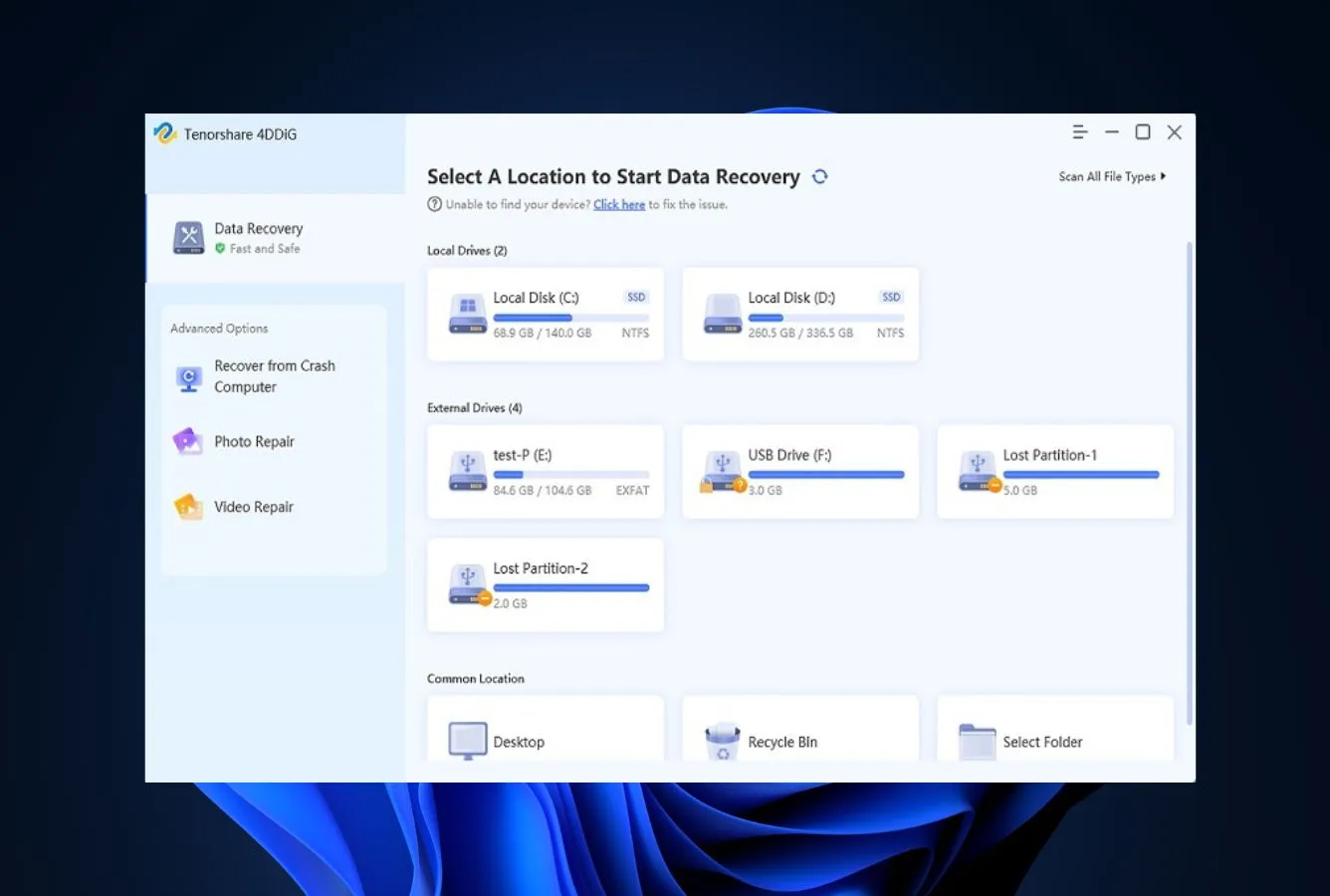
4DDiG gets two things genuinely right: the interface is the most polished and approachable in the consumer recovery category, and the integrated repair-then-cloud-save workflow is something no competitor matches. Aggregated independent evaluation places the core recovery engine in the middle tier — solid for recently deleted files on intact NTFS, weaker on formatted drives and corrupted partitions where filesystem-aware competitors pull ahead. The 2 GB free tier is enough to verify your files exist before paying, and the lifetime license at $79.95 is the most defensible purchase tier given recurring auto-renewal complaints in verified user reviews.
✓ What We Liked
- Polished, modern interface with guided onboarding — easiest first-launch experience in the category
- Integrated photo and video repair module runs as part of the recovery workflow
- Cloud save — recover directly to OneDrive or Google Drive, unique among consumer tools
- Bootable disk creation for unbootable Windows systems (paid edition)
- 2 GB free tier with full preview — verify recoverability before paying
- Fast quick scan on recently deleted files via Recycle Bin shortcut
✕ What We Didn’t
- No file integrity indicators in scan results — health unknown until file is opened
- No lost-partition search — falls back to signature scanning when partition table is damaged
- Verified Trustpilot and Capterra users frequently report auto-renewal confusion and refund delays
4DDiG Alternatives
Brief selection A quick shortlist of our top alternative picks, based on aggregated independent research. |
Best Alternative  EaseUS Data Recovery Wizard Best overall · 2 GB free |
 Stellar Data Recovery Best for photos · 1 GB free |
 Wondershare Recoverit Best for video · 100 MB free |
|---|---|---|---|
| Deep Scan | ✓ | ✓ | ✓ |
| Formatted Drive Recovery | ✓ | ✓ | ✓ |
| RAW Photo Support | Broad | Broad | Limited |
| File Repair | ✓ | ✓ | Video only |
| Free Tier | 2 GB | 1 GB | 100 MB |
Research Methodology
This review aggregates three evidence types for v10.2: vendor documentation (the official 4DDiG product page, pricing matrix, supported file-type and file-system lists, release notes), independent external evaluation cross-referenced across long-running editorial sources, and verified user feedback from primary review platforms — Trustpilot, Capterra, G2, SourceForge, and the Microsoft Store. Tier assignments (Excellent / Very Good / Good / Fair / Limited / Not supported) reflect the aggregate of that evidence per capability. Where vendor marketing claims diverge from independent results — particularly around file-type coverage and recovery rates — we follow the independent evidence and note the gap. Full methodology details are on our How We Test page.
Is 4DDiG Safe?
The software itself is technically safe — vendor documentation confirms read-only scanning, the installer is clean, and the application is also distributed through the Microsoft Store, which adds a layer of platform vetting. Tenorshare was founded in 2007 in Shenzhen and has a long product portfolio across recovery, system repair, and mobile utilities. The trust caveat sits with billing rather than malware: verified user reviews on Trustpilot and Capterra consistently flag auto-renewal confusion and refund delays. Always download from the official 4ddig.tenorshare.com page or the Microsoft Store, and verify subscription settings immediately after purchase.
Monthly and annual plans auto-renew by default. Verified user feedback frequently cites unexpected charges. If you only need the tool for a single recovery, cancel auto-renewal in the Tenorshare order portal immediately, or pay $79.95 for the lifetime license to avoid recurring charges entirely.
How to Use 4DDiG
4DDiG’s onboarding is the smoothest in the consumer recovery category. The Quick Start Guide overlay walks first-time users through every step, no technical knowledge required:
Download and install
Download from 4ddig.tenorshare.com or the Microsoft Store. The installer is approximately 105 MB. A guided Quick Start overlay appears on first launch.
Select a location
Choose a drive, partition, or quick-access shortcut (Desktop, Recycle Bin, Documents, specific folders). Filter by file type using the top-right selector to speed up the scan.
Scan automatically
Click Start. The tool runs a quick scan followed by deep scan in sequence. Results populate in real time, organized as Deleted Files, Lost Location, Tagged Files, and File Name Not Found.
Preview and recover
Browse by file type or folder view. Preview supported formats before recovering. Select files, click Recover, and save to a different drive — local, OneDrive, or Google Drive. Free tier: up to 2 GB.
The free version lets you scan and preview before paying. Confirm your files appear in the results and previews look correct before purchasing — this is the most defensible way to evaluate whether the tool will actually solve your problem.
Who 4DDiG Is For
4DDiG is built for the casual user facing common, everyday data loss — the kind that doesn’t involve a damaged partition table or a corrupted filesystem. If you’ve emptied the Recycle Bin and want those files back, deleted a folder by mistake, or accidentally formatted an external drive that was still bootable, this is the tool’s home turf. The polished onboarding means you don’t need to know what NTFS, MFT, or signature scanning are; the tool handles it for you.
A concrete example: a Windows 11 user who emptied their Recycle Bin, realized minutes later they needed those files back, and wants a quick scan-and-restore experience without learning recovery vocabulary. The 2 GB free tier handles that scenario without paying anything.
If your situation involves a formatted drive with critical files, a corrupted GPT partition, a lost Linux Ext4 volume, or RAID reconstruction, the next section explains where 4DDiG’s design choices push you toward a different tool.
4DDiG’s Strengths in Real-World Use
Aggregated independent evaluation and verified user feedback consistently surface the same four areas where 4DDiG outperforms its tier.
The most polished consumer interface in the category
First-launch UX matters when you’re stressed about lost files, and 4DDiG’s Quick Start overlay is genuinely the smoothest onboarding in the consumer recovery space. Independent external evaluation consistently rates the interface as Excellent — modern visual design, drag-and-drop simplicity, and clear scan-result categorization (Deleted Files, Lost Location, Tagged Files, File Name Not Found). Verified G2 and Trustpilot reviewers repeatedly cite ease of use as the primary reason they chose the tool.
Integrated photo and video repair workflow
No other consumer recovery tool bundles repair as deeply into the workflow. After recovery, corrupted JPEG, PNG, MP4, and MOV files can be passed directly to the integrated repair module without exporting and re-importing into a separate app. Independent evaluation rates the repair success as moderate — useful as a convenience that turns some otherwise-lost files into usable ones, especially media that suffered partial corruption rather than complete overwrite.
Cloud save to OneDrive and Google Drive
A genuine differentiator. After recovery, files can be saved directly to cloud storage — useful when local drives are full, when the recovery target was your only fast disk, or when you simply want recovered files immediately backed up to prevent re-loss. Vendor documentation confirms native integration with both Microsoft and Google’s cloud APIs. We’ve seen this in no other tool in the consumer recovery category.
Bootable disk creation for crashed systems
The paid edition includes WinPE-based bootable USB creation for recovering files from systems that won’t boot — bluescreens, corrupted Windows installs, boot-loop situations. This isn’t unique to 4DDiG, but the implementation is approachable: the build flow walks you through USB creation step by step rather than dropping you into command-line ISO tooling.
Where 4DDiG Falls Short
The same consumer-first design priorities that make 4DDiG approachable create real architectural gaps for harder recovery scenarios.
No file integrity indicators in scan results
Scan results show every file the engine identified, but offer no way to know whether a recovered file is actually intact before you save and open it. Independent evaluation flags this as a meaningful workflow problem — you discover corruption only after recovery, sometimes after running through the 2 GB free tier on partially damaged files. Filesystem-aware competitors typically flag recovery confidence per file (high/medium/low or color-coded indicators); 4DDiG does not.
No lost-partition search
When a partition has been deleted from the partition table, corrupted by a damaged GPT, or otherwise made unreadable to Windows, 4DDiG cannot reconstruct it from boot sectors or backup superblocks. The tool falls back to raw signature scanning — the least effective approach for partition-level loss, recovering files without their original names, paths, or folder structure. Independent evaluation rates this scenario in the lower tier for 4DDiG, well behind tools with dedicated partition managers.
RAW camera format coverage skews legacy
Vendor marketing references “2000+ file types,” but the underlying signature database leans toward older RAW formats. CR2, NEF, and ARW are recognized; modern formats including Canon CR3, Olympus ORF, Adobe DNG, Fujifilm RAF, and Panasonic RW2 are inconsistent or absent. For recent mirrorless camera files, dedicated photo recovery software with broader RAW signature databases handles these scenarios more reliably.
Recurring billing complaints in verified user reviews
This isn’t a recovery-engine problem, but it is a real friction point that affects buying decisions. Trustpilot and Capterra reviews consistently flag auto-renewal charges users didn’t expect, refund delays beyond the stated 30-day window, and a cancellation flow that requires support contact rather than a one-click portal. The lifetime license at $79.95 sidesteps the issue entirely — a defensible workaround when the tool itself otherwise fits the use case.
4DDiG Capability Summary
How 4DDiG performs, capability by capability, based on aggregated independent evaluation and vendor documentation:
| Capability | Tier | Notes |
|---|---|---|
| Deleted-file recovery (NTFS) | Good | Works on intact filesystems; competitive on Recycle Bin scenarios |
| Recycle Bin recovery | Very Good | Quick-access shortcut, fast scan, original names preserved |
| Formatted-drive recovery | Fair | Recovers files but most lose original names and folder structure |
| Corrupted-partition recovery | Limited | No lost-partition search; falls back to signature scanning |
| USB / external HDD recovery | Good | Solid on mountable removable drives |
| SD card recovery | Good | FAT/exFAT supported; weaker on modern RAW formats |
| exFAT / FAT32 support | Good | Fast scans, low corruption on simple filesystems |
| HFS+ / APFS support | Fair | Mac edition handles these; Windows edition limited |
| RAW camera format support | Limited | Legacy CR2/NEF/ARW only; CR3, ORF, DNG, RAF, RW2 inconsistent |
| File integrity indicators | Not supported | No pre-recovery health flags on scan results |
| Photo & video repair | Good | Integrated module; moderate success on partial corruption |
| Cloud save (OneDrive, Google Drive) | Excellent | Unique among consumer recovery tools |
| Bootable disk creation | Good | WinPE-based USB build; paid edition only |
| Ease of use & onboarding | Excellent | Quick Start overlay; the smoothest first launch in the category |
| Free tier usability | Good | 2 GB recovery, full preview; sufficient to verify before paying |
| Trust & billing transparency | Limited | Recurring auto-renewal complaints in verified user reviews |
| RAID reconstruction | Not supported | No RAID constructor; consumer-tier scope |
Tier scale: Excellent / Very Good / Good / Fair / Limited / Not supported. Aggregated from independent evaluation and verified user feedback, 2026.
4DDiG Cost
Tenorshare uses a subscription-first pricing model with three individual tiers and a business tier above. Monthly is $45.95 for one PC. Annual is $59.95 for one PC. Lifetime is $79.95 for one PC, the only non-recurring individual option. Business plans start at $89.95 for up to 5 PCs and scale up to roughly $499 for larger seat counts. Coupon codes commonly bring all tiers down 15–30% — a “discount” that appears more or less permanent across the year. The free edition recovers up to 2 GB with full preview, sufficient to verify whether your files are recoverable before paying.
For context, EaseUS Data Recovery Wizard runs $99.95/year, Disk Drill Pro is $89/year, Stellar Standard is $79.99/year, and R-Studio costs $79.99 one-time. 4DDiG’s annual pricing sits in the middle of the consumer field but its recovery depth ranks toward the lower end of the same field — the value picture is mixed unless you specifically need the integrated repair workflow or cloud save. The lifetime license at $79.95 is the most defensible purchase tier given recurring auto-renewal complaints. For broader pricing context, see our best PC data recovery software comparison.
4DDiG vs. Competitors (2026)
| Tool | Deleted-file Recovery | Formatted Drive | Corrupted Drive | Free Tier | Price |
|---|---|---|---|---|---|
| Disk Drill | Excellent | Excellent | Very Good | 100 MB | $89/yr |
| R-Studio | Excellent | Very Good | Excellent | <256 KB | $79.99 one-time |
| EaseUS DRW | Very Good | Very Good | Very Good | 2 GB | $99.95/yr |
| Stellar | Very Good | Good | Good | 1 GB | $79.99/yr |
| 4DDiG ← | Good | Fair | Limited | 2 GB | $59.95/yr |
| Recuva | Good | Fair | Not supported | Unlimited | Free / $24.95 |
Tier assignments based on aggregated independent evaluation and verified user feedback. 2026.
Try 4DDiG Free
Scan, preview, and recover up to 2 GB. No account required.
4DDiG Features & Tools
4DDiG’s feature set is built around workflow convenience rather than recovery depth. The standout is the integrated repair pipeline: scan a drive, recover files, repair corrupted media, and save directly to cloud storage — all within a single application. No other tool in the consumer recovery category bundles this end-to-end experience.
The bootable disk creation is a practical addition for crashed Windows systems, and the polished Quick Start overlay makes the first-launch experience genuinely effortless. Where the feature set thins out: there’s no RAID constructor, no hex editor, no lost-partition search, no file health indicators, and no advanced filtering of scan results by recoverability confidence. The tool deliberately stops short of the filesystem-engineering features that pro-tier competitors include.
4DDiG User Reviews
4DDiG has extensive online coverage thanks to Tenorshare’s marketing investment, but the picture from primary user-feedback platforms is more nuanced. Trustpilot, Capterra, G2, and the Microsoft Store each tell a similar story: praise for ease of use and the integrated repair workflow, frustration with billing practices and weaker-than-advertised performance on harder scenarios.
Recovered my deleted photos easily. However, I was charged again after cancelling and had to dispute through my bank.
Clean interface and easy to use. The built-in repair feature is a nice bonus for corrupted files.
Works well for simple deletions but disappointed with results on a formatted drive — most files came back unnamed.
I bought a lifetime subscription and can’t transfer it to another PC. The license tied to one machine permanently is a problem.
I use 4DDiG regularly for accidental deletions and crashes. Easy setup and the recovery features have saved important work multiple times.
Cancelled within the trial period and was still charged for another month. Refund process was difficult and slow.
4DDiG’s paid-placement footprint is large, which can crowd out independent perspectives in search results. Verified Trustpilot and Capterra reviews consistently split between users satisfied with simple recoveries (Recycle Bin, recently deleted files) and users frustrated with billing practices or formatted-drive performance. The lifetime license sidesteps the billing complaints entirely.
When to Choose Something Else
4DDiG is competitive on simple deletions and Recycle Bin recovery. For other scenarios, a different tool fits better:
Frequently Asked Questions
Is Tenorshare 4DDiG free?+
Does 4DDiG work on formatted drives?+
Why are there so many billing complaints?+
Can 4DDiG repair corrupted photos and videos?+
How does 4DDiG compare to EaseUS?+
Does 4DDiG handle corrupted or lost partitions?+
Is 4DDiG safe to install?+
Final Verdict
4DDiG gets two things genuinely right: the interface is the most polished in the consumer recovery category, and the integrated scan-recover-repair-cloudsave workflow is something no competitor matches. For the common case of “I emptied the Recycle Bin and need those files back,” it works well, and the 2 GB free tier lets you verify recoverability before paying anything. The trade-offs are real and architectural: no lost-partition search, no file integrity indicators, modest RAW camera coverage, and recurring billing complaints in verified user reviews. Recovery depth on formatted drives and corrupted partitions ranks toward the lower end of the consumer category.
Choose 4DDiG if you want an approachable consumer tool with integrated repair and cloud save, plan to recover recently deleted files, and buy the $79.95 lifetime license to sidestep auto-renewal friction. Choose something else if you need formatted-drive recovery, partition reconstruction, modern RAW format support, or per-file recovery confidence indicators — see the alternatives above for stronger options. For the broader category context, see our best data recovery software roundup.
About the Authors


This review reflects independent research with no commercial relationship with Tenorshare. 4DDiG links in this review are not affiliate links. If you believe any claim is inaccurate, contact us at contact@datarecoveryfix.com.