AnyRecover Review (2026): Multi-Platform Recovery Done Right
AnyRecover from Shenzhen iMyFone Technology bundles Windows, Mac, iOS, and Android recovery in one license — an unusually broad multi-platform play backed by AI repair add-ons. Independent evaluation places recovery at solid mid-tier on NTFS, weaker on formatted drives and exFAT, with the polished interface and bundled iOS/Android modules being the genuine differentiators. This review evaluates the trade-offs at $99.99 promotional ($159.99 regular) lifetime pricing.
evaluation, user reports
Win + Mac + iOS + Android
$159.99 regular
v9.1

AnyRecover earns its score through breadth of coverage and genuinely polished UX, not through best-in-class recovery. Aggregated evaluation places NTFS quick-scan recovery in the Very Good tier — competitive for recently deleted files with filenames intact. The bundled iOS, Android, and Mac recovery modules add real value for users with mixed-device environments. The differentiating positives end there. Deep scan reliability on exFAT and HFS+ partitions is documented as inconsistent — recovered files can contain corrupted data. Formatted-drive recovery trails dedicated specialists. The Free trial is restrictive (typically 3 files), making meaningful trial validation difficult. Auto-renewal billing complaints surface consistently in user feedback. At $99.99 promotional / $159.99 regular for the lifetime tier, AnyRecover is the right tool for users who specifically value the multi-platform bundling and modern UI — and the wrong tool for users who need best-in-class recovery for serious data loss.
✓ What We Liked
- One of the cleanest, most beginner-friendly interfaces in the consumer recovery category
- Bundled iOS, Android, and Mac recovery in a single lifetime license — multi-platform value
- Quick scan competent on NTFS — recently deleted files with filenames preserved
- AI Repair add-ons available for corrupted photos, videos, and documents
- ReFS support included alongside NTFS, FAT, exFAT — uncommon in consumer tools
- Lifetime tier covers 3 PCs and 5 devices — generous for household or small-team use
✕ What We Didn’t
- Deep scan reliability issues on exFAT and HFS+ — recovered files may contain corrupted data
- Free trial limited to ~3 file recoveries — among the most restrictive in the category
- Auto-renewal billing and refund complaints recurring in verified user feedback
AnyRecover Alternatives
Brief selection A quick shortlist of top alternative picks based on aggregated independent research. |
Best Alternative

EaseUS Data Recovery Wizard
Best overall · 2 GB free
|

Stellar Data Recovery
Best for photos · 1 GB free
|

Wondershare Recoverit
Best for video · 100 MB free
|
|---|---|---|---|
| Deep scan | ✓ | ✓ | ✓ |
| Formatted drive recovery | ✓ | ✓ | ✓ |
| RAW photo support | Broad | Broad | Limited |
| File repair | ✓ | ✓ | Video only |
| Free tier | 2 GB | 1 GB | 100 MB |
Research Methodology
This review aggregates three evidence types for AnyRecover v9.1: vendor documentation (the official product pages, pricing tiers, and current installer), independent external evaluation, and verified user feedback from G2, Trustpilot, SourceForge, and download portal review sections. Tier assignments (Excellent / Very Good / Good / Fair / Limited / Not supported) reflect the aggregate of that evidence rather than an in-house benchmark — we do not claim independent recovery percentages. For broader Windows recovery comparisons, see our ranking of the best data recovery software for Windows. Full methodology is documented on our How We Test page.
Is AnyRecover Safe?
Yes. AnyRecover is a legitimate software product developed by Shenzhen iMyFone Technology Co., Ltd. (operating as AnyRecover Technology), a Shenzhen-based company established in 2015. The same company produces iMyFone LockWiper and a portfolio of other iOS-focused utilities. The product has been continuously developed for nearly a decade and maintains active multi-platform releases for Windows, Mac, iOS, and Android.
AnyRecover operates in read-only mode during recovery scanning — recovery operations do not modify source drives. The installer is a small ~4 MB stub that downloads the full application (~200 MB) during setup. The file preview module requires a separate additional download on first use, which is unusual but not a safety concern. Always download from the official anyrecover.com website to avoid bundleware or cracked copies from third-party sites — cracked installers are routinely Trojan-laden given AnyRecover’s commercial pricing.
The safety caveat that recurs across user feedback is not malware-related but billing-related. Multiple verified Trustpilot reviewers report unexpected auto-renewal charges and difficulty processing refunds. Monthly and yearly plans auto-renew by default. Cancellation requires using the order management link in the purchase confirmation email, and several users report that cancellation didn’t process before renewal. If you purchase, verify auto-renewal settings immediately and confirm cancellation is processed before the renewal date.
Multiple verified Trustpilot reviewers report unexpected renewal charges and difficulty processing refunds. Monthly and yearly plans auto-renew by default. If you purchase, verify subscription settings immediately and document any cancellation confirmation. The 30-day money-back guarantee is documented but several users report friction obtaining refunds.
How to Use AnyRecover
AnyRecover uses a wizard-driven, beginner-focused workflow — one of its genuine strengths. The automatic scan mode removes the manual quick-vs-deep toggle that confuses first-time users in other tools.
Download and install
Download from anyrecover.com. The 4 MB stub installer downloads the full application during setup. Install on a different physical drive than the one you need to recover from.
Select a scan location
AnyRecover displays drives, partitions, and quick-access shortcuts (Desktop, Recycle Bin, custom folders). Select where your files were lost. For unrecognized volumes, click “Couldn’t Find Location” to scan unallocated or damaged drives.
Wait for the automatic scan
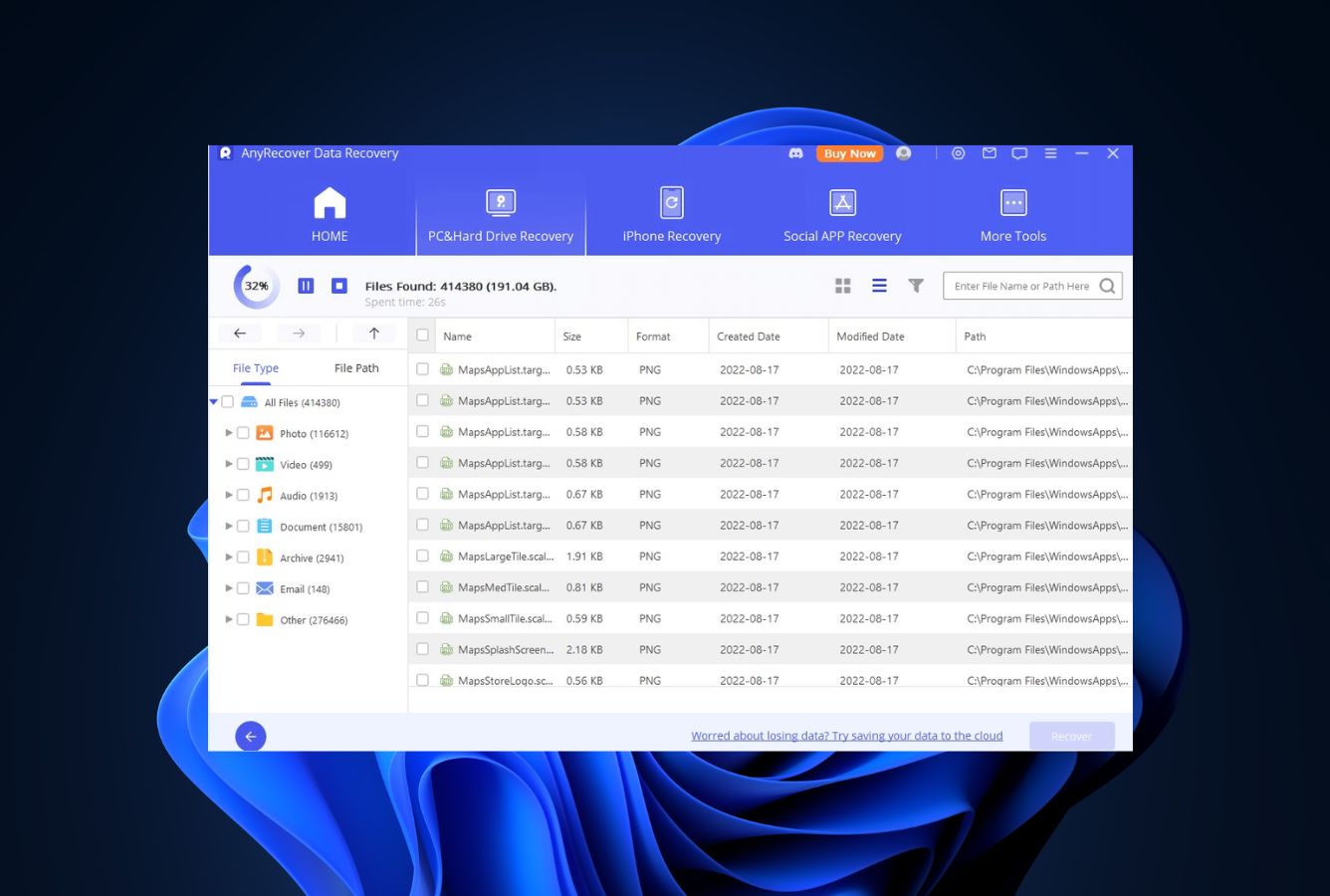
The software runs scanning automatically — no manual quick/deep toggle. Results populate in real time, organized by file type (Photos, Audio, Documents, etc.). You can pause and resume the scan, and recover already-found files before the full scan completes.
Preview and recover
Browse results by type or folder structure. Previewing files requires downloading a separate module on first use (a quirk that should be bundled by default). Select files and click Recover. Always save to a different drive than the source. Free users are limited to recovering a small number of files (typically 3) regardless of size.
Who AnyRecover Is For
AnyRecover targets a specific consumer audience well and is wrong for several others. Three audiences get clear value:
First-time recovery users prioritizing UI over absolute recovery rates. The wizard-driven workflow, automatic scan mode, and modern result categorization make AnyRecover one of the most approachable recovery tools for users who haven’t done file recovery before. If you’ve just emptied the Recycle Bin and need to undelete files quickly, AnyRecover delivers a smooth experience.
Users with mixed-device environments. The standard license bundles iOS device recovery (contacts, messages, photos, WhatsApp), Android recovery, and Mac recovery in addition to Windows recovery. For households or small teams with iPhones, Android phones, and Macs alongside Windows PCs, this multi-platform bundling delivers value that single-platform competitors don’t match. The lifetime tier covers 3 PCs and 5 devices — generous coverage for typical household use.
Users who can leverage AI Repair add-ons. AnyRecover’s separate AI Repair modules for corrupted photos, videos, and documents are credible additions for users who routinely deal with damaged media files. The AI Video Enhancer, photo colorizer, and image upscaler tools are tangentially useful even outside data loss scenarios.
AnyRecover is the wrong choice for: users with serious data loss requiring best-in-class recovery rates (dedicated specialists deliver more reliable results), photographers needing broad RAW camera format support (the “1000+ formats” claim doesn’t translate to comprehensive RAW coverage), users working primarily with exFAT or HFS+ volumes (deep scan reliability is documented as inconsistent on non-NTFS file systems), and users who need to verify recovery quality through a meaningful free trial before purchase (the ~3-file recovery cap rules out trial validation). For broader hardware recovery comparisons, see our best hard drive recovery software guide.
AnyRecover’s Strengths in Real-World Use
AnyRecover’s strengths cluster around UX polish and multi-platform breadth, not raw recovery performance.
One of the cleanest UIs in the consumer recovery category
The interface is genuinely AnyRecover’s most defensible advantage. Automatic scan mode removes the manual quick-vs-deep toggle that confuses first-time users in other tools. File results are categorized clearly by type, the layout is modern and uncluttered, and the Recycle Bin shortcut launches a focused recovery flow optimized for the most common consumer scenario. For non-technical users, the experience requires no documentation and no prior recovery knowledge.
Multi-platform bundling unusual in the category
A single AnyRecover license covers Windows, Mac, iOS, and Android recovery. Most competitors sell iOS recovery as a separate product at a separate price. The lifetime tier extends this to 3 PCs and 5 devices — a generous coverage envelope for households with mixed devices. For a family with iPhones, Android phones, and Windows PCs, this bundling delivers value that single-platform tools don’t match.
Solid NTFS quick-scan recovery for recent deletions
Aggregated independent evaluation places NTFS quick-scan recovery in the Very Good tier. The MFT-based quick scan handles recently deleted files competently, with original filenames and folder paths preserved. Recycle Bin recovery is the strongest scenario — fast scans, reliable filename recovery, and minimal corruption. For the most common consumer scenario (“I emptied the Recycle Bin, get my files back”), AnyRecover handles the job effectively.
AI Repair add-ons for corrupted media
AnyRecover’s separate AI Repair modules — photo repair, video repair, all-in-one file repair, video enhancer, photo colorizer, image upscaler — are credible additions for users who routinely deal with damaged media. These are positioned as separate products within the AnyRecover family rather than bundled with the data recovery license, but they integrate with the recovery workflow when files come back damaged. ReFS (Resilient File System) support is also included, which is uncommon in consumer recovery tools and useful for Windows Server environments.
Where AnyRecover Falls Short
AnyRecover’s weaknesses are specific and recur consistently in independent evaluation and verified user feedback. Three deserve weight in any purchase decision.
Deep scan reliability issues on exFAT and HFS+
The most significant technical weakness. AnyRecover’s deep scan uses file signature matching rather than file system metadata, and it has documented issues with file boundary identification on exFAT and HFS+ partitions. Recovered files may appear in the results list as successfully recovered but contain truncated content or data from adjacent disk sectors when opened. This affects primarily large media files and documents over 100 MB. NTFS recovery is more reliable because the MFT-based quick scan reads file system metadata directly. For users working with portable SSDs commonly formatted as exFAT, or recovering from Mac-formatted external drives, this reliability gap is a real concern.
Free trial too restrictive for meaningful validation
The Free trial allows unlimited scanning and previewing but limits actual recovery to a small number of files (typically 3, sometimes documented as 100 MB / 8 files in older versions). Compare to Recuva’s genuinely unlimited free recovery, EaseUS’s 2 GB tier, Stellar’s 1 GB, Disk Drill’s 100 MB, R-Studio’s 256 KB. AnyRecover’s tier is among the most restrictive. The practical implication: users cannot meaningfully verify whether AnyRecover’s recovery engine works for their specific data loss scenario before committing to the $59.99/month or $99.99 lifetime price. Combined with the auto-renewal and refund concerns, this creates real purchase risk.
Auto-renewal billing and refund friction
This is the most consistent user complaint across Trustpilot, SourceForge, and other verified review platforms. Monthly and yearly subscriptions auto-renew by default. Multiple users report unexpected renewal charges, cancellations that didn’t process before renewal, and difficulty obtaining refunds despite the documented 30-day money-back guarantee. AnyRecover’s pricing also relies heavily on permanent “promotional” discounts — the regular prices ($79.99 monthly, $99.99 yearly, $159.99 lifetime) are rarely displayed at checkout, which makes price comparison less transparent. Buyers should verify subscription settings immediately after purchase, document any cancellation confirmation, and budget for the regular (not promotional) price when calculating long-term TCO.
AnyRecover Capability Summary
How AnyRecover performs capability by capability:
| Capability | Tier | Notes |
|---|---|---|
| UI & ease of use | Excellent | Modern, beginner-friendly, automatic scan mode — best-in-class consumer UX |
| Multi-platform coverage | Excellent | Windows + Mac + iOS + Android in one license; 3 PCs + 5 devices on lifetime tier |
| iOS recovery (bundled) | Very Good | Contacts, messages, photos, WhatsApp from iPhones and iPads |
| Android recovery (bundled) | Very Good | Photos, videos, documents from Android storage and SD cards |
| Deleted-file recovery (NTFS) | Very Good | Quick scan competent; filenames preserved for recent deletions |
| Recycle Bin recovery | Very Good | Strongest scenario — fast, reliable, minimal corruption |
| AI Repair add-ons | Very Good | Photo repair, video repair, file repair as separate modules |
| ReFS support | Good | Microsoft’s resilient file system supported — uncommon in consumer tools |
| USB / FAT32 recovery | Good | Solid for FAT32 USB and SD card scenarios |
| NTFS deep scan | Good | Adds files but with mixed quality — RAW formats inconsistent |
| External drive recovery | Good | Solid on NTFS externals; exFAT issues affect portable SSDs |
| Formatted-drive recovery | Fair | Filenames and folder structure largely lost; trails specialists |
| Corrupted-partition recovery | Fair | Signature-based only — no partition reconstruction |
| SD card / RAW photo recovery | Fair | JPEG works; RAW format coverage thinner than marketing claims |
| Deep scan reliability (exFAT) | Fair | Documented file integrity issues on non-NTFS volumes |
| Free trial value | Limited | ~3 file recovery cap; among most restrictive in category |
| Billing transparency | Limited | Auto-renewal and refund complaints recurring in user feedback |
| RAW camera format breadth | Limited | CR2/NEF supported; CR3/ARW/ORF/DNG/RAF inconsistent |
| TRIM-active NVMe SSD | Not supported | Hardware limitation affecting all recovery tools |
Tier scale: Excellent / Very Good / Good / Fair / Limited / Not supported. Aggregated from vendor documentation, independent evaluation, and verified user feedback, 2026.
AnyRecover Cost
AnyRecover uses a tiered subscription model with promotional pricing that’s effectively permanent — the regular prices are rarely displayed at checkout. The Free trial allows unlimited scanning and previewing but caps actual recovery at a small number of files (typically 3).
| Tier | Promo | Regular | Coverage |
|---|---|---|---|
| Free trial | $0 | — | Unlimited scan + preview · ~3 file recovery cap |
| 1-Month | $59.99 | $79.99 | Full recovery · 1 PC · auto-renews monthly |
| 1-Year | $79.99 | $99.99 | Full recovery · 1 PC · auto-renews annually |
| Lifetime | $99.99 | $159.99 | Full recovery · 3 PCs + 5 devices · one-time purchase |
All paid tiers include Windows, Mac, iOS, and Android recovery. AI Repair modules are separate products. 30-day money-back guarantee documented but with reported friction.
Lifetime is the value tier. At $99.99 promotional, it covers 3 PCs and 5 devices for a one-time payment — competitive against subscription tools over multi-year ownership. The $79.99 1-Year plan effectively prices identical to lifetime once you renew once, making the subscription path poor value unless you only need recovery for a single project. Against the comparable lifetime competitor R-Studio at $79.99, AnyRecover’s $99.99 is $20 more — but adds the bundled iOS/Android/Mac coverage R-Studio doesn’t include. For category context, see our ranking of the best data recovery software, and for free-first options, our free Windows data recovery software guide.
AnyRecover vs. Competitors (2026)
| Tool | NTFS recovery | Multi-platform | iOS / Android | Free recovery | Entry price |
|---|---|---|---|---|---|
| AnyRecover ← | Very Good | Win + Mac + iOS + Android | Bundled | ~3 files | $99.99 lifetime |
| EaseUS DRW | Very Good | Win + Mac | Separate | 2 GB | $99.95/yr |
| Disk Drill | Class-leading | Win + Mac | No | 100 MB | $89/yr |
| Stellar | Very Good | Win + Mac | Separate | 1 GB | $79.99/yr |
| Wondershare Recoverit | Very Good | Win + Mac | Separate | 100 MB | $79.99/yr |
| Recuva | Good | Windows only | No | Unlimited | Free / $24.95 |
AnyRecover’s defining differentiator is the multi-platform bundling — Windows + Mac + iOS + Android in one license. Aggregated from vendor documentation, April 2026.
Try AnyRecover
Free trial: scan and preview unlimited. Multi-platform recovery from $99.99 lifetime promo.
AnyRecover Features & Tools
AnyRecover differentiates through breadth and UX rather than recovery depth. The most unusual selling point is the multi-platform bundling — Windows, Mac, iOS, and Android recovery all included in the same license. The interface is genuinely one of the best in the consumer data recovery space.
AnyRecover User Reviews
User feedback is mixed. The interface earns consistent praise across verified review platforms. Recovery effectiveness reports are split — simple deletion scenarios get positive reviews, while serious recovery (formatted drives, corrupted partitions, exFAT volumes) generates frustration. The most consistent negative pattern is around billing: auto-renewal charges and refund difficulties recur frequently in verified Trustpilot and SourceForge reviews.
Was charged for renewal even after cancelling. Support took over a week to respond with a generic template response.
I recovered all my deleted photos from the Recycle Bin within minutes. Very straightforward process.
A reliable choice for quick everyday data restoration with intuitive interface and strong format coverage.
Polished interface but recovery missed several files I was specifically trying to get back.
App didn’t seem to offer recovery options as named — only cloud backup choices behind premium subscription.
Free trial too restrictive to evaluate properly. Couldn’t tell if it would actually recover my data before paying.
Quick scan brought back files I thought were gone forever. Easy to use, no technical skills required.
Difficulties cancelling auto-renewal subscriptions and unexpected charges — verify your billing settings.
Verified user reviews praise the interface and Recycle Bin workflow but flag two recurring issues: recovery effectiveness on serious data loss scenarios (formatted drives, corrupted partitions, exFAT) and auto-renewal billing friction. The interface and Recycle Bin recovery genuinely deliver; serious recovery scenarios require lower expectations.
When to Choose Something Else
AnyRecover works for simple recent deletions on NTFS and is a good fit for households with mixed devices. For other priorities:
Frequently Asked Questions
Is AnyRecover free?+
Does AnyRecover work on Windows 11?+
How well does AnyRecover recover NTFS files?+
Can AnyRecover recover from formatted drives?+
Is AnyRecover safe to install?+
Does AnyRecover include iOS and Android recovery?+
How is AnyRecover’s auto-renewal billing?+
Final Verdict
AnyRecover earns its 4.0/5 by delivering two things consumer recovery competitors don’t match well: one of the cleanest, most beginner-friendly interfaces in the category, and genuine multi-platform bundling that includes Windows, Mac, iOS, and Android recovery in a single $99.99 lifetime promotional license covering 3 PCs and 5 devices. NTFS quick-scan recovery is competent in the Very Good tier; Recycle Bin recovery is the strongest scenario. For a household with iPhones, Android phones, and Windows PCs that needs to recover from accidental deletions and the occasional emptied Recycle Bin, AnyRecover delivers a smooth experience.
The trade-offs are real and consistent. Deep scan reliability on exFAT and HFS+ partitions is documented as inconsistent — recovered files may contain corrupted data. Formatted-drive and corrupted-partition recovery trail dedicated specialists. The Free trial allows only ~3 file recoveries, blocking meaningful trial validation. And auto-renewal billing complaints with refund friction recur consistently in verified user feedback. Pick AnyRecover if you specifically value the multi-platform bundling or the polished UX above all else. Pick Disk Drill (see alternatives below) if you want similar UX with better recovery rates. Pick MiniTool or EaseUS if you want a meaningful free trial. Pick R-Studio at $79.99 lifetime if you want pure recovery without the iOS/Android extras and stronger deep scan reliability.
About the Authors


This site earns revenue through affiliate links when you purchase AnyRecover or other products through our links. This financial relationship has no influence on our tier assignments, methodology, or conclusions — all tools are evaluated independently against the same rubric and the same body of aggregated evidence. If you believe any claim is inaccurate, contact us at contact@datarecoveryfix.com.

DiskGenius Review 2026