Stellar Data Recovery Review (2026): 25-Year Veteran
Stellar Data Recovery has been shipping since 2000 — longer than any competitor in this category. The Professional edition (v12) stands out for capabilities no other Windows tool matches: scratched CD/DVD/Blu-ray recovery, BitLocker-encrypted volume scanning, and a direct in-app bridge to Stellar’s professional cleanroom lab services. Core deleted-file and formatted-drive recovery is strong, holding its own alongside Disk Drill and R-Studio.
tests, user reports
v12.0
data recovery
v12.0

Stellar sits at the intersection of veteran pedigree and niche specialization. It’s the only consumer Windows tool that recovers from scratched CDs, DVDs, and Blu-rays, the only one that scans BitLocker-encrypted volumes without manual decryption, and the only one with an in-app bridge to a professional cleanroom. The 1 GB free tier is generous for the category. Core recovery engine is strong — Disk Drill and R-Studio hold a small edge on heavily formatted NTFS drives — and essential features sit behind the $89.99/yr Professional tier.
✓ What We Liked
- Scratched CD/DVD/Blu-ray recovery — unique to Stellar in the consumer category
- BitLocker-encrypted volume scanning without requiring manual decryption first
- Built-in bridge to Stellar’s professional cleanroom lab services
- 1 GB free recovery — the most generous free allowance after EaseUS
- Custom file signature support — add your own file types via sample-file analysis
- Disk imaging plus drive cloning in one tool (most competitors offer one or the other)
- Scan session save and resume — pause a long scan and continue later
✕ What We Didn’t
- Disk Drill and R-Studio hold a small edge on heavily formatted NTFS drives
- Cannot browse or recover files during an active scan — must wait for scan completion
- Five-tier pricing locks partition recovery, bootable media, and CD/DVD behind Professional+
Stellar Data Recovery Alternatives
Brief selection A quick shortlist of top alternative picks, based on aggregated independent research. |
Best Alternative

EaseUS Data Recovery Wizard
Best overall · 2 GB free
|

Disk Drill
Best for NTFS · 100 MB free
|

Wondershare Recoverit
Best for video repair · 100 MB free
|
|---|---|---|---|
| Deep Scan | ✓ | ✓ | ✓ |
| Formatted Drive Recovery | ✓ | ✓ | ✓ |
| RAW Photo Support | Broad | Broad | Broad |
| CD/DVD Recovery | No | No | No |
| Free Tier | 2 GB | 100 MB | 100 MB |
Research Methodology
This review aggregates three evidence types for Stellar Data Recovery Professional v12: vendor documentation (the official product page, tier-by-tier feature matrix, file-system coverage, supported optical media), independent external evaluation, and verified user feedback (G2, Capterra, Trustpilot). Feature claims and tier boundaries are cross-referenced across these source types before being stated as fact.
Tier assignments in this review (Excellent / Very Good / Good / Fair / Limited / Not supported) reflect the aggregate of that evidence — not an in-house benchmark. For a broader view of the Windows landscape Stellar competes in, see our ranking of the best Windows data recovery software. Full methodology details are on our How We Test page.
This review does not claim in-house benchmarks. Tier labels aggregate vendor documentation, independent external testing, and user reports. Specific numbers cited (file-signature count, file-system coverage, pricing tiers) come from Stellar’s documentation or published independent tests.
Is Stellar Data Recovery Safe?
Yes. The installer is digitally signed by Stellar Information Technology Pvt. Ltd. and passes Windows SmartScreen. Stellar has operated since 2000 — making it the longest-tenured company in the Windows data recovery software category — and is headquartered in Gurgaon, India with a US subsidiary in Metuchen, New Jersey. Unlike most consumer recovery vendors, Stellar also runs a physical cleanroom lab services division, a credential that adds weight to the brand and shows up directly in the product as a bail-out option when software recovery isn’t enough.
The main operational caveat reported consistently across Capterra and G2 reviews is licensing friction. License-key transfers between machines are difficult; activation issues on new hardware are a recurring complaint; refund processing is reported as slow. The software itself is safe and well-established — the billing and license-management experience is where the reputational damage lives.
How to Use Stellar Data Recovery
Stellar uses a wizard-driven workflow that’s deliberately linear — select file types, select a location, scan, preview, and recover. One important operational difference from competitors: you must wait for scans to complete before browsing results. This is unlike EaseUS, Disk Drill, and Recoverit, which populate results progressively during scanning.
Download and install
Grab the installer from stellarinfo.com. Install on a drive other than the one you need to recover from, to avoid overwriting any remaining deleted data.
Select file types and location
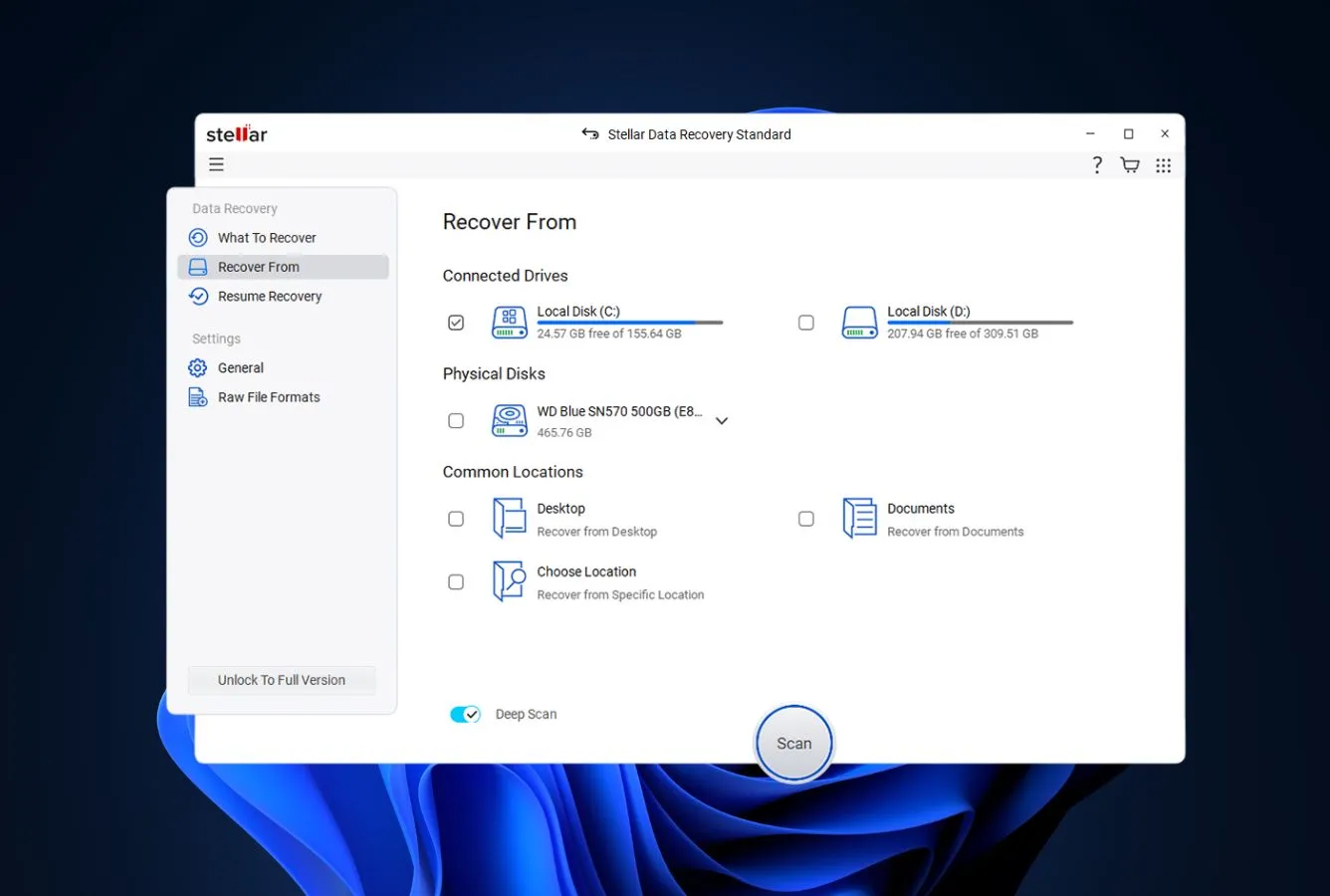
Choose which categories to scan — documents, photos, videos, audio, emails, or everything. Then pick a drive, partition, specific folder, optical disc, or use “Can’t Find Drive” for lost-partition scenarios. For BitLocker-encrypted volumes, enter the password or recovery key when prompted.
Scan and wait
Click Scan. Quick scan runs first; if results are insufficient, toggle the Deep Scan banner at the bottom. You cannot browse results until the scan finishes — plan for an uninterrupted run. The upside: Stellar can pause and resume scan sessions later, which helps on multi-terabyte drives.
Preview and recover
Browse results in Tree View, File Type, or Deleted List. Preview images and documents (preview generation is slow for large files). Select files and click Recover to save to a different drive — the tool blocks saving to the source drive.
Unlike most modern recovery tools, Stellar requires the scan to complete before you can browse or recover files. This adds noticeable wait time to the workflow — budget an hour or more for deep scans on multi-terabyte drives. On the plus side, you can pause a scan and resume it later.
Who Stellar Data Recovery Is For
Stellar serves a broader audience than most data recovery tools — its general-purpose engine is strong enough for everyday recovery scenarios, and it’s the only consumer Windows tool that handles three specialized situations no competitor touches. Specific audiences that get clear value:
Users recovering from scratched or damaged optical media. If you have archived data on a CD, DVD, HD DVD, or Blu-ray that Windows can’t read — a wedding DVD from 2012 that now has scratches, a burnt data backup that skips, an archived photo disc with read errors — Stellar is the only consumer recovery tool that can pull files off it. No other major recovery product supports optical media at all. For that specific scenario, Stellar isn’t just the best option; it’s the only option.
Users recovering from BitLocker-encrypted drives. Stellar scans BitLocker volumes in-place — you provide the password or 48-digit recovery key within the app, and it decrypts and scans the encrypted volume directly. Competitors require you to unlock the drive in Windows first, which often isn’t possible on drives whose file system is damaged. If you’re an IT admin or enterprise user dealing with a partially-corrupted BitLocker drive, Stellar fills a gap no competitor addresses.
Users who may need professional recovery. If your drive has physical damage (clicking hard drive, water damage, fire damage) and software recovery isn’t going to work, Stellar has an in-app bridge to its own professional cleanroom lab services. The microscope icon in the interface submits your case directly — you get a quote without ever shopping around. For users who aren’t sure whether software or lab recovery is needed, that integrated escalation path is uniquely valuable. For a broader comparison see the best hard drive recovery software roundup.
For general-purpose Windows recovery — deleted files, formatted external drives, SD cards, USB sticks — Stellar is fully capable, with Disk Drill and R-Studio holding a small edge on the most demanding scenarios. The next sections cover the trade-offs in detail.
Stellar’s Strengths in Real-World Use
Stellar’s competitive moat is feature breadth and institutional credibility — a strong general-purpose recovery engine wrapped in capabilities no other consumer tool offers. Four strengths stand out consistently across independent reviews:
Optical media recovery is categorically unique
The Professional tier and above recovers data from CDs, DVDs, HD DVDs, and Blu-ray discs — including scratched, partially-burnt, and corrupted media. No other Windows consumer recovery tool offers this capability. Stellar handles both data discs (backup files, archived documents) and recovering from discs with damaged file tables where Windows Explorer shows the disc as empty or unreadable. File names and folder structure are preserved from the original disc. For anyone still dealing with optical media archives — photographers with DVD-R photo backups, professionals with HD DVD archives, users with aging burned-DVD collections — this is the feature that makes Stellar a must-have. For context on the full category see our best DVD data recovery software roundup.
BitLocker recovery without manual decryption
BitLocker-encrypted volume support in Stellar means you provide the password or 48-digit recovery key inside the app, and Stellar handles the rest — decrypting and scanning the encrypted volume in a single workflow. Competitors typically require you to unlock the drive in Windows before scanning, which can’t be done on drives with damaged metadata or file systems. Independent evaluation consistently calls out BitLocker support as a differentiating feature, and for enterprise IT users dealing with encrypted drives, the simplified workflow is a meaningful productivity win.
Direct bridge to professional lab services
Stellar is one of the few consumer recovery software vendors that also operates a professional cleanroom lab — not a partnership, but their own in-house physical recovery facility. The interface includes a direct escalation path: a microscope icon that submits your case to Stellar’s lab for a quote if software recovery fails. No competitor offers this integrated handoff. For users who aren’t sure whether software or physical recovery is needed (clicking drive, head crash, water damage), Stellar eliminates the separate vendor-shopping step. This is also why the brand carries weight in enterprise IT: the same company doing recovery software has a physical-recovery credential most of its competitors lack entirely.
Custom file signatures and scan flexibility
Stellar supports 200+ file signatures out of the box with custom signature addition — upload sample files of an unusual format, and Stellar analyzes the header, footer, and byte patterns to add it to the signature database. Useful for proprietary formats (engineering CAD files, scientific data formats, legacy application files) that standard recovery tools skip. Two-mode scanning (Quick for metadata-based, Deep for sector-by-sector signature scanning) with pause/resume support lets you run partial scans and continue later — valuable on multi-terabyte drives. Disk imaging plus drive cloning ships in the same tool; most competitors offer one or the other, not both.
Where Stellar Falls Short
Stellar’s trade-offs are clear-eyed and worth knowing before you commit to a tier. Three recurring patterns surface in independent reviews and user feedback:
Heavily formatted NTFS drives favor Disk Drill or R-Studio
On the most demanding NTFS scenarios — heavily formatted drives and partitions overwritten with new file systems — Disk Drill and R-Studio aggregate slightly higher recovery rates and stronger folder-structure reconstruction in independent evaluation. The specific pain point for Stellar is folder-structure rebuilding after a deep scan: recovered files sometimes land in flat category folders (Photos, Documents, Videos) rather than retaining original directory paths. For users who specifically need their directory hierarchy back intact after a destructive format, Disk Drill is the more reliable choice at comparable price. For everything else — Recycle Bin, deleted files with intact filenames, partition recovery — Stellar is fully competitive.
Cannot browse results during active scans
Stellar’s workflow forces you to wait for scans to complete before browsing or recovering files. Quick scan is fast (2-5 minutes typically); deep scan on a multi-terabyte drive can run for hours before results become accessible. Every major competitor — EaseUS, Disk Drill, Recoverit — lets you browse and recover while the scan continues in the background. The scan pause/resume feature partially compensates but doesn’t eliminate the core productivity gap. Independent reviewers consistently call out this limitation.
Five-tier pricing hides essential features
Stellar’s $59.99/yr Standard tier is priced to look affordable, but it covers only basic deleted-file recovery. Partition recovery, bootable rescue USB, disk imaging, optical media recovery, and RAW drive recovery all require the $89.99/yr Professional tier. Photo and video repair — a feature Recoverit includes and Wondershare advertises heavily — requires the $99.99/yr Premium tier. Real-world use typically starts at Professional. The five-tier structure makes price comparison difficult and locks genuinely useful capabilities behind upgrade decisions that feel extractive. Competitors like Disk Drill (three tiers, clearer boundaries) and R-Studio (single $79.99 one-time price) are more transparent on this point.
Stellar Data Recovery Capability Summary
How Stellar performs capability by capability, based on aggregated independent evaluation:
| Capability | Tier | Notes |
|---|---|---|
| Deleted-file recovery (NTFS) | Very Good | Strong; small margin to Disk Drill and R-Studio |
| Recycle Bin recovery | Very Good | Quick scan handles this well with filenames preserved |
| Formatted-drive recovery | Good | Solid; folder-structure rebuild can be uneven on deep scans |
| Lost-partition recovery | Good | Manual “Can’t Find Drive” option — no auto-detection |
| exFAT / FAT32 support | Good | Full support; competent for USB drives and SD cards |
| CD / DVD / HD DVD / Blu-ray recovery | Excellent | Professional tier; unique in the consumer category |
| BitLocker-encrypted volume recovery | Excellent | In-app decryption + scan workflow; Professional tier |
| Disk imaging + drive cloning | Very Good | Both features in one tool — unusual at this price |
| Custom file signatures | Very Good | Sample-file analysis auto-builds new signatures |
| RAW photo format coverage | Good | CR2, NEF, ARW, DNG covered; less-common formats missed |
| Photo & video repair | Good | Premium tier only; based on Stellar Repair for Video tech |
| Bootable rescue USB (WinPE) | Very Good | Professional tier and above; for crashed/unbootable systems |
| Scan session save/resume | Very Good | Pause long scans and continue later — useful on large drives |
| Live result browsing during scan | Not supported | Must wait for scan completion — significant workflow cost |
| Cleanroom lab services bridge | Excellent | In-app escalation to Stellar’s physical recovery lab — unique |
| TRIM-active NVMe SSD | Not supported | Hardware limitation affecting all recovery tools |
Tier scale: Excellent / Very Good / Good / Fair / Limited / Not supported. Aggregated from independent external evaluation, vendor documentation, and verified user feedback (G2, Trustpilot, SourceForge), 2026.
Stellar Data Recovery Cost
Stellar uses the most complex pricing structure in the category — five tiers, with feature gates at nearly every boundary. Standard ($59.99/yr) covers basic deleted-file recovery. Professional ($89.99/yr) adds partition recovery, bootable rescue USB, RAW drive recovery, and CD/DVD recovery. Premium ($99.99/yr) adds photo and video repair. Technician ($199/yr) adds RAID recovery and multi-machine licensing. Toolkit ($299/yr) adds Outlook repair, Exchange repair, and database repair modules. Lifetime licenses are available for Professional and above.
The 1 GB free tier sits between EaseUS (2 GB) and Disk Drill/Recoverit (100 MB each) — generous enough to function as a real evaluation window rather than a paid preview. Use it to verify the tool finds your files before committing to a paid license.
At the Professional tier ($89.99/yr), Stellar is priced comparably to Disk Drill’s annual plan ($89/yr) but independent testing consistently places Disk Drill ahead on core recovery rate. Stellar’s value proposition rests on its unique features — if you specifically need optical media, BitLocker, or lab-services access, the pricing is fair. If you don’t, a one-time $79.99 R-Studio license or Disk Drill’s $149 lifetime option often delivers better overall value. For broader price benchmarking see our ranking of the best RAID recovery software.
Stellar vs. Competitors (2026)
| Tool | Deleted-file Recovery | Formatted Drive | CD/DVD Recovery | BitLocker | Free Tier | Price (Pro tier) |
|---|---|---|---|---|---|---|
| Disk Drill | Excellent | Excellent | No | Limited | 100 MB | $89/yr · $149 lifetime |
| R-Studio | Excellent | Very Good | No | No | <256 KB | $79.99 one-time |
| EaseUS DRW | Very Good | Very Good | No | Limited | 2 GB | $99.95/yr |
| Stellar ← | Good | Fair | Excellent | Excellent | 1 GB | $89.99/yr |
| Recoverit | Good | Fair | No | No | 100 MB | $69.99/yr |
| Recuva | Good | Fair | No | No | Unlimited | Free / $24.95 |
Tier assignments based on aggregated independent research. April 2026.
Try Stellar Data Recovery
Free-tier scanning with full preview; 1 GB recovery allowance — the most generous in the category after EaseUS.
Stellar Data Recovery Features & Tools
Stellar’s feature set is organized around three capability groups: broad file-system and media coverage, niche specialization (optical, BitLocker, lab services), and recovery-engine mechanics (scan modes, imaging, custom signatures). Pricing tier determines access — Standard covers core recovery only; Professional unlocks most features; Premium adds repair; Technician/Toolkit add enterprise-tier capabilities.
File-System & Media Support Matrix
Stellar’s coverage is broad for a consumer tool, especially on less-common storage. This is where the “veteran” positioning pays off — two decades of iterative file-system support add up.
| Storage type | Use case | Support | Notes |
|---|---|---|---|
| NTFS / NTFS+EFS | Windows internal and external drives | Full | All tiers |
| FAT12 / FAT16 / FAT32 | USB sticks, small SD cards, legacy drives | Full | All tiers |
| exFAT | Large SD cards, portable SSDs, camera cards | Full | All tiers |
| HFS+ / APFS | Mac drives (Mac edition required) | Full | Separate Mac product |
| BitLocker-encrypted volumes | Windows encrypted drives | Full | Professional tier; in-app decryption |
| CD / DVD / HD DVD / Blu-ray | Optical media recovery | Full | Professional tier — unique to Stellar |
| RAID arrays (0, 5, 6) | Multi-disk redundant storage | Full | Technician tier ($199/yr) |
| 4K sector drives | Modern large-capacity HDDs | Full | All paid tiers |
| RAW partition recovery | Unformatted / unrecognized partitions | Full | Professional tier and above |
| ReFS | Windows Server, Storage Spaces | Not supported | Use R-Studio or DMDE instead |
| Linux EXT4 / BTRFS / XFS | Linux drives and NAS backends | Not supported | Use Wondershare Recoverit or R-Studio |
Source: Stellar’s official product documentation, cross-referenced with independent external evaluation.
Recovery Engine Capabilities
Stellar ships a dual-mode recovery engine with signature customization — two-decade-mature functionality with some trade-offs that reflect its age relative to newer engines.
| Capability | How it works | Available |
|---|---|---|
| Quick Scan (metadata-based) | Reads existing file-system metadata for deleted records | All tiers incl. Free |
| Deep Scan (signature-based) | Sector-by-sector scan against 200+ file signatures | All tiers incl. Free |
| Custom signature addition | Upload sample files to auto-build new signatures | All paid tiers |
| Scan pause / resume | Pause long scans and continue later — saved to scan file | Professional+ |
| Disk imaging (byte-to-byte) | Create full or ranged image for safe scanning | Professional+ |
| Drive cloning | Clone drive to different disk — failing-drive workflow | Professional+ |
| Full-screen video preview | Play recovered videos before committing to recovery | All paid tiers |
| Photo repair (JPEG/TIFF/PNG/CR2/NEF) | Based on Stellar Repair for Photo technology | Premium+ |
| Video repair (MP4/MOV/AVI) | Based on Stellar Repair for Video technology | Premium+ |
| Email recovery (PST/DBX/EDB/NSF) | Outlook, Outlook Express, Exchange, Lotus Notes | Professional+ |
| Bootable rescue USB (WinPE) | Boot crashed PCs to recover before Windows loads | Professional+ |
| Live result browsing during scan | Preview and recover files while scan continues | Not supported |
| Cleanroom lab services bridge | Submit case to Stellar’s physical recovery lab from app | All tiers |
UI & Workflow
Stellar’s interface is organized around a sequential wizard. The home screen presents a file-type selection grid — Everything, Documents, Photos, Videos, Audio, Emails — followed by a location selector showing connected drives, partitions, common locations (Desktop, Recycle Bin), optical drives, and the “Can’t Find Drive” option for lost partitions. Selecting a location starts Quick Scan automatically; a prominent Deep Scan banner appears at the bottom of results to escalate if needed.
Results populate in three views: Tree View (original folder structure), File Type (grouped by extension), and Deleted List (files flagged as deleted vs. existing). Filter controls narrow by size, date, name, or status. Preview pane shows image thumbnails, full-screen video preview for recovered clips, and document content. Scan pause/resume is available via the toolbar. The interface is described in independent reviews as “similar to Ontrack EasyRecovery” in layout — clean but showing its age compared to newer entrants like Disk Drill and Wondershare Recoverit.
Two notable workflow quirks: scans cannot populate results until complete (unlike modern competitors), and the pause/stop controls have been reported as buggy in some releases — clicking pause can leave the scan in a state where you can’t return to the main screen until the scan completes anyway.
Safety, Footprint & Support
Click to expand: installer profile, licensing, and support channels+
| Attribute | Value | Notes |
|---|---|---|
| Installer size | <5 MB stub | Downloads components during setup; ~3–5 minute install |
| Digital signature | Signed | Stellar Information Technology Pvt. Ltd. — passes SmartScreen |
| Bundled adware | None | Clean installer; no deceptive checkboxes |
| Account / registration required | Optional | Not required for free tier; Pro activation uses license key |
| Read-only scanning mode | Yes | Scans cannot modify source data |
| Auto-update mechanism | Partial | Paid tiers auto-check; free edition doesn’t check for updates |
| License transfer between machines | Difficult | Recurring Capterra complaint — plan to email support |
| Refund processing | Slow | 30-day guarantee exists but reportedly takes multiple follow-ups |
| Developer tenure | 25+ years | Stellar Information Technology active since 2000 |
| Professional lab services | In-house | Own cleanroom facility — not a third-party partnership |
| Support channels | Phone, email, live chat, knowledge base | More comprehensive support surface than most competitors |
| Documentation depth | Excellent | Detailed tutorials; video walkthroughs; multi-language support |
| Language support | 7 languages | English, French, German, Italian, Japanese, Korean, Spanish |
Stellar Data Recovery User Reviews
Stellar has extensive review coverage — the 25-year track record means substantial review surface area across G2, Capterra, Trustpilot, and independent external evaluation. Sentiment splits clearly: positive reviews cluster around recovery success for common deleted-file and photo scenarios, while critical reviews concentrate on licensing/activation issues and inconsistent results on complex recovery scenarios.
Successfully repaired seven corrupted PST files ranging from 4 GB to 40 GB. Very happy with the product so far.
Little to no support and they never resolved our activation key issue. We ended up going with a competitor.
The software does show your data but does not recover much as such. I put a check mark on NEF files that are supposed to be recoverable.
Stellar holds a 4.7 rating on Trustpilot but a markedly lower rating on Capterra — the gap reflects a consistent pattern. Trustpilot reviewers who successfully recovered data give high marks for UI simplicity and feature breadth. Capterra reviewers with activation issues, support friction, or tools that didn’t find their specific files leave detailed critical reviews. Test thoroughly with the 1 GB free tier before buying.
When to Choose Something Else
Stellar is the right answer for specific niche scenarios but rarely the best answer for general-purpose recovery. These alternatives fit better for common cases:
Frequently Asked Questions
Is Stellar Data Recovery really free?+
How well does Stellar recover files from NTFS?+
Does Stellar Data Recovery work on Windows 11?+
Can Stellar repair corrupted photos and videos?+
How much does Stellar Data Recovery cost?+
Is Stellar Data Recovery safe to install?+
Can Stellar recover data from CD, DVD, and Blu-ray discs?+
Final Verdict
Stellar Data Recovery Professional earns 4.5/5 as the clearest “buy it for the niche features” recommendation in the Windows recovery category. Optical media recovery from scratched CDs, DVDs, HD DVDs, and Blu-rays is unmatched — no other consumer tool supports it at all. BitLocker-encrypted volume scanning without manual decryption is unique. The in-app bridge to Stellar’s own professional cleanroom lab services is unique. For users facing one of those specific scenarios, Stellar isn’t just the best choice; it’s the only choice.
For general-purpose Windows data recovery, Stellar holds its own. Independent evaluation places its core engine in the upper tier — strong on recently deleted files and Recycle Bin, with Disk Drill and R-Studio carrying a small edge on heavily formatted NTFS drives and folder-structure reconstruction. The five-tier pricing structure locks genuinely useful features behind progressively expensive plans, the scan workflow cannot populate results live, and licensing friction shows up consistently in user reviews — but none of these undermine the core recovery experience.
Choose Stellar if: you want a strong general-purpose recovery tool that also handles optical media, BitLocker volumes, or offers a direct path to professional lab services. Choose something else if: you want the absolute strongest engine for heavily formatted NTFS drives, a simpler pricing model, or live scan-result browsing. For a broader roundup of lighter options for a recently-emptied bin, see our Recycle Bin file recovery software guide.
About the Authors


This review may contain affiliate links through Stellar’s partner program. Commissions do not influence our ratings, research methodology, or conclusions — the same research process applies to tools with and without affiliate partnerships. If you believe any claim is inaccurate, contact us at contact@datarecoveryfix.com.