
MiniTool Power Data Recovery Review (2026): Clean Mid-Ranger, Best Lifetime License
MiniTool Solution Ltd. has built disk utilities from its Vancouver headquarters since 2009, and Power Data Recovery is the company’s flagship recovery product — the same developer behind MiniTool Partition Wizard, one of Windows’ most-used partition managers. Version 12.8 ships five dedicated scan modules (Undelete, Damaged Partition, Lost Partition, Digital Media, CD/DVD) and a bootable WinPE recovery environment. The $99 Personal Ultimate license covers three PCs with lifetime upgrades — the best pure-value deal in the paid Windows recovery category.
Our review aggregates independent testing from G2, Capterra, Trustpilot, Pandora Recovery, 7 Data Recovery, and TechnologyEvaluation, plus vendor documentation. MiniTool is a clean, competent tool with real structural advantages — but the recovery engine itself sits in the middle tier rather than the top. Scans are noticeably slow, video recovery from formatted drives is a known weak point, and complex fragmented-drive scenarios favor Disk Drill or R-Studio.
tests, user reports
v12.8
1 GB free tier
v12.8
MiniTool’s clean interface, five dedicated recovery modules, and — most notably — the $99 Personal Ultimate license (three PCs, lifetime upgrades, no subscription) make it the best value proposition in the paid Windows recovery category. Lost-partition recovery and CD/DVD scanning are genuine differentiators that simpler tools like Recuva cannot offer. The software is safe, well-established (Microsoft Partner since 2009), and gets consistent praise for USB and memory-card recovery from users.
The recovery engine itself sits in the middle tier rather than the top. Scans are slow and tax system resources — a recurring complaint across G2, Capterra, and Trustpilot. Video-file recovery from formatted drives is a known weak point (multiple users report corrupted recovered videos). On complex fragmented or heavily-formatted drives, Disk Drill and R-Studio deliver meaningfully better rates. The Monthly $69 tier is hard to justify for anyone not in a one-time emergency. But for users who want clean software, multi-PC coverage, and a one-time payment, MiniTool is a reasonable pick.
✓ What We Liked
- $99 Personal Ultimate lifetime license — 3 PCs, lifetime upgrades, best value in paid category
- Clean, modern interface — one of the most intuitive layouts in the category
- Five dedicated scan modules (Undelete, Damaged/Lost Partition, Digital Media, CD/DVD)
- Lost-partition recovery scans RAW and unmounted drives — a real capability
- CD/DVD recovery module — uncommon in the category, shared only with Stellar
- Bootable WinPE recovery media for crashed or unbootable systems (paid tiers)
- 70+ file types supported in the preview panel across 14 categories
✕ What We Didn’t
- Recovery engine trails the top tier on complex formatted-drive scenarios
- Scans are slow and noticeably slow down the rest of the system during Deep Scan
- Video-file recovery from formatted drives frequently yields corrupted output
MiniTool Power Data Recovery Alternatives
Brief selection A quick shortlist of top alternative picks based on aggregated independent research. |
Best Alternative

EaseUS Data Recovery Wizard
Best overall · 2 GB free
|

Disk Drill
Best engine · 100 MB free
|

Stellar Data Recovery
Unique CD/DVD · 1 GB free
|
|---|---|---|---|
| Paid pricing (lifetime) | None — subscription only | $149 PRO lifetime | None — subscription only |
| Free Tier | 2 GB | 100 MB | 1 GB |
| Lost Partition Recovery | ✓ | ✓ | ✓ |
| CD/DVD Recovery | No | No | ✓ |
| File Repair | ✓ | No | ✓ |
Research Methodology
This review aggregates three evidence types for MiniTool Power Data Recovery v12.8: vendor documentation (the official MiniTool product page, upgrade history, supported file systems and formats, module descriptions), independent external testing (Pandora Recovery, 7 Data Recovery, TechnologyEvaluation, Softpedia), and community feedback (G2, Capterra, Trustpilot, SoftwareSuggest). Feature claims, version details, pricing tiers, and supported platforms are cross-referenced across source types before being stated as fact.
Tier assignments (Excellent / Very Good / Good / Fair / Limited / Not supported) reflect the aggregate of that evidence — not an in-house benchmark. For a broader view of the Windows recovery landscape MiniTool competes in, see our ranking of the best data recovery software for Windows. Full methodology details are on our How We Test page.
This review does not claim in-house benchmarks. Tier labels aggregate vendor documentation, independent external testing, and user reports. Version numbers come from MiniTool’s upgrade history page and published download trackers (Softpedia, FileHorse, TechSpot) cross-referenced to confirm v12.8 as the current release.
Is MiniTool Power Data Recovery Safe?
Yes. MiniTool Solution Ltd. is a Microsoft Partner headquartered in Vancouver, British Columbia, Canada, operating since 2009. The company produces a portfolio of widely-used Windows utilities including MiniTool Partition Wizard (one of the most-deployed partition managers in the category) and MiniTool ShadowMaker (backup and imaging). The Power Data Recovery installer is digitally signed, passes Windows SmartScreen, and uses read-only scanning that cannot modify source drives.
Two caveats worth noting. First, some users on Trustpilot report licensing friction — specifically that licenses are tied to specific machines and cannot always be transferred to replacement PCs without support intervention; the Personal Ultimate tier’s three-PC coverage softens this but doesn’t eliminate it. Second, always download directly from minitool.com. Third-party download sites bundle MiniTool installers with adware with some regularity; the official installer from MiniTool’s own site is clean.
How to Use MiniTool Power Data Recovery
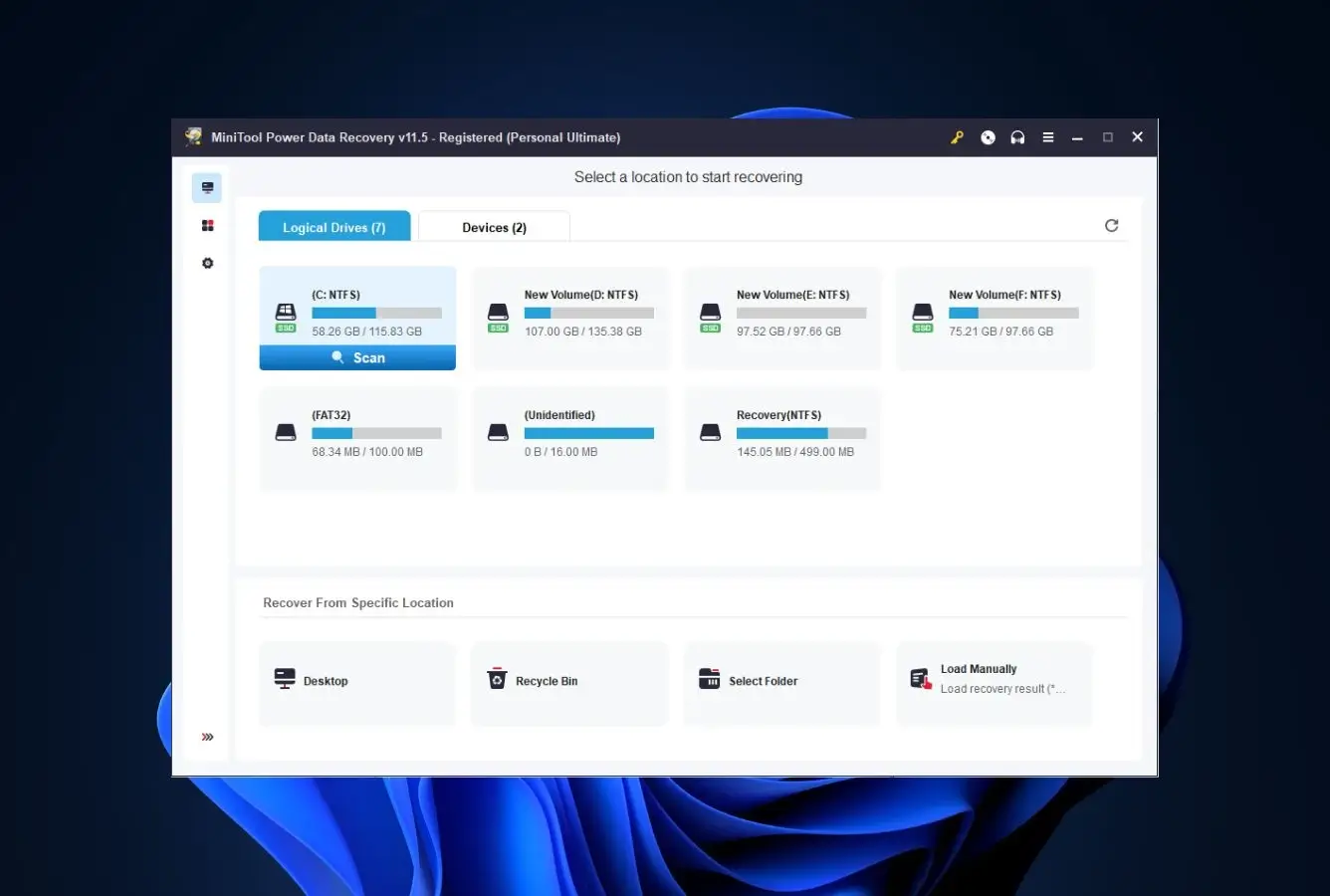
MiniTool’s interface is one of the cleanest in the Windows recovery category. The main screen lists all detected drives and partitions alongside shortcut scan targets (Desktop, Recycle Bin, specific folder). Workflow is four steps and typically completes a full recovery in under an hour on routine drives.
Download and install
Download MiniTool Power Data Recovery from minitool.com. Install on a drive other than the one you’re recovering from — installing on the source drive risks overwriting deleted data.
Select a drive, partition, or specific location
The main screen lists all detected drives, partitions, and lost partitions. Or shortcut directly to Desktop, Recycle Bin, or a specific folder. The Specific Location option saves significant time versus full-drive scans when you know approximately where the files were.
Scan and browse results
Click Scan. Quick Scan runs first, followed automatically by Deep Scan. You can browse and recover files during the scan without waiting for completion. The preview add-on downloads on first use — a small inconvenience but works reliably after install.
Preview, select, and recover
Preview documents, images, and supported video files before recovering. Select files, click Save, and choose a different drive as the destination. The free tier caps recovery at 1 GB — upgrade prompts appear when you approach the limit.
One meaningful free-tier limitation: scan session results cannot be saved. If you close the application before recovering everything, you’ll need to re-run the full scan next time. Paid tiers unlock result saving, which matters for large drives where Deep Scan takes hours.
Who MiniTool Is For
MiniTool Power Data Recovery occupies a clear niche: the pragmatic Windows user who wants a clean, safe, established tool with a fair lifetime price. It’s not the most powerful recovery engine in the category, but for most everyday recovery scenarios, the differences versus top-tier tools are narrower than they appear — and MiniTool’s pricing structure rewards users who need recovery capability available on multiple machines without subscription commitment.
Four audiences get clear value:
Small-business owners and households with multiple PCs. The $99 Personal Ultimate license covers three PCs with lifetime upgrades. Nothing else in the paid Windows recovery category matches this — Disk Drill’s lifetime is $149 for Windows-only, EaseUS and Stellar are subscription-only. For a household with three computers or a small business with a few workstations, MiniTool is the straightforward economic pick.
IT technicians managing mixed hardware. The Technician tier includes bootable WinPE media and handles repeat deployments across unrelated machines. The WinPE boot environment is genuinely useful for crashed systems that won’t boot into Windows — plug in a prepared USB, boot from it, run recovery on the dead system’s drive. Disk Drill offers this too but at a higher price point.
Users with damaged CDs or DVDs. MiniTool’s CD/DVD Recovery module is genuinely uncommon. Most category competitors don’t scan optical media at all. If you have scratched or partially-burnt discs with important data — old photo archives, family video backups, legacy project files — MiniTool is one of only two mainstream tools (alongside Stellar Data Recovery, reviewed in the alternatives above) that can attempt recovery. Our best DVD data recovery software guide covers the full category.
Non-technical users who want a guided experience. The interface is consistently praised for its simplicity on G2 and Capterra. The five-module approach — Undelete, Damaged Partition, Lost Partition, Digital Media, CD/DVD — guides users toward the correct scan type for their specific scenario rather than forcing everyone through a one-size-fits-all flow. Users without recovery experience navigate MiniTool more successfully than they do most competitors.
If your scenario is on the harder end — heavily fragmented drives, complex RAID recovery, deeply corrupted NTFS metadata, forensic-grade work — MiniTool is not the right tool. The top tier (Disk Drill, R-Studio) outperforms it on those scenarios. The sections below explain exactly where and why.
MiniTool’s Strengths in Real-World Use
MiniTool’s strengths are structural rather than raw-performance: how the product is shaped, priced, and scoped differentiates it more than recovery rates do. Four strengths show up consistently across independent reviews and vendor evidence:
The best paid-tier value in the category
The $99 Personal Ultimate license is the single strongest value proposition in paid Windows recovery. Three PCs covered. Lifetime upgrades included. One-time payment, no subscription. For comparison: Disk Drill PRO lifetime is $149 (Windows-only), EaseUS and Stellar have no lifetime option at all (annual subscriptions only). Over a 2–3 year ownership window, MiniTool’s economics are genuinely hard to beat — even accounting for the weaker recovery engine. The $89 Annual subscription, by contrast, is overpriced versus that same $99 lifetime for anyone who expects to use the tool more than once.
Clean, modern interface with smart workflow shortcuts
Independent reviewers at G2, Capterra, SoftwareSuggest, and 7 Data Recovery all praise MiniTool’s interface as one of the most approachable in the category. The main screen’s Specific Location shortcuts (Desktop, Recycle Bin, specific folder) save real time versus tools that force a full-drive scan for every attempt. The ability to browse and recover during an active scan is a workflow improvement that matters on large drives. Non-technical users complete successful recoveries without hand-holding — the hallmark of good product design.
Five dedicated scan modules, including CD/DVD
MiniTool ships five distinct recovery modules rather than a single one-size-fits-all scan: Undelete Recovery (for deleted files), Damaged Partition Recovery (corrupted partitions), Lost Partition Recovery (deleted partitions that no longer appear in Windows), Digital Media Recovery (camera cards, USB, phones), and CD/DVD Recovery. The last one is rare — most competitors don’t scan optical media at all. For users with scratched or partially-readable CDs and DVDs containing legacy backups, MiniTool is one of a very small number of modern tools that still attempts recovery. The 1 GB free tier makes MiniTool worth trying before you buy — see our best free data recovery software comparison for how its free allowance stacks up.
Established company with long-term support
MiniTool Solution Ltd. has been operating since 2009, is a Microsoft Partner, and maintains a portfolio of disk utilities that users run daily (Partition Wizard alone has tens of millions of installations). The company isn’t going anywhere. Version 12.8 was released January 2026 with ongoing maintenance; the upgrade history page shows consistent releases across the last several years. When you buy a lifetime license, “lifetime” has real meaning because the company has a long track record of shipping updates. This is not a small thing — several smaller recovery tools have abandoned their user bases after acquisition or pivot.
Where MiniTool Falls Short
MiniTool’s weaknesses cluster around the recovery engine itself rather than the product’s structure. Three gaps stand out consistently across independent testing:
Recovery engine trails the top tier on complex scenarios
On routine scenarios — recently deleted files on healthy NTFS, Recycle Bin recovery, USB flash drive recovery — MiniTool performs comparably to the category leaders. The gap opens on harder scenarios: long-formatted drives, heavily fragmented media, partially-overwritten files, and complex NTFS metadata corruption. Independent reviewers including Pandora Recovery and 7 Data Recovery consistently place MiniTool below Disk Drill and R-Studio on these scenarios. If your use case is demanding — forensic recovery, corrupted enterprise volumes, heavily used drives — this gap matters. If your use case is everyday file recovery, it probably doesn’t.
Slow scans that tax system resources
Capterra reviews repeatedly note that Deep Scans run slowly and the system becomes unusable for other work during scanning. The 78-minute scan time reported for a 4 TB external HDD in independent testing is slower than Disk Drill and EaseUS on comparable hardware. MiniTool’s scan engine appears to be CPU-heavier than optimal, and there’s no obvious throttle or background-mode toggle. For a tool that recommends recovering to a separate drive, expecting you to sit idle during a multi-hour scan is a real friction point. Plan to run MiniTool scans overnight or when you don’t need the machine.
Video-file recovery weakness on formatted drives
Multiple user reviews on Capterra and G2 specifically call out corrupted video recovery as a recurring problem: the filenames come back, the file sizes look right, but the video itself won’t play or plays with heavy corruption. This is particularly an issue on formatted drives where the video’s internal structure has been partially overwritten — MiniTool’s signature-based recovery recovers the raw bytes but doesn’t validate playability. For users recovering significant video libraries — wedding footage, family archives, professional recordings — this matters. Dedicated video-repair tools (or Wondershare Recoverit’s integrated video repair) are worth considering as complements. See our best video file repair software guide for options.
MiniTool Capability Summary
How MiniTool performs capability by capability, based on aggregated independent evaluation:
| Capability | Tier | Notes |
|---|---|---|
| Recently-deleted files (NTFS) | Very Good | Undelete Recovery module handles this well; filenames preserved |
| Recycle Bin recovery | Very Good | Dedicated Recycle Bin scan shortcut; sub-2-minute on small drives |
| Formatted-drive recovery | Good | Damaged Partition module works; trails top tier on heavy fragmentation |
| Corrupted partition recovery | Good | Can scan unmounted partitions; recovery rates trail top tier |
| Lost partition recovery | Very Good | Dedicated module; one of MiniTool’s structural strengths |
| CD/DVD recovery | Very Good | Rare in category — only Stellar offers comparable capability |
| USB flash drive recovery | Very Good | Frequently praised by users on G2 and Capterra |
| SD card / camera card recovery | Good | Digital Media Recovery module; JPEG strong, RAW moderate |
| External HDD recovery | Very Good | Works well; slow scans on multi-TB drives |
| External SSD (exFAT) recovery | Good | Weaker than NTFS HDD; exFAT signatures less mature |
| RAW camera format coverage | Good | CR2, NEF, DNG, ARW recognized; CR3 and ORF less reliable |
| Video file recovery (formatted) | Fair | Known weakness — corrupted output frequently reported |
| Bootable WinPE media | Very Good | Paid tiers only; useful for crashed system recovery |
| File preview (70+ types) | Very Good | Broad preview support across documents, images, video, archives |
| Scan during recovery | Very Good | Browse and recover without waiting for scan completion |
| Save/resume scan sessions | Paid only | Free tier forces full re-scan on app restart |
| Scan speed | Fair | Slow on multi-TB drives; system resource-heavy during scans |
| RAID array recovery | Limited | Basic volume support; use R-Studio for serious RAID work |
| File repair (photo/video) | Not supported | No repair modules — recovery only |
| Mac / APFS / EXT4 | Not supported | Windows-only — separate MiniTool Mac Data Recovery product exists |
| TRIM-active NVMe SSD | Not supported | Hardware limitation affecting all recovery tools |
Tier scale: Excellent / Very Good / Good / Fair / Limited / Not supported. Aggregated from Pandora Recovery, 7 Data Recovery, G2, Capterra, TechnologyEvaluation, and vendor documentation, 2026.
MiniTool Power Data Recovery Cost
MiniTool ships four pricing tiers. The pricing structure strongly favors the Personal Ultimate lifetime license — the Monthly and Annual tiers are priced awkwardly relative to it.
| Tier | Price | Coverage | Notes |
|---|---|---|---|
| Free | $0 | 1 PC · 1 GB recovery cap | Full scan, full preview, no registration. Cannot save scan sessions. |
| Monthly | $69 / month | 1 PC · unlimited recovery | Hard to justify — same money gets 8 months of Annual or nearly 1 year of Ultimate lifetime |
| Annual | $89 / year | 1 PC · unlimited recovery | Fair but outpriced by Ultimate at the 2-year mark |
| Personal Ultimate | $99 one-time | 3 PCs · lifetime upgrades | Best value in paid Windows recovery category |
| Business Standard | $199 / year (approx) | 1 PC · commercial use | For use in business environments |
| Business Deluxe | $399 / year (approx) | 3 PCs · commercial use | Small-team business deployment |
| Business Enterprise | $499+ / year | Multi-PC · commercial use | Larger organization deployment |
| Business Technician | Custom | Unlimited PCs · service provider | For IT repair shops and recovery service providers |
Pricing verified against the official MiniTool store and Capterra listings, April 2026. Business pricing tiers may vary and we recommend checking with MiniTool sales for current figures.
The value picture is clear: the Personal Ultimate at $99 is substantially better than any annual or monthly tier for anyone who expects to use the tool more than once. It’s also competitive with Disk Drill’s $149 lifetime tier — MiniTool’s recovery engine is weaker but the software covers three PCs rather than one. For a household or small office, that’s often the right trade. For a single power user who wants the best possible recovery engine on one machine, Disk Drill’s higher-priced lifetime is likely the better call. For dedicated HDD-focused tool comparisons, see our best hard drive recovery software ranking.
MiniTool vs. Competitors (2026)
| Tool | Deleted-file | Formatted | Corrupted | CD/DVD | Free Tier | Price |
|---|---|---|---|---|---|---|
| Disk Drill | Excellent | Excellent | Very Good | No | 100 MB | $89/yr · $149 lifetime |
| R-Studio | Excellent | Very Good | Excellent | No | <256 KB | $79.99 one-time |
| EaseUS DRW | Very Good | Very Good | Very Good | No | 2 GB | $99.95/yr |
| Stellar | Very Good | Good | Good | Yes | 1 GB | $79.99/yr |
| MiniTool ← | Very Good | Good | Good | Yes | 1 GB | Free / $89/yr / $99 lifetime |
| Recuva | Good | Fair | Not supported | No | Unlimited | Free / $24.95 |
Tier assignments based on aggregated independent research. April 2026.
Try MiniTool Free (1 GB Recovery)
Full scan, full preview, no registration. $99 Personal Ultimate unlocks 3-PC lifetime upgrades.
MiniTool Power Data Recovery Features & Tools
MiniTool’s feature set clusters around its five-module architecture, with a bootable recovery environment and extensive file system support. The module-based approach is unusual in the category — most competitors ship a single unified scan.
File System & Storage Support Matrix
MiniTool’s file system coverage is broader than most Windows-focused tools, including legacy Mac HFS+, ISO9660 for optical media, and UDF for newer discs.
| Storage / file system | Use case | Support | Notes |
|---|---|---|---|
| NTFS | Windows internal and external drives | Full | Primary use case; most mature support |
| FAT12 / FAT16 / FAT32 | Legacy drives, small USB sticks | Full | Comprehensive FAT family coverage |
| exFAT | Large SD cards, portable SSDs | Partial | Works but less mature than NTFS |
| HFS+ | Mac-formatted external drives | Read-only | Can recover from Mac drives connected to Windows |
| ISO9660 / Joliet | CDs, DVDs, optical media | Full | CD/DVD Recovery module |
| UDF | Blu-ray, DVD-RW, newer optical | Full | CD/DVD Recovery module |
| Windows Dynamic Disk volumes | Simple/Spanned/Striped/Mirror/RAID-5 | Full | Handles all Dynamic Volume types |
| Internal HDDs / SSDs (SATA, NVMe) | Standard Windows drives | Full | Scan speed slower on large NVMe drives |
| External HDDs / SSDs | USB-connected drives | Full | Strong user reviews for this scenario |
| USB flash drives | Thumb drives, pen drives | Full | Digital Media Recovery module; fast scans |
| SD cards / CF cards | Camera cards, phone storage | Full | Digital Media Recovery module |
| CD-ROM / DVD-ROM | Scratched or damaged optical discs | Full | CD/DVD Recovery module — uncommon in category |
| Blu-ray discs | High-capacity optical backup | Full | CD/DVD Recovery module with UDF |
| BitLocker-encrypted drives | Encrypted Windows volumes | Supported | Requires BitLocker password during scan |
| Virtual hard drives (VHD/VHDX) | VM disk images | Full | Scan inside VHD/VHDX image files |
| RAID arrays (hardware/OS) | Multi-disk redundant storage | Limited | Basic RAID only — use R-Studio for complex RAID |
| APFS / EXT4 / ZFS | Mac and Linux native file systems | Not supported | Windows product — use MiniTool Mac Data Recovery separately |
Source: MiniTool official documentation cross-referenced with Softpedia, FileHorse, and Capterra listings, 2026.
Five Recovery Modules — The Core Architecture
MiniTool’s defining architectural choice is its five-module approach. Rather than one unified scan that handles everything, the tool routes different scenarios to different purpose-built scan engines.
| Module | Scenario | How it works |
|---|---|---|
| Undelete Recovery | Files deleted normally or via Shift+Delete | Parses NTFS/FAT file-system metadata for deleted entries. Fast. Preserves filenames and folder structure. |
| Damaged Partition Recovery | Formatted or corrupted partitions | Deep sector-by-sector scan with signature matching. Slow but finds files beyond what metadata scanning can see. |
| Lost Partition Recovery | Deleted partitions no longer in Windows | Scans the physical disk for partition signatures, reconstructs deleted partitions, then scans them. |
| Digital Media Recovery | Camera cards, USB drives, phone storage | Optimized for removable media with broad photo/video format recognition. |
| CD/DVD Recovery | Scratched or damaged optical discs | ISO9660/Joliet/UDF handling for CDs, DVDs, and Blu-ray. Rare capability in category. |
UI & Workflow
Independent reviewers at G2, Capterra, SoftwareSuggest, and 7 Data Recovery consistently call out MiniTool’s interface as among the cleanest in the category. The main screen lists drives, partitions, and lost partitions alongside shortcut scan targets (Desktop, Recycle Bin, specific folder). File results appear in a familiar tree-view with preview, filter, and size/date columns. The ability to browse results during an active scan is a genuine workflow win — with most competitors you wait for scan completion before you can see what was found. MiniTool’s v12.x UI refresh (real-time sector progress, improved high-DPI scaling, language-switching without restart per the official upgrade history) brings the interface visually on par with modern competitors while preserving the familiar workflow.
Installer, Support & Advanced Features
Click to expand: installer profile, support channels, advanced capabilities+
| Attribute | Value | Notes |
|---|---|---|
| Installer size | ~116 MB | Full-featured installer with all modules |
| Digital signature | Signed | MiniTool Solution Ltd. — passes Windows SmartScreen |
| Bundled adware (official site) | None | minitool.com installer is clean |
| Bundled adware (third-party sites) | Risk | Avoid FileCR, karanpc, cracksurl mirrors — download direct only |
| Account / registration required | No | Free tier works without any account |
| Read-only scanning mode | Yes | Cannot modify source drives |
| Latest version | v12.8 | January 2026 release; improved UI clarity and real-time progress |
| Windows support | 7 through 11 | Plus Server 2003, 2008 (R2), 2012 |
| Mac version | Separate product | MiniTool Mac Data Recovery is a different product — not this tool on Mac |
| File preview types | 70+ across 14 categories | Documents, images, video, audio, archives, email, text, etc. |
| Bootable WinPE media | Paid tiers | USB bootable for crashed-system recovery — Ultimate and Business tiers |
| Save/resume scan results | Paid tiers | Free tier forces full re-scan each session |
| Auto Quick + Deep Scan | Yes | Runs Quick Scan first, Deep Scan follows automatically |
| Recover-during-scan | Yes | Browse and recover files while scan is still running |
| Specific Location Scan | Yes | Desktop / Recycle Bin / custom folder shortcuts save time |
| Support channels | Email, phone, live chat | 24/7 availability per vendor documentation |
| License transfer | Friction reported | Some Trustpilot users report difficulty moving license to new PC |
MiniTool Power Data Recovery User Reviews
MiniTool has substantial presence across G2, Capterra, Trustpilot, and SoftwareSuggest with generally positive ratings. The consensus across sources is consistent: users praise ease of use and USB/memory-card recovery, complain about slow scanning, the 1 GB free cap, video recovery corruption, and license transferability.
Easy to use and invaluable when it comes to recovery. We use it daily with a high success rate.
It managed to recover almost 90 percent of our data where even other software had failed. Some files were corrupted but most were recovered.
Full scans take a long time and you cannot use your computer when the scan is running.
If you have installed the software on a PC this is stored and saved. Should you change hardware, you cannot transfer the license.
I have recovered much of my important mobile data that was lost. Customer support is good and supportive.
Recovered files are often corrupted and not usable, especially video files.
Its recovery performance is holding it back. Excelled in some areas and underperformed in others.
A simple, dependable tool that works well for recovering deleted files and formatted USB drives. Not the fastest, nor the most feature-rich option.
Reviews across platforms show a clear split: interface quality, USB/memory-card recovery, and customer support get consistent praise; scan speed, video-recovery corruption, and license transferability are recurring critical themes. Professional reviewers position MiniTool as mid-tier — good but not top-of-category.
When to Choose Something Else
MiniTool is a good fit for multi-PC households, CD/DVD recovery, and clean-UI preferences. For other scenarios:
Frequently Asked Questions
Is MiniTool Power Data Recovery free?+
How well does MiniTool recover NTFS files?+
Does MiniTool work on Windows 11?+
Can MiniTool recover formatted drives?+
How much does MiniTool Power Data Recovery cost?+
Is MiniTool safe to use?+
What are MiniTool’s five recovery modules?+
Final Verdict
MiniTool Power Data Recovery is the pragmatic pick in paid Windows recovery. The $99 Personal Ultimate license — three PCs, lifetime upgrades, one-time payment — is the strongest value proposition anywhere in the paid category. The interface is clean and modern, the five-module architecture routes different scenarios to purpose-built scans, and CD/DVD recovery (genuinely rare in the 2026 landscape) is included. MiniTool Solution Ltd. is established, Microsoft Partner-certified, and has been shipping consistent updates to this product for fifteen-plus years.
The recovery engine itself is the ceiling. On routine scenarios — recently deleted files, Recycle Bin, USB drives, lost partitions — MiniTool performs comparably to the category leaders and often wins on workflow. On harder scenarios — long-formatted drives, heavily fragmented media, complex NTFS metadata corruption — it trails Disk Drill and R-Studio by a visible margin. Scans are slow enough to interfere with other work. Video recovery from formatted drives frequently yields corrupted output (a recurring complaint across user reviews). The $69 Monthly tier is overpriced relative to the $99 Ultimate and exists mostly for one-time emergency use.
Pick MiniTool if you want multi-PC coverage with a one-time payment, if you need CD/DVD recovery, or if you value clean software over maximum recovery performance. Pick R-Studio or Disk Drill if you need the strongest possible engine for complex scenarios. Pick Recuva or PhotoRec (both reviewed in the alternatives above) if you need unlimited free recovery and your scenario is on the simpler end.
About the Authors


This site earns revenue through affiliate links when you purchase MiniTool or other products through our links. This financial relationship has no influence on our tier assignments, methodology, or conclusions — all tools are evaluated independently against the same rubric and the same body of aggregated evidence. If you believe any claim is inaccurate, contact us at contact@datarecoveryfix.com.




