
R-Studio Review (2026): Pro-Grade Recovery Toolkit
R-Studio is the professional’s data recovery workstation. Built by R-Tools Technology Inc. — a company that has focused exclusively on data recovery and disk utilities since 2000 — it packages RAID reconstruction, network recovery via R-Studio Agent, multi-pass disk imaging, a full hex editor, and support for more file systems than any other consumer-accessible tool. Aggregated independent evaluation (HandyRecovery, CleverFiles, Wondershare, TechRadar) consistently ranks R-Studio at the top of the category for corrupted partition recovery and the only serious option for RAID work.
The trade-offs are specific and well-documented: a dense, dated interface with a steep learning curve, a 256 KB per-file demo cap that makes trial evaluation essentially impractical, and separate licenses for Windows, Mac, and Linux. At $79.99 for a lifetime Standard license — not a subscription — R-Studio offers the lowest multi-year cost of ownership among professional recovery tools. This review aggregates vendor documentation for v9.5.191742 (April 8, 2026) with independent editorial evaluation and verified user feedback.
tests, user reports
Win · Mac · Linux
one-time purchase
v9.5.191742
R-Studio is the professional toolkit other recovery tools measure themselves against. Its RAID reconstruction — 13+ standard levels plus custom layouts, with automatic parameter detection for RAID 5/6 — has no peer among consumer-accessible tools. Its file system breadth (NTFS 3.14 ReFS, FAT, exFAT, HFS+, APFS, ext2/3/4, UFS1/UFS2, UDF) is similarly unmatched. Network recovery via R-Studio Agent, multi-pass disk imaging that’s safer for failing drives, and a full hex editor round out a feature set that treats recovery as an engineering problem rather than a consumer app.
The interface, however, has earned consistent criticism for being dated and dense — independent reviewers describe it as not beginner-friendly, and the demo’s 256 KB per-file cap means there’s no meaningful way to try before buying. R-Studio also splits pricing across Windows, Mac, and Linux as separate licenses, and forensic-tier features (network recovery, portable build) require the more expensive Corporate or Technician editions. At $79.99 Standard lifetime, this is still the best long-term value in the professional category — but it’s the right tool only for users who want depth and can navigate complexity. If you want a wizard-driven one-click tool, go elsewhere.
✓ What We Liked
- Best-in-class RAID reconstruction — 13+ standard levels plus custom layouts with auto-parameter detection
- Broadest file system coverage available — NTFS/ReFS 3.14, APFS, ext4, UFS, UDF, HFS+
- Network recovery via R-Studio Agent with 3DES-encrypted transport
- Multi-pass disk imaging — retries damaged sectors progressively, protecting failing drives
- Full built-in hex editor for manual inspection and forensic work
- Custom file signatures — extend the signature database for proprietary formats
- $79.99 Standard lifetime license — no subscription, industry-best TCO
✕ What We Didn’t
- Dense, dated interface — steep learning curve consistently flagged by independent reviewers
- Demo limited to 256 KB per file — effectively unusable for real trial evaluation
- Separate licenses required for Windows, Mac, and Linux — no unified cross-platform purchase
R-Studio Alternatives
Brief selection A quick shortlist of top alternative picks based on aggregated independent research. |
Best Alternative

Disk Drill
Friendlier UI · 100 MB free
|
UFS Explorer
Pro-grade peer · RAID support
|

DMDE
Technical · $20 lifetime
|
|---|---|---|---|
| Starting price | $89/yr | From $24.95 | $20 lifetime |
| RAID reconstruction | Limited | Full | Via hex editor |
| Hex editor | No | Yes | Yes |
| Network recovery | No | Yes | No |
| Learning curve | Gentle | Steep | Steep |
Research Methodology
This review aggregates three evidence types for R-Studio v9.5.191742. First, vendor documentation from the official R-Studio product page and the R-TT forum changelog — which details the April 8, 2026 release including bug fixes for bound-image handling, plus the November 2025 addition of ReFS 3.14 (Windows 11 25H2) support and UDF file system coverage. Second, independent external evaluation: HandyRecovery’s in-depth review (covering the v9.5 demo build), CleverFiles’ comparative scoring (3.8/5 rating, detailed feature-by-feature breakdown), Wondershare’s competitive assessment, TechRadar’s editorial take (“impressively complete recovery utility”), and GetApp/Capterra aggregated user reports. Third, verified user feedback from Capterra (including practitioners at commercial data recovery shops), 7datarecovery.com (which specifically dispelled the “expensive” perception by comparing lifetime versus subscription pricing), and the r-studio.com user forum.
Tier assignments (Excellent / Very Good / Good / Fair / Limited / Not supported) reflect the aggregate of that evidence rather than an in-house benchmark. For the professional-capability categories where R-Studio is uniformly praised (RAID reconstruction, corrupted partition recovery, file system breadth, disk imaging, hex editor, network recovery), the tier assignments converge across all reviewed sources. For the UI/ease-of-use category, tier assignments reflect the equally consistent criticism from independent reviewers — HandyRecovery: “hard for us to recommend it to everyone”; CleverFiles: “the wealth of options cannot be overlooked” but “too much here for the beginner”; Wondershare: “not ideal for casual users.” For broader Windows recovery landscape comparisons, see our ranking of the best data recovery software for Windows. Full methodology is on our How We Test page.
This review does not claim in-house benchmarks. The “professional toolkit” characterization is the consistent finding of HandyRecovery, CleverFiles, TechRadar, Wondershare, and the commercial data recovery practitioners whose reviews appear on Capterra. The tier labels below aggregate vendor documentation, independent editorial evaluations, and verified user experience reports.
Is R-Studio Safe?
Yes. R-Studio has been developed by R-Tools Technology Inc. since 2000 — a company that has focused exclusively on data recovery and disk utilities for 25+ years, producing a family of related professional tools (R-Drive Image, R-Wipe & Clean, R-Undelete, R-Linux). The software is widely used by commercial data recovery labs, IT consultancies, and forensic practitioners worldwide. Independent reviewers universally treat R-Studio as a legitimate and well-maintained professional tool.
R-Studio operates in read-only mode during scanning — it does not modify or write to source drives. This makes it appropriate for forensic evidence preservation, which is why legal firms and law enforcement specifically adopt the Technician edition. The Windows installer is under 70 MB and the installed footprint is approximately 240 MB. Always download from the official r-studio.com website — avoid cracked copies from third-party sites, which are often Trojan-laden given R-Studio’s commercial pricing.
One safety consideration worth noting: R-Studio exposes low-level disk operations that less experienced users could misconfigure. Because all scanning is read-only, misconfiguration cannot damage source data — but it can waste hours on inefficient scans or overlook recoverable files through incorrect filter settings. If you’re new to data recovery, read the official user manual before your first real-case scan, or start with a friendlier tool and escalate to R-Studio only if the simpler tool fails.
How to Use R-Studio
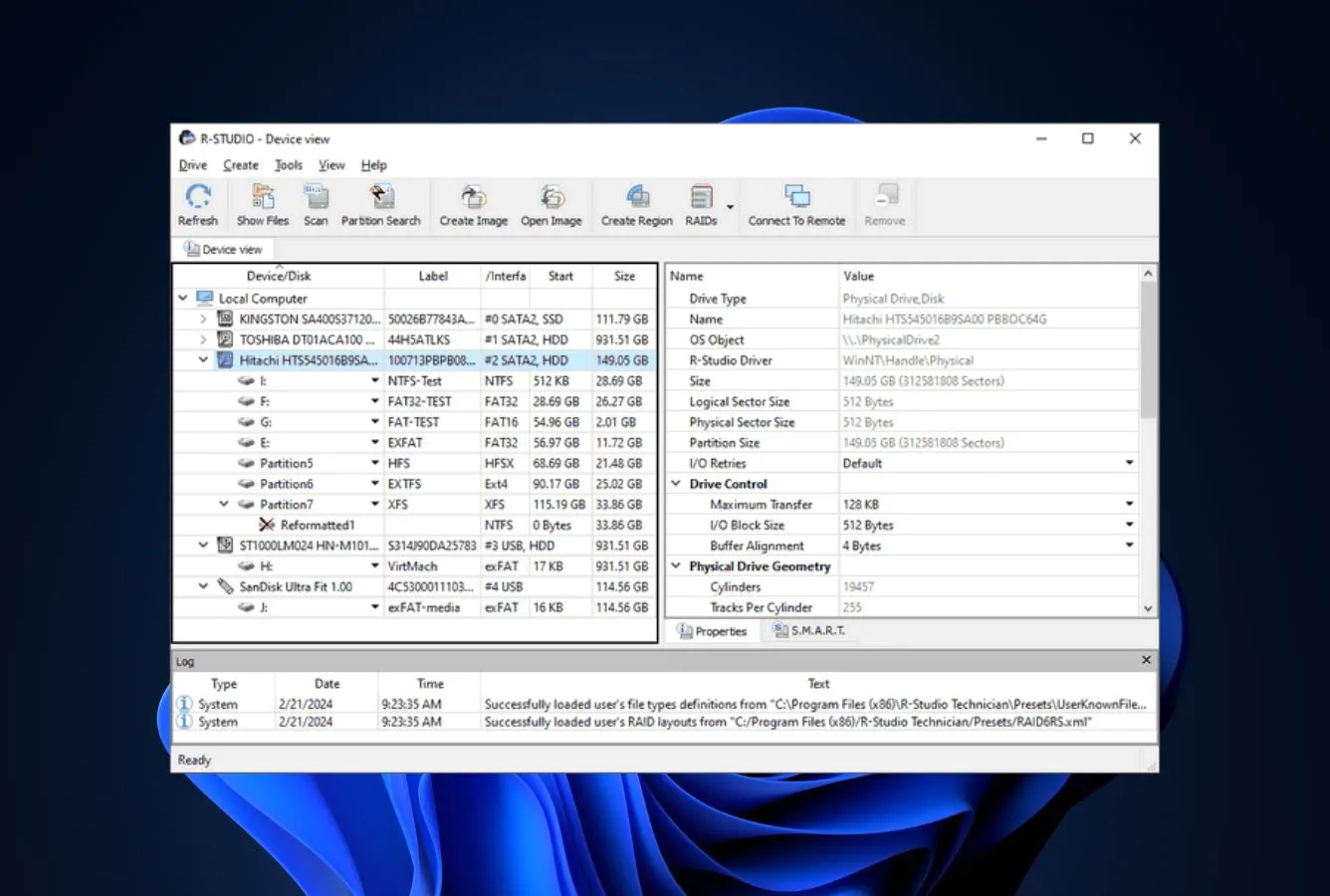
R-Studio does not provide a step-by-step wizard. The main panel presents all connected drives, partitions, disk geometry, and SMART data at once — powerful for anyone who knows what they’re looking at, initially overwhelming for anyone who doesn’t. Four broad steps cover most recovery workflows.
Download, install, and image first (if drive is failing)
Download from r-studio.com. Install to a different drive than your recovery target. For failing or degraded drives, use R-Studio’s multi-pass imaging tool to create a byte-level copy first — then scan the image. This protects the failing drive from further wear during what may be a long scan.
Select target and configure scan parameters
In the Device View, select the drive, partition, or loaded disk image. Open the Scan dialog. Review the file system options (R-Studio defaults to all supported file systems) and file type filters. For most consumer scenarios, accept the defaults. For RAID, first assemble the virtual array in the RAID reconstruction panel before scanning.
Scan and monitor progress
Click Scan. Progress shows per-sector read status and estimated time. Large drives (4 TB+) and RAID arrays take several hours on deep scans. R-Studio can save scan results to disk so you can close the application and resume later without re-scanning — a feature missing from many consumer tools.
Filter, preview, recover
Browse results by folder structure, by recovery list, or by Extra Found Files (signature-based matches without filesystem metadata). Preview images, documents, and media to verify integrity. Select what you need, click Recover, and save to a different physical drive. Track recovery progress in the task panel.
R-Studio’s multi-pass imaging is one of the most valuable features in the toolkit. On a drive that’s making unusual noises, returning read errors, or showing SMART reallocated-sector warnings, every additional read attempt risks further degradation. Create an image first, then run all scans against the image. This single practice has rescued more data than any specific recovery algorithm.
Who R-Studio Is For
R-Studio is a professional toolkit that was purpose-built for specific user archetypes. It is emphatically not a consumer product that happens to be powerful — it is a professional product that serious consumers can learn to use. Three audiences get clear value:
Data recovery professionals and IT administrators. This is the primary audience. If you handle recovery for clients, manage corporate storage, or work with RAID arrays regularly, R-Studio is a standard tool in your category. The Corporate ($179.99) and Technician ($899.99) editions unlock network recovery, portable deployment, and commercial-use rights that make it practical to support multiple clients or sites from a single installation. Commercial practitioners on Capterra specifically cite R-Studio as their daily-use tool.
Technical home users with complex recovery scenarios. If a simpler tool has already failed, or if your scenario involves RAID failure, cross-filesystem work (recovering a Linux ext4 drive from a Windows machine, for example), heavily corrupted partitions, or forensic evidence preservation, R-Studio’s $79.99 Standard license is likely the right answer. The learning curve is real, but the official manual and forum cover common workflows well. For users specifically evaluating HDD recovery options, see our best hard drive recovery software ranking.
Long-term repeat users who want the best total cost of ownership. R-Studio’s $79.99 one-time Standard license cost less than half of what a single year of Disk Drill ($89/yr) or EaseUS ($99.95/yr) costs. Over three years of use, the subscription competitors will cost $267–$300; R-Studio is still $79.99. If you expect to face data loss scenarios repeatedly — multiple drives across multiple years — the lifetime license is the dominant value proposition regardless of whether you ever use the advanced features.
R-Studio is the wrong tool for: beginners facing their first data loss who want a wizard-driven one-click experience; users with simple Recycle Bin or recent deletion scenarios where free tools like Recuva or built-in Windows File History solve the problem without software purchase; anyone who values modern UX and is unwilling to navigate a dense, dated interface; and anyone who primarily needs mobile-device recovery (iOS, Android), which R-Studio does not support. For those use cases, friendlier tools exist and deliver better outcomes for less effort.
R-Studio’s Strengths in Real-World Use
R-Studio’s strengths are specifically the capabilities that consumer tools don’t offer at all — not areas where it does the same things faster or better than competitors. This is the toolkit you reach for when simpler tools have already failed, and four strengths surface consistently across every independent evaluation.
Best-in-class RAID reconstruction
This is the defining capability. When a RAID controller fails, when a member disk drops out of an array, or when a NAS device loses its volume — most data recovery tools are simply useless, because they cannot interpret striped or parity-distributed data spread across multiple drives. R-Studio is purpose-built for this. It supports standard levels (RAID 0, 1, 4, 5, 6) plus combinations (RAID 10, 50, 60) and nested variants (1E, 5E, 5EE, 6EE). Automatic parameter detection for RAID 5 and 6 identifies block size, member order, and parity distribution — saving hours of manual trial-and-error that was previously the professional’s standard workflow. It handles NAS platforms including Linux mdadm, Apple RAID, Windows Storage Spaces, Apple CoreStorage, and LVM/LVM2. CleverFiles’ review documents this succinctly: R-Studio is “one of the few tools that can virtually reconstruct multi-disk arrays even if one of the disks is missing.” For broader RAID-specific recovery options, see our best RAID recovery software comparison.
Broadest file system coverage available
R-Studio supports more file systems than any other consumer-accessible tool: NTFS, NTFS5, ReFS (including 3.14 for Windows 11 25H2, added November 2025), FAT12/16/32, exFAT, HFS, HFS+, APFS, UFS1, UFS2, ext2, ext3, ext4, and UDF (added November 2025). For cross-platform work — recovering from a Linux ext4 drive using a Windows workstation, or recovering from a Mac APFS volume without booting macOS — this matters. Competitors that handle three or four file systems well still can’t help you with XFS, UFS, or UDF recovery. R-Studio can. The November 2025 ReFS 3.14 addition specifically handles Microsoft’s modern resilient file system used by Windows 11 25H2 and Server 2025 — a capability competitors are still catching up to.
Multi-pass disk imaging and forensic tools
R-Studio’s multi-pass imaging reads healthy sectors in the first pass, then retries damaged areas with progressively longer timeouts on subsequent passes. For failing drives — where every additional read risks further mechanical degradation — this is critical. The runtime imaging option combines scanning and cloning into a single operation: as R-Studio reads sectors for recovery analysis, it simultaneously writes them to a target image, cutting total processing time roughly in half compared to the traditional image-first-scan-second workflow. Output formats include raw images, VMDK, VHD, VHDX, and R-Studio’s native RDR format with optional encryption. The built-in hex editor supports direct sector inspection and editing, RAID parity analysis, and custom file signature definition — features that competitor tools either don’t include or sell separately.
Network recovery via R-Studio Agent
For IT administrators managing distributed systems, R-Studio Agent is a meaningful capability gap versus consumer tools: install the Agent on a remote Windows, Mac, or Linux machine (it can be deployed remotely with admin credentials), connect from the admin’s R-Studio workstation over TCP/IP, and scan or image the remote drives as if they were local. All transport is encrypted with 3DES. Recovered files can be saved to the admin’s machine, back to the remote host, or any accessible network target. The Corporate license ($179.99) includes five Agent licenses; the Technician license ($899.99) includes unlimited deployment for data recovery businesses. R-Studio does not pump gigabytes of data over the network to analyze — scan intelligence runs on the remote machine, only metadata and selected recovery traffic cross the wire.
Where R-Studio Falls Short
R-Studio’s weaknesses are the mirror image of its strengths: the tool was built for professionals, and user-experience priorities that matter to consumers have not been the focus of development. Three specific gaps deserve weight in any purchase decision.
Dense, dated interface with steep learning curve
This is the single most consistent criticism across every independent evaluation we reviewed. HandyRecovery: “it’s hard for us to recommend it to everyone.” CleverFiles: “there might be too much here for the beginner.” Wondershare: “not ideal for casual users… feels outdated and dense, with many technical options that can overwhelm casual users.” The main panel exposes drive geometry, SMART data, partition maps, and scan controls simultaneously — every control matters in context, but discovering what each one does requires reading the manual or experimenting. There is no step-by-step wizard, no recovery-goal-driven interface, no modern drag-and-drop affordances. The visual design has not substantively evolved in several major versions. For a tool at this price point, that’s a defensible design choice (professionals value access over polish), but for consumer evaluation it’s a clear disadvantage versus Disk Drill, EaseUS, or Recoverit.
Demo cap makes trial evaluation impractical
The free demo lets you scan drives and preview recoverable files, but actual recovery is limited to files under 256 KB each. 7datarecovery’s review puts it plainly: “barely enough for a small text document or a heavily compressed photo.” Compare this to Recuva’s unlimited free recovery, EaseUS’s 2 GB free tier, Stellar’s 1 GB free, or even Disk Drill’s 100 MB free — all of which let you actually recover real files at no cost. R-Studio’s demo is functionally a pre-purchase scan verification, not a meaningful trial. You essentially have to commit to the $79.99 purchase on faith that the tool will work for your scenario. The generous 60-day money-back guarantees that competitors offer (iBeesoft, for example) would reduce this risk, but R-Studio’s refund terms are narrower.
Platform-specific licensing and tier fragmentation
R-Studio’s licensing is unusually fragmented. Windows, Mac, and Linux each require separate licenses — using R-Studio on both a Windows workstation and a MacBook means buying two licenses. Within a platform, the $49.99 FAT-only and $59.99 NTFS-only editions save money only if you never touch any other file system, which is an unusual constraint. The $79.99 Standard is the most sensible entry point for most users, but critical professional features (full network recovery, portable/bootable deployment, commercial-use rights) require jumping to Corporate ($179.99) or Technician ($899.99). Wondershare’s competitive review specifically calls this out: “confusing licensing… multiple licensing options separately for Windows, Linux, and Mac, which can confuse users when choosing the appropriate one.” For a solo user on a single platform, this is manageable. For IT shops supporting mixed environments, the cumulative cost adds up quickly.
R-Studio Capability Summary
How R-Studio performs capability by capability, based on aggregated independent evaluation:
| Capability | Tier | Notes |
|---|---|---|
| RAID reconstruction (standard levels) | Excellent | RAID 0/1/4/5/6/10/1E/5E/5EE/6EE/50/60 with auto-parameter detection for 5/6 |
| RAID reconstruction (custom layouts) | Excellent | Non-standard parity delays, custom block ordering, manual configuration |
| NAS volume recovery | Excellent | Linux mdadm, Apple RAID, Windows Storage Spaces, CoreStorage, LVM/LVM2 |
| Corrupted partition recovery | Excellent | Consistently ranked top-tier in independent reviews |
| Formatted-drive recovery | Very Good | Strong metadata reconstruction + EXIF-based JPEG renaming for unnamed recoveries |
| Deleted-file recovery (NTFS) | Very Good | Strong MFT parsing; slightly behind Disk Drill on aggregated scoring |
| File system breadth | Excellent | NTFS/NTFS5/ReFS 3.14, FAT, exFAT, HFS/HFS+, APFS, UFS1/UFS2, ext2/3/4, UDF |
| Network recovery (R-Studio Agent) | Excellent | 3DES-encrypted transport, remote deployment, LAN + routed network |
| Multi-pass disk imaging | Excellent | Progressive retry on damaged sectors — critical for failing drives |
| Runtime imaging | Excellent | Combined image-and-scan in single pass; cuts total time roughly in half |
| Hex editor / forensic tools | Excellent | Full built-in hex editor with RAID parity analysis |
| Custom file signatures | Excellent | Extensible signature database for proprietary or unusual formats |
| BitLocker / APFS encrypted / LUKS | Very Good | Recovery from encrypted volumes when credentials available |
| SMART monitoring | Very Good | Drive health displayed in Device View before scanning |
| Virtual disk (VMDK/VHD/VHDX/VDI) | Very Good | Load virtual disk files for recovery; Corporate/Technician create them |
| Scan session save / reload | Very Good | Save scan results; resume later without re-scanning |
| Long-term value (lifetime license) | Excellent | $79.99 one-time vs $89–$100/yr subscription competitors |
| Demo / trial usability | Limited | 256 KB per-file cap — useful for verification, not for meaningful recovery |
| UI modernness & ease of use | Fair | Dense, dated, steep learning curve — consistent criticism across reviews |
| Step-by-step wizard | Not supported | R-Tools suggests R-Undelete for wizard-driven recovery |
| Mobile device recovery (iOS/Android) | Not supported | Use dedicated mobile recovery tools instead |
| Cross-platform single license | Not supported | Windows/Mac/Linux require separate license purchases |
| File repair (video/document) | Not supported | No built-in repair — use dedicated file repair tools after recovery |
| TRIM-active NVMe SSD | Not supported | Hardware limitation affecting all recovery tools |
Tier scale: Excellent / Very Good / Good / Fair / Limited / Not supported. Aggregated from HandyRecovery, CleverFiles, TechRadar, Wondershare, Capterra, GetApp, and vendor documentation, 2026.
R-Studio Cost
R-Studio uses a tiered one-time lifetime licensing model (with one exception, the T80+ subscription for short-term professional use). No recurring subscription fees, no annual renewals. The standard $79.99 Windows license is a one-time purchase that remains valid indefinitely, with paid upgrades to future major versions available separately.
| Edition | Price | Coverage | Notes |
|---|---|---|---|
| Demo | $0 | Scan & preview · 256 KB recovery cap | Meaningful recovery limited — for pre-purchase verification only |
| R-Studio FAT | $49.99 | FAT12/16/32, exFAT only | Save $30 if you never need NTFS or other file systems |
| R-Studio NTFS | $59.99 | NTFS, NTFS5, ReFS only | Save $20 if you never need FAT, ext, APFS, HFS+ |
| R-Studio Standard | $79.99 | All file systems · 1 PC | The sensible entry point for most users; lifetime license |
| R-Studio Corporate | $179.99 | Standard + full network recovery + 5 Agent licenses | For IT admins supporting multiple machines |
| R-Studio Technician | $899.99 | Corporate + commercial use rights + portable build | For commercial data recovery businesses |
| R-Studio T80+ | ~$1/day | Technician-tier features, short-term subscription | For single projects — cheaper than Technician if you need only a few days |
Pricing verified against r-studio.com, HandyRecovery, CleverFiles, and 7datarecovery reviews, April 2026. Windows licenses; Mac and Linux licenses are sold separately at comparable tier prices.
The Standard $79.99 lifetime license is the breakthrough value proposition. Over two years, R-Studio costs $79.99 one-time. Disk Drill costs $178 ($89 × 2 years). EaseUS costs $199.90 ($99.95 × 2 years). Stellar costs $159.98 ($79.99 × 2 years). Over three years, the gap widens: R-Studio remains $79.99 while Disk Drill crosses $267, EaseUS crosses $299. For users who expect to face data loss scenarios over multiple years — which is nearly everyone who’s bought recovery software once — R-Studio’s lifetime model delivers the lowest total cost of ownership in the professional category by a significant margin.
The T80+ subscription is a smart addition for a specific niche: professionals who need Technician-tier capabilities (portable deployment, commercial use rights, forensic tools) for a single short project rather than ongoing. At roughly $1/day, a two-week recovery engagement costs ~$14 versus the $899.99 perpetual Technician license. For anyone considering long-term recovery work, the Technician license still wins — but T80+ lowers the barrier to occasional professional use. For broader lifetime-license alternatives in the category, see our best data recovery software ranking.
R-Studio vs. Competitors (2026)
| Tool | RAID | Network recovery | Hex editor | Lifetime license | Starting price |
|---|---|---|---|---|---|
| R-Studio ← | Excellent (13+ levels) | Yes | Yes | $79.99 (Std) | $49.99 (FAT only) |
| UFS Explorer | Excellent | Yes | Yes | Yes | From $24.95 |
| DMDE | Via hex editor | No | Yes | $20 lifetime | $20 |
| Disk Drill | Limited | No | No | $149 (Windows) | $89/yr |
| EaseUS DRW | No | No | No | No | $99.95/yr |
| Stellar | Technician only | No | No | No | $79.99/yr |
| Recuva | No | No | No | Pro $24.95/yr | Free / $24.95/yr |
Professional feature comparison. Aggregated from vendor documentation and independent reviews, April 2026.
Download R-Studio
$79.99 lifetime license. RAID reconstruction, network recovery, hex editor included.
R-Studio Features & Tools
R-Studio is not a scan-and-recover utility with some extras bolted on. It is a full workstation-class data recovery toolkit where scanning is one function among several co-equal capabilities. Here is the functional breakdown.
File System & Storage Support Matrix
R-Studio’s file system coverage is the broadest in its category — noticeably wider than competitors at the same price point.
| Storage / file system | Use case | Support | Notes |
|---|---|---|---|
| NTFS / NTFS5 | Windows primary drives | Full | Core strength; strong MFT parsing and metadata reconstruction |
| ReFS 3.14 | Windows 11 25H2, Server 2025 | Full | Added November 2025 — competitors still catching up |
| FAT12 / FAT16 / FAT32 | Legacy drives, small USB | Full | Complete support including FAT recognition without boot records |
| exFAT | Large SD cards, portable SSDs | Full | Standard coverage plus recognition of partitions without boot records |
| HFS / HFS+ | Mac-formatted external drives | Full | Recover from Mac drives on Windows without booting macOS |
| APFS | Modern Mac file system | Full | Including APFS-encrypted volumes with FileVault credentials |
| ext2 / ext3 / ext4 | Linux-formatted drives | Full | Enumeration of huge ext4 file systems significantly improved January 2026 |
| UFS1 / UFS2 | BSD / Unix systems | Full | Unusual at any price point |
| UDF | DVD / Blu-ray / packet writing | Full | Added November 2025 |
| Dynamic Volumes (MBR + GPT) | Windows 2000 through 2022/11 | Full | Spanned, striped, mirrored dynamic volumes |
| Windows Storage Spaces | Windows 8/8.1/10 pooled storage | Full | Automatic component assembly |
| Apple CoreStorage / Fusion Drive | Mac tiered storage | Full | Automatic component recognition |
| Linux mdadm RAID | Linux software RAID | Full | Automatic assembly plus manual override for damaged databases |
| Linux LVM / LVM2 | Linux Logical Volume Manager | Full | Components recognized and assembled automatically |
| BitLocker-encrypted | Windows encrypted volumes | Full | Requires recovery key or password |
| Linux LUKS / dm-crypt | Linux encrypted volumes | Full | Requires passphrase |
| RAW partitions | Unrecognized / corrupted partitions | Full | Full deep scan of unmounted partitions |
Source: R-Tools Technology official documentation cross-referenced with R-TT forum release notes through April 2026.
Recovery Engine Capabilities
Every capability here is included in the $79.99 Standard license unless noted otherwise.
| Capability | How it works | Availability |
|---|---|---|
| Filesystem-metadata recovery | Parses MFT/FAT/inode structures for deleted entries | Standard + |
| Raw signature scanning | Sector-by-sector signature matching for formatted/corrupted drives | Standard + |
| Custom file signature definitions | Add your own signatures for proprietary or unusual formats | Standard + |
| EXIF-based JPEG renaming | Recovered JPEGs without filenames get renamed using EXIF metadata | Standard + |
| Scan session save / reload | Save results; resume recovery later without re-scanning | Standard + |
| Multi-pass disk imaging | Progressive retry on damaged sectors with configurable timeouts | Standard + |
| Runtime imaging | Combined image+scan in single pass — half the total time | Standard + |
| RAID 0/1/4/5/6/10 reconstruction | Virtual RAID assembly from member disks | Standard + |
| Nested RAID (1E/5E/5EE/6EE/50/60) | Complex nested array reconstruction | Standard + |
| Auto RAID parameter detection | Identifies block size, order, parity for RAID 5/6 automatically | Standard + |
| Custom RAID layouts | Non-standard layouts with manual block ordering | Standard + |
| Built-in hex editor | Direct sector inspection, file structure editing, parity analysis | Standard + |
| SMART monitoring | Drive health in Device View before scanning | Standard + |
| Virtual disk file load (VMDK/VHD/VHDX/VDI) | Load virtual machine disk images for recovery | Standard + |
| Network recovery via R-Studio Agent | Full remote scan and recovery over TCP/IP (3DES encrypted) | Corporate + |
| Portable build | Run from USB without installation on target machine | Technician only |
| Commercial-use rights | Use for paid client data recovery | Technician only |
| Virtual disk creation (VMDK/VHD) | Create virtual disk images from recovered data | Corporate + |
| Emergency bootable version | ISO-based recovery when OS won’t boot | Technician only |
| File repair (video/document) | Repair corrupted recovered files | Not supported |
| Mobile device recovery (iOS/Android) | Recover from phones/tablets | Not supported |
| Wizard-driven workflow | Step-by-step guided recovery | Not supported |
UI & Workflow
R-Studio’s interface is organized around a single-panel Device View that lists all connected storage with partition geometry, SMART data, and scan controls. Results appear in a tree view with filesystem hierarchy, Extra Found Files (signature-based matches without metadata), and Raw Files sections. The tab-based workflow lets you run multiple scans simultaneously — a meaningful capability for professional workflows where you’re scanning one drive while imaging another. Filter tools support wildcards and regex for locating specific files in large result sets. The visual design is utilitarian: every control is present because it matters, but there’s no effort made to soften the density. Independent reviewers consistently describe this as the tool’s biggest consumer-facing weakness, though professionals often describe the same density as a strength — information density matters when you’re trying to diagnose a complex recovery scenario quickly.
Installer, Support & Company Profile
Click to expand: installer profile, support channels, version history+
| Attribute | Value | Notes |
|---|---|---|
| Installer size | <70 MB | Compact for feature depth |
| Installed footprint | ~240 MB | Including documentation and tools |
| Digital signature | Signed | Passes Windows SmartScreen |
| Bundled adware | None | Clean installer from official source |
| Account / registration required | No | Demo works without account |
| Read-only scanning mode | Yes | Forensic evidence preservation |
| Current version | 9.5.191742 | Released April 8, 2026 |
| Recent additions (Nov 2025 – Apr 2026) | ReFS 3.14, UDF, ext4 improvements | Active development cadence |
| Windows support | 2000 through 11 (incl. 25H2) | Plus Server through 2025 |
| Mac support | Separate license | Apple Silicon native |
| Linux support | Separate license | Command-line and GUI builds |
| Language support | 9 languages | English, German, French, Spanish, Portuguese, Russian, Japanese, Simplified/Traditional Chinese |
| Developer | R-Tools Technology Inc. | Active since 2000 |
| Related tools | R-Drive Image, R-Wipe & Clean, R-Undelete | Sibling products in the R-TT family |
| Support channels | Email, phone (ET business hours), forum | forum.r-tt.com is actively moderated by R-TT engineers |
| Refund policy | Narrow | Less generous than competitor 30- or 60-day guarantees |
R-Studio User Reviews
R-Studio’s reviews split along a predictable axis: data recovery professionals and technical home users rate it highly, while consumers encountering it as a first recovery tool often find the learning curve prohibitive. Editorial reviewers consistently acknowledge its feature depth while noting the UI and trial limitations.
An impressively complete recovery utility with options for retrieving lost data, managing disks, and creating virtual RAIDs.
R-Studio is reliable, can recover deleted files, easy to use. We use R-Studio at our data recovery business so often.
Features like disk imaging, RAID recovery for complex storage setups, and the ability to add custom file types make it a standout tool.
One of the few tools that can virtually reconstruct multi-disk arrays — RAID 5, RAID 6, and beyond — even if one of the disks is missing.
The license costs $79.99, and that’s the version we used for this review. Considering it’s a lifetime license, that price feels more than fair.
I had a minor technical issue and R-Studio would not spend 30 seconds on the phone assisting me.
Not ideal for casual users. Unlike other tools, which provide a simple workflow, it is difficult to use for RAID failures and complex file systems.
This is a great tool for recovering lost or deleted data from various types of storage media. One downside is that it can be a bit pricey.
The review pattern is consistent across sources: data recovery professionals (commercial practitioners, IT administrators, forensic users) rate R-Studio at or near the top of the category. Editorial reviewers acknowledge the feature depth while flagging UI and trial limitations. First-time consumer users most often cite the learning curve and the 256 KB demo cap as barriers to evaluation. Support quality reviews are mixed — some praise the technical depth, others report difficulty getting timely phone assistance.
When to Choose Something Else
R-Studio is the right answer when you need professional-grade capability. For other priorities:
Frequently Asked Questions
Is R-Studio free?+
Is R-Studio safe to use?+
Can R-Studio recover files from a formatted drive?+
Does R-Studio work on Windows 11?+
Can R-Studio recover RAID arrays?+
Is R-Studio better than Disk Drill?+
Can R-Studio recover data over a network?+
Final Verdict
R-Studio earns its 4.2/5 by being the clear category leader on the capabilities that distinguish professional recovery from consumer recovery: RAID reconstruction across 13+ levels with automatic parameter detection, the broadest file system coverage available (including ReFS 3.14 and UDF added in late 2025), network recovery via R-Studio Agent, multi-pass disk imaging safer for failing drives, a full built-in hex editor, and custom file signature extensibility. Aggregated independent evaluation from HandyRecovery, CleverFiles, TechRadar, Wondershare, and commercial practitioners on Capterra converges on the same picture: this is the tool other recovery tools are measured against in the professional category.
The honest caveats are equally consistent. The interface is dense and dated, with a steep learning curve that independent reviewers universally flag — this is explicitly not a tool for first-time users who want a wizard-driven experience. The demo’s 256 KB per-file cap makes meaningful trial evaluation impractical; you essentially commit to the $79.99 purchase on faith. Windows, Mac, and Linux each require separate licenses, and critical professional features are gated behind the more expensive Corporate or Technician editions.
Pick R-Studio if you’re a data recovery professional, an IT administrator supporting RAID or multi-platform environments, a technical home user whose scenario has already defeated simpler tools, or anyone evaluating total cost of ownership across multiple years (at which point the $79.99 lifetime model decisively beats every subscription competitor). Pick Disk Drill if you want the most approachable consumer tool with genuinely strong recovery. Pick DMDE if you want R-Studio-adjacent technical depth at $20. Pick Recuva or built-in Windows tools first (all reviewed in the alternatives above) — if they solve your problem, you don’t need R-Studio at all.
About the Authors


This site earns revenue through affiliate links when you purchase R-Studio or other products through our links. This financial relationship has no influence on our tier assignments, methodology, or conclusions — all tools are evaluated independently against the same rubric and the same body of aggregated evidence. The professional-toolkit characterization in this review reflects the consistent independent finding of HandyRecovery, CleverFiles, TechRadar, Wondershare, and commercial data recovery practitioners, not our own assertion. If you believe any claim is inaccurate, contact us at contact@datarecoveryfix.com.




