DiskDigger Review (2026): $14.99 Lifetime Recovery
DiskDigger is the recovery tool sysadmins quietly keep on a USB stick. At 1.7 MB portable with no installer, it’s the lightest serious recovery utility we’ve evaluated — and the personal Pro license is $14.99 one-time, the cheapest paid recovery license in the entire category. Developed by Dmitry Brant at Defiant Technologies since 2010, it’s a focused signature scanner with surprisingly broad RAW camera coverage. Our review aggregates vendor documentation, independent external evaluation, and verified user feedback to map exactly where this $15 tool punches above its weight class — and where it doesn’t.
evaluation, user reports
+ Linux + Android
or free with nag

DiskDigger is the most honest pricing in the data recovery category — $14.99 one-time, no subscription, no auto-renewal, no upsell tiers. The signature scanner is genuinely capable: RAW camera format coverage (CR3, CR2, ARW, NEF, RAF, RW2, ORF) is broader than several tools costing five times more. At 1.7 MB portable, it’s the ideal “emergency USB stick” recovery utility for sysadmins and photographers. The trade-offs are predictable and align with the price: no filesystem reconstruction means formatted-drive recovery loses filenames, the interface is dated, and there’s no file repair, partition manager, or RAID support. As a focused, single-purpose signature scanner, it delivers honest value.
✓ What We Liked
- $14.99 lifetime — the cheapest paid recovery license in the category, no subscription
- 1.7 MB portable executable — zero installation, runs from USB, never touches the recovery target
- Surprisingly broad RAW signature coverage: CR3, CR2, ARW, SR2, NEF, DCR, PEF, RAF, RW2, ORF
- Free version recovers unlimited files — only friction is a per-file nag prompt before each save
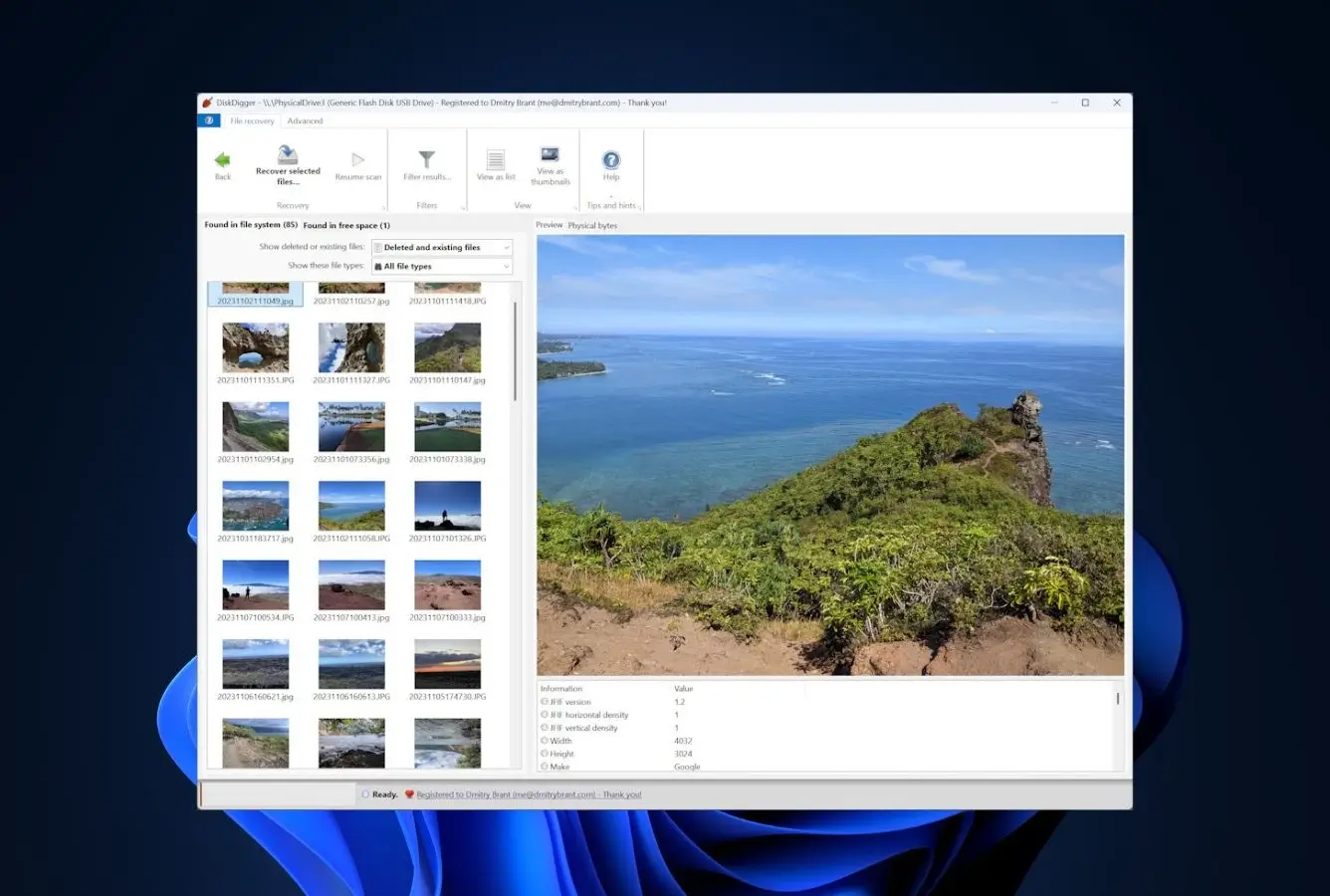
- Rich preview before recovery: thumbnails, MP3 playback, EXIF readout, ZIP archive contents
- Save recovered files directly to Google Drive or Dropbox — convenient cloud integration
- VirusTotal returns zero detections across 70+ engines — independently verified safe
✕ What We Didn’t
- No filesystem reconstruction — Dig Deeper loses original filenames and folder structure
- Dated interface — Windows 7-era visual design with no dark mode or modern polish
- No file repair, no partition manager, no RAID support, no disk imaging — strictly a scanner
DiskDigger Alternatives
Brief selection A quick shortlist of our top alternative picks, based on aggregated independent research. |
Best Alternative  EaseUS Data Recovery Wizard Best overall · 2 GB free |
 Stellar Data Recovery Best for photos · 1 GB free |
 Wondershare Recoverit Best for video · 100 MB free |
|---|---|---|---|
| Deep Scan | ✓ | ✓ | ✓ |
| Formatted Drive Recovery | ✓ | ✓ | ✓ |
| RAW Photo Support | Broad | Broad | Limited |
| File Repair | ✓ | ✓ | Video only |
| Free Tier | 2 GB | 1 GB | 100 MB |
Research Methodology
This review aggregates three evidence types for the current DiskDigger Windows build: vendor documentation (the official diskdigger.org site, FAQ, license and pricing pages, signature support lists), independent external evaluation cross-referenced across long-running editorial sources, and verified user feedback from primary platforms — Trustpilot, CNET, SourceForge, Reddit’s r/datarecovery and r/sysadmin, the Microsoft Store, and the Google Play Store for the related Android app. Tier assignments (Excellent / Very Good / Good / Fair / Limited / Not supported) reflect the aggregate of that evidence per capability. Where vendor positioning diverges from independent results — particularly around deep-scan performance — we follow the independent evidence and note the gap. Full methodology details are on our How We Test page.
Is DiskDigger Safe?
DiskDigger is one of the safest recovery tools available, by both architecture and track record. Vendor documentation and verified VirusTotal scans (zero detections across more than 70 antivirus engines including Bitdefender, Kaspersky, CrowdStrike, and Microsoft Defender) confirm the executable is malware-free. The tool performs strictly read-only operations on scanned media — it never writes to the source drive during scanning or recovery. As a fully portable 1.7 MB executable, it requires no installation, creates no registry entries, runs no background services, and makes no system modifications of any kind. Defiant Technologies LLC has developed and maintained it since 2010 as a one-person project by Dmitry Brant, and the FAQ explicitly confirms no analytics or telemetry are sent — only optional license-key verification and update checks. Always download exclusively from the official diskdigger.org domain.
How to Use DiskDigger
The wizard-style interface walks through recovery in four steps:
Download and run
Download the 1.7 MB ZIP from diskdigger.org. Extract the executable — no installation. Run directly from a USB stick or local folder. Administrator rights required to scan physical drives.
Select drive and scan mode
Choose the target drive. Pick Dig Deep for fast recovery of recently deleted files with filenames intact, or Dig Deeper for thorough sector-level signature scanning of formatted, corrupted, or otherwise damaged media.
Browse and preview
Results appear in a list or thumbnail view organized by file type tabs. Use the rich preview tools — image zoom/pan, MP3 playback, document text preview, ZIP archive inspection, EXIF readout for photos — to verify recoverability before committing.
Recover files
Select files and save to a different drive than the source — local or directly to Google Drive or Dropbox. Free version: a license-purchase prompt appears before each saved file. Pro ($14.99): no prompt, all files saved without interruption.
Saving recovered files back to the source drive risks overwriting other recoverable files. Use a second internal drive, an external USB drive, or the cloud-save option. This rule applies to every recovery tool, not just DiskDigger.
Who DiskDigger Is For
DiskDigger fits two specific users genuinely well. The first is the IT generalist or sysadmin who wants a portable, no-install recovery utility on their toolkit USB stick — something they can hand to a friend, run from a customer’s PC without administrative footprint, or boot from a thumb drive. At 1.7 MB with zero installation, no other tool fits this brief as cleanly. The second is the photographer or hobbyist on a tight budget facing a corrupted SD card, where the surprisingly broad RAW format coverage (CR3, CR2, ARW, SR2, NEF, DCR, PEF, RAF, RW2, ORF) outperforms several mid-tier paid tools.
A concrete example: a wedding photographer whose SanDisk SD card threw a “card needs to be formatted” error after a shoot, who needs to recover RAW photos and wants to verify recoverability before paying anything more than $15. Run DiskDigger free, preview the RAW thumbnails, and only buy the $14.99 license once you’ve confirmed the photos are intact.
If you need filesystem-aware recovery on a formatted NTFS drive, partition reconstruction, RAID assembly, file repair, or a polished modern interface, the next section explains exactly where DiskDigger’s design choices push you toward a different tool.
DiskDigger’s Strengths in Real-World Use
Aggregated independent evaluation and verified user feedback consistently surface four areas where DiskDigger outperforms its $15 price tier.
The most honest pricing in the category
$14.99 is a one-time personal license with no subscription, no auto-renewal, no upgrade tiers, no business-vs-consumer split, and no surprise charges. Vendor documentation confirms a 30-day money-back guarantee and SSL-protected checkout. By comparison, the next-cheapest paid recovery tools cost $25/year (Recuva Pro), $48 perpetual (DMDE Standard), or $79.99 to $99.95/year (most premium suites). Verified user reviews consistently cite the price-transparency as the primary reason for purchasing — particularly compared to tools that quote a discounted monthly price up front and silently auto-renew.
Surprisingly broad RAW camera format coverage
Vendor documentation and independent evaluation both confirm signature support for an unusually wide RAW format set: Canon CR3 and CR2, Sony ARW and SR2, Nikon NEF and DCR, Pentax PEF, Fujifilm RAF, Panasonic RW2, and Olympus ORF. This is broader than several tools in the $50–$100 range. For photographers facing a corrupted SD card, DiskDigger frequently identifies and recovers RAW files that other budget tools miss entirely. EXIF data is preserved on recovered JPEG and TIFF files, which helps with post-recovery sorting.
True portability — 1.7 MB, zero installation
DiskDigger is the smallest serious recovery utility available — a single 1.7 MB executable that runs from any folder, including a USB stick, without writing to the registry, creating services, or modifying the system. This matters in two ways: it eliminates the risk of overwriting recoverable data during installation (a real concern when recovering from the same drive Windows is running on), and it makes the tool ideal for an IT toolkit USB. Independent r/sysadmin discussions cite the portable design as the primary reason DiskDigger earns a permanent slot in their recovery USB collection.
Rich file preview before recovery
DiskDigger’s preview system is more capable than its dated UI suggests. Photo thumbnails support zoom and pan; MP3 and WMA files play back inline with ID3 tag display; document text previews work for common formats; ZIP archive contents can be inspected without extraction; and JPEG/TIFF files show full EXIF metadata. These pre-recovery checks let you verify files are actually recoverable before saving, which is genuinely useful on Dig Deeper scans where filenames are lost — you can identify the photos by content rather than guessing from sequential names.
Where DiskDigger Falls Short
DiskDigger is deliberately a focused, single-purpose tool — these gaps reflect that scope, not bugs.
No filesystem reconstruction in Dig Deeper mode
The fundamental architectural limitation. Dig Deeper scans raw disk sectors looking for file headers (signatures) rather than reading the filesystem’s directory structure. Because it bypasses the filesystem entirely, every file recovered through Dig Deeper loses its original name, date, and folder path — files are assigned sequential names organized by file type. Independent evaluation rates formatted-drive and corrupted-partition recovery as Fair as a result: you get a meaningful share of files back, but rebuilding their organization is on you. Filesystem-aware tools handle this scenario more completely. For broader options, see our best Windows data recovery software roundup.
No file repair, partition manager, RAID, or imaging
The feature set is intentionally narrow. There’s no module for repairing corrupted JPEGs or fragmented videos. There’s no partition manager to reconstruct lost or damaged partitions from boot sectors. There’s no RAID constructor for assembling virtual arrays. And there’s no disk imaging or cloning capability for working with failing drives. If your scenario involves any of these — a partially corrupted MP4, a deleted partition, a degraded RAID-5, or a drive throwing read errors — DiskDigger will not help. Tools like DMDE or R-Studio bundle these capabilities for power users who need them.
Dated interface and visual design
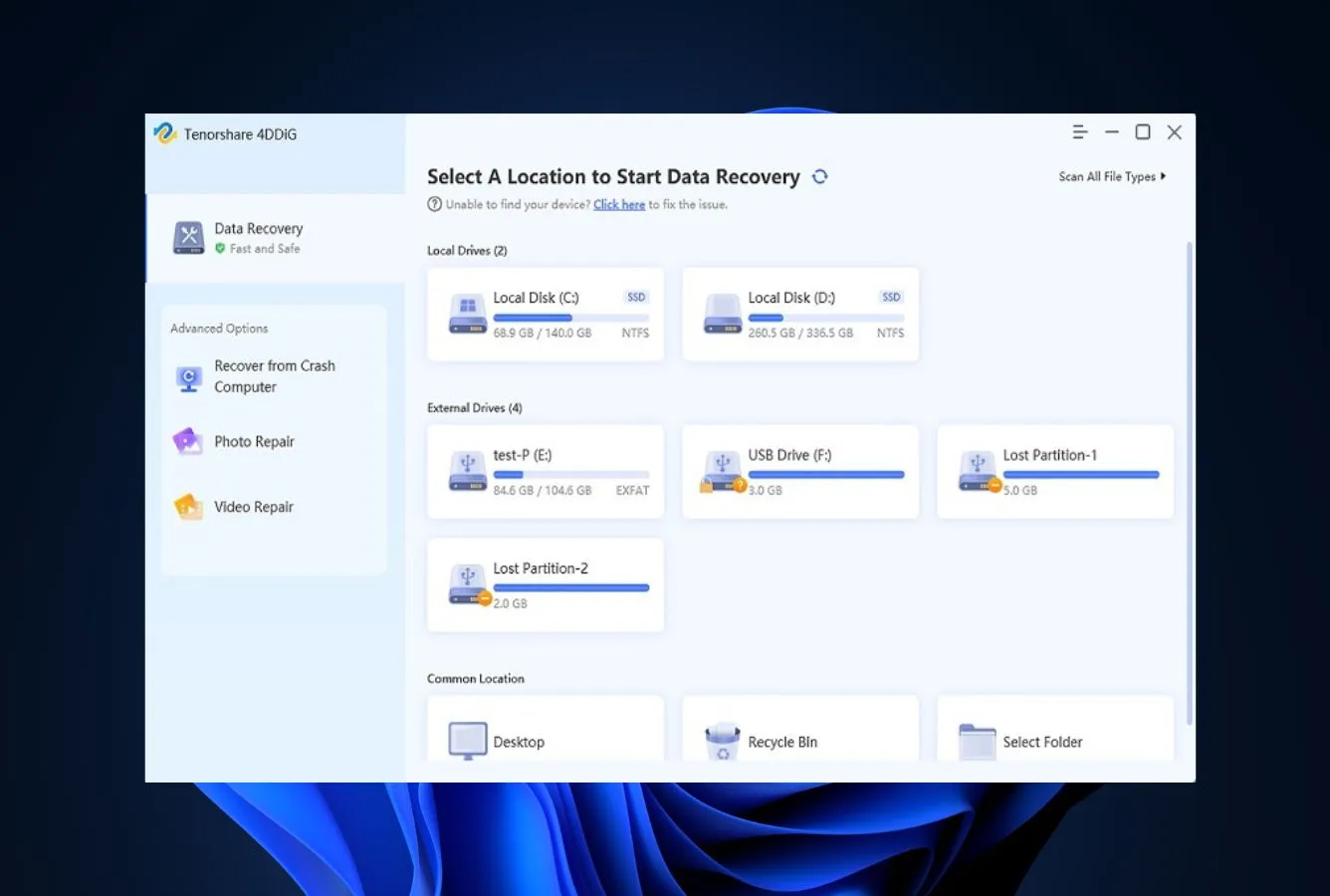
The wizard-style UI is functional and easy to navigate, but the visual design has not been refreshed in over a decade — verified user feedback consistently flags it as Windows 7-era. There’s no dark mode, no modern iconography, and no polish you’d expect from a 2026 application. For technically comfortable users this isn’t a real obstacle; for users expecting a Disk Drill or 4DDiG-level visual experience it can feel jarring. The trade-off is intentional: a one-person project keeps overhead low and the price at $14.99.
License key tied to current major version
Vendor documentation states the personal license key is valid for the current major version and all minor updates, but expires with the next major release. The developer’s FAQ notes major releases happen “infrequently” and are announced “well in advance,” and historically the cadence has been multi-year. In practice, this is closer to “lifetime for this version” than a true perpetual license. Worth knowing before purchase, even though it’s a far softer commitment than annual subscriptions.
DiskDigger Capability Summary
How DiskDigger performs, capability by capability, based on aggregated independent evaluation and vendor documentation:
| Capability | Tier | Notes |
|---|---|---|
| Deleted-file recovery (NTFS) | Good | Dig Deep preserves filenames on recently deleted files |
| Recycle Bin recovery | Very Good | Quick scan, original filenames intact, file integrity clean |
| Formatted-drive recovery | Fair | Recovers files by signature only — filenames lost |
| Corrupted-partition recovery | Fair | Signature scanning only — no partition reconstruction |
| USB / external HDD recovery | Very Good | Strong on FAT and NTFS removable drives; clean integrity |
| SD card & camera recovery | Very Good | Standout strength — broad RAW format coverage |
| RAW camera format support | Very Good | CR3, CR2, ARW, SR2, NEF, DCR, PEF, RAF, RW2, ORF |
| FAT12/16/32 support | Very Good | Best-performing filesystem for the tool |
| exFAT support | Good | Adequate, less optimized than FAT/NTFS |
| Ext / HFS+ support | Fair | Read-supported but less algorithmic depth |
| File preview before recovery | Excellent | Thumbnails, audio, EXIF, ZIP contents, document text |
| Cloud save (Drive / Dropbox) | Very Good | Direct save to Google Drive or Dropbox |
| Filesystem reconstruction | Not supported | Dig Deeper bypasses MFT and directory tables |
| Partition manager | Not supported | No lost-partition search or reconstruction |
| RAID reconstruction | Not supported | No RAID constructor |
| File repair (photo / video) | Not supported | Recovery only — no repair module |
| Disk imaging / cloning | Not supported | No imaging for failing drives |
| Portability | Excellent | 1.7 MB single executable, no install, USB-friendly |
| Value for money | Excellent | $14.99 lifetime — cheapest paid license in category |
| Trust & billing transparency | Excellent | One-time payment, no auto-renewal, 30-day refund |
Tier scale: Excellent / Very Good / Good / Fair / Limited / Not supported. Aggregated from independent evaluation and verified user feedback, 2026.
DiskDigger Cost
The simplest pricing in the data recovery category. DiskDigger has exactly two tiers: Free (download, scan, preview, and recover unlimited files — but a license-purchase prompt appears before each saved file) and Personal Pro ($14.99 one-time, removes the prompt and unlocks unrestricted recovery for personal use). On Linux, the program is fully free with no nag. There is also a separate commercial license for paid recovery work, available via the vendor’s purchase page. No monthly plans, no annual subscriptions, no auto-renewal, no upsell tiers. The $14.99 price includes a 30-day money-back guarantee.
For context across the category: Recuva Pro costs $24.95/year, DMDE Standard costs $48 perpetual, R-Studio costs $79.99 one-time, Disk Drill Pro is $89/year, EaseUS Data Recovery Wizard runs $99.95/year. DiskDigger Pro at $14.99 lifetime is less than any of them, and the only one with truly no recurring component. For broader budget context, see our free Windows recovery tools guide.
One licensing note worth knowing: the personal license key is valid for the current major version and all minor updates, but expires with the next major release. Vendor documentation states major releases happen infrequently and are announced well in advance — historically the cadence has been multi-year. In practical terms it functions as “lifetime for this version” rather than a strict perpetual license.
DiskDigger vs. Competitors (2026)
| Tool | Deleted-file Recovery | Formatted Drive | Corrupted Drive | Free Tier | Price |
|---|---|---|---|---|---|
| Disk Drill | Excellent | Excellent | Very Good | 100 MB | $89/yr |
| R-Studio | Excellent | Very Good | Excellent | <256 KB | $79.99 one-time |
| EaseUS DRW | Very Good | Very Good | Very Good | 2 GB | $99.95/yr |
| Stellar | Very Good | Good | Good | 1 GB | $79.99/yr |
| Recuva | Good | Fair | Not supported | Unlimited | Free / $24.95 |
| DiskDigger ← | Good | Fair | Fair | Unlimited (nag prompt) | $14.99 lifetime |
Tier assignments based on aggregated independent evaluation and verified user feedback. 2026.
Try DiskDigger
1.7 MB portable. Free with per-file nag. Pro: $14.99 lifetime, no subscription.
DiskDigger Features & Tools
DiskDigger’s feature philosophy is minimalism: do one thing well and skip everything else. The tool is a pure file signature scanner with a capable preview system, and that’s deliberately the entire scope. No filesystem reconstruction engine, no partition table repair, no disk imaging, no hex editor, no file repair. This isn’t an oversight — it’s the design choice that keeps the price at $14.99 and the executable at 1.7 MB.
Where DiskDigger surprises is signature breadth and preview quality. The scanner recognizes 100+ file types, with RAW camera format coverage genuinely broader than several tools in the $50–$90 price range. The preview system is also more capable than the dated UI suggests: thumbnail grids for photos with zoom and pan, audio playback with ID3 tag display, document text previews, ZIP contents inspection, and full EXIF readout for JPEG and TIFF files — all available before committing to recovery.
DiskDigger User Reviews
DiskDigger receives less Windows-specific editorial coverage than the larger consumer suites — the Android app has the larger user base and review pool. Across the verified-user platforms where the Windows version does appear, sentiment is consistent: praise for the price-to-capability ratio and SD card recovery, occasional frustration with the dated UI and the per-file save prompt in the free version.
DiskDigger is free and does what it says, though the scan can take a while on larger drives.
I had a corrupt 1GB SD card with 400+ images. A more popular tool wanted $100. DiskDigger recovered everything for $15.
The portable nature makes it ideal for emergency recovery without risking further data loss. Useful tool to keep on a USB stick.
It found my photos from an old SD card when other free tools missed them. No complaints for $15.
User interface is a little archaic, but the actual recovery just works. Doesn’t sort by filename in the deep scan, which is the main pain point.
Lives permanently on my recovery USB. 1.7 MB, portable, no install. Does exactly what I need 90% of the time.
Verified user feedback across CNET, Trustpilot, SourceForge, and Reddit converges on the same pattern: praise for price, portability, and SD card / RAW photo recovery; criticism centers on the dated interface and the lack of filename sorting in Dig Deeper results. Users who need quick photo recovery from removable media are the most satisfied; those expecting formatted-drive recovery at premium-tool levels generally aren’t the target audience.
When to Choose Something Else
DiskDigger is the cheapest serious recovery tool available. Step up when your scenario goes beyond simple signature scanning:
Frequently Asked Questions
Is DiskDigger completely free?+
What is the difference between Dig Deep and Dig Deeper?+
Can DiskDigger recover RAW camera photos?+
Why does Dig Deeper lose filenames?+
Is the $14.99 license really lifetime?+
Does DiskDigger work on Android?+
Can I save recovered files to cloud storage?+
Final Verdict
DiskDigger does one thing and does it well: file signature scanning at a price that makes premium tools feel extravagant. At 1.7 MB portable with no installer, it’s the ideal “emergency USB stick” recovery tool. The RAW photo signature coverage is genuinely impressive — broader than several tools costing five times more — and the preview system lets you verify recoverability before paying anything. For SD cards, USB sticks, and recently deleted files, it handles the job competently at the most honest price in the category. The free version’s per-file nag prompt is a minor friction, not a barrier; $14.99 lifetime Pro removes it entirely with no subscription strings attached.
Use DiskDigger if you’re a sysadmin building an emergency USB toolkit, a photographer with a corrupted SD card, or anyone who values transparent one-time pricing over modern UI polish. Choose something else if you need filesystem reconstruction on formatted drives, partition recovery, RAID assembly, or file repair — see the alternatives above for stronger options. For broader category context, see our best photo recovery software roundup where DiskDigger holds its own against tools costing far more.
About the Authors


DiskDigger does not operate an affiliate program — there are no affiliate links in this review. This review reflects independent research with no commercial relationship with Defiant Technologies. If you believe any claim is inaccurate, contact us at contact@datarecoveryfix.com.