Data Rescue Review (2026): Aging but Still Reliable
Data Rescue 6 is Prosoft Engineering’s cross-platform recovery tool — a 40-year-old California utility software company with deep roots in the Mac community. The current Windows build (v6.0.9) supports NTFS, FAT/FAT32, exFAT, and ext2/3 with two genuine differentiators: FileIQ, which lets you train custom file signatures from sample files, and built-in disk cloning for working with failing drives. The single license covers both Windows and Mac — useful for users who switch platforms. Our review aggregates vendor documentation, independent external evaluation, and verified user feedback to map exactly where Data Rescue still fits in 2026’s recovery landscape, and where the aging interface and steep $79/30-day pricing make competitors a better choice.
evaluation, user reports
covers both platforms
or 1 GB free trial

Data Rescue 6 is a competent NTFS document recovery tool held back by aging design choices and tough pricing math. Independent evaluation consistently rates the core engine as Good for recently-deleted NTFS scenarios — DOCX, PDF, and XLSX files come back reliably with original filenames intact. FileIQ custom signatures and built-in disk cloning are genuine differentiators. The dual-platform license (one purchase covers Windows and Mac) is uncommon and useful for users who switch.
The hard problems are pricing and modernity. At $79 for 30 days, Standard costs almost as much as a full year of Disk Drill ($89) — a tool that outperforms it across the board with a more polished interface. RAW camera format recovery is a documented weakness, exFAT support is uneven, and the dual-mode interface (Standard / Advanced) was last meaningfully refreshed in 2023. For Windows-only users with one-time recovery needs, better value exists. The 1 GB free trial is the right place to verify whether your specific scenario is one Data Rescue handles well before paying.
✓ What We Liked
- Strong NTFS document recovery — DOCX, PDF, XLSX come back reliably with filenames intact
- FileIQ lets you train custom file signatures from sample files — uncommon at this price
- Built-in disk cloning creates byte-level images of failing drives for safer recovery
- Single license covers both Windows and macOS — uncommon in the category
- Basic RAID 0 and JBOD reconstruction available in Advanced Mode
- Hex viewer for power users verifying file headers and diagnosing corruption
- 40-year US-based developer with malware-free installer and read-only scanning
✕ What We Didn’t
- Aging interface — no thumbnails, no file health indicators, dual-mode split feels disjointed
- Weak RAW camera recovery — CR2, ARW, NEF frequently corrupted in independent testing
- $79 for 30 days or $399/year — no lifetime option, weak value vs. annual-license rivals
Data Rescue 6 Alternatives
Brief selection A quick shortlist of our top alternative picks, based on aggregated independent research. |
Best Alternative  EaseUS Data Recovery Wizard Best overall · 2 GB free |
 Stellar Data Recovery Best for photos · 1 GB free |
 Wondershare Recoverit Best for video · 100 MB free |
|---|---|---|---|
| Deep Scan | ✓ | ✓ | ✓ |
| Formatted Drive Recovery | ✓ | ✓ | ✓ |
| RAW Photo Support | Broad | Broad | Limited |
| File Repair | ✓ | ✓ | Video only |
| Free Tier | 2 GB | 1 GB | 100 MB |
Research Methodology
This review aggregates three evidence types for the current Data Rescue 6 v6.0.9 build: vendor documentation (the official Prosoft Engineering site, the in-app license and pricing pages, the supported file format list), independent external evaluation cross-referenced across long-running editorial sources, and verified user feedback from primary platforms — Trustpilot (where Prosoft’s profile sits at 2.6/5 from a small review pool), G2, the Reddit r/datarecovery community, and platform-specific forums on both Windows and Mac. Tier assignments (Excellent / Very Good / Good / Fair / Limited / Not supported) reflect the aggregate of that evidence per capability. Where vendor positioning diverges from independent results — particularly around exFAT and RAW format performance — we follow the independent evidence and note the gap. Full methodology details are on our How We Test page.
Is Data Rescue 6 Safe?
Data Rescue 6 is safe to install and run. Prosoft Engineering has been developing utility software since 1985 from their headquarters in Pleasanton, California, and the company built its reputation in the Mac community before expanding to Windows recovery. The installer is clean, weighs roughly 28 MB, and does not bundle third-party software. The application performs read-only scanning by default and requires a separate destination drive for recovered files — it will not write to the drive being scanned. An internet connection is required for license activation, and Prosoft’s privacy policy states usage data is anonymized and never sold to third parties. The widely-discussed Trustpilot rating of 2.6/5 reflects company-level complaints concentrated on billing friction and license activation — not software safety, malware, or data integrity issues. The 1 GB free trial provides a low-risk way to verify the software works on your specific scenario before committing.
How to Use Data Rescue 6
Download and install
Download the Windows installer from prosofteng.com. The installer is roughly 28 MB. Installation completes in seconds with no bundled software. You’ll need an internet connection to activate your license or start the 1 GB free trial.
Select the target drive
From the welcome screen, click “Start Recovering Files.” Choose the drive or partition you want to scan. If scanning your primary drive, change the temporary file location first via File → Change Temporary Storage Location to avoid overwriting recoverable data.
Run Quick Scan or Deep Scan
Quick Scan parses filesystem metadata (NTFS MFT) and finishes in minutes — best for recently deleted files where filenames need to be preserved. Deep Scan performs signature analysis across the entire drive surface — slower but necessary for formatted or damaged drives.
Preview and recover
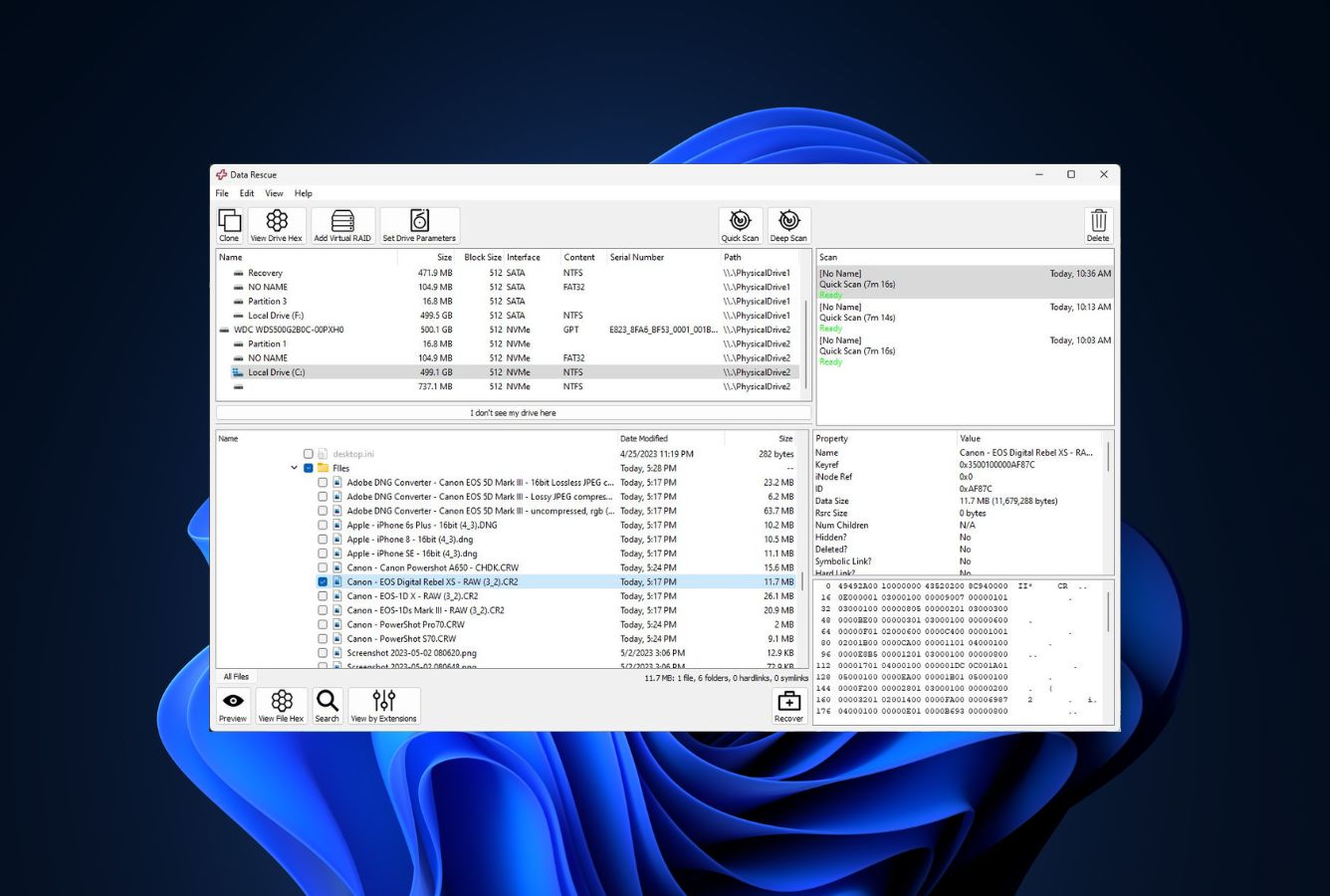
Browse the file tree, use the Search function for specific files, and click Preview to verify file integrity before committing. Select files to recover, click Recover, and choose a destination on a different drive. The 1 GB free trial covers the recovery step itself.
Saving recovered files back to the source drive risks overwriting other recoverable files. Use a second internal drive, an external USB drive, or a network location. Data Rescue won’t let you target the source drive, but if you have only one drive available, clone it first via the disk cloning feature.
Who Data Rescue Is For
Data Rescue 6 fits two specific users genuinely well in 2026. The first is the dual-platform user — someone who works across both Windows and Mac and wants a single license that covers both. This is rare in the recovery category, and Data Rescue’s per-license dual-platform support is genuinely useful if you regularly switch between operating systems or maintain machines on both. The second is the user with a failing drive who needs to clone before recovering — Data Rescue’s built-in disk cloning is unusual at this price tier and lets you create a byte-level image of a degrading drive, then scan the clone instead of stressing the failing hardware further.
A concrete example: a small consultancy supporting both Windows and Mac users who occasionally needs to recover files for clients. The $399 Professional license, while steep on its own, makes more sense across a year of mixed-platform jobs than buying separate Windows and Mac tools. The disk cloning feature also matters in this scenario — you can image a client’s failing drive once and work from the clone repeatedly.
For Windows-only users with a one-time data loss event, the next section explains exactly why the math doesn’t work — and why competitors’ annual licenses cost less than Data Rescue’s 30-day Standard.
Data Rescue’s Strengths in Real-World Use
Aggregated independent evaluation and verified user feedback consistently surface four areas where Data Rescue 6 still earns its place against newer competitors.
Reliable NTFS document recovery
Across independent reviews, Data Rescue’s Quick Scan on intact NTFS volumes consistently produces strong results for office documents and common file types. DOCX, XLSX, PDF, and TXT files come back with original filenames and folder paths preserved, opening cleanly in their native applications. For the specific scenario of accidentally deleted documents on a still-functioning NTFS drive, the engine does its job well — independent evaluation rates this as Very Good. The Recycle Bin recovery scenario is similarly strong because the underlying mechanism is the same: read still-intact MFT entries, extract the file content, preserve the metadata.
FileIQ custom signature training
FileIQ is the genuine differentiator in Data Rescue’s feature set. You provide a working sample of a file format, and the application analyzes its structure to create a custom signature that’s added to future scans. This is uncommon at any price tier and especially uncommon at $79 — most competitors either cap signature support to their built-in library or charge professional-tier prices for custom-signature support. The catch is that you need a working sample of the format, which is unhelpful if your only copy was on the drive you’re recovering from. But for niche or proprietary file types where you have access to one good copy and need the rest recovered, FileIQ delivers something most tools can’t.
Built-in disk cloning
Data Rescue includes byte-level disk cloning in the base license — a feature most competitors reserve for higher tiers or omit entirely. You can clone a failing drive to another physical disk or save the image as an IMG file, then scan the clone repeatedly without stressing the original hardware. For drives showing S.M.A.R.T. warnings or mechanical noise, this is a meaningful workflow advantage: the standard recovery practice is “image first, work from the image,” and Data Rescue makes that one fewer separate tool to learn. Clone reads support skipping bad sectors with configurable retry counts, which independent reviews flag as helpful for marginal drives.
Single license covers Windows and macOS
Cross-platform license coverage is rare in data recovery — most tools sell separate Windows and Mac licenses, even when the underlying engine is shared. Data Rescue’s standard license activates on either platform with the same purchase, including the ability to deactivate on one machine and reactivate on another. For users who genuinely work across both operating systems (or support family members on both), this single-license structure can offset some of the otherwise weak pricing math. Verified user feedback particularly cites this as a reason for repeat purchases despite the subscription model.
Where Data Rescue Falls Short
Several gaps reflect the tool’s age and design choices rather than execution failures — but they matter when comparing total value.
Aging interface, awkward dual-mode design
Independent evaluation universally flags the interface as visibly dated. There are no thumbnail previews in scan results, no color-coded recovery probability indicators, no drag-and-drop, and no modern visual cues guiding new users through the process. The dual-mode split between Standard Mode and Advanced Mode creates a disjointed experience: Standard Mode strips out so much that experienced users find it limiting, while Advanced Mode drops you into hex-viewer-and-RAID-options territory with little guidance. Tools released or refreshed in the last two years have moved past this paradigm with single-mode interfaces that scale gracefully from beginner to power-user. The last meaningful UI refresh was around 2023, and it shows.
RAW camera format and exFAT recovery are documented weaknesses
Verified independent testing across multiple sources consistently rates RAW photo recovery as Fair to Limited. Canon CR2 and CR3, Sony ARW, Nikon NEF, and Fujifilm RAF formats frequently show partial corruption or missing EXIF data after Deep Scan recovery, even when the underlying data appears intact. exFAT performance is similarly weaker than NTFS — Quick Scan struggles with exFAT directory entries, and Deep Scan introduces more false positives than competitors. For photographers facing a corrupted SD card or anyone working with exFAT-formatted external drives, this gap is significant. PhotoRec (free) and DiskDigger ($14.99) both deliver broader RAW format coverage than Data Rescue at $79 — see our best photo recovery software roundup for stronger photo-focused alternatives.
$79 for 30 days is hard to justify against annual-license rivals
The pricing structure is the single biggest issue with Data Rescue in 2026. The Standard License at $79 unlocks 30 days of unlimited recovery on one computer. The Professional License at $399 per year provides unlimited activations and recoveries — designed for IT pros and recovery businesses. There is no lifetime license option. Competitors charge $89/year (Disk Drill), $48 perpetual (DMDE), or $14.99 lifetime (DiskDigger) for results that match or beat Data Rescue on most scenarios. For the majority of one-time-recovery users, the math doesn’t work. The Professional tier makes more sense for high-volume technicians, but at that price point the field gets even more competitive.
No file repair, no S.M.A.R.T. monitoring, no bootable Windows recovery
The feature set has visible holes when measured against modern competitors. There’s no file repair module for fixing partially corrupted recoveries — recovered DOCX or JPEG files that are damaged stay damaged. There’s no disk health monitoring or S.M.A.R.T. diagnostics, so you can’t proactively identify failing drives from within the tool. The Mac version includes a bootable recovery drive feature; the Windows version does not, meaning if your Windows system is unbootable, you have to physically remove the drive and connect it to another machine. None of these are deal-breakers individually, but together they widen the value gap against tools that bundle them in.
Data Rescue 6 Capability Summary
How Data Rescue 6 performs, capability by capability, based on aggregated independent evaluation and vendor documentation:
| Capability | Tier | Notes |
|---|---|---|
| Deleted-file recovery (NTFS) | Good | Quick Scan preserves filenames on recently-deleted NTFS files |
| Recycle Bin recovery | Very Good | Strongest scenario — fast, clean, filenames intact |
| Document recovery (DOCX/PDF/XLSX) | Very Good | Reliable across both Quick Scan and Deep Scan modes |
| Formatted-drive recovery | Fair | Deep Scan finds files but loses filenames; documents fare better than media |
| Corrupted-partition recovery | Fair | Pure signature scanning — no MFT reconstruction, folder structure lost |
| USB / external HDD recovery | Fair | FAT32 parsing is a documented weak spot vs. competitors |
| SD card & camera recovery | Fair | Common photo formats OK; RAW formats frequently corrupted |
| RAW camera format support | Fair | Documented weakness — narrower library than budget rivals |
| NTFS support | Very Good | Best-performing filesystem for the engine |
| FAT12/16/32 support | Fair | Quick Scan struggles with FAT directory entries |
| exFAT support | Fair | Independent testing flags consistent weakness |
| Ext2/3 support | Good | Adequate for Linux filesystem recovery on attached drives |
| FileIQ custom signatures | Very Good | Genuine differentiator — train scanner from sample files |
| Disk cloning / imaging | Very Good | Built-in byte-level cloning with bad-sector skip — uncommon at this tier |
| RAID reconstruction | Fair | Basic RAID 0 and JBOD only in Advanced Mode — no RAID 5/6 |
| Hex viewer | Good | Available in Advanced Mode for power-user verification |
| File preview before recovery | Good | Functional but no thumbnails — basic file viewer only |
| File repair (photo / video) | Not supported | Recovery only — no repair module for partial files |
| S.M.A.R.T. drive monitoring | Not supported | No proactive drive health diagnostics |
| Cross-platform license | Excellent | One license covers both Windows and macOS — uncommon |
| Value for money | Limited | $79/30-day pricing weak vs. annual-license competitors |
Tier scale: Excellent / Very Good / Good / Fair / Limited / Not supported. Aggregated from independent evaluation and verified user feedback, 2026.
Data Rescue 6 Cost
Data Rescue 6 uses a tiered pricing model with no lifetime license option. The free trial for new users recovers up to 1 GB — enough to verify the software works on your specific scenario before paying. The Standard License at $79 unlocks unlimited recovery for 30 days on a single computer. The Professional License at $399 per year provides unlimited system activations and unlimited drive recoveries as an annual subscription with auto-renewal (which can and should be turned off in your Prosoft account post-purchase). There’s also a pay-per-file option starting at $19 for recovering individual files outside an active license — useful if you only need one or two files back. For broader budget context across the category, see our free Windows recovery tools guide.
The pricing math is the single biggest issue with Data Rescue in 2026. At $79 for 30 days, Standard costs nearly as much as a full year of Disk Drill ($89), which outperforms Data Rescue across most scenarios with a more polished interface and broader feature set. DMDE Standard is $48 perpetual. EaseUS Data Recovery Wizard runs $99.95 per year. PhotoRec is free and open-source. The $399 Professional tier targets technicians and IT pros doing frequent multi-machine recovery work, where the unlimited activations make sense — but at that price the field includes options like R-Studio ($79.99 perpetual) that genuinely compete on capability.
Data Rescue 6 vs. Competitors (2026)
| Tool | Deleted-file Recovery | Formatted Drive | Corrupted Drive | Free Tier | Price |
|---|---|---|---|---|---|
| Disk Drill | Excellent | Excellent | Very Good | 100 MB | $89/yr |
| R-Studio | Excellent | Very Good | Excellent | <256 KB | $79.99 one-time |
| EaseUS DRW | Very Good | Very Good | Very Good | 2 GB | $99.95/yr |
| Stellar | Very Good | Good | Good | 1 GB | $79.99/yr |
| DMDE | Very Good | Very Good | Excellent | 4,000 files/dir | $48 perpetual |
| Data Rescue 6 ← | Good | Fair | Fair | 1 GB (new users) | $79 / 30 days |
Tier assignments based on aggregated independent evaluation and verified user feedback. 2026.
Try Data Rescue 6 Free
1 GB recovery for new users. Verify before paying.
Data Rescue 6 Features & Tools
Data Rescue 6 takes a deliberately minimalist approach to features. Where competitors load up on supplementary tools — disk health monitoring, file shredding, partition management, file repair — Prosoft focuses on the core recovery workflow plus two genuine differentiators (FileIQ and disk cloning) and leaves everything else off the menu. The result is a lean feature set that covers the essentials without attempting to be an all-in-one disk toolkit. For some users this focus is a feature in itself; for others, the missing pieces matter more than what’s there.
FileIQ is the most distinctive capability. The user provides a working sample file in a format that Data Rescue doesn’t natively recognize, and the software analyzes its structure to create a custom signature for future scans. This is genuinely useful for niche or proprietary formats — engineering CAD files, specialized scientific data, legacy database formats — though it requires you to already have a working copy of the format, which limits usefulness in complete data loss scenarios. Disk cloning rounds out the standout features: byte-level imaging of failing drives to another physical disk or an IMG file, with configurable bad-sector retry behavior. For drives showing mechanical degradation, this is the right first step regardless of which recovery tool you ultimately use to scan the clone.
Data Rescue 6 User Reviews
Data Rescue receives less Windows-specific editorial coverage than the larger consumer suites — much of the available discussion focuses on the Mac version, which has the longer history and larger user base. Verified user feedback across Trustpilot, G2, Reddit’s r/datarecovery community, and platform-specific forums converges on a consistent pattern: the recovery engine is reliable for what it covers, the FileIQ and disk cloning features are genuinely appreciated, and the friction concentrates around pricing model, license activation, and auto-renewal handling rather than recovery quality.
Recovered my files reliably. The license activation was more trouble than the actual recovery. Disable auto-renew immediately after purchase.
FileIQ is the feature that sold me. Trained it on a sample of my CAD files and it found the rest reliably. Worth the Standard license for that one feature.
Solid for Mac users, less compelling on Windows. The disk cloning is genuinely useful — pair it with PhotoRec on the clone for free deep scanning.
Document recovery just works. Filenames intact, files open cleanly. Lost interest when I tried RAW photos from my Sony — half were corrupted.
$79 for 30 days felt like rental pricing. Did the job for my one-time recovery but I’d buy a perpetual license elsewhere next time.
Professional license makes sense if you’re recovering across multiple machines regularly. For a one-shot job, look at the alternatives first.
Verified user feedback converges on the same observation: the recovery engine and unique features (FileIQ, disk cloning, dual-platform license) earn praise; the pricing structure, license activation, and auto-renewal handling produce the friction. Document and NTFS recoveries leave users satisfied; RAW photo and exFAT scenarios frequently disappoint. For users whose scenario matches the strengths, Data Rescue still delivers — but the 1 GB free trial is essential for verifying the match before paying.
When to Choose Something Else
Data Rescue 6 handles NTFS document recovery competently but several common scenarios are better served elsewhere:
Frequently Asked Questions
Is Data Rescue 6 free?+
Is Data Rescue safe to use?+
Can Data Rescue recover formatted drives?+
Does Data Rescue work on Windows 11?+
Is Data Rescue better than Disk Drill?+
Can Data Rescue recover photos from an SD card?+
How much does Data Rescue cost?+
Final Verdict
Data Rescue 6 still does its core job competently. NTFS document recovery is genuinely reliable — DOCX, PDF, and XLSX files come back with original filenames intact and open cleanly. FileIQ custom signature training is unusual at this price tier and useful for niche file formats. Built-in disk cloning is the right first step for failing drives and most competitors don’t include it. The dual-platform license is uncommon and useful for users who genuinely work across both Windows and Mac. For the right user — multi-platform consultant, occasional recovery technician, someone with a working file sample needing more — Data Rescue still earns its place.
For everyone else, the math is hard to make work. At $79 for 30 days, Standard costs nearly as much as a full year of Disk Drill ($89) — a tool that outperforms Data Rescue across most scenarios with a more polished interface. RAW camera format recovery is a documented weakness. exFAT performance is uneven. The dual-mode interface feels disjointed, and the last meaningful refresh was around 2023. The 1 GB free trial is essential for verifying whether your specific scenario is one Data Rescue handles well — for many users it won’t be, and the alternatives in our best Windows data recovery software roundup deliver more for less.
About the Authors


This review reflects independent research by the datarecoveryfix.com team. Some links on this page may earn the site a referral fee at no extra cost to you — this does not influence our ratings, rankings, or editorial conclusions. If you believe any claim is inaccurate, contact us at contact@datarecoveryfix.com.