Klennet Recovery Review (2026): The ZFS Specialist
Klennet Recovery is the successor to Zero Assumption Recovery (ZAR), one of the longest-running data recovery projects in existence. Developed by Alexey V. Gubin since 2001, the current product (Build 3322) supports 11 filesystems with a standout capability no mainstream competitor matches: automatic ZFS pool layout detection — including RAID levels, disk order in vdevs, and native ZFS encryption. It also handles BTRFS with automatic RAID detection, plus the standard Windows and Linux filesystems. Our review aggregates vendor documentation, independent external evaluation, and verified user feedback to map exactly where Klennet is irreplaceable — and where the dated interface, evaluation-only-preview model, and constant internet requirement make mainstream alternatives a better fit.
evaluation, user reports
Windows-only, 8 GB RAM min
+ 1 year updates

Klennet Recovery is a niche professional tool built for specific use cases that mainstream software handles poorly or not at all. Its ZFS recovery — with automatic pool layout detection, vdev disk ordering, RAIDZ1/Z2/Z3, and native encryption support — is unmatched in the commercial recovery space. BTRFS recovery with automatic RAID detection is similarly strong. For standard Windows filesystems (NTFS, FAT, exFAT), independent evaluation rates the tool as Very Good with strong directory structure reconstruction.
The limitations are significant for general users. The evaluation version only previews — no file copying without a license, which can be a frustrating discovery in time-sensitive recovery. The cheapest tier ($79 Lite) covers only Windows filesystems, making the ZFS/BTRFS capabilities a meaningful step up in price. A near-always-on internet connection is required at all times — there’s no offline or portable mode. The interface is utilitarian and dated. For NAS administrators and ZFS users, this is the tool to know about. For everyone else, mainstream alternatives offer more polish at similar or lower prices.
✓ What We Liked
- Automatic ZFS pool layout detection — RAID levels, vdev disk order, encryption, compression
- Strong NTFS recovery with directory structure preservation (filenames, paths, timestamps)
- 11 filesystems: FAT, exFAT, NTFS, HFS+, APFS, BTRFS, ext2/3/4, F2FS, XFS, ZFS
- BTRFS recovery with automatic RAID detection — handles Synology and QNAP metadata
- RAID analysis for RAID0 and RAID5 — auto-detects block size and disk order
- Built-in file validation and preview before recovery, with checksum verification
- Lifetime license model with 30-day money-back guarantee
✕ What We Didn’t
- Evaluation version only previews — no file copying without a paid license
- Requires near-always-on internet connection — no offline or portable mode
- $79 Lite covers only Windows filesystems; ZFS/BTRFS requires the higher tier
Klennet Recovery Alternatives
Brief selection A quick shortlist of our top alternative picks, based on aggregated independent research. |
Best Alternative  EaseUS Data Recovery Wizard Best overall · 2 GB free |
 Stellar Data Recovery Best for photos · 1 GB free |
 Wondershare Recoverit Best for video · 100 MB free |
|---|---|---|---|
| Deep Scan | ✓ | ✓ | ✓ |
| Formatted Drive Recovery | ✓ | ✓ | ✓ |
| RAW Photo Support | Broad | Broad | Limited |
| File Repair | ✓ | ✓ | Video only |
| Free Tier | 2 GB | 1 GB | 100 MB |
Research Methodology
This review aggregates three evidence types for the current Klennet Recovery Build 3322: vendor documentation (the official klennet.com site, the in-app capabilities and licensing pages, the supported filesystem and ZFS feature lists), independent external evaluation cross-referenced across long-running editorial sources, and verified user feedback from primary platforms — Trustpilot, the Reddit r/datarecovery and r/zfs communities, NAS-vendor forums (TrueNAS Community, FreeNAS, Synology, QNAP), and the testdisk-users mailing list where users compare ZFS recovery approaches. Tier assignments (Excellent / Very Good / Good / Fair / Limited / Not supported) reflect the aggregate of that evidence per capability. Where vendor positioning diverges from independent results — particularly around RAW format coverage and interface usability — we follow the independent evidence and note the gap. Full methodology details are on our How We Test page.
Is Klennet Recovery Safe?
Klennet Recovery copies recovered files to a separate destination and does not modify the original disks during scanning. The software is developed by Alexey V. Gubin, who previously created Zero Assumption Recovery (ZAR) in 2001 — one of the longest-running data recovery projects. The current product has operated under the Klennet Storage Software brand since 2017, and should only be downloaded from the official klennet.com domain. The codebase is proprietary (not open-source).
Two factors warrant disclosure rather than concern. First, the developer is based in Volgograd, Russia — some users in security-sensitive environments may want to consider the implications. Second, the software requires a near-always-on internet connection for license verification (not data transmission, per vendor documentation), but there is no offline or portable mode available. For air-gapped recovery work, alternatives like DMDE or R-Studio offer fully offline portable versions. Despite these considerations, the tool has a clean security record and is genuinely respected among data recovery professionals — particularly NAS administrators dealing with ZFS and BTRFS recovery scenarios that mainstream software simply cannot handle.
How to Use Klennet Recovery
The workflow is straightforward for a professional tool, though not as guided as consumer alternatives:
Download and install
Download from klennet.com. Klennet Recovery requires installation — do not install it on the partition you’re trying to recover from. Run as Administrator. 8 GB RAM minimum (more for large ZFS pools).
Select the target disk or partition
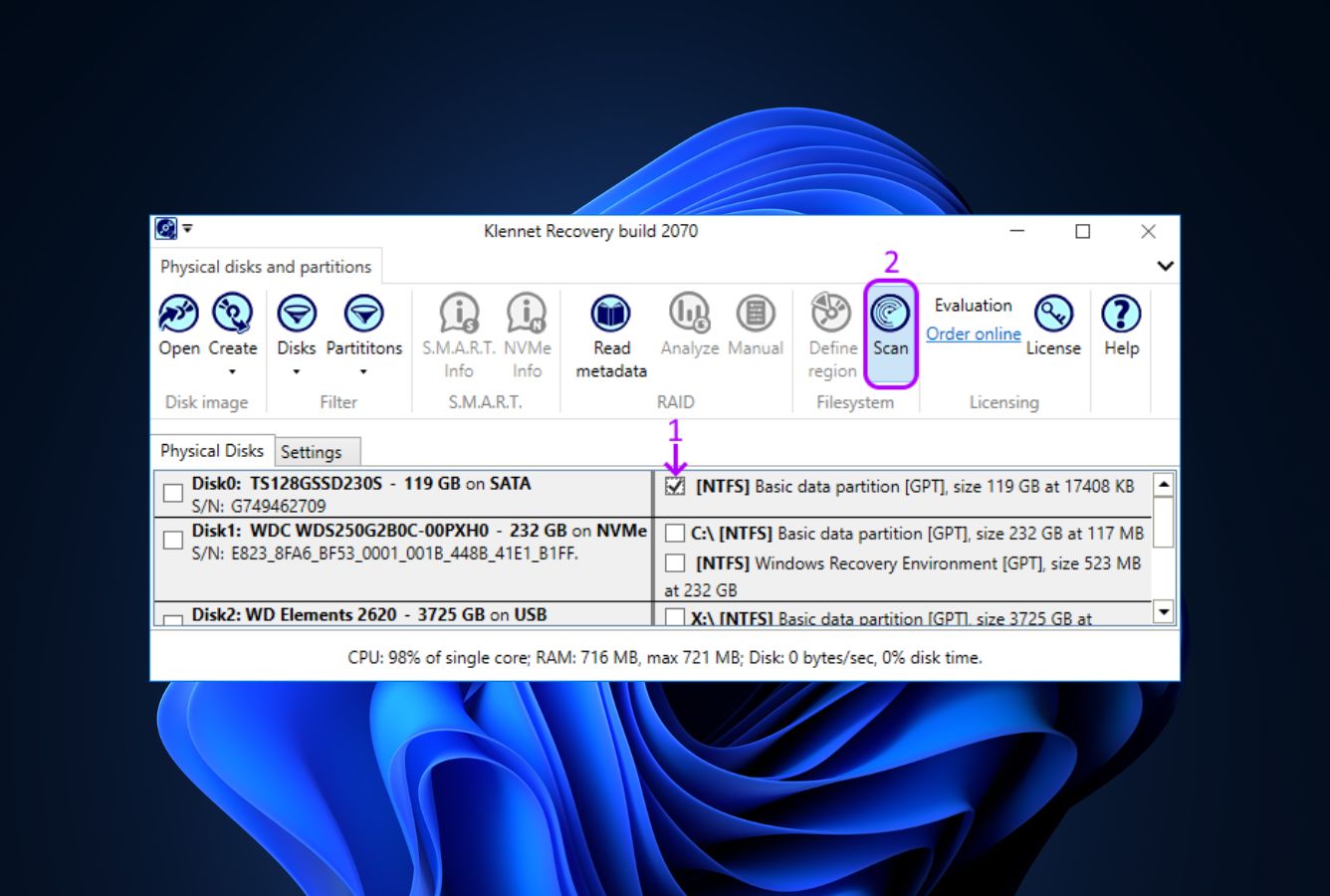
The main screen displays detected storage devices. Select the physical disk or partition you want to scan. For missing or corrupted partitions, select the physical disk to scan across all sectors. For ZFS recovery, all pool member disks should be attached.
Scan and preview
Start the scan. Klennet Recovery reconstructs directory structure and filenames when filesystem metadata is available. Use the built-in preview and validation features (with checksum verification) to assess recovery quality before purchasing a license.
Purchase license and recover files
Select files and choose a destination on a different drive. The evaluation version allows scanning and preview but does not copy files — a paid license ($79 Lite for Windows filesystems, higher tiers for ZFS/BTRFS) is required to save recovered data.
The evaluation version shows you exactly what files will be recovered and lets you preview them with checksum verification. Run it first to confirm the tool can actually recover your specific scenario before purchasing a license. There’s no refund for “I bought it but it didn’t recover what I needed” — the 30-day refund policy is more flexible than many competitors but the evaluation step is essential.
Who Klennet Recovery Is For
Klennet Recovery fits two specific users with extreme precision and almost no one else. The first is the NAS administrator dealing with a damaged ZFS pool — TrueNAS, FreeNAS, OpenZFS-based systems where multiple disks have failed labels or the pool no longer mounts. Klennet’s automatic pool layout detection — figuring out RAID level, disk order in vdevs, and ashift values from raw disk content alone — is genuinely unmatched in the commercial recovery space. For this scenario, Klennet is often the difference between recovery and total loss.
The second is the BTRFS user, particularly someone managing a Synology or QNAP NAS. Klennet handles BTRFS RAID across all RAID levels with automatic disk-order detection, and reads Synology’s NVMe write-back cache metadata natively. For these scenarios, mainstream tools either fail entirely or require manual reconstruction work that Klennet automates.
A concrete example: a small business runs a 4-disk RAIDZ1 pool on TrueNAS Core. After a power event, the pool no longer imports — all four disks show damaged labels. Mainstream recovery tools cannot identify the pool layout. Klennet Recovery scans the four disks, automatically determines they form a 4-disk RAIDZ1 with a specific disk order and ashift=12, reconstructs the filesystem virtually, and presents the original directory tree for selective recovery. No other commercial tool currently does this end-to-end.
For Windows-only filesystem recovery (NTFS, FAT, exFAT) — which is the scenario most readers face — the next section explains why mainstream alternatives offer better value and ergonomics despite Klennet’s solid filesystem-level performance.
Klennet Recovery’s Strengths in Real-World Use
Aggregated independent evaluation and verified user feedback consistently surface four areas where Klennet Recovery is exceptional, sometimes uniquely so.
Automatic ZFS pool layout detection — irreplaceable for damaged pools
This is the capability that justifies Klennet’s existence in the recovery toolkit. The tool reads raw disk content from a ZFS pool and automatically determines: pool layout (mirrors, stripe, RAIDZ1, RAIDZ2, RAIDZ3), the number of disks in each vdev, the disk order within each vdev (critical for RAIDZ reconstruction), and the ashift value (sector size). It supports LZ4, LZJB, GZIP, ZLE, and ZSTD compression algorithms; native ZFS encryption (128/192/256-bit AES-CCM and AES-GCM); and GELI encryption as used in FreeNAS and TrueNAS. Verified user feedback from r/zfs and TrueNAS Community forums consistently cites scenarios where Klennet was the only tool that found and recovered the pool — including cases where vendor-recommended professional services declined the job.
BTRFS recovery with automatic RAID detection
BTRFS gets similar treatment to ZFS — automatic RAID detection across all BTRFS RAID levels, with disk-order determination. For Synology DSM users, Klennet reads the NVMe write-back cache metadata that mainstream tools ignore entirely. For QNAP devices using BTRFS, Klennet handles the metadata layout natively. This puts Klennet in a category of one for NAS recovery work where the storage layer is BTRFS rather than the more common ext4 or NTFS.
11 filesystem support in one tool
FAT, exFAT, NTFS for Windows; HFS+, APFS for Mac; ext2/3/4, F2FS, XFS for Linux; plus BTRFS and ZFS. This breadth in a single Windows-hosted tool is unusual — most recovery software focuses on the host operating system’s native filesystems. For data recovery technicians who handle drives from any source platform, Klennet Recovery’s filesystem coverage is a meaningful workflow advantage. Independent evaluation rates the actual recovery quality on the less-common filesystems (HFS+, APFS, F2FS, XFS) as competitive with platform-native tools.
Solid Windows filesystem recovery with directory preservation
For the Windows filesystems most readers will actually encounter, independent evaluation rates NTFS deleted-file recovery as Very Good with strong directory structure reconstruction (filenames, paths, timestamps preserved from MFT entries when intact). Formatted-drive recovery is similarly Very Good — Klennet detects the previous filesystem and reconstructs the directory tree rather than dumping signature-found files into anonymous folders, which is a meaningful workflow advantage over pure carving tools.
Where Klennet Recovery Falls Short
The gaps are real and frame Klennet as a specialist tool rather than a general-purpose recovery suite.
Evaluation-only-preview model is a trust problem in time-sensitive recovery
The evaluation version scans, finds files, and previews them — but won’t copy them out without a paid license. This isn’t clearly communicated upfront on the download page, and verified user feedback consistently surfaces it as the single biggest frustration: spending hours waiting for a scan to complete on a large drive, seeing your files in the preview, and then discovering you need to pay $79 to $499 before you can save anything. The 30-day refund policy mitigates the risk somewhat, but if your drive is mechanically degrading and time matters, this workflow forces a license purchase decision under pressure. Tools with hard recovery caps in their free tiers (like Recuva at unlimited, EaseUS at 2 GB) are more honest about the trade-off.
Constant internet requirement breaks air-gapped workflows
Klennet Recovery requires a near-always-on internet connection to function. There is no offline mode, no portable version, and no way to run it on an isolated workstation. For data recovery technicians working in secure facilities, fielded environments, or just on a customer site without reliable internet, this is a hard blocker. Vendor documentation states the connection is for license verification only (not data transmission), but the fact remains that the tool will not run without it. Competitors like DMDE ship a fully offline portable executable, R-Studio supports offline operation after activation, and PhotoRec needs no network at all.
Tier pricing puts ZFS/BTRFS behind a meaningful upgrade
The Lite tier ($79) covers only Windows filesystems — FAT, exFAT, NTFS — which means the unique ZFS and BTRFS capabilities that justify choosing Klennet over alternatives require a higher tier (up to $499 for Commercial license, with the middle Full tier varying by source). For NAS administrators specifically buying Klennet for ZFS support, the practical entry price is meaningfully higher than the headline $79. Independent reviews consistently note this tier structure feels punitive for the exact users the tool is best suited for. For broader budget context, see our best Windows data recovery software roundup.
Dated interface and limited consumer features
Verified user feedback universally flags the interface as visibly dated. There’s no thumbnail view, no filtering, no sorting beyond basic columns, no view-mode options, and no built-in updater. RAM usage is high (8 GB minimum, more for large ZFS pools). Session-saving is limited. RAW camera format coverage is thin compared to consumer tools — the main recovery tool handles CR2 and NEF but not CR3, ARW, ORF, or many others. The separate Klennet Carver product covers some additional formats but requires a separate purchase. Other consumer features are absent: no file repair, no secure deletion, no hex editor (only a viewer), no full disk cloning (only imaging to raw, VHD, and VHDX). RAID support is limited to RAID0, RAID1, and RAID5 — no RAID6 or RAID10.
Klennet Recovery Capability Summary
How Klennet Recovery performs, capability by capability, based on aggregated independent evaluation and vendor documentation:
| Capability | Tier | Notes |
|---|---|---|
| ZFS pool recovery | Excellent | Auto-detects layout, RAID level, vdev disk order, ashift — unmatched |
| BTRFS RAID recovery | Excellent | All BTRFS RAID levels with auto disk-order detection |
| NAS recovery (Synology / QNAP) | Excellent | Reads native NAS metadata including write-back cache |
| Filesystem breadth | Excellent | 11 filesystems: FAT, exFAT, NTFS, HFS+, APFS, BTRFS, ext2/3/4, F2FS, XFS, ZFS |
| NTFS deleted-file recovery | Very Good | Strong MFT-direct parsing with filename and folder preservation |
| Recycle Bin recovery | Very Good | Fast and accurate on fresh NTFS deletions |
| Formatted-drive recovery | Very Good | Detects previous filesystem, reconstructs directory tree |
| Corrupted-partition recovery | Very Good | Reconstructs lost partitions from raw disk content |
| USB / external HDD recovery | Good | Solid on FAT/NTFS removable drives; clean integrity |
| RAID analysis (RAID0, RAID5) | Very Good | Auto-detects block size and disk order; reads DDF, LDM, MD-RAID, LVM2 |
| Disk imaging | Good | Raw, VHD, VHDX formats — no full byte-to-byte cloning |
| File preview & validation | Good | Built-in checksum verification before recovery |
| SD card / camera recovery | Fair | Filesystem-level OK, but RAW format coverage is thin |
| RAW camera format support | Fair | Main tool handles CR2, NEF; CR3/ARW/ORF need separate Klennet Carver |
| RAID 6 / RAID 10 / nested RAID | Not supported | Only RAID0, RAID1, RAID5 — R-Studio is stronger here |
| File repair (photo / video) | Not supported | Recovery only — no repair module for partial files |
| Hex editor | Not supported | Only a viewer; DMDE provides a full editor |
| Disk cloning (byte-to-byte) | Not supported | Imaging only — no full disk-to-disk cloning |
| Offline / portable mode | Not supported | Constant internet required — no air-gapped operation |
| Ease of use / interface | Limited | Dated UI, no thumbnails, no filtering, high RAM usage |
| Value for money (Windows-only) | Fair | $79 Lite competitive; ZFS/BTRFS tier pricing weakens value |
Tier scale: Excellent / Very Good / Good / Fair / Limited / Not supported. Aggregated from independent evaluation and verified user feedback, 2026.
Klennet Recovery Cost
Three license tiers, all one-time purchases with one year of included updates. The license you buy keeps working after that year — only the update entitlement expires. Lite ($79) covers Windows filesystems only (FAT, exFAT, NTFS) for personal use. Full adds all supported filesystems including ZFS, BTRFS, ext2/3/4, HFS+, APFS, F2FS, and XFS — essential for NAS recovery and the tier most NAS administrators actually need. Commercial ($499) allows charging clients for recovery services. The middle Full tier price varies across pricing sources and the vendor’s order page is the authoritative source — confirm at klennet.com before purchase.
The evaluation version lets you scan and preview but does not copy files. This isn’t clearly communicated upfront and consistently surfaces in user feedback as the single biggest frustration. For Windows-only recovery, the $79 Lite tier is competitive with DMDE Standard ($48 perpetual) but more expensive than Recuva (free) or PhotoRec (free). For ZFS/BTRFS recovery specifically, the Full tier competes with R-Studio ($79.99 perpetual) and UFS Explorer Standard, though Klennet’s ZFS auto-detection is unique. There are no announced discounts, but a 30-day money-back guarantee applies to all tiers via support request. For broader category context, see our best NAS recovery software guide where Klennet appears alongside its closest specialist competitors.
Klennet Recovery vs. Competitors (2026)
| Tool | ZFS / BTRFS | NTFS | RAID | Free Tier | Price |
|---|---|---|---|---|---|
| Klennet Recovery ← | Excellent | Very Good | RAID0/1/5 only | Preview only | $79–$499 |
| R-Studio | Not supported | Excellent | Full incl. RAID6/10 | <256 KB | $79.99 perpetual |
| UFS Explorer | Manual | Very Good | Very Good | Preview only | $30–$1,800 |
| DMDE | Not supported | Very Good | Basic RAID | 4,000 files/dir | $48 perpetual |
| Disk Drill | Not supported | Excellent | Limited | 100 MB | $89/yr |
Tier assignments based on aggregated independent evaluation and vendor documentation. 2026.
Try Klennet Recovery Evaluation
Scan and preview free. License from $79 to copy files out.
Klennet Recovery Features & Tools
Klennet Recovery’s feature philosophy centers on filesystem expertise — particularly for storage systems that mainstream tools ignore. The tool doesn’t try to be everything: there’s no file repair, no secure deletion, no hex editor (only a viewer), and no disk cloning. What it does offer is deep filesystem reconstruction across 11 filesystems, with ZFS and BTRFS receiving the most sophisticated treatment available in any commercial recovery tool.
The ZFS implementation deserves specific attention. Klennet Recovery automatically detects pool layout — mirrors, RAIDZ1, RAIDZ2, RAIDZ3 — determines the number and order of disks in each vdev even when all disk labels are damaged, and reads ashift values (sector sizes 512, 4096, or 8192 bytes). It supports LZ4, LZJB, GZIP, ZLE, and ZSTD compression, plus native ZFS encryption (128/192/256-bit AES-CCM and AES-GCM) and GELI encryption as used in FreeNAS and TrueNAS. For NAS administrators running TrueNAS, FreeNAS, or OpenZFS-based systems, this is the recovery tool to know about.
BTRFS support is similarly strong — automatic RAID detection across all BTRFS RAID levels with disk order determination. For NAS devices from Synology and QNAP that use BTRFS, Klennet reads their metadata natively including Synology’s NVMe write-back cache metadata.
Klennet Recovery User Reviews
Klennet Recovery has a small but dedicated user base, primarily NAS administrators and data recovery professionals working with ZFS or BTRFS storage systems. Independent review coverage is limited compared to mainstream consumer tools — most discussion appears in NAS-vendor forums (TrueNAS Community, Synology, QNAP), the r/zfs and r/datarecovery subreddits, and the testdisk-users mailing list rather than general consumer review sites. The pattern across sources is consistent: the ZFS and BTRFS capabilities earn high praise; the friction concentrates on the evaluation-only-preview model, the dated interface, and the constant internet requirement.
After our 4-disk RAIDZ1 lost all labels, Klennet was the only tool that figured out the pool layout automatically. Recovered 95% of our data after pro services declined the job.
Klennet is the GOAT for ZFS recovery. Nothing else even comes close on automatic pool reconstruction. The price is steep but cheaper than professional services.
Recovered my BTRFS volume after a failed DSM update. Klennet read the metadata Synology uses directly. The interface is rough but it works.
Spent 6 hours scanning, saw my files in preview, then realized I had to pay $79 to copy anything out. Wish that was clearer upfront.
For QNAP BTRFS recovery, this is the tool. Reads our metadata natively where R-Studio fails. UI is from 2010 but the engine is current.
For NTFS we still use TestDisk and PhotoRec. Klennet is for the cases where filesystem-aware ZFS reconstruction is actually needed — niche but irreplaceable.
Verified user feedback converges on a consistent pattern: where Klennet’s specialist capabilities apply (damaged ZFS pools, BTRFS NAS recovery), users describe it as irreplaceable. Where they don’t (general Windows filesystem recovery, RAW photos, casual undelete scenarios), users routinely mention switching to mainstream tools. The 30-day refund policy is cited as the primary safety net for the evaluation-only-preview workflow.
When to Choose Something Else
Klennet Recovery excels at ZFS, BTRFS, and advanced filesystem recovery. Several common scenarios are better served elsewhere:
Frequently Asked Questions
Is Klennet Recovery free?+
Can Klennet Recovery handle ZFS?+
How does Klennet Recovery compare to R-Studio?+
Does Klennet Recovery require an internet connection?+
What happened to ZAR (Zero Assumption Recovery)?+
Can Klennet Recovery recover RAW camera photos?+
Is the developer based in Russia?+
Final Verdict
Klennet Recovery occupies a specific niche: it is the best tool available for ZFS and BTRFS recovery, with automatic pool layout detection that no commercial competitor matches. For NAS administrators running TrueNAS, FreeNAS, or Synology and QNAP devices with BTRFS, this capability alone justifies the price. The standard Windows filesystem recovery is genuinely strong too — independent evaluation rates NTFS deleted-file recovery as Very Good with directory structure reconstruction that pure carving tools can’t match.
The trade-offs limit appeal for general users. The $79 Lite tier covers only Windows filesystems — the ZFS and BTRFS capabilities that make this tool special require the Full tier. The evaluation version won’t copy files, which can be a frustrating surprise during a time-sensitive recovery. A near-always-on internet connection is required at all times. The interface is dated. RAW camera format coverage is thin. RAID 6 and RAID 10 are not supported.
Choose Klennet Recovery if you need ZFS or BTRFS recovery, you’re a NAS administrator dealing with damaged pools, or you need recovery from a storage system mainstream tools simply don’t support. Choose one of our top-rated recovery tools if you want broad format coverage, a modern interface, or offline operation. For the specific problems Klennet Recovery solves, it is irreplaceable — and that’s enough to earn it a place in any serious recovery toolkit even with the rough edges.
About the Authors


Klennet Storage Software does not operate an affiliate program — there are no affiliate links to Klennet in this review. This review reflects independent research by the datarecoveryfix.com team. Some links to other products on this page may earn the site a referral fee at no extra cost to you — this does not influence our ratings, rankings, or editorial conclusions. If you believe any claim is inaccurate, contact us at contact@datarecoveryfix.com.