Remo Recover Review (2026): Polished but Overpriced
Remo Recover for Windows is a consumer-grade recovery tool from Remo Software (Bengaluru, India; US office in Cupertino, California). Build 6.0 supports NTFS, FAT16/32, exFAT, and NTFS5 with several genuine differentiators: an automated dual-scan workflow, a Dynamic Recovery View that lets you copy files out while scanning continues, AI-powered file filters, and an Add New File Type feature for training custom signatures. The interface is the most polished in this price range — but pricing starts at $69.97 for one month, which makes the value math hard to defend. Our review aggregates vendor documentation, independent evaluation, and verified user feedback.
evaluation, user reports
Win 7+ supported
or 1 GB free

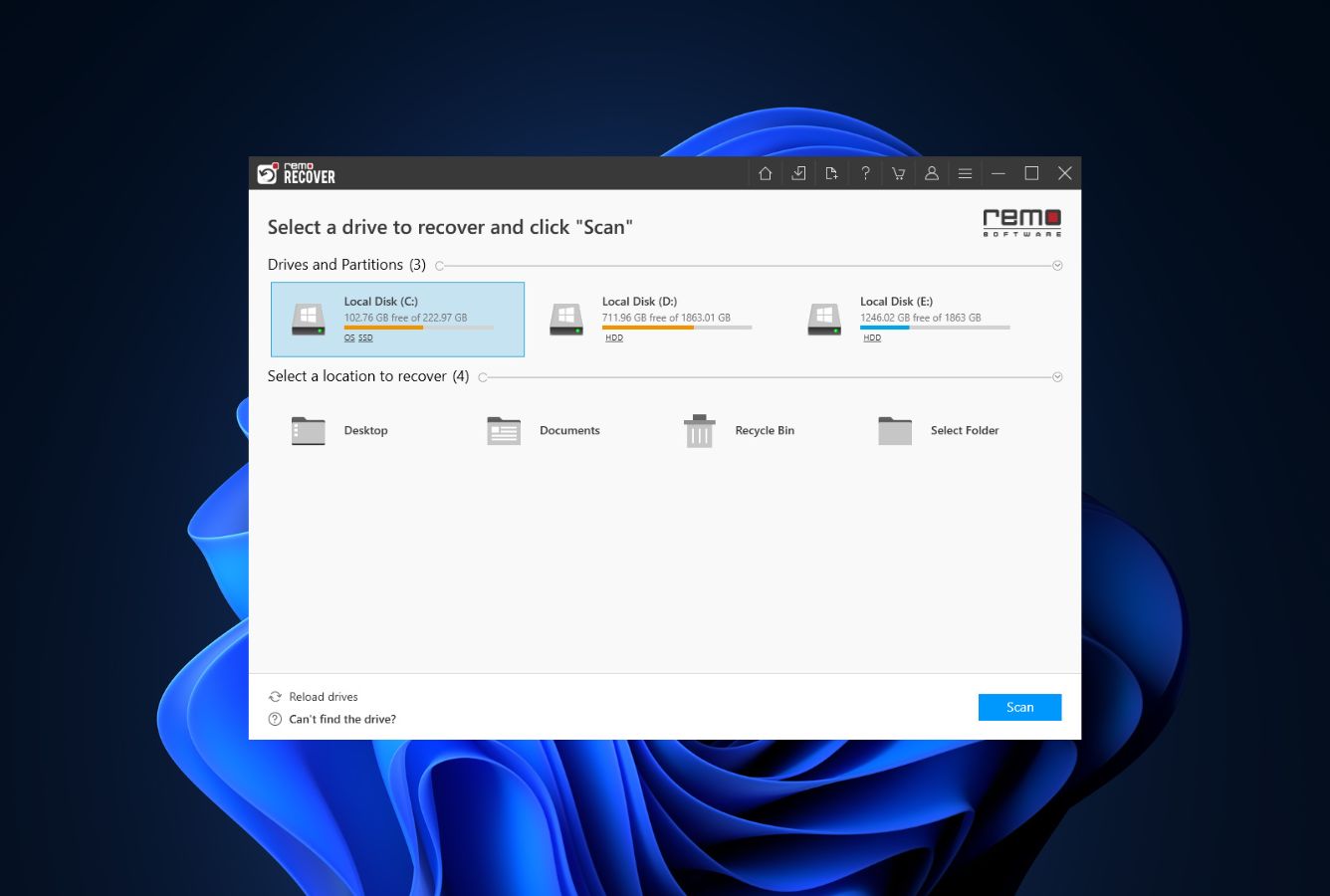
Remo Recover makes a strong first impression. The interface is the most polished in its price range — clean, modern, navigable for non-technical users where most pro recovery tools default to clutter. The automated dual-scan flow (Quick Scan into Deep Scan with no manual intervention) is genuinely friendly, and the Dynamic Recovery View is uncommon at any price tier — you can begin recovering files while the deep scan is still running, which can save hours on large drives. AI-powered filters help locate files by properties, genres, and metadata when filenames are gone. The Add New File Type feature lets you train custom signatures from sample files for uncommon formats.
The pricing math is the issue. $69.97 is the starting price for ONE MONTH of access on Windows — Disk Drill costs $89 for a full year. The edition tiering (Basic / Media / Pro) is opaque from the website and forces users to figure out which features they need before they know whether the tool will recover their files. Independent evaluation rates standard NTFS deleted-file recovery as Good, formatted-drive recovery as Fair, and corrupted-partition scenarios as weaker than mainstream competitors. The 1 GB Free Edition is essential for verifying the tool can handle your specific scenario before paying — and the 30-day money-back guarantee provides additional protection. For users who genuinely value the dynamic-recovery workflow and polished interface, Remo Recover earns its place. For everyone else, the math doesn’t work.
✓ What We Liked
- Most polished interface in this price range — clean, modern, beginner-friendly
- Dynamic Recovery View — copy files while scanning continues, uncommon at any tier
- Automated dual scan — Quick Scan flows into Deep Scan without manual intervention
- AI-powered file filters by properties, genre, and metadata — useful when filenames are lost
- Add New File Type lets you train custom signatures for uncommon proprietary formats
- Save and resume scan sessions — pause large scans and continue later without restarting
- 30-day money-back guarantee on all paid licenses + 1 GB Free Edition for verification
✕ What We Didn’t
- $69.97 buys only 1 month — full-year competitors cost less for stronger recovery
- Edition tiering (Basic/Media/Pro) opaque — buyers must guess feature coverage upfront
- Formatted-drive and corrupted-partition recovery weaker than mainstream rivals
Remo Recover Alternatives
Brief selection A quick shortlist of our top alternative picks, based on aggregated independent research. |
Best Alternative  EaseUS Data Recovery Wizard Best overall · 2 GB free |
 Stellar Data Recovery Best for photos · 1 GB free |
 Wondershare Recoverit Best for video · 100 MB free |
|---|---|---|---|
| Deep Scan | ✓ | ✓ | ✓ |
| Formatted Drive Recovery | ✓ | ✓ | ✓ |
| RAW Photo Support | Broad | Broad | Limited |
| File Repair | ✓ | ✓ | Video only |
| Free Tier | 2 GB | 1 GB | 100 MB |
Research Methodology
This review aggregates three evidence types for the current Remo Recover Build 6.0 for Windows: vendor documentation (the official remosoftware.com site, the in-app capabilities and licensing pages, the supported filesystem and file format lists), independent external evaluation cross-referenced across long-running editorial sources, and verified user feedback from primary platforms — Trustpilot, the Reddit r/datarecovery community, software directories like Capterra and GetApp, and Windows-specific forums where users discuss recovery outcomes. Tier assignments (Excellent / Very Good / Good / Fair / Limited / Not supported) reflect the aggregate of that evidence per capability. Where vendor positioning diverges from independent results — particularly around recovery rates on formatted and corrupted drives — we follow the independent evidence and note the gap. Full methodology details are on our How We Test page.
Is Remo Recover Safe?
Remo Recover is safe to install and run when downloaded from the official source. Remo Software is headquartered in Bengaluru, India, with a US office at 20289 Stevens Creek Blvd, Cupertino, California. The company has been in the data recovery and utility software space for over a decade. The official installer is malware-free and the application performs read-only scanning by default — recovered files always go to a separate destination drive, never overwriting the source. Vendor documentation states that recovered files are stored only on the customer’s computer and never on Remo’s servers; the recovery process runs entirely offline once the license is activated.
One critical safety note: searches for “Remo Recover crack” or “free license key” frequently return results pointing to cracked installers. These are not Remo Software’s products and consistently contain malware, ransomware, or credential-stealing payloads. The 1 GB Free Edition (no payment details required) and the 30-day money-back guarantee on paid licenses make the legitimate path the only sensible one. License activation is per-computer with the option to activate on two computers using the same key.
How to Use Remo Recover
Download and install
Download the Free Edition from remosoftware.com. The installer is small and bundle-free. Important: do not install on the partition you’re trying to recover from. Run as Administrator.
Select the target drive
From the main screen, choose the drive or partition you want to scan. Remo Recover detects all internal and external storage including USB drives, SD cards, and external HDDs/SSDs. For BitLocker-encrypted volumes, you’ll be prompted for the recovery key.
Start the dual scan
The scan runs Quick Scan first (filesystem metadata, fast, preserves filenames) and automatically transitions to Deep Scan (signature-based, slower, finds more) without manual intervention. The Dynamic Recovery View lets you start copying files out as soon as they appear — you don’t have to wait for the full scan to finish.
Filter, preview, and recover
Use the AI-powered filters to narrow results by file type, properties, genre, or metadata. Preview files before recovery to verify integrity. Select files and recover to a different drive. The Free Edition allows up to 1 GB; a paid license (from $69.97 / 1 month) is required beyond that.
The 1 GB Free Edition lets you scan, preview, and actually recover up to 1 GB without entering payment details. Run it first to confirm the tool can handle your specific scenario before committing to a paid license. Combined with the 30-day money-back guarantee, this is the right way to manage Remo Recover’s premium pricing risk.
Who Remo Recover Is For
Remo Recover fits two specific users well in 2026. The first is the non-technical home user who has lost files in a straightforward scenario — accidentally deleted documents, emptied Recycle Bin, recently formatted external drive — and wants the most beginner-friendly recovery interface available. The polished UI, automated dual-scan flow, AI-powered filters, and Dynamic Recovery View add up to the smoothest end-to-end consumer experience in the category, particularly for users who would find DMDE or PhotoRec intimidating. If you’d rather pay a premium for clarity than save money on a tool with a learning curve, Remo Recover delivers that.
The second is the user with niche or proprietary file formats that mainstream tools don’t recognize. The Add New File Type feature lets you train custom signatures from working sample files — useful for engineering CAD formats, specialized scientific data, legacy database files, or anything else outside standard signature libraries. Combined with the dynamic-recovery workflow, this can be a meaningful workflow advantage for technical users with specific format needs.
A concrete example: a small business administrator accidentally formats an external HDD that contained quarterly archives. The scenario is straightforward, the data is recent, and the priority is recovering working files quickly without learning a complex tool. Remo Recover’s Free Edition proves the recovery is possible (within the 1 GB limit), the $69.97 1-month license unlocks the rest, the dynamic view starts copying files out within minutes, and the polished UI keeps the process from feeling overwhelming. For this user, the premium pricing buys real ergonomic value.
For users with corrupted partitions, complex RAID scenarios, ZFS or BTRFS storage, or anyone whose primary criterion is recovery rate per dollar, the next section explains why mainstream alternatives consistently produce better outcomes despite the rougher interfaces.
Remo Recover’s Strengths in Real-World Use
Aggregated independent evaluation and verified user feedback consistently surface four areas where Remo Recover earns its place against more established competitors.
The most polished interface in this price range
Independent evaluation universally cites the Remo Recover interface as one of the cleanest and most beginner-friendly in the category. The main screen is uncluttered, drives are presented visually, scan modes are clearly labeled, and the recovery workflow guides users through each step with minimal friction. There’s no Standard / Advanced mode split (unlike older tools), no awkward filesystem terminology surfaced where it isn’t needed, no power-user controls obscuring the main flow. For users who’d find DMDE or PhotoRec intimidating, this matters — and Remo Recover does it better than most paid mainstream rivals at any price.
Dynamic Recovery View is genuinely uncommon and useful
The Dynamic Recovery View — being able to copy files out while the scan is still running — is rare even among premium tools. On large drives where full deep scans can run for hours, this is meaningful: you don’t have to choose between waiting or restarting if you spot the files you need early. Verified user feedback consistently cites this as one of the features that justifies the price for time-sensitive recovery scenarios. Combined with the save-and-resume scan sessions, the workflow handles long scans more gracefully than most competitors.
Add New File Type for proprietary or uncommon formats
The Add New File Type feature lets you provide a working sample of a file format Remo Recover doesn’t natively recognize, and trains a custom signature for use in future scans. This is useful for niche file types — engineering CAD files, specialized scientific formats, legacy database structures, anything outside standard signature libraries. The catch is the same as with similar features in other tools: you need a working sample of the format, which is unhelpful in complete data loss scenarios. But for partial losses where one good copy survives and the rest need recovery, this delivers something most consumer tools can’t.
AI-powered filters and BitLocker support
The AI-powered filters help locate files by properties (size, date), genre (documents, media, archives), and metadata when filenames are lost — particularly useful in formatted-drive scenarios where filesystem-level data is gone. BitLocker-encrypted drive support with manual key entry is uncommon at this price tier and useful for users dealing with encrypted Windows volumes. Independent evaluation rates both as solid implementations rather than checkbox features.
Where Remo Recover Falls Short
The gaps are concentrated around pricing structure and recovery quality on harder scenarios.
$69.97 for one month is genuinely hard to justify
The cheapest paid Remo Recover Windows license is $69.97 for a single month of access. For comparison: Disk Drill Pro is $89 for a full year with stronger recovery rates and a similarly polished interface; Stellar Data Recovery is around $79.99/year; DMDE Standard is $48 perpetual. Even EaseUS Data Recovery Wizard at $99.95/year covers more scenarios. Remo Recover’s lifetime license (around $199.97 single-computer) is more competitive on a multi-year basis, but the entry price is higher than full-year competitors and the value proposition is hard to defend for one-time recovery needs. Independent reviews consistently flag this as the tool’s biggest weakness.
Edition tiering is opaque from the website
Remo sells multiple editions (Basic, Media, Pro, with different file-type coverage and feature sets) but the pricing page doesn’t clearly map editions to use cases. Users must figure out which edition covers their scenario before they know whether the tool will recover their files at all — a backwards purchase decision flow. Verified user feedback consistently surfaces buyers landing on the wrong edition, hitting feature limits mid-recovery, and either upgrading (more cost) or asking for refunds (within the 30-day window). The mainstream competition mostly uses single-tier consumer pricing that avoids this confusion entirely.
Formatted-drive and corrupted-partition recovery are weaker than mainstream rivals
Independent evaluation consistently rates Remo Recover’s NTFS deleted-file recovery as Good (recently-deleted files with intact MFT come back reliably), but formatted-drive recovery as Fair and corrupted-partition recovery as below-average. The dual-scan engine handles common scenarios well but doesn’t have the filesystem-reconstruction depth that DMDE or R-Studio bring to harder cases. For users whose recovery scenario is straightforward, this isn’t a problem. For anyone whose drive is heavily corrupted, has been re-formatted multiple times, or where filesystem metadata is badly damaged, mainstream professional tools deliver substantially more recovered data.
Separate Windows and Mac products, narrower platform scope
Unlike some competitors that ship cross-platform single-license tools, Remo sells the Windows and Mac versions as separate products with separate licenses. For users who genuinely work across both platforms, this doubles the cost. Other consumer-grade absences: no native ZFS or BTRFS support (specialist territory anyway), no offline portable mode, no built-in disk health monitoring, and no fully-functional file repair (recovered files that are partially corrupted stay damaged). For broader budget context, see our best Windows data recovery software roundup.
Remo Recover Capability Summary
How Remo Recover performs, capability by capability, based on aggregated independent evaluation and vendor documentation:
| Capability | Tier | Notes |
|---|---|---|
| Interface polish | Excellent | Cleanest in this price range — beginner-friendly without sacrificing depth |
| Dynamic Recovery View | Excellent | Recover files while scan continues — uncommon at any tier |
| Scan speed | Very Good | Fast Quick Scan; Deep Scan within category norms |
| NTFS deleted-file recovery | Good | Reliable on recently-deleted NTFS with intact MFT |
| Recycle Bin recovery | Very Good | Strong on recently-emptied Recycle Bin scenarios |
| Document recovery (DOCX/PDF/XLSX) | Very Good | Reliable across both Quick and Deep Scan modes |
| Formatted-drive recovery | Fair | Recently-formatted OK; older or repeatedly-formatted weaker |
| Corrupted-partition recovery | Fair | Below mainstream pro tools — DMDE and R-Studio recover more |
| USB / external HDD recovery | Good | Solid on FAT32 and NTFS removable drives |
| SD card & camera recovery | Good | Strong format coverage including ARW, CR3, KDC, MRW |
| RAW camera format breadth | Good | Wider than some rivals; narrower than dedicated photo tools |
| NTFS / NTFS5 support | Very Good | Best-performing filesystem for the engine |
| FAT16/32 / exFAT support | Good | Solid coverage of all Windows-native filesystems |
| BitLocker encrypted drives | Good | Manual recovery-key entry supported — uncommon at this price |
| Add New File Type signatures | Very Good | Train custom signatures from sample files — genuine differentiator |
| AI-powered file filters | Good | Useful when filenames are lost — properties, genre, metadata |
| Save / resume scan sessions | Good | Pause long scans and continue — uncommon convenience |
| File repair (photo / video) | Not supported | Recovery only — partially corrupted files stay damaged |
| ZFS / BTRFS / specialist FS | Not supported | Windows filesystems only — Klennet or UFS Explorer needed |
| Cross-platform license | Not supported | Separate Windows and Mac products — doubled cost for both |
| Value for money | Limited | $69.97/month entry undercuts the value proposition vs. annual rivals |
Tier scale: Excellent / Very Good / Good / Fair / Limited / Not supported. Aggregated from independent evaluation and verified user feedback, 2026.
Remo Recover Cost
Remo Recover for Windows uses an edition-based pricing model with subscription and lifetime options. The Free Edition recovers up to 1 GB without requiring payment details — essential for verifying the tool works on your specific scenario. Paid licenses start at $69.97 for a 1-month subscription on a single computer (activatable on a second computer using the same key, per Remo’s policy). Semi-annual subscriptions are also offered, and lifetime licenses run up to roughly $199.97 single-computer for top tiers. Multiple editions exist (Basic, Media, Pro) with different file-type coverage — verify on the official pricing page before purchasing because the edition mapping is not always clear from the marketing.
The pricing math is the single biggest issue with Remo Recover in 2026. At $69.97 for one month, the entry price exceeds full-year licenses from stronger-performing competitors: Disk Drill Pro at $89/year, Stellar Data Recovery around $79.99/year, EaseUS Data Recovery Wizard at $99.95/year. DMDE Standard is $48 perpetual. Even Recuva is free for the simplest scenarios. Remo’s lifetime tier becomes more competitive over multi-year ownership, but for users facing one-time recovery needs the math doesn’t work. The 30-day money-back guarantee provides a safety net, and the 1 GB Free Edition lets you verify recovery is possible before paying anything — both should be used. For broader category context, see our free Windows recovery tools guide.
Remo Recover vs. Competitors (2026)
| Tool | Interface | NTFS Recovery | Formatted Drive | Free Tier | Price |
|---|---|---|---|---|---|
| Disk Drill | Excellent | Excellent | Excellent | 100 MB | $89/yr |
| EaseUS DRW | Very Good | Very Good | Very Good | 2 GB | $99.95/yr |
| Stellar | Very Good | Very Good | Good | 1 GB | $79.99/yr |
| Remo Recover ← | Excellent | Good | Fair | 1 GB | $69.97 / 1 mo |
| Recuva | Good | Good | Fair | Unlimited | Free / $24.95 |
| DMDE | Fair | Very Good | Very Good | 4,000 files/dir | $48 perpetual |
Tier assignments based on aggregated independent evaluation and verified user feedback. 2026.
Try Remo Recover Free Edition
1 GB recovery, no payment details. Verify before paying.
Remo Recover Features & Tools
Remo Recover’s feature philosophy centers on consumer ergonomics — making the recovery process as smooth and beginner-friendly as possible without sacrificing too much underlying capability. The tool prioritizes workflow polish over raw recovery depth: where DMDE or R-Studio surface filesystem terminology and let users dig into hex viewers, Remo abstracts that complexity away in favor of clear visual indicators and AI-powered filtering. The result is an experience that feels genuinely modern in a category where most competitors still look like Windows 7-era utilities.
The most distinctive feature combination is the automated dual scan paired with the Dynamic Recovery View. The scan starts with Quick Scan (filesystem metadata, fast, preserves filenames) and automatically transitions to Deep Scan (signature-based, slower, finds more) without requiring user intervention. The Dynamic Recovery View lets you copy recovered files out while the scan is still running — uncommon even at premium price tiers. Combined with save-and-resume scan sessions, this handles long scans on large drives more gracefully than most rivals.
Add New File Type is the second standout. You provide a working sample of a file format and Remo Recover analyzes its structure to create a custom signature for future scans — useful for niche or proprietary formats not in the built-in library. The catch is that you need a working sample, which limits use in complete data loss scenarios. BitLocker-encrypted drive support with manual recovery-key entry rounds out the meaningful feature set — uncommon at this price tier and useful for Windows users dealing with encrypted volumes.
Remo Recover User Reviews
Remo Recover has solid review coverage across software directories (Capterra, GetApp, G2) with mixed independent editorial reception. Verified user feedback across Trustpilot, Reddit’s r/datarecovery community, and software directories converges on a consistent pattern: the interface, dynamic-recovery workflow, and dual-scan automation earn praise; the friction concentrates on pricing math, edition tiering, and recovery quality on harder scenarios. Editorial reviews are similarly split — coverage acknowledges the polished UX and unique features while flagging the pricing as difficult to justify against full-year competitors. For broader category context, see our best photo recovery software roundup which ranks Remo Recover against dedicated photo-focused tools.
Easiest recovery interface I’ve used. The dynamic view let me start saving files within 10 minutes of starting the scan. Worth it for that feature alone, even at the price.
Recovered our team’s accidentally formatted external drive cleanly. The AI filters helped find specific files when filenames were lost. Pricey but did the job.
$69.97 for a month felt like rental pricing. Tried the free edition first which was the right call — it found everything, then I paid for the upgrade.
Bought the wrong edition the first time and had to upgrade. The pricing page should be clearer about which edition covers which file types.
Add New File Type saved a project. Trained it on a sample of our proprietary CAD files and it found the rest. Not many tools at this price do that.
30-day refund came through without friction when the tool couldn’t recover from my badly corrupted drive. Disk Drill found more — but Remo’s UI was nicer.
Verified user feedback converges on the same observation: the interface, dynamic-recovery workflow, and dual-scan automation earn praise; the pricing structure, edition tiering, and recovery on harder scenarios produce the friction. Free Edition + 30-day refund are the two consistent escape hatches users cite as making the premium pricing tolerable. For users whose scenario matches Remo’s strengths, the experience is genuinely good — but the 1 GB free verification step is essential before paying.
When to Choose Something Else
Remo Recover’s polished interface and dynamic-recovery workflow are real, but several common scenarios are better served by other tools:
Frequently Asked Questions
Is Remo Recover free?+
Is Remo Recover safe to use?+
Can Remo Recover recover formatted drives?+
Does Remo Recover work on Windows 11?+
Is Remo Recover better than Disk Drill?+
Can Remo Recover recover photos from an SD card?+
How much does Remo Recover cost?+
Final Verdict
Remo Recover for Windows is a genuinely well-made consumer recovery product. The interface is the cleanest in this price range, the automated dual-scan workflow is friendly, and the Dynamic Recovery View is uncommon enough at any price tier to be a real differentiator — being able to copy files while the scan continues can save hours on large drives. The Add New File Type feature for custom signatures, AI-powered filters, BitLocker support, and save-and-resume sessions all add up to a polished end-to-end consumer experience. For users whose primary criterion is “easiest possible recovery on a straightforward scenario,” Remo Recover delivers.
The pricing math is the issue. $69.97 for one month exceeds the full-year license cost of stronger-performing competitors — Disk Drill ($89/year) outperforms Remo across most scenarios with a similarly polished interface, EaseUS ($99.95/year) covers more scenarios with a more generous free tier, DMDE ($48 perpetual) is dramatically more powerful for technical users. The edition tiering (Basic / Media / Pro) is opaque and forces a backwards purchase decision flow. Formatted-drive and corrupted-partition recovery are weaker than mainstream rivals.
Choose Remo Recover if you need the most beginner-friendly recovery interface available and your scenario is straightforward — recently deleted files, recently formatted drive, files lost from external storage. Use the 1 GB Free Edition to verify recovery is possible before paying anything; combined with the 30-day money-back guarantee, this is the right way to manage the pricing risk. For everyone else, the alternatives in our best Windows data recovery software roundup deliver more recovery for less money.
About the Authors


This review reflects independent research by the datarecoveryfix.com team. Some links on this page may earn the site a referral fee at no extra cost to you — this does not influence our ratings, rankings, or editorial conclusions. If you believe any claim is inaccurate, contact us at contact@datarecoveryfix.com.