iBoysoft Data Recovery Review (2026): BitLocker Specialist
iBoysoft Data Recovery for Windows is a consumer recovery tool from Chengdu Aibo Tech Co., Ltd. (Chengdu, China; founded 2017). Build 4.5 supports NTFS, FAT32, and exFAT with two genuine differentiators: dedicated BitLocker encrypted-drive recovery and RAW partition repair, both of which are first-class modules rather than checkbox features. The tool claims 1000+ file types across 2000+ device types and runs on Windows XP through 11. Pricing starts at $69.95/year for the Basic edition; the free trial allows scanning and previewing without payment but does not allow recovery. Our review aggregates vendor documentation, independent evaluation, and verified user feedback.
evaluation, user reports
XP+ supported
Preview-only trial

iBoysoft Data Recovery is a niche specialist that earns its place against bigger competitors through two specific capabilities. The first is BitLocker encrypted-drive recovery — a dedicated module that scans BitLocker volumes when you provide either the password or the 48-digit recovery key. The second is RAW partition repair — fixing partitions that Windows refuses to mount because the filesystem header is damaged. Both are first-class modules, not afterthoughts. On general-purpose recovery (NTFS deleted files, formatted drives, corrupted partitions), iBoysoft is mid-tier — usable but not category-leading. The tool also brings broad legacy OS support (Windows XP through 11, including Server editions) and a long-running reputation in the Mac community where the Mac edition won the Macworld Best of 2025–26 Award.
The friction is concentrated in two places. The free trial allows scanning and previewing files but does NOT allow any recovery — competitors like EaseUS (2 GB free) and Recuva (unlimited free) let you verify actual recovery before paying, which iBoysoft does not. The interface, while functional, has been flagged by independent reviewers as dated — a static window, single result view, no auto-resume on reconnected drives. Pricing starts at $69.95/year for the Basic edition (competitive vs Disk Drill at $89/year and Stellar at $79.99/year), but the lack of any free recovery shifts the value calculus toward alternatives. Choose iBoysoft when you specifically need BitLocker recovery or RAW partition repair; for general-purpose recovery without those needs, the alternatives offer better value.
✓ What We Liked
- BitLocker encrypted-drive recovery — first-class dedicated module, password or 48-digit key
- RAW partition repair — fixes unmountable drives with damaged filesystem headers
- Lost partition scanner — finds deleted or missing partitions across the whole disk
- Broad legacy OS support — Windows XP through 11 plus Server 2003–2019 editions
- 1000+ file types across 2000+ storage device types per vendor documentation
- WinPE bootable media in Professional / Technician editions for unbootable systems
- Read-only scanning — no data uploaded to servers, recovery runs entirely offline
✕ What We Didn’t
- No free recovery — trial allows only scanning and previewing, never restoration
- Dated interface — static window, single result view, awkward navigation back to home
- Edition tiering opaque — Basic vs Professional vs Technician feature mapping unclear
iBoysoft Data Recovery Alternatives
Brief selection A quick shortlist of our top alternative picks, based on aggregated independent research. |
Best Alternative  EaseUS Data Recovery Wizard Best overall · 2 GB free |
 Stellar Data Recovery Best for photos · 1 GB free |
 Wondershare Recoverit Best for video · 100 MB free |
|---|---|---|---|
| Deep Scan | ✓ | ✓ | ✓ |
| BitLocker Recovery | ✓ | ✓ | Limited |
| RAW Partition Repair | Limited | Limited | Limited |
| File Repair | ✓ | ✓ | Video only |
| Free Tier | 2 GB | 1 GB | 100 MB |
Research Methodology
This review aggregates three evidence types for the current iBoysoft Data Recovery Build 4.5 for Windows: vendor documentation (the official iboysoft.com site, in-app capabilities and licensing pages, the published filesystem and file format lists), independent external evaluation cross-referenced across long-running editorial sources, and verified user feedback from primary platforms — G2, Capterra, GetApp, the Reddit r/datarecovery community, and Windows-specific forums where users discuss recovery outcomes. Tier assignments (Excellent / Very Good / Good / Fair / Limited / Not supported) reflect the aggregate of that evidence per capability. Where vendor positioning diverges from independent results — particularly around general-purpose recovery rates versus the specialized BitLocker and RAW modules — we follow the independent evidence and note the gap. Full methodology details are on our How We Test page.
Is iBoysoft Data Recovery Safe?
iBoysoft Data Recovery is safe to install and run when downloaded from the official source. Chengdu Aibo Tech Co., Ltd. (iBoysoft) is headquartered at No. 308, 3/F, Unit 1, Building 6, No. 1700 Tianfu Avenue North, High-tech Zone, Chengdu, China. The company was founded in 2017 and has built a strong reputation particularly in the Mac community — the Mac edition of iBoysoft Data Recovery received the Macworld Best of 2025–26 Award and was recognized as Best Disk Recovery Software for Mac. The Windows version is separate but built by the same team. The official installer is malware-free and contains no bundled third-party software.
The application performs read-only scanning by default and writes only to a separate destination drive when recovering files — it never modifies the source. Vendor documentation states the recovery process runs entirely offline and that recovered data is never uploaded to iBoysoft servers. License activation is per-computer and the software is malware-free per independent evaluation across G2, Capterra, and consumer review sites. One critical safety note: searches for “iBoysoft data recovery activation key” or “crack” return many results, and these are not iBoysoft products. They consistently contain malware or credential-stealing payloads. The free trial (no payment details required) and the legitimate paid licenses are the only safe paths.
How to Use iBoysoft Data Recovery
Download and install
Download the free trial from iboysoft.com. The installer is lightweight with no bundled third-party software. Important: do not install on the partition you’re trying to recover from. Run as Administrator.
Choose recovery mode
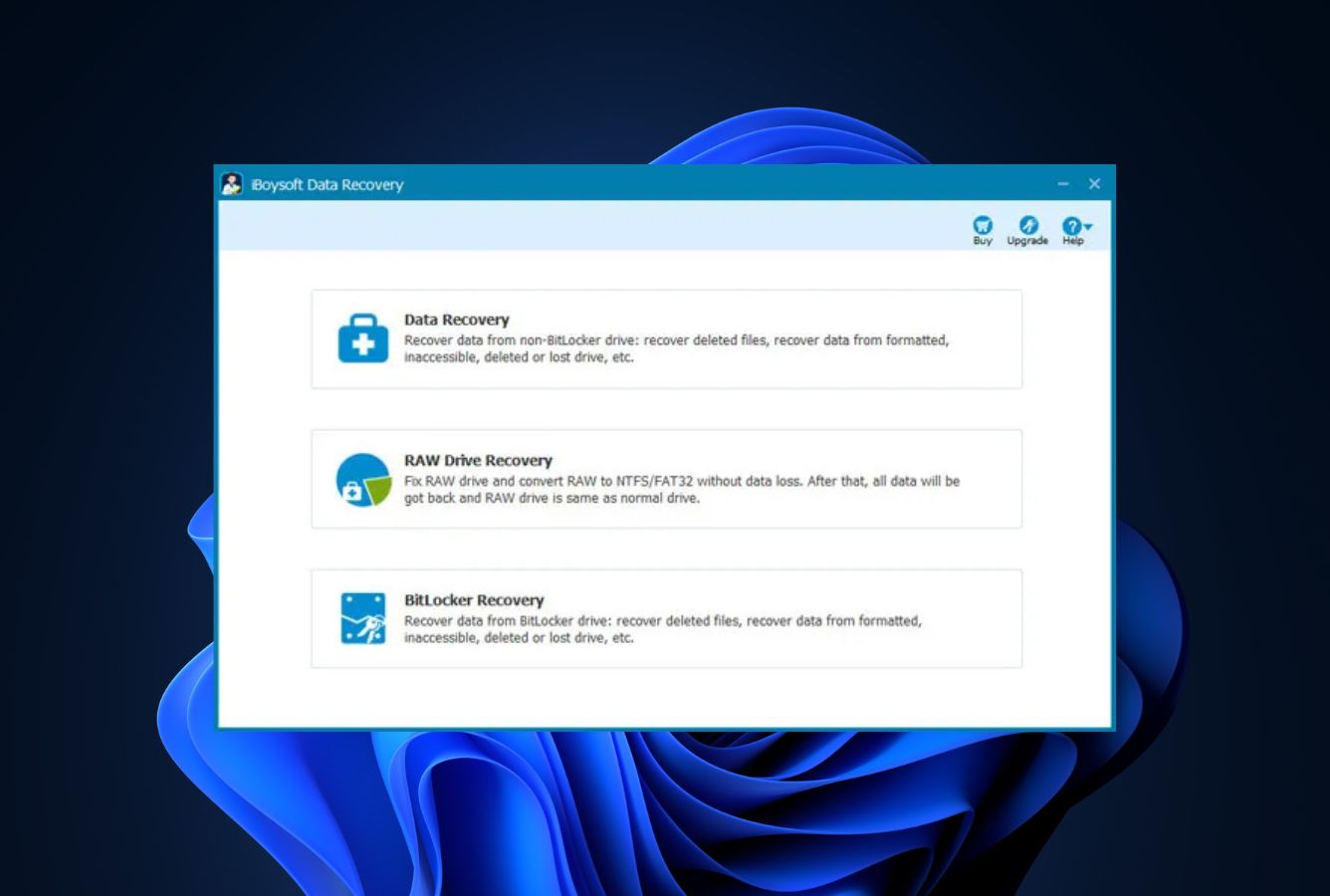
From the main screen, pick the appropriate scan mode. For deleted files, use the standard Data Recovery mode. For BitLocker-encrypted drives, choose BitLocker Recovery (you’ll need either the password or the 48-digit recovery key — iBoysoft cannot break BitLocker encryption without one of these). For unmountable drives showing as RAW in Windows, use the dedicated RAW Recovery module.
Run the scan
iBoysoft runs a Quick Scan first (filesystem metadata, fast, preserves filenames) followed by Deep Scan if needed (signature-based, slower, finds more on formatted or damaged drives). The dual-stage scan is automatic. The lost-partition scanner runs as a separate option if your target volume isn’t visible.
Preview, then license
Browse results and use Preview (right-click a file or click Preview) to verify file integrity for documents, photos, videos, and audio. The free trial stops here — to actually restore files, you need a paid license. Once licensed, select files and click Recover, saving to a different drive than the source.
Unlike EaseUS or Recuva, iBoysoft does not give you any free recovery to test outcomes. The Preview function is your only way to verify the tool found your files in usable form before committing to the $69.95/year Basic license. Spend time in preview — it’s how you avoid paying for a tool that can’t recover what you need.
Who iBoysoft Is For
iBoysoft Data Recovery fits two specific users well in 2026. The first is anyone facing a BitLocker-encrypted drive with intact credentials (password or 48-digit recovery key) where files have been deleted, the partition has gone RAW, or the drive has been formatted. iBoysoft’s BitLocker Recovery is a dedicated first-class module — you provide the credential, iBoysoft decrypts and scans the volume, and you get standard recovery results from inside an encrypted partition. Most general-purpose recovery tools either don’t support BitLocker, support it as an afterthought, or charge for an upgraded edition to access it. iBoysoft includes BitLocker recovery in the Basic edition.
The second is anyone whose Windows drive has gone “RAW” — Windows refuses to mount it because the filesystem header is corrupt, but the data is still physically present. iBoysoft’s RAW Partition Repair module attempts to fix the filesystem structure so Windows can mount the drive again. When it works, this is the cleanest possible outcome — the drive comes back online with its original folder structure intact. When it doesn’t, iBoysoft falls back to standard signature-based recovery. This dual approach is uncommon at consumer pricing.
A concrete example: a user opens their external NTFS HDD and Windows shows “You need to format the disk before you can use it.” Files are still there, but the filesystem is unreadable. iBoysoft’s RAW Partition Repair tries to restore the partition structure. If it succeeds, the drive mounts normally. If not, the standard recovery module finds files via signature scanning. Either way, the user has more options than a general-purpose tool would provide. Add legacy OS support — iBoysoft runs on Windows XP and Server 2003 onward — and this is also the right tool for users on older systems where modern competitors won’t install.
For users without BitLocker volumes or RAW partitions, anyone whose primary criterion is recovery rate per dollar, or anyone who wants free recovery before committing to a paid license, the next section explains why mainstream alternatives are typically a better fit.
iBoysoft’s Strengths in Real-World Use
Aggregated independent evaluation and verified user feedback consistently surface four areas where iBoysoft Data Recovery earns its place against larger general-purpose competitors.
BitLocker recovery is a genuine first-class module
Most consumer recovery tools either don’t support BitLocker volumes or treat them as an edge case behind upgraded editions. iBoysoft includes BitLocker Recovery in the Basic edition as a primary scan mode — you choose it from the main screen, provide either the password or the 48-digit recovery key, and the software decrypts and scans the volume in one workflow. Independent evaluation consistently rates this as one of the cleanest BitLocker recovery experiences in the consumer category. Critically, iBoysoft cannot break BitLocker encryption without credentials — but for the common scenario where you have the password but the volume itself is damaged or files are deleted, this is exactly the right tool.
RAW partition repair, not just recovery
When a Windows drive goes RAW (filesystem unreadable, Windows demands formatting), most tools just scan via signatures and recover individual files. iBoysoft has a dedicated RAW Partition Repair module that attempts to actually fix the filesystem structure so Windows can mount the drive again — restoring it to a working state with original folder structure intact. When the repair succeeds, this is dramatically cleaner than standard recovery (which loses filenames and folders). When it fails, iBoysoft falls back to signature scanning. This dual approach matches what professional tools like DMDE and R-Studio offer at higher price points.
Broad legacy OS support
iBoysoft supports Windows XP, Vista, 7, 8, 8.1, 10, 11, plus Windows Server 2003 through 2019. Few modern recovery tools install cleanly on XP or older Server versions — most have dropped support entirely. For users on legacy systems (still common in industrial, embedded, and small-business environments), this is genuinely valuable. The Mac edition runs on macOS 10.9 onward, similarly broad. Combined with WinPE bootable media support in the Professional and Technician editions for unbootable systems, iBoysoft has unusually wide platform reach.
Lost partition scanner and 1000+ file types
The lost partition scanner finds deleted or invisible partitions across the whole disk and lets you recover from them — useful when the partition table itself has been damaged or repartitioning has gone wrong. Vendor documentation lists 1000+ file types supported across 2000+ device types. Independent verification confirms broad coverage of standard formats (DOCX, PDF, JPEG, MP4, ZIP) plus a wide range of camera RAW formats. The custom file signature feature lets advanced users add formats not in the built-in library, though this requires a working sample file.
Where iBoysoft Falls Short
The friction is concentrated around free-tier behavior, interface, and general-purpose recovery rates.
No free recovery — preview-only trial is the biggest weakness
The single most consistent complaint across user reviews is that iBoysoft’s free trial does not include any actual recovery — only scanning and previewing. Competitors handle this differently: EaseUS gives you 2 GB of free recovery, Stellar gives you 1 GB, Recuva gives you unlimited free recovery on simple scenarios, even Disk Drill gives you 100 MB. iBoysoft gives you zero. This means you cannot verify the recovered file actually works (only that it appears in preview) before committing to a $69.95/year subscription. For users with a single critical file to recover, this is a significant value barrier — competitors let you test the actual outcome before paying.
Dated interface and awkward navigation
Independent reviewers and verified user feedback consistently flag interface issues. The application window is static — cannot be resized or made fullscreen on most Windows configurations. There’s a single result view (no thumbnail/list/tree alternatives), no auto-resume when reconnecting an unplugged drive, and navigating between scans requires returning to the home screen. The iBoysoft UI hasn’t received the modernization treatment that Disk Drill, EaseUS, or Wondershare Recoverit have invested in over the past few years. For technical users this is tolerable; for non-technical users it adds friction at a price point where alternatives are smoother.
General-purpose recovery rates are mid-tier, not category-leading
iBoysoft’s specialized modules (BitLocker, RAW partition) are excellent. Its general-purpose recovery — NTFS deleted files, formatted drives, corrupted partitions — is mid-tier. Independent evaluation places iBoysoft below Disk Drill, R-Studio, and EaseUS on standard recovery scenarios, particularly on exFAT and on RAW camera formats from SD cards. For users without BitLocker or RAW partition needs, the specialized modules don’t help, and the general-purpose recovery doesn’t justify the price relative to better-performing alternatives.
Edition tiering and refund-policy friction
iBoysoft sells three editions (Basic at $69.95/year, Professional with WinPE bootable media, Technician at $299/year for 5 PCs with commercial use). The feature mapping between editions is not always clear from the website — buyers report landing on Basic, hitting WinPE limits, and needing to upgrade. G2 and Capterra reviewers also flag the refund policy as restrictive in practice — vendor documentation references “lifetime free technical support” but the refund terms are less generous than the EaseUS or Stellar money-back guarantees. For broader category context, see our best Windows data recovery software roundup.
iBoysoft Data Recovery Capability Summary
How iBoysoft Data Recovery performs, capability by capability, based on aggregated independent evaluation and vendor documentation:
| Capability | Tier | Notes |
|---|---|---|
| BitLocker encrypted-drive recovery | Excellent | First-class module — needs password or 48-digit key |
| RAW partition repair | Excellent | Dedicated module to fix unmountable drives — uncommon at this price |
| Lost partition scanner | Very Good | Whole-disk scan finds deleted or invisible partitions |
| Legacy Windows OS support | Very Good | Windows XP through 11, Server 2003–2019 — unusually broad |
| WinPE bootable media (Pro/Tech) | Good | Available in Professional and Technician editions only |
| NTFS deleted-file recovery | Good | Reliable on recently-deleted NTFS with intact MFT |
| Recycle Bin recovery | Very Good | Strong on recently-emptied Recycle Bin scenarios |
| Document recovery (DOCX/PDF/XLSX) | Very Good | Reliable across both Quick and Deep Scan modes |
| Formatted-drive recovery | Good | Above-average on damaged file systems; mid-tier overall |
| Corrupted-partition recovery | Good | Strong on damaged metadata; folder structure typically lost |
| USB / FAT32 recovery | Good | Solid on FAT32 removable drives |
| SD card & camera recovery | Fair | JPEG strong; RAW camera formats inconsistent on exFAT |
| RAW camera format breadth | Fair | Standard CR2/ARW/NEF supported; narrower than dedicated photo tools |
| NTFS / FAT32 / exFAT support | Good | Three Windows-native filesystems covered; no APFS/HFS+ on Windows build |
| 1000+ file type support | Very Good | Broad signature library per vendor docs; custom signatures available |
| Custom file signatures | Good | Train new signatures from sample files for proprietary formats |
| File preview before recovery | Good | Documents, photos, videos, audio — essential for trial verification |
| Interface polish | Fair | Functional but dated — static window, single result view |
| Free recovery tier | Limited | Trial allows scan + preview only — no recovery without payment |
| File repair (photo / video) | Not supported | Recovery only — partially corrupted files stay damaged |
| Disk health / S.M.A.R.T. monitoring | Not supported | No disk health features — separate tool needed |
Tier scale: Excellent / Very Good / Good / Fair / Limited / Not supported. Aggregated from independent evaluation and verified user feedback, 2026.
iBoysoft Data Recovery Cost
iBoysoft Data Recovery for Windows uses an edition-based subscription model with three tiers. The free trial requires no payment details and allows unlimited scanning and file preview — but no actual recovery. The Basic edition starts at $69.95/year and unlocks recovery on a single computer. The Professional edition adds WinPE bootable media support for recovering from unbootable Windows systems (price varies). The Technician edition is $299/year for 5 PCs with commercial use rights — appropriate for IT service providers handling multiple client machines. Monthly subscriptions and lifetime licenses are also available; the vendor offers all three duration options across the editions.
The Basic at $69.95/year is competitive against Disk Drill ($89/year) and Stellar ($79.99/year), but the lack of any free recovery shifts the value calculus. EaseUS gives 2 GB free, Stellar gives 1 GB, Recuva gives unlimited free recovery on simple scenarios — iBoysoft gives nothing without paying. The Technician edition at $299/year for 5 PCs is reasonably priced for IT pros and service providers who need multi-machine licensing. For one-time consumer recoveries, the alternatives mostly offer better value unless you specifically need BitLocker or RAW partition recovery. For broader category context, see our best hard drive recovery software guide.
iBoysoft vs. Competitors (2026)
| Tool | BitLocker | RAW Partition | NTFS Recovery | Free Tier | Price |
|---|---|---|---|---|---|
| iBoysoft ← | Excellent | Excellent | Good | Preview only | $69.95/yr |
| Disk Drill | Good | Good | Excellent | 100 MB | $89/yr |
| EaseUS DRW | Good | Good | Very Good | 2 GB | $99.95/yr |
| Stellar | Good | Fair | Very Good | 1 GB | $79.99/yr |
| R-Studio | Good | Very Good | Excellent | <256 KB | $79.99 perpetual |
| DMDE | Not supported | Very Good | Very Good | 4,000 files/dir | $48 perpetual |
Tier assignments based on aggregated independent evaluation and verified user feedback. 2026.
Try iBoysoft Free Trial
Scan and preview recoverable files. BitLocker and RAW partition support included.
iBoysoft Features & Tools
iBoysoft Data Recovery’s feature philosophy centers on doing a small number of things well rather than building an all-in-one disk toolkit. Where competitors load up on disk health monitoring, partition management, file shredding, and S.M.A.R.T. dashboards, iBoysoft focuses on the recovery workflow plus its two specialty modules. The result is a lean, focused tool that handles its core scenarios competently — but lacks the supplementary features that bigger competitors include as table stakes.
The most distinctive feature is the BitLocker Recovery module. This is not “BitLocker is supported” as a checkbox — it’s a primary scan mode you select from the main screen. You provide the BitLocker password or 48-digit recovery key, iBoysoft decrypts the volume in memory, and runs standard recovery against the decrypted contents. Critically, iBoysoft cannot break BitLocker encryption without credentials — but for the common scenario where you have access but the volume is damaged or files are deleted, this is exactly the right workflow. Most general-purpose tools either don’t handle BitLocker or require an expensive upgrade.
RAW Partition Repair is the second standout. When Windows shows a drive as RAW (filesystem header damaged, Windows refuses to mount it), iBoysoft’s dedicated module attempts to actually fix the filesystem structure rather than just signature-scanning for files. When the repair succeeds, the drive remounts with original folder structure intact — the cleanest possible outcome. When it fails, iBoysoft falls back to standard recovery. This dual approach is uncommon at consumer pricing.
iBoysoft User Reviews
iBoysoft Data Recovery has moderate review coverage with stronger Mac coverage than Windows. G2 rates the product 4.3/5 from a small number of reviews (some incentivized — disclosed on the platform). Verified user feedback across G2, Capterra, GetApp, and the Reddit r/datarecovery community converges on a consistent pattern: BitLocker recovery, RAW partition repair, and broad legacy OS support earn praise; the preview-only free trial, dated interface, and edition-tier confusion produce the friction. The Mac edition’s Macworld Best of 2025–26 Award lifts the brand’s overall reputation, though Windows reviewers note the Windows build hasn’t received equivalent UI investment. For broader category context, see our best hard disk repair tools roundup which ranks tools focused on unmountable partition scenarios.
Recovered files from a BitLocker drive after an OS reinstall. Provided the recovery key, ran the BitLocker module, got everything back. Most other tools couldn’t handle this scenario.
RAW Partition Repair fixed my external drive after Windows said it needed formatting. Saved hours of signature-scan recovery and folder reorganization.
Free trial finds files but you can’t recover anything without paying. Annoying — competitors give you 1-2 GB free. Make sure preview shows the file is intact before buying.
Works on our old Windows Server 2008 box where newer tools wouldn’t even install. Saved a project from a dying RAID array. Worth the $69.95 just for that.
UI feels stuck in 2017. Window can’t be resized, single result view, no way to resume scans. Did the job but wasn’t smooth.
Macworld award-winning Mac version. Windows version is a sibling but less polished. Bought Basic at $69.95/year — works for what I needed.
Verified user feedback converges: the specialty modules (BitLocker, RAW partition) earn the strongest praise; the preview-only trial, dated UI, and edition-tier confusion are the consistent friction points. The free trial preview is the verification path before paying — exercise it thoroughly. Editorial reviews follow a similar pattern, acknowledging the genuine specialty strengths while flagging the value calculus relative to free-recovery competitors.
When to Choose Something Else
iBoysoft’s BitLocker and RAW partition modules are real strengths, but several common scenarios are better served by other tools:
Frequently Asked Questions
Is iBoysoft Data Recovery free?+
Is iBoysoft Data Recovery safe to use?+
Can iBoysoft Data Recovery recover formatted drives?+
Does iBoysoft Data Recovery work on Windows 11?+
Is iBoysoft Data Recovery better than Disk Drill?+
Can iBoysoft Data Recovery recover photos from an SD card?+
How much does iBoysoft Data Recovery cost?+
Final Verdict
iBoysoft Data Recovery for Windows earns its niche through two genuine specialties: BitLocker encrypted-drive recovery and RAW partition repair. Both are first-class dedicated modules — not afterthoughts behind upgraded editions — and both are uncommon at consumer pricing. The Lost Partition Scanner, broad legacy Windows OS support (XP through 11, plus Server 2003–2019), and 1000+ file types add genuine breadth. The Mac edition’s Macworld Best of 2025–26 Award reflects real product quality, though the Windows build hasn’t received equivalent UI investment.
The pricing and value math is mixed. Basic at $69.95/year is competitive on paper against Disk Drill ($89/year) and Stellar ($79.99/year), but iBoysoft’s preview-only free trial is the biggest weakness — competitors all let you verify actual recovery (1-2 GB free) before paying, iBoysoft does not. For users with BitLocker volumes, RAW partitions, or legacy Windows systems, iBoysoft is the right tool. For everyone else, the alternatives offer free recovery to verify outcomes plus stronger general-purpose recovery rates and more polished interfaces.
Choose iBoysoft if your scenario specifically needs BitLocker recovery, RAW partition repair, or runs on a legacy Windows version where modern competitors won’t install. Use the free trial extensively first — preview every file you need before paying, since the paid license is your only way to actually restore them. For general-purpose Windows recovery without those specific needs, the alternatives in our best Windows data recovery software roundup deliver more value.
About the Authors


This review reflects independent research by the datarecoveryfix.com team. Some links on this page may earn the site a referral fee at no extra cost to you — this does not influence our ratings, rankings, or editorial conclusions. If you believe any claim is inaccurate, contact us at contact@datarecoveryfix.com.