8 Best DMDE Alternatives – Quick Comparison
Eight ranked alternatives plus one greyed baseline row showing where DMDE itself sits on each criterion. The “vs DMDE” column reflects editorial evaluation of how decisively each alternative addresses DMDE’s specific limitations – the 1990s-era interface that independent reviewers have described as “stuck in the 90s,” the steep learning curve and menu-driven navigation, the limited file preview (only common image formats), and the per-directory free-tier cap (4,000 files at a time). Not an in-house benchmark.
| Tool | vs DMDE | Interface | Platforms | Free Limit | Starting Price | Best For |
| Disk Drill |
Excellent |
Modern wizard |
Win + Mac (3 devices) |
500 MB |
$89 / yr · $149 lifetime |
Friendliest cross-platform replacement |
| EaseUS Data Recovery Wizard |
Excellent |
Wizard |
Win + Mac |
2 GB |
$99.95 / yr · $149.95 lifetime |
Friendliest wizard with broadest free tier |
| Stellar Data Recovery |
Very Good |
Modern wizard |
Win + Mac |
1 GB |
$59.99 / yr Standard |
Most current UI design |
| R-Studio |
Excellent |
Pro/forensic |
Win + Mac + Linux |
Files < 256 KB |
$79.99 lifetime |
Pro-tier with network recovery |
| UFS Explorer |
Very Good |
Pro/forensic |
Win + Mac + Linux |
Files < 256 KB |
$69.95 lifetime |
Direct pro-tier match |
| MiniTool Power Data Recovery |
Good |
Modular wizard |
Win + Mac |
1 GB |
$69 / yr · $89 lifetime |
Wizard with bootable WinPE rescue |
| DiskGenius |
Good |
Power-user |
Windows only |
Files < 64 KB |
$69.90 lifetime |
Combined Windows recovery + disk mgmt |
| Recuva |
Good |
Free wizard |
Windows only |
Unlimited (free) |
Free · $24.95 Pro |
Free Windows wizard |
| DMDE (baseline) |
|
Menu-driven (1990s) |
Win + Mac + Linux + DOS |
4,000 files / dir |
$20 / yr · $48 lifetime |
Power-user RAID + partition recovery |
The greyed bottom row shows DMDE itself as the baseline being compared against. Not a recommendation. All prices come from the vendors’ current product pages and reflect single-license tiers, with bundle discounts excluded.
8 Best DMDE Alternatives – In-Depth Reviews
1. Disk Drill – Best Overall DMDE Alternative
4.78
★★★★★
Modern wizard interface replacing DMDE’s 1990s-era menu layout, with a $149 lifetime cross-platform license.
PlatformsWindows + macOS
Free trial500 MB (Win)
Devices3 per license
From$89 / yr
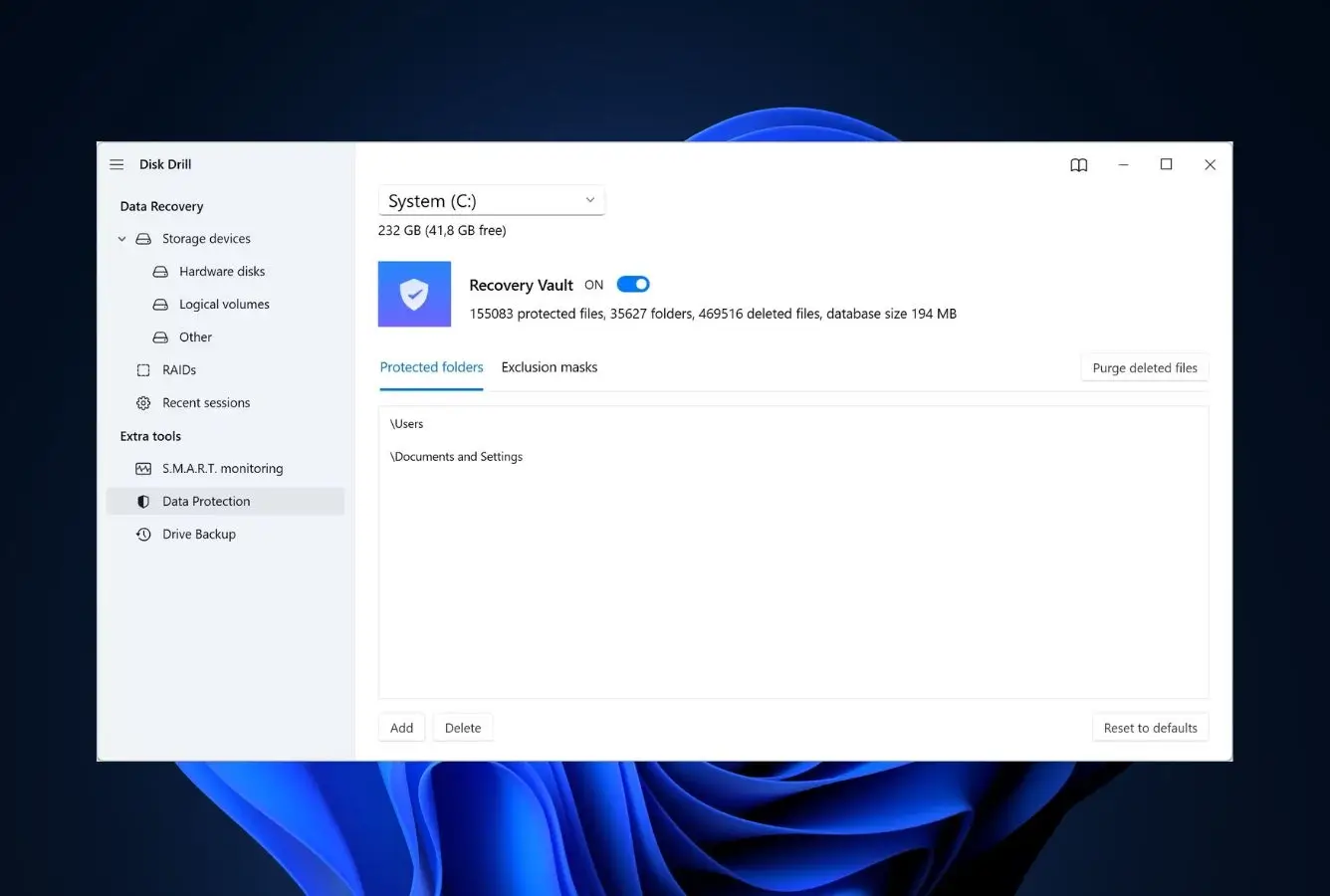
Disk Drill is the best overall DMDE alternative for users who want comparable recovery results without DMDE’s 1990s-era interface, menu-driven navigation, or steep learning curve. Where DMDE surfaces physical devices, partition entries, sectors, and cluster sizes up front, Disk Drill ships a modern wizard with a single “Search for lost data” button on the home screen. The Universal Scan combines Quick, Deep, and Signature passes in one run, with file preview during scanning across all common formats (DMDE previews only common image formats), recovery-chance estimates next to each detected file, and selective recovery. The recovery engine handles APFS, HFS+, NTFS, FAT, exFAT, and ext4 with metadata-aware recovery. The lifetime PRO license at $149 activates on Windows and macOS across three devices. The trade-off is on the pro side: Disk Drill has no native RAID reconstruction, no integrated hex editor, and a smaller signature library than DMDE Pro – users who need those should look at R-Studio at #4 or stay on DMDE Professional.
✓ Pros
- Modern wizard interface replacing DMDE’s 1990s-era menu-driven layout
- Full file preview across all common formats (DMDE previews only common images)
- $149 lifetime PRO covers Windows + macOS across 3 devices
- Five-minute learning curve replacing DMDE’s steep technical onboarding
- Byte-level disk imaging, Recovery Vault, S.M.A.R.T. monitoring
- Advanced Camera Recovery for fragmented multimedia files
✕ Cons
- No native RAID reconstruction (DMDE Professional handles full RAID 0/1/4/5/6)
- No integrated hex editor (DMDE includes a built-in disk editor)
- 500 MB Windows free trial is more restrictive than DMDE’s 4,000-files-per-directory free
- Smaller signature library than DMDE for severely damaged drives
Recovery Power
Comparable to DMDE on healthy drives, weaker on RAID and severely corrupted volumes.
For everyday recovery scenarios on healthy drives (deleted files, formatted drives, RAW partitions, accidentally emptied Recycle Bin or Trash), Disk Drill produces results comparable to DMDE with file preview and recovery-chance estimates surfaced more clearly than DMDE’s technical results pane. The metadata-aware engine on NTFS, APFS, HFS+, exFAT, FAT, and ext4 preserves original filenames and folder structure. Where DMDE pulls clearly ahead is on RAID work (DMDE Professional handles full 0/1/4/5/6 reconstruction with automatic detection, where Disk Drill has no native RAID support), severely corrupted file systems where DMDE’s engine goes deeper than consumer tools, and the integrated hex editor for low-level disk inspection. For non-RAID consumer recoveries, Disk Drill is the friendlier path; for technical work involving RAID or partition reconstruction, DMDE retains the depth advantage.
Interface & Experience
The friendliest interface ranked here, where DMDE sits at the most technical end of the spectrum.
Disk Drill’s home screen presents a list of drives accompanied by friendly file-type icons and a single “Search for lost data” call-to-action. DMDE opens to a menu-driven layout that surfaces physical devices, partition entries, sectors, file-system signatures, and cluster sizes front and center, with no wizard layer. Disk Drill takes the opposite approach: scan results land in friendly category buckets (photos, video, audio, documents, archives) with inline preview on images and documents, a recoverability score next to each item, and per-file checkboxes for choosing what to restore. There are no menu hierarchies, no manual scan parameter dialogs, no hex tables, no RAID-builder controls to navigate. The transition cost from DMDE to Disk Drill is roughly five minutes for a competent user, in exchange for losing access to DMDE’s power-user controls.
Price & Value
$149 lifetime versus DMDE Standard’s $48, with friendlier interface and broader device coverage.
Disk Drill PRO is $89/yr or $149 lifetime; DMDE Standard is $48 lifetime per OS. The price gap (roughly $100) is meaningful and reflects what each delivers: DMDE is the unit-economics winner on raw recovery capability, while Disk Drill’s premium buys a friendlier interface, cross-platform coverage from one license (Windows + macOS on three devices), full file preview, and a polished UX. For users who only need one platform and don’t mind DMDE’s technical interface, the savings are real. For users who want a modern wizard interface, full file preview, and cross-platform coverage from one license, Disk Drill earns the premium. DMDE Multi-OS at $133 lifetime is the closer cross-platform comparison and meaningfully cheaper than Disk Drill, but with the trade-off of the dated UI.
2. EaseUS Data Recovery Wizard – Best Wizard-Style Workflow
4.62
★★★★★
Three-step wizard workflow replacing DMDE’s menu-driven interface, with 2 GB free recovery and full file preview.
PlatformsWindows + macOS
Free recovery2 GB
LicenseSub or lifetime
From$99.95 / yr
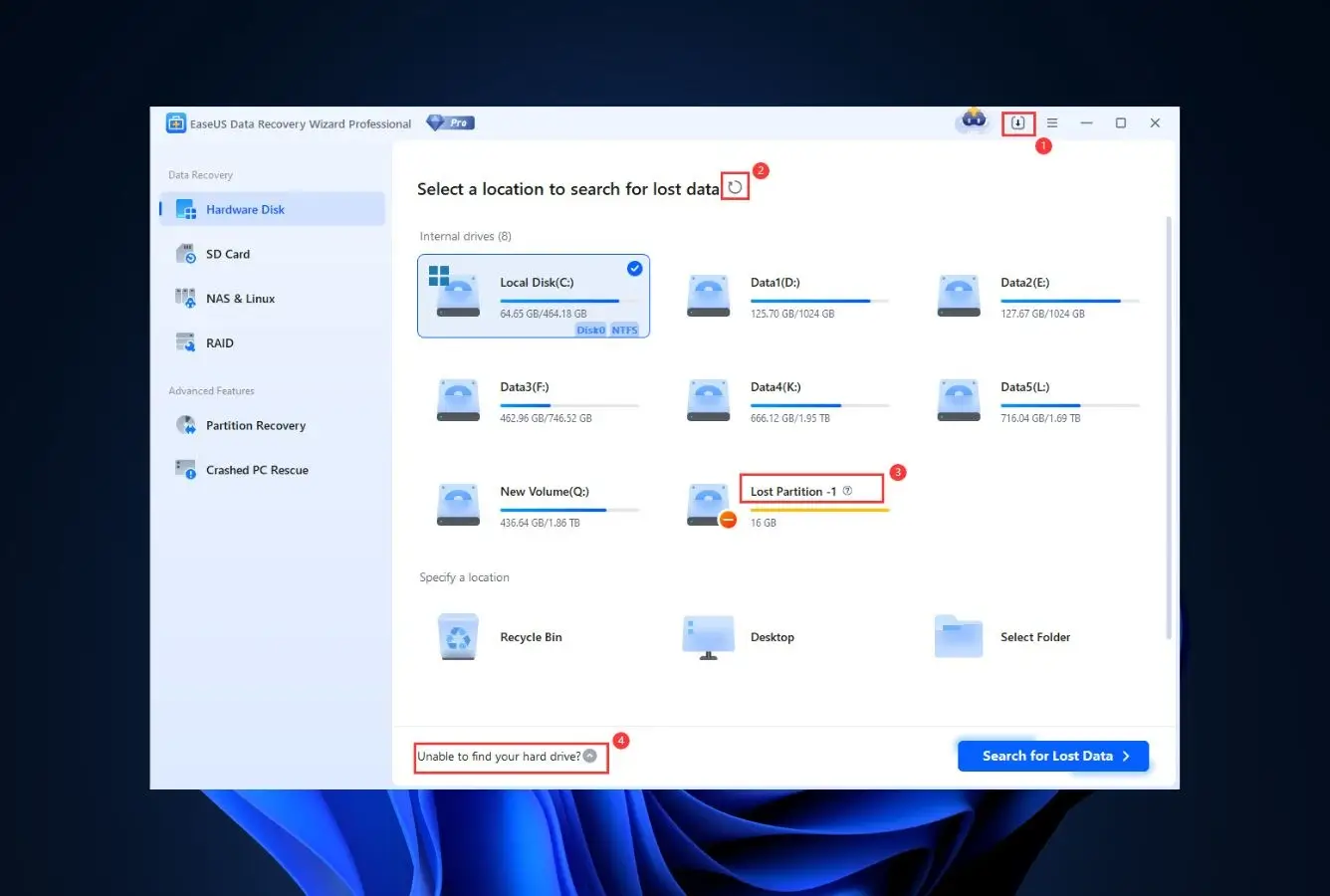
EaseUS Data Recovery Wizard is the right pick for users coming from DMDE who want the friendliest wizard-style workflow with broad file-system support and a meaningful free tier. Where DMDE surfaces a menu-driven layout that exposes sectors, signatures, and cluster sizes up front, EaseUS presents the most beginner-friendly wizard on this list: select a drive, choose a scan mode, browse results in a tree view with full file preview across common formats and recovery-chance estimates (good/poor/unrecoverable). The recovery engine reads APFS, HFS+, exFAT, NTFS, FAT, and ReFS read/write on both Mac and Windows builds, which covers the same file-system breadth as DMDE Standard for non-RAID work. The 2 GB free recovery is more flexible than DMDE Free’s 4,000-files-per-directory cap (no need to break a large recovery into multiple sessions), and EaseUS Pro at $149.95 lifetime is the friendlier-tier premium versus DMDE’s $48 lifetime Standard. The trade-off is on the pro side: EaseUS has no native RAID reconstruction, no integrated hex editor, and a smaller signature library than DMDE Pro.
✓ Pros
- The friendliest wizard UX ranked here, where DMDE sits at the most technical end
- Full file preview across all common formats (DMDE previews only common images)
- 2 GB free recovery, more flexible than DMDE Free’s 4,000-files-per-directory cap
- Comparable file-system breadth to DMDE Standard for non-RAID consumer work
- Preserves original filenames and folder structure on healthy drives
✕ Cons
- No native RAID reconstruction (DMDE Professional handles full RAID 0/1/4/5/6)
- No integrated hex editor (DMDE includes a built-in disk editor)
- $149.95 lifetime is over 3x DMDE Standard’s $48 lifetime
- Aggressive in-app upsells during free-tier scans
Recovery Power
Comparable to DMDE on healthy drives, weaker on RAID and severely corrupted volumes.
For everyday recovery scenarios on healthy drives (deleted files, formatted volumes, RAW partitions), EaseUS produces results comparable to DMDE Standard with the practical advantage of file preview and recovery-chance estimates surfaced more cleanly than DMDE’s technical results pane. The metadata-aware engine on NTFS, APFS, HFS+, exFAT, FAT, and ReFS handles the same file systems DMDE handles for non-RAID work. Where DMDE pulls clearly ahead is on RAID arrays (full 0/1/4/5/6 reconstruction with automatic detection in DMDE Professional, where EaseUS has no native RAID), severely corrupted file systems where DMDE’s engine goes deeper, and the integrated hex editor for low-level disk inspection. For consumer recoveries that don’t involve RAID or partition reconstruction, EaseUS is the friendlier path; for technical work, DMDE retains the depth advantage.
Interface & Experience
The single biggest UX upgrade from DMDE on this list.
EaseUS’s wizard model is immediately clear: select a drive, set a scan mode, then explore the results tree with filtering and inline preview. Compared to DMDE’s menu-driven layout that surfaces sectors, signatures, and cluster sizes up front, EaseUS hides the technical machinery and surfaces only what the user needs to choose what to recover. Scan output displays per-file recovery-chance ratings (good/poor/unrecoverable), and the selective-recovery model requires ticking each desired file before pressing Recover. For DMDE users whose primary objection is the dated interface, EaseUS offers the lowest cognitive load on this list. The trade-off is that EaseUS does not expose any of DMDE’s power controls (RAID builder, hex editor, custom file signatures, manual scan parameters).
Price & Value
$149.95 lifetime versus DMDE Standard’s $48, with friendliness as the premium.
EaseUS Data Recovery Wizard Pro is $99.95/yr or $149.95 lifetime; DMDE Standard is $48 lifetime per OS. The price gap (over 3x) is significant and reflects what each delivers: DMDE is the unit-economics winner on raw recovery capability, while EaseUS’s premium buys a wizard interface, full file preview, and a polished UX. The 2 GB free tier is more flexible than DMDE Free’s 4,000-files-per-directory cap (no need to break large recoveries into multiple sessions). For users who don’t mind DMDE’s technical interface, DMDE wins on price; for users who specifically need a wizard workflow and full file preview, EaseUS earns the premium.
3. Stellar Data Recovery – Best Modern UI Replacement
4.48
★★★★½
A 2026-era wizard interface that contrasts sharply with DMDE’s 1990s-era menu layout, at $59.99/yr Standard.
PlatformsWindows + macOS
Free recovery1 GB
LicenseAnnual sub
From$59.99 / yr
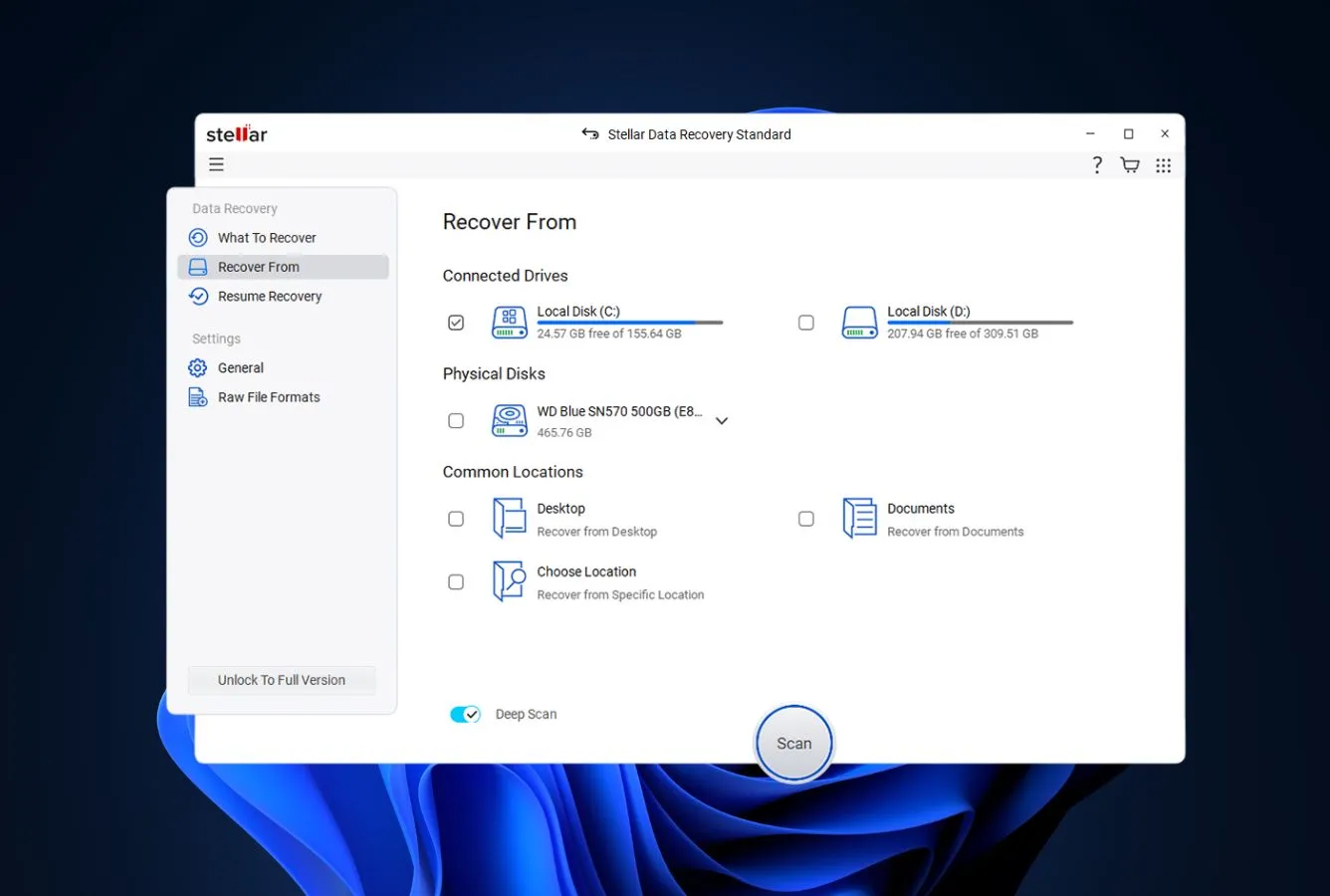
Stellar Data Recovery is the strongest pick for DMDE users whose primary objection is the dated 1990s-era interface and who want a 2026-era wizard UI without paying Disk Drill or EaseUS lifetime pricing. Stellar greets the user with a “what did you lose” home screen built around file-type cards (documents, photos, videos, audio, emails), then displays scan results with real-time file preview as the scan progresses and per-file recovery-quality estimates. Compared to DMDE’s menu-driven layout, which surfaces sectors, file-system signatures, and cluster sizes up front, Stellar surfaces only what the user needs to choose what to recover. The recovery engine supports NTFS, FAT, FAT32, exFAT, ext2/3/4, HFS+, and APFS read/write on both platforms, comparable to DMDE Standard for non-RAID work. Stellar Standard at $59.99/yr is competitive with DMDE Standard’s $48 lifetime on first-year cost. For users who specifically need DMDE’s RAID and partition recovery capability, Stellar is not the right replacement; for users who just want their files back, Stellar is the friendlier path.
✓ Pros
- The most modern wizard interface ranked here, contrasting with DMDE’s dated layout
- 1 GB free recovery, more flexible than DMDE’s 4,000-files-per-directory cap
- File-system breadth comparable to DMDE Standard for non-RAID work
- Active development cycle with frequent updates and visual refreshes
- Live file preview during scan (DMDE previews only common image formats)
✕ Cons
- No native RAID at Standard tier (DMDE Pro handles full RAID 0/1/4/5/6)
- No integrated hex editor (DMDE includes a built-in disk editor)
- Subscription-first pricing, no lifetime at Standard level
- Mac and Windows sold as separate licenses (DMDE Multi-OS is one license)
Recovery Power
Comparable to DMDE on healthy drives, weaker on RAID and severely corrupted volumes.
Stellar’s Windows and Mac builds both run metadata-aware recovery on NTFS, FAT, exFAT, APFS, HFS+, and ext2/3/4 file systems, providing full read/write recovery across the entire supported set. For everyday recovery scenarios on healthy drives, the engine produces results comparable to DMDE Standard. Where DMDE pulls clearly ahead is on RAID arrays (full 0/1/4/5/6 with automatic detection in DMDE Professional, where Stellar Standard has no RAID support), severely corrupted file systems where DMDE’s engine goes deeper, the integrated hex editor for low-level disk inspection, and partition recovery from boot-sector backups. Stellar’s Pro and Premium tiers add RAID reconstruction and video repair, but DMDE Professional remains the deeper tool for partition-level technical work.
Interface & Experience
The most modern wizard interface ranked here, where DMDE sits at the most dated end.
Stellar’s launch screen presents a “what did you lose” prompt with file-type cards for documents, photos, videos, audio, and emails, all built in current 2026 design language. DMDE opens to a menu-driven layout that surfaces physical devices, partition entries, sectors, and cluster sizes up front, with no wizard layer and a visual style closer to 1995 than 2026. The contrast is dramatic: where DMDE assumes the user knows what a file system, signature, or sector range is, Stellar assumes the user knows what kind of files they lost. Every result row shows a recovery-quality label, file preview is rendered in real time during the scan instead of waiting for it to finish, and individual files can be checked off before clicking Recover. The trade-off is configurability: Stellar does not surface anything as deep as DMDE’s power controls (RAID builder, hex editor, custom file signatures, manual scan parameters).
Price & Value
$59.99/yr Standard is competitive with DMDE Standard’s $48 lifetime over a single year.
Stellar Standard at $59.99/yr is competitive with DMDE Standard’s $48 lifetime on first-year cost (the gap is roughly $12). The 30-day refund window protects against buyer’s remorse. Pricing on Stellar is structured to push Standard buyers into annual renewals – the perpetual-license option only becomes available once you step up to the Pro tier ($89.99/yr and beyond). For users replacing DMDE specifically because of the dated interface and recurring one-off recovery needs, Stellar Standard is the cheapest path to a modern wizard UI. For users who plan to use the tool over multiple years, DMDE Standard’s lifetime tier remains the better unit economics. For users who specifically need DMDE’s pro features (RAID, hex editor, partition recovery), Stellar is not the right replacement; R-Studio at #4 or UFS Explorer at #5 are the closer matches.
4. R-Studio – Best for Pros Who Want a Modern Pro Tool
4.42
★★★★½
DMDE’s closest match on RAID and engine depth, with a more current visual rendering and better-supported network recovery.
PlatformsWin + Mac + Linux
FreeFiles < 256 KB
LicenseLifetime
From$79.99 lifetime
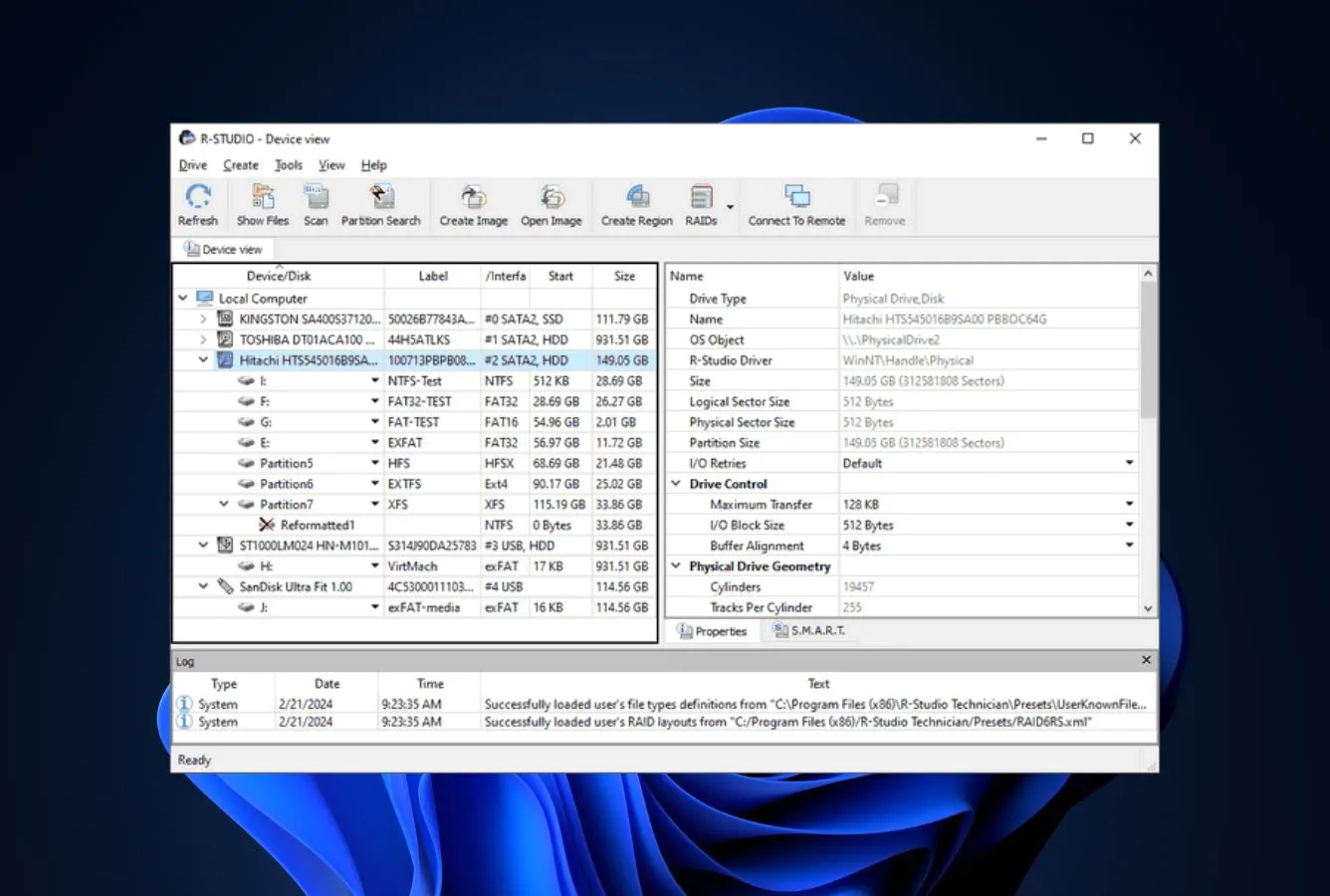
R-Studio from R-Tools Technology is the closest pro-tier alternative for DMDE users who want comparable engine depth on RAID and forensic work but with a more current visual rendering and broader network recovery capability. The two products serve a near-identical professional audience (IT technicians, data recovery specialists, forensic analysts) with overlapping feature sets: full RAID 0/1/4/5/6 reconstruction (matching DMDE Professional), automatic RAID parameter detection, integrated hex editor, disk imaging with bad-sector handling, virtual disk support (VMDK, VHD, VHDX, VDI), and cross-platform Windows / Mac / Linux builds. Where R-Studio differentiates: integrated network recovery via R-Studio Agent (3DES encrypted, no equivalent in DMDE), forensic file format support (E01/EWF and AFF in Technician edition), and a tri-pane interface that, while still dense, renders more cleanly on modern high-DPI displays than DMDE’s menu-driven layout. The trade-off is the free tier: R-Studio Free recovers only files under 256 KB, where DMDE Free covers 4,000 files per directory.
✓ Pros
- Full RAID 0/1/4/5/6 reconstruction with automatic parameter detection
- Network recovery via R-Studio Agent (DMDE has no network recovery)
- $79.99 Standalone lifetime, comparable to DMDE Professional ($95)
- Cleaner display rendering than DMDE on modern high-DPI screens
- Forensic file format support (E01/EWF/AFF) in Technician tier
- Cross-platform Windows + Mac + Linux from one codebase
✕ Cons
- Interface is still dense and technical, not a wizard tool
- Free tier preview-only (under 256 KB); DMDE Free is meaningfully more useful
- R-Studio Standalone covers one OS only (separate licenses for Win / Mac / Linux)
- Steeper learning curve than consumer wizards
Recovery Power
Comparable to DMDE Professional on RAID and engine depth, ahead on network recovery.
R-Studio matches DMDE Professional on full RAID 0/1/4/5/6 reconstruction, automatic RAID parameter detection, custom layouts, and forensic-grade engine depth on severely corrupted file systems. The two products handle the same range of professional scenarios (RAID arrays, formatted drives, partition recovery, disk imaging with bad-sector handling). Where R-Studio pulls clearly ahead is network recovery: the R-Studio Agent system encrypts data over 3DES and can recover from remote drives without pumping gigabytes over the network for every analysis pass. DMDE has no network recovery equivalent. R-Studio Technician also adds forensic file format support (E01/EWF/AFF) that DMDE does not offer. For RAID and partition work without network requirements, the engines are interchangeable in practice.
Interface & Experience
Tri-pane technical layout, but renders more cleanly than DMDE’s menu-driven UI.
R-Studio opens to a tri-pane layout (drive list, file system tree, metadata) that surfaces forensic information up front – the same general design philosophy as DMDE, with no wizard layer. Where R-Studio differs visually: the rendering is more current on modern high-DPI displays, the menus are slightly less nested, and the icon set feels closer to 2020 than to 1995. For DMDE users who already work in the technical interface and just want a more polished visual experience, R-Studio is the lowest-friction transition. For users who want a wizard-style interface, R-Studio is not the answer; Disk Drill, EaseUS, or Stellar are friendlier paths.
Price & Value
$79.99 Standalone, comparable per-license to DMDE Professional.
R-Studio Standalone is $79.99 lifetime per OS, with one year of free upgrade support included. R-Studio Network ($179.99 lifetime) adds the Agent for remote recovery; R-Studio Technician ($899 lifetime) adds forensic file formats and unlimited customer recoveries. DMDE Professional is $95 lifetime for one OS family, $133 for Multi-OS. The per-license price gap is small (~$15) but the feature mix differs: DMDE Multi-OS at $133 covers all four supported operating systems from one license, while R-Studio sells separate per-OS licenses. For users who specifically need one OS plus network recovery, R-Studio Network is the better value; for cross-platform without network, DMDE Multi-OS wins on price.
5. UFS Explorer – Best Pro-Tier Alternative
4.45
★★★★½
A direct DMDE Pro-tier match with broader Linux file-system support and a more current visual rendering.
PlatformsWin + Mac + Linux
Free trial256 KB / file
LicenseLifetime
From$69.95 lifetime
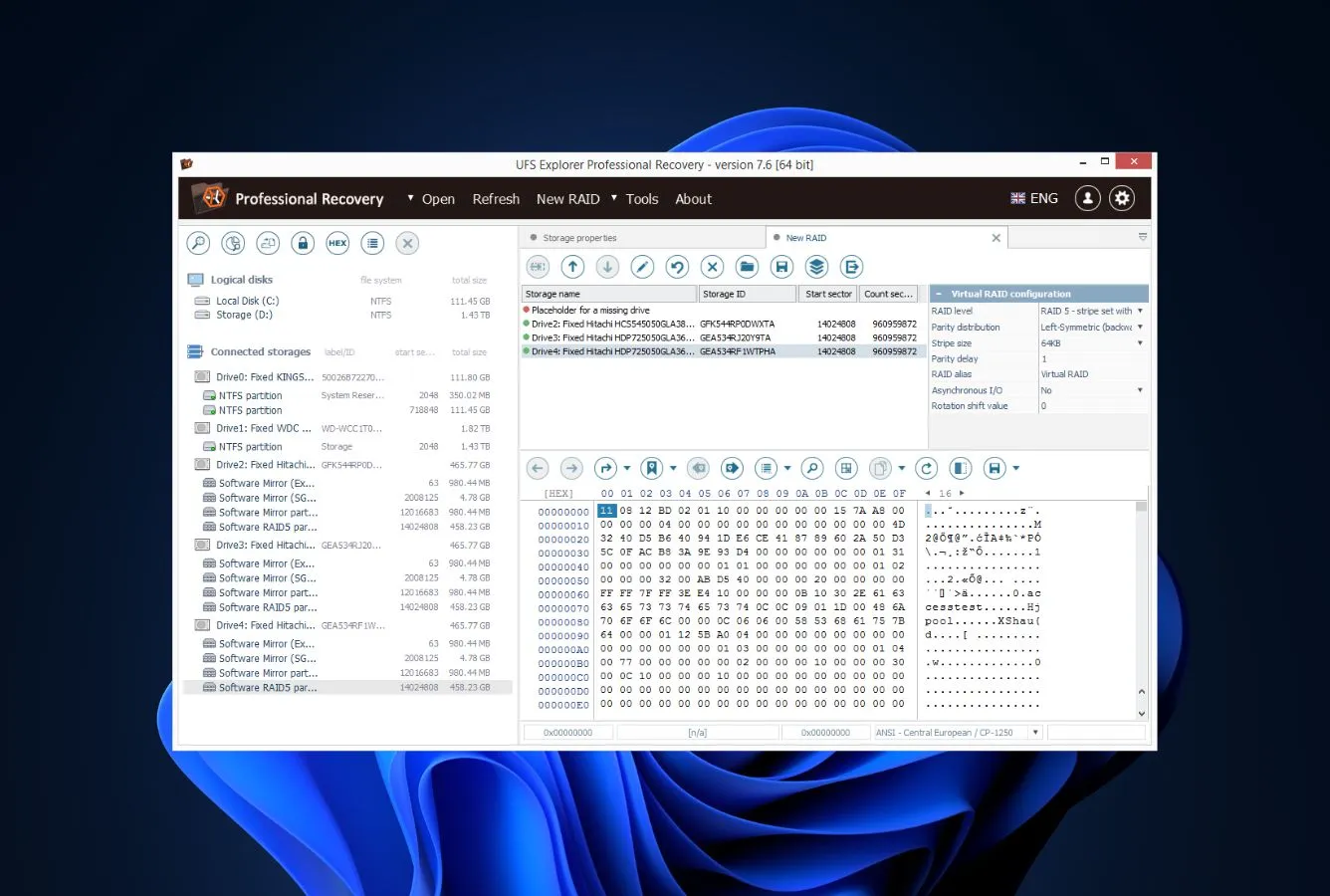
UFS Explorer from SysDev Laboratories is the closest direct alternative to DMDE Professional for users who want comparable engine depth and feature parity from a different vendor with a more current interface. The two products serve a near-identical audience (data recovery technicians, IT professionals, forensic analysts) with overlapping feature sets: deep file-system support across NTFS, ReFS, APFS, HFS+, ext2/3/4, XFS, BtrFS, ZFS, UFS (broader than DMDE’s coverage on Linux file systems); full RAID 0/1/4/5/6 reconstruction with custom layouts; virtual disk support (VMDK, VHD, VHDX, VDI); hex editor; disk imaging. Where UFS Explorer differentiates from DMDE: the visual rendering is meaningfully more current than DMDE’s 1990s-era look, and the menu structure is less nested. The Standard Recovery edition at $69.95 lifetime is competitive with DMDE Standard ($48 lifetime), with the price gap reflecting UFS Explorer’s broader file-system coverage and more current UI.
✓ Pros
- Direct feature parity with DMDE Professional in the pro tier
- Broader Linux file-system coverage (BtrFS, ZFS, XFS) than DMDE
- Full RAID 0/1/4/5/6 with custom layouts, comparable to DMDE Professional
- More current visual rendering than DMDE’s 1990s-era interface
- $69.95 lifetime Standard Recovery, competitive with DMDE Standard ($48)
✕ Cons
- Interface is still dense and technical, not a wizard tool
- Free trial is preview-only (256 KB per file), more restrictive than DMDE Free’s 4,000 files / dir
- Smaller user community and fewer tutorials than DMDE
- $69.95 lifetime is roughly 45% more than DMDE Standard
Recovery Power
Comparable to DMDE Professional across the board, ahead on Linux file-system breadth.
UFS Explorer’s engine is in the same professional tier as DMDE Professional, with comparable depth on damaged file systems, RAID arrays, and partition-table reconstruction. On Linux file systems specifically, UFS Explorer pulls ahead: native support for BtrFS, XFS, ZFS, and UFS that DMDE handles less comprehensively. Both tools cover standard RAID levels (0/1/4/5/6) plus nested layouts, and both include custom-layout builders for handling non-standard array configurations. On severely corrupted drives, the signature-based recovery engines on each side perform at a comparable level. For users who specifically need Linux file-system depth (especially BtrFS or ZFS), UFS Explorer is the stronger pick; for everything else, the two engines are interchangeable in practice.
Interface & Experience
Dense and technical like DMDE, but with a meaningfully more current visual rendering.
UFS Explorer’s main window follows a similar power-user layout pattern as DMDE (drive list, file system tree, metadata panes), with a comparably steep learning curve and the same technical-first approach. Where UFS Explorer differs visually: the rendering is more current on modern high-DPI displays, the icon set feels closer to 2020 than to 1995, and the menu structure is slightly less nested. For DMDE users who want comparable engine depth in a more polished visual framework, the transition is straightforward because the underlying mental model translates directly. Users seeking a wizard interface should look elsewhere – UFS Explorer doesn’t provide one; Disk Drill, EaseUS, or Stellar are the wizard alternatives.
Price & Value
Standard Recovery at $69.95 lifetime, competitive with DMDE Standard’s $48.
UFS Explorer’s Standard Recovery edition at $69.95 lifetime is priced 45% above DMDE Standard ($48 lifetime), with the gap reflecting broader Linux file-system support and a more current visual rendering. The Professional Recovery edition at $599.95 lifetime targets a higher tier than DMDE Professional ($95) with deeper RAID and forensic capability for serious data recovery shops. For users who specifically need broader Linux file-system support (BtrFS, ZFS, XFS) and don’t mind the price gap, UFS Explorer is the better pick. For users who only need the recovery engine depth, DMDE Standard at $48 lifetime remains hard to beat. For Multi-OS coverage, DMDE Multi-OS at $133 is meaningfully cheaper than UFS Explorer’s separate per-OS Standard licenses.
6. MiniTool Power Data Recovery – Best Wizard with Bootable Rescue
4.25
★★★★½
A modular wizard at $89 lifetime, friendlier than DMDE’s menu-driven layout, with bootable WinPE rescue media.
PlatformsWindows + macOS
Free recovery1 GB
LicenseSub or lifetime
From$69 / yr
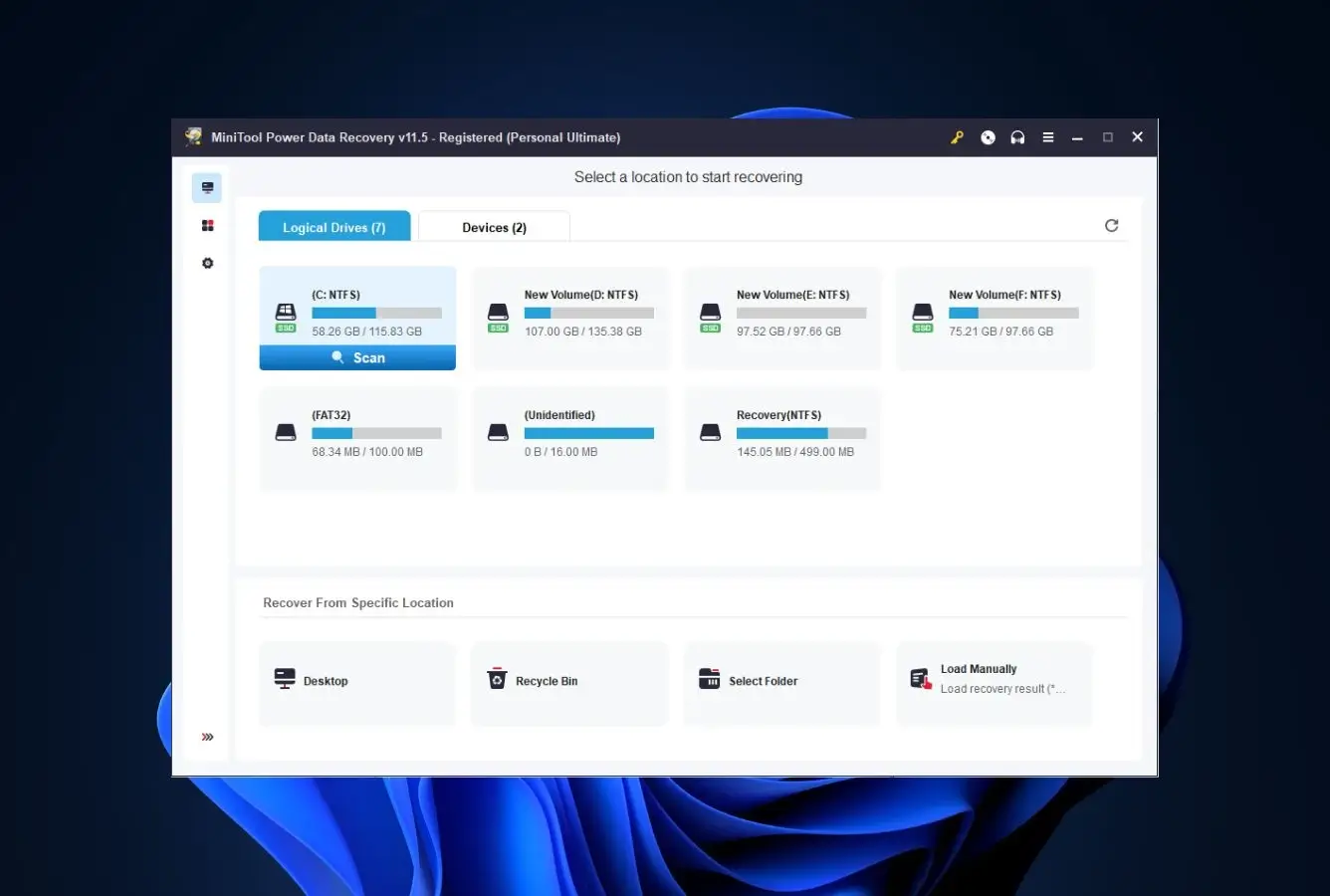
MiniTool Power Data Recovery is the right pick for DMDE users who want a modular wizard interface and a friendlier UX without going as polished as Stellar or as feature-rich as Disk Drill. Recovery in MiniTool is divided into discrete modules – Undelete, Damaged Partition, Lost Partition, Digital Media, and CD/DVD – each tailored to a specific loss scenario. The split matches how everyday users frame their problem – “I deleted a file” or “I lost a partition” – rather than expecting a single unified scan flow like DMDE’s menu-driven layout. Where DMDE surfaces sectors, signatures, and cluster sizes up front, MiniTool surfaces the right recovery module up front based on what was lost. The 1 GB free tier is more flexible than DMDE Free’s 4,000-files-per-directory cap (no need to break large recoveries into multiple sessions). Pricing is $69/yr or $89 lifetime, almost double DMDE Standard’s $48 lifetime but with the wizard interface as the premium. The Personal Deluxe tier adds bootable WinPE rescue media for unbootable Windows systems, a feature DMDE does not include.
✓ Pros
- Modular wizard interface friendlier than DMDE’s menu-driven layout
- 1 GB free recovery, more flexible than DMDE Free’s 4,000-files-per-directory cap
- Bootable WinPE rescue media on Windows (DMDE does not offer this)
- Full file preview across common formats, plus selective recovery
- $89 lifetime Personal, with Deluxe adding RAID at $99/yr
✕ Cons
- $89 lifetime is roughly 85% more than DMDE Standard’s $48 lifetime
- No RAID reconstruction at Personal tier (DMDE Pro handles full RAID 0/1/4/5/6)
- No integrated hex editor (DMDE includes a built-in disk editor)
- Engine depth on severely damaged drives is shallower than DMDE
Recovery Power
Comparable to DMDE Standard on healthy drives, weaker on RAID and severely corrupted volumes.
For everyday recovery scenarios (deleted files on healthy media, recently formatted drive, simple RAW partition), MiniTool produces results comparable to DMDE Standard for non-technical recovery work. Where DMDE pulls clearly ahead is on damaged drives: DMDE’s engine depth on heavily-corrupted file systems is meaningfully deeper than MiniTool’s, and DMDE Professional’s full RAID 0/1/4/5/6 reconstruction with automatic detection has no equivalent in MiniTool’s Personal tier (Personal Deluxe at $99/yr adds basic RAID). The bootable WinPE rescue media is the one meaningful capability advantage MiniTool has over DMDE: for unbootable Windows systems, MiniTool’s rescue media addresses a scenario DMDE does not include in any tier.
Interface & Experience
A friendlier modular GUI than DMDE’s menu-driven layout.
The home screen presents recovery modules as large cards with plain-English labels (“Undelete Recovery”, “Lost Partition Recovery”, “Digital Media Recovery”) – more readable for non-technical users than DMDE’s menu-driven layout, which surfaces physical devices, partition entries, and signature data up front. Click a card, pick a drive, the scan starts. Found items populate a tree view supporting inline file preview, per-file recoverability badges, and individual checkboxes for granular recovery selection. For DMDE users whose primary objection is the dated interface and steep learning curve, MiniTool offers a lower-friction transition path than going to denser tools like R-Studio or UFS Explorer. The trade-off is that MiniTool does not expose any of DMDE’s power controls (RAID builder, hex editor, custom file signatures, manual scan parameters).
Price & Value
$89 lifetime versus DMDE Standard’s $48, with friendliness and bootable rescue as the premium.
MiniTool Personal at $69/yr or $89 lifetime sits 85% above DMDE Standard’s $48 lifetime price. The premium reflects the friendlier wizard interface, full file preview, and bootable WinPE rescue media that DMDE doesn’t offer. Personal Deluxe ($99/yr) adds RAID. The 1 GB free tier is more flexible than DMDE Free’s 4,000-files-per-directory cap. For Windows users specifically replacing DMDE because the dated interface is the friction point, MiniTool’s wizard plus rescue media is a meaningful capability advantage. For users who actually need DMDE’s pro feature set (RAID, hex editor, custom signatures), MiniTool is not the right replacement; R-Studio at #4 or staying on DMDE Pro is the better path.
7. DiskGenius – Best Windows Combined Tool
4.32
★★★★½
A single Windows-only product combining file recovery, partition recovery, and complete disk-management tooling under a lifetime license.
PlatformWindows only
Free tierFiles < 64 KB
LicenseLifetime
From$69.90 Standard
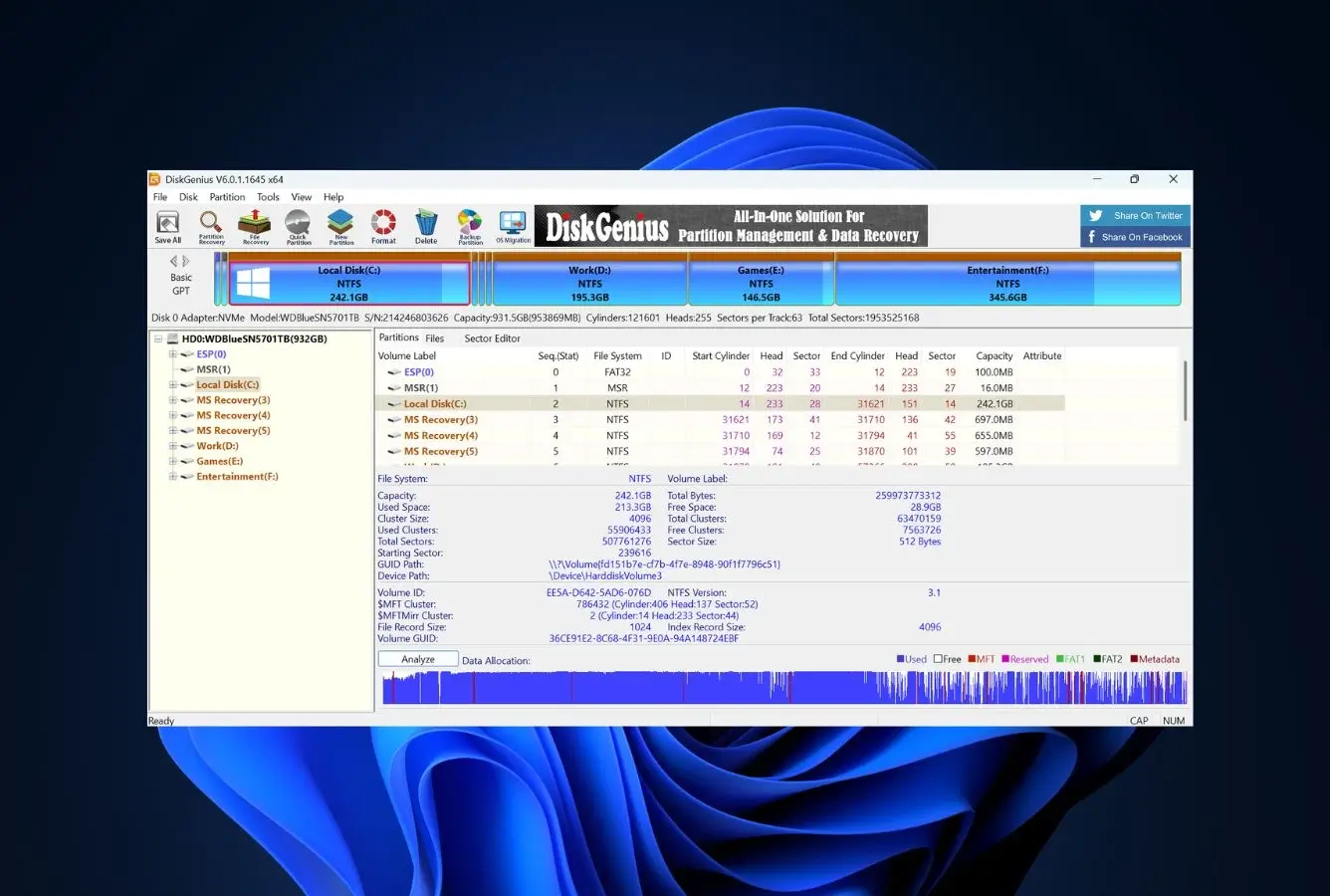
DiskGenius from Eassos is the right pick for Windows users who want a single tool combining file recovery, partition recovery, and disk-management features that DMDE handles partially or not at all. The recovery engine reads NTFS, FAT, FAT32, exFAT, ext2/3/4, and Linux LVM with metadata-aware recovery, and falls back to signature-based scanning when the file system is gone – comparable engine depth to DMDE for non-RAID Windows-only work. Where DiskGenius differentiates from DMDE: full disk-management tools (resize, move, split, merge, format, clone, bad-sector repair, virtual disk creation, bootable WinPE drive creation), Smart Partition Recovery that tests detected partitions for file-system integrity before write-back, and a friendlier-than-DMDE interface that’s closer to a power-user wizard than a 1990s-era menu console. The trade-off is platform reach: DiskGenius is Windows-only with no Mac, Linux, or DOS build, where DMDE runs across all four operating systems from the Multi-OS license.
✓ Pros
- File recovery + partition recovery + disk management in one Windows tool
- Friendlier UI than DMDE without going full wizard
- $69.90 lifetime Standard, comparable to DMDE Standard ($48) plus capability premium
- Bootable WinPE drive creation built in (DMDE has no rescue media)
- Bad-sector detection and repair, which DMDE does not offer
- Smart Partition Recovery tests partitions before write-back
✕ Cons
- Windows-only; no Mac, Linux, or DOS builds (DMDE Multi-OS covers all four)
- RAID support requires Professional tier ($99.90), where DMDE Pro is $95
- Hex editor is shallower than DMDE’s integrated disk editor
- Free tier file recovery cap (64 KB) is more restrictive than DMDE Free’s 4,000 files / dir
Recovery Power
Comparable to DMDE on Windows file recovery and partition reconstruction, with broader disk-management tools.
For everyday Windows recovery work (deleted files, formatted drives, lost partitions, file-system corruption), DiskGenius produces results comparable to DMDE Standard with the practical advantage of a friendlier workflow and Smart Partition Recovery that tests detected partitions for file-system integrity before write-back (DMDE does not offer this). Where DiskGenius adds capability DMDE doesn’t have: bootable WinPE rescue media, bad-sector repair, disk cloning with bootloader handling, virtual disk creation, and partition resize/move/merge tools. Where DMDE pulls ahead: RAID work (DMDE Professional handles full RAID 0/1/4/5/6 with automatic detection at $95, where DiskGenius Pro’s RAID is shallower at $99.90), the integrated hex editor for low-level disk inspection, cross-platform reach (DMDE runs on Windows + Mac + Linux + DOS, DiskGenius is Windows-only), and the more generous free tier (4,000 files / dir versus 64 KB).
Interface & Experience
The tidiest combined-tool interface for partition work plus recovery on Windows.
DiskGenius opens to a graphical disk layout panel (drives, partitions, free space) along the top with a file/folder tree view occupying the lower portion of the window. Starting a file recovery in DiskGenius is done either from a toolbar button or via the right-click context menu on a drive or partition. Recovery results populate the existing tree view, with checkboxes for selection, file preview support, and per-item recovery-chance signals. Advanced tools – RAID, hex editor, virtual disk, bootable media – live behind tabs and right-click context menus, which keeps the primary view tidy for users running only basic recovery operations. The transition cost from DMDE is roughly an hour: the underlying mental model (devices, partitions, file systems, allocation blocks) translates directly from DMDE’s menu-driven layout, and the surface controls feel meaningfully friendlier without going full wizard. The visual rendering is current Windows 10/11 design language, where DMDE’s look is closer to 1995.
Price & Value
$69.90 lifetime versus DMDE Standard’s $48, with combined disk management as the premium.
DiskGenius Standard at $69.90 lifetime is priced 45% above DMDE Standard’s $48 lifetime. The price gap reflects the combined toolset: DiskGenius bundles file recovery, partition recovery, and full disk management (resize, clone, format, bad-sector repair, bootable media) in one license, where DMDE focuses on the recovery engine itself. The Professional tier at $99.90 lifetime adds RAID support, comparable to DMDE Professional ($95). For Windows-only users specifically replacing DMDE because they want disk-management tools alongside recovery, DiskGenius covers more ground per dollar. For users who only need the recovery engine and don’t need cross-platform reach, DMDE Standard at $48 lifetime remains the unit-economics winner. For users who need cross-platform coverage, DMDE Multi-OS at $133 lifetime is the right path; DiskGenius doesn’t compete there.
8. Recuva – Best Free Windows-Only Wizard
4.32
★★★★½
Free unlimited recovery on Windows, the friendliest free Windows wizard for users who don’t need DMDE’s power-user feature set.
PlatformWindows only
Free recoveryUnlimited
LicenseFree or $24.95 Pro
FromFree
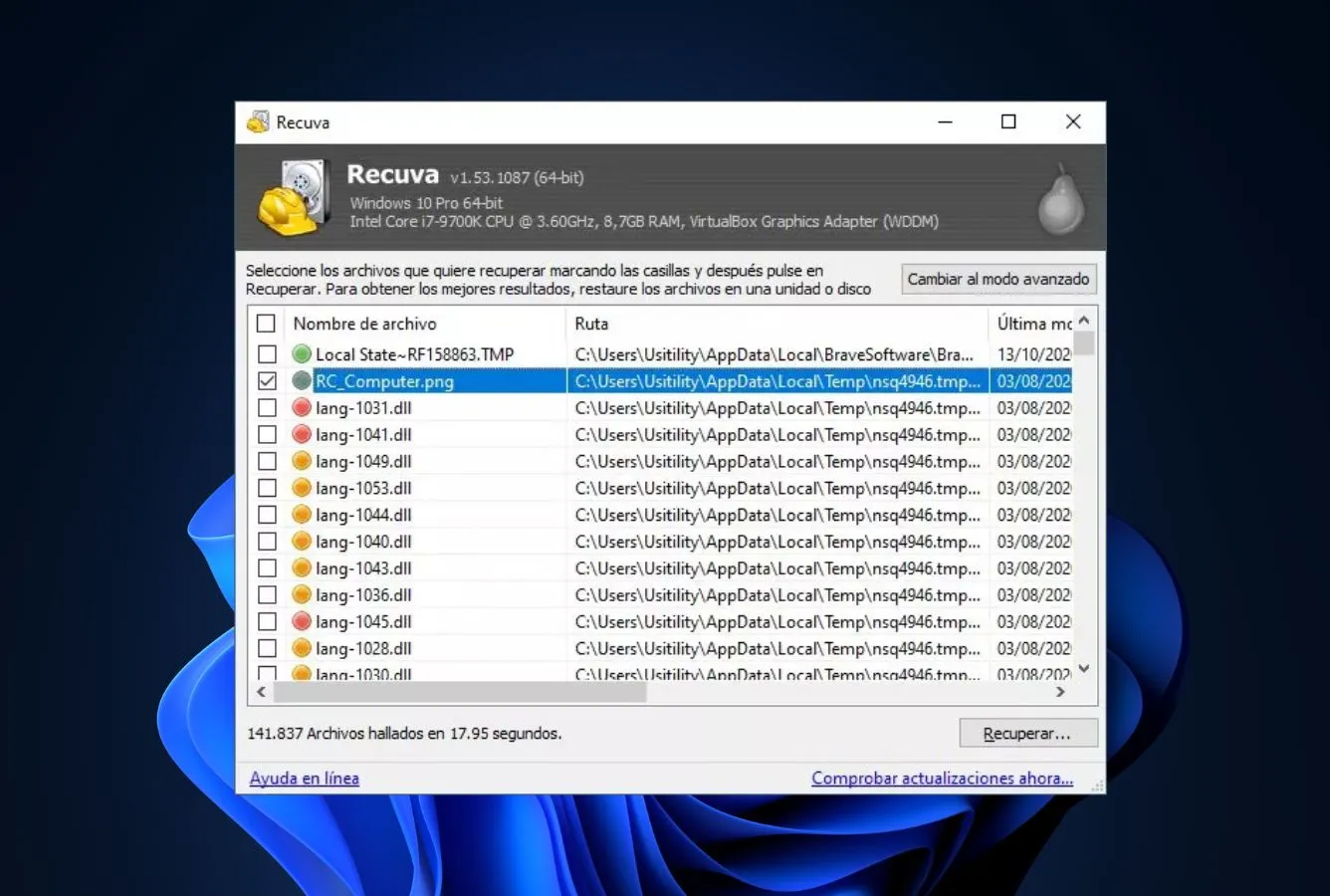
Recuva from Piriform is the budget alternative for Windows users who don’t need DMDE’s power-user feature set (RAID, hex editor, partition recovery from boot-sector backups) and are recovering occasional deleted files from a healthy drive. Where DMDE Free caps recovery at 4,000 files per directory (with unlimited repetitions), Recuva Free is genuinely unlimited on Windows with no recovery cap, no time limit, and no upgrade prompts on completed recoveries. Recuva’s interface walks the user through a friendly wizard prompting “what kind of files do you want to recover,” uses file-type cards to capture the answer, then presents results in a tree view with inline file preview, traffic-light recoverability badges (green / yellow / red), and selective recovery checkboxes. The trade-offs versus DMDE are platform reach (Windows-only, where DMDE Multi-OS runs on Windows + Mac + Linux + DOS), engine depth on damaged drives, and power features (no RAID, no hex editor, no partition recovery from boot-sector backups). For occasional Windows recoveries where DMDE’s feature set is overkill, Recuva delivers what most users need at zero cost.
✓ Pros
- Free unlimited recovery on Windows (no per-directory cap like DMDE Free’s 4,000 files)
- Friendlier wizard interface than DMDE’s menu-driven layout
- Recuva Pro at $24.95 lifetime is the cheapest paid tier ranked here
- File preview and color-coded recovery-chance indicators in scan results
- Preserves filenames and folder structure on healthy drives
✕ Cons
- Windows-only, where DMDE Multi-OS runs on Windows + Mac + Linux + DOS
- No RAID reconstruction, no integrated hex editor (DMDE has both)
- Engine depth on damaged drives is shallower than DMDE
- Development cycle has been slow since the 2023 freeze
Recovery Power
Sufficient for healthy Windows drives, weaker than DMDE everywhere else.
In everyday Windows situations – deleted files on healthy NTFS or FAT volumes, an emptied Recycle Bin, or a recently formatted drive whose file system is intact – Recuva delivers the practical outcome most home users are looking for. Where DMDE pulls clearly ahead is essentially everywhere else: damaged drives (DMDE’s engine handles heavily-corrupted file systems and RAW partitions far better), RAID arrays (Recuva has no RAID support, where DMDE Pro handles full RAID 0/1/4/5/6), partition recovery from boot-sector backups, hex editing for low-level disk inspection, and Mac / Linux / DOS coverage (Recuva is Windows-only). For occasional Windows recoveries on healthy drives where DMDE’s feature set is overkill, Recuva delivers the same practical outcome at zero cost; for any other scenario, DMDE or one of the other ranked alternatives is the right tool.
Interface & Experience
The most polished wizard layout in the free Windows recovery space.
Recuva opens with a two-step guided wizard: first pick the lost file category (pictures, music, documents, video, archives, emails, or all), then specify the location (a particular drive, removable media, the Recycle Bin, or anywhere on the system). After two clicks, the scan begins. The recovered file listing appears in a tree-style layout with checkboxes per file, color-coded recoverability indicators (green / yellow / red), preview pane support for images and documents, and detailed selection controls. The contrast with DMDE is dramatic: where DMDE surfaces a menu-driven layout with sectors, signatures, and cluster sizes up front, Recuva surfaces a wizard that asks questions in plain English. The trade-off is that Recuva exposes none of DMDE’s power controls (no RAID, no hex editor, no partition recovery from boot-sector backups, no custom file signatures, no Mac / Linux / DOS builds).
Price & Value
Truly free and uncapped on Windows, with the lowest cost-per-recovery of anything ranked above.
There’s no recovered-data cap on Recuva Free, no expiration on use, and no upsell prompts triggered when a recovery finishes. Stepping up to Recuva Pro for $24.95 (lifetime) layers in virtual-hard-drive scanning and automatic updates; for routine recovery, the free version handles most needs. The honest comparison against DMDE is that DMDE Free covers 4,000 files per directory (with unlimited repetitions), while Recuva Free has no per-directory cap and no upgrade prompts. For Windows-only users replacing DMDE specifically because the dated interface and steep learning curve are overkill for occasional home recovery, Recuva is the cheapest credible swap. For users who need the cross-platform reach DMDE Multi-OS includes (Windows + Mac + Linux + DOS), Recuva is not the right replacement; Disk Drill or staying on DMDE are the closer matches.
How We Evaluate DMDE Alternatives
A switching ranking is easy to do badly. Plenty of competing articles simply re-order the same handful of tools the author monetizes and present that as a fresh ranking. We approached this differently: we identified the four most-cited reasons users switch away from DMDE – the 1990s-era interface that independent reviewers have described as “stuck in the 90s,” the steep learning curve and menu-driven navigation with no wizard layer, the limited file preview (only common image formats), and the per-directory free-tier cap (4,000 files at a time) that requires multiple sessions for large recoveries – then evaluated each alternative on how decisively it solves those specific gaps alongside core recovery capability. Research is layered across vendor documentation for baseline feature claims, independent external testing for cross-validation of recovery performance, and community feedback on Reddit (r/datarecovery, r/techsupport) and Trustpilot for real-world support and outcome patterns. Rankings reflect that aggregate, not an in-house benchmark.
📚
Vendor Documentation
Each candidate’s official product pages, pricing tiers, supported file systems, license terms, and changelogs, the baseline held at arm’s length until cross-referenced against external testing.
🧪
Independent Testing
Cross-referenced findings from external testing labs and editorial reviews on recovery rates, scan times, and engine behavior, used to separate marketing claims from repeatable outcomes.
💬
Community Feedback
Reddit threads on r/datarecovery and r/techsupport, Trustpilot complaint patterns, G2 ratings, and SourceForge community posts, for real-world support, billing, and recovery-outcome signals.
Test platforms: Windows 10 and 11 (24H2), macOS 14 Sonoma and 15 Sequoia, plus the major Linux distributions where applicable. Key factors weighted: modern interface design vs DMDE’s 1990s-era menu layout (25%), file preview substance vs DMDE’s common-images-only limit (20%), file recovery capability (20%), RAID and partition recovery capability (15%), free-tier flexibility vs DMDE’s 4,000-files-per-directory cap (10%), and total cost of ownership (10%).
01
Modern Interface Design (25%)
UI design relative to DMDE’s 1990s-era menu-driven layout. Wizard-style tools with file-type cards and current visual frameworks score highest; tools with dense technical interfaces score lower for the consumer use case.
02
File Preview Substance (20%)
Whether the tool offers full file preview across common formats versus DMDE’s common-images-only preview. Tools with live preview during scan and broad-format preview (Disk Drill, EaseUS, Stellar) score highest.
03
File Recovery Capability (20%)
Engine performance on signature-based and metadata-aware recovery passes, scored across both healthy and damaged drive scenarios. Tools that match DMDE’s engine depth on consumer scenarios score highest; tools that match it on professional scenarios are rare.
04
RAID & Partition Recovery (15%)
Whether the tool matches DMDE Professional’s RAID 0/1/4/5/6 reconstruction with automatic detection plus partition recovery from boot-sector backups. Most consumer tools score zero here; R-Studio, UFS Explorer, and DiskGenius Pro score highest.
05
Free-Tier Flexibility (10%)
Whether the no-cost tier offers usable recovery without DMDE’s per-directory 4,000-file cap. Tools with unlimited free recovery (Recuva) or generous flat caps (EaseUS 2 GB, MiniTool 1 GB, Stellar 1 GB) score highest.
06
Total Cost of Ownership (10%)
Lifetime versus subscription pricing and three-year total cost of ownership versus DMDE Standard’s $48 lifetime or DMDE Multi-OS at $133. Lifetime tiers score highest; tools competing on price near DMDE’s tier earn full credit.
🔎
Want the raw testing data?
Per-tool notes, scan-time logs, and individual test runs from our ongoing evaluations are documented on our full methodology page. That is the source for the raw numbers behind any claim above.
Niche Alternatives & Honorable Mentions
Six tools we considered as DMDE replacements but didn’t include in the main ranking. Each addresses a specific niche where it would outperform the eight tools ranked above, plus DMDE itself as the canonical reference being compared against.
The reference. Dmitry Sidorov’s tool, in active development since 2006, with full RAID 0/1/4/5/6 reconstruction (automatic detection), integrated hex editor, partition recovery from boot-sector backups, and disk imaging across Windows, Mac, Linux, and DOS. $48 Standard lifetime, $95 Professional, $133 Multi-OS lifetime. The 1990s-era interface and steep learning curve are the friction points. For RAID and partition work, the engine remains best-in-class at the price.
The free, open-source signature-scanning recovery tool from CGSecurity. Command-line interface, comparable in friction to DMDE for first-time users (or harder, given the lack of any GUI), but with unlimited free use and the strongest signature library in the free category. PhotoRec is the right call when zero cost matters most and you’re comfortable with terminal-based recovery.
Mac-first wizard alternative with strong APFS, FileVault-encrypted, and Time Machine recovery, at $89.95 lifetime. The Mac edition is meaningfully friendlier than DMDE for non-technical Mac users. Engine depth on RAID and severely corrupted drives is shallower than DMDE Pro, but for everyday Mac recovery work the friendlier UI is the trade.
iMyFone’s wizard-driven recovery utility, covering a broad range of file systems behind a polished interface. Engine depth is shallower than DMDE Pro or R-Studio, but the friendliness and lifetime pricing make it a credible mid-tier option for users uncertain about Disk Drill or EaseUS who want to leave DMDE’s technical interface.
A current-generation wizard tool that pairs file recovery with AI-assisted video recovery capabilities. The multimedia capabilities are genuinely differentiated, particularly for fragmented MP4 files and RAW camera output where DMDE’s engine is competent but not specialized for media recovery. Wizard-style interface contrasts sharply with DMDE’s menu-driven layout.
Prosoft Engineering’s tool, sold as a single license for both Windows and macOS, with FileIQ for training the engine on custom file types plus Quick and Deep scan modes. Friendlier than DMDE but pricier ($79 for 30 days, $399/yr Professional, no lifetime). For users specifically wanting a cross-platform Mac+Windows license without DMDE’s technical interface or upgrade path.
How to Pick the Right DMDE Replacement
Four factors separate the right DMDE replacement from the wrong one. Apply the four filters in order – whichever one first eliminates a tool tends to make the decision on its own.
Do you want a wizard or are you ok with a technical UI?
DMDE’s 1990s-era menu-driven interface is the most-cited reason users switch. The wizard tier of replacements ranges from Stellar Data Recovery (the most current visual design ranked here) and EaseUS Data Recovery Wizard (broadest file-system coverage in a wizard) down through Disk Drill (cleanest macOS-native UI), MiniTool Power Data Recovery (modular wizard plus bootable WinPE rescue), and Recuva (simplest free Windows option). For users who want a power-user GUI without going full wizard but still cleaner than DMDE’s 1990s look, R-Studio at #4 and UFS Explorer at #5 deliver comparable engine depth in more current visual frameworks. DiskGenius sits in between, with combined file recovery and disk management in a friendlier-than-DMDE Windows interface. For an overview of free recovery options where interface friendliness is part of the equation, see our free data recovery roundup.
Do you need RAID or partition recovery capability?
DMDE Professional at $95 lifetime delivers full RAID 0/1/4/5/6 reconstruction with automatic detection plus partition recovery from boot-sector backups – capabilities most consumer wizards don’t match. For users who specifically need this feature set in a different vendor: R-Studio at #4 ($79.99 Standalone lifetime) matches DMDE Pro on RAID and adds network recovery via R-Studio Agent. UFS Explorer at #5 ($69.95 Standard lifetime) is the closest direct pro-tier match with broader Linux file-system support. DiskGenius Professional at $99.90 lifetime adds RAID to its Windows disk-management toolkit. The wizard tools (Disk Drill, EaseUS, Stellar Standard, MiniTool Personal, Recuva) do not match DMDE on RAID work and are the wrong replacement for users who need that capability. For RAID-specific guidance, see our RAID recovery software guide.
Cross-platform reach: do you need more than one operating system?
DMDE runs on Windows, Mac, Linux, and DOS from one codebase, but four of five license tiers are single-OS only. The Multi-OS Professional license at $133 lifetime is required for cross-platform use. The alternatives that match DMDE’s cross-platform reach are R-Studio ($79.99 lifetime per OS, separate licenses required for Win/Mac/Linux) and UFS Explorer ($69.95 lifetime per OS). When the requirement is one license spanning Windows + Mac, Disk Drill at $149 lifetime (covering 3 devices) is the most straightforward choice. Windows-only users have DiskGenius, MiniTool, and Recuva as native-Windows options without any cross-platform compromise. For Mac-specific guidance and ranked Mac-first tools, see our Mac data recovery roundup.
Lifetime vs subscription: how does total cost of ownership work out?
DMDE Standard at $48 lifetime is one of the most aggressive prices in the data recovery category, with DMDE Professional at $95 and Multi-OS at $133 also lifetime. The lifetime alternatives ranked here are Recuva Pro ($24.95), DiskGenius Standard ($69.90), UFS Explorer Standard ($69.95), R-Studio Standalone ($79.99), MiniTool Personal ($89 lifetime), Disk Drill PRO ($149), and EaseUS Data Recovery Wizard Pro ($149.95). For users replacing DMDE specifically because the dated interface is the friction point but who want comparable lifetime pricing, DiskGenius ($69.90) and UFS Explorer ($69.95) are the closest cost-of-ownership matches. For users who want the friendliest wizard at any price point, the EaseUS / Disk Drill / Stellar tier is where the premium goes. For dedicated photo recovery comparison where DMDE is competent but not specialized, see our photo recovery software guide.
Disk Drill is the best DMDE alternative in 2026. Where DMDE surfaces a 1990s-era menu-driven interface that assumes the user understands file systems and signatures, Disk Drill ships a modern wizard that asks plain-English questions and shows files instead of sectors. It delivers comparable recovery results on consumer scenarios (deleted files, formatted drives, RAW partitions) with file preview during scanning across all common formats, recovery-chance estimates next to each detected file, and a $149 lifetime cross-platform license that activates on Windows and macOS across three devices. For most DMDE users whose work doesn’t actually involve RAID, hex editing, or partition recovery from boot-sector backups, this is the answer.
Beyond the winner: EaseUS Data Recovery Wizard is the right pick for users who want the friendliest wizard-style workflow with the broadest file system support and a 2 GB free tier (more flexible than DMDE Free’s 4,000-files-per-directory cap). Stellar Data Recovery offers the lowest entry-tier annual pricing ranked here ($59.99/yr Standard), paired with the most current wizard interface in the lineup. R-Studio at #4 is the closest direct match for users who specifically need DMDE’s RAID and engine depth in a different vendor with more current visual rendering and added network recovery. UFS Explorer at #5 is the other professional-tier alternative with broader Linux file-system support. If your work routinely involves RAID arrays, hex editing, or partition recovery from boot sectors, DMDE remains an excellent tool with hard-to-beat pricing – the upgrade path from DMDE Standard to DMDE Professional ($95) often beats switching tools entirely. For everything else, picking from this list will save real time without losing recovery depth.
Frequently Asked Questions
What is the best DMDE alternative in 2026?
+
Disk Drill is the strongest overall DMDE alternative for users who want comparable recovery results without DMDE’s 1990s-era interface and steep learning curve. Where DMDE surfaces a menu-driven layout that assumes the user understands file systems and signatures, Disk Drill ships a modern wizard interface with file preview during scanning, recovery-chance estimates, and selective recovery. The $149 lifetime PRO license activates on Windows and macOS across three devices. EaseUS Data Recovery Wizard is the alternative for users who want the friendliest wizard-style workflow with a 2 GB free tier. R-Studio is the closest direct match for users who specifically need DMDE’s engine depth on RAID and forensic-grade work.
Why is DMDE so hard to use?
+
DMDE has been developed by a single author (Dmitry Sidorov) since 2006, with the interface design largely unchanged from its early days. The result is a menu-driven layout that surfaces physical devices, partition entries, sectors, file-system signatures, and cluster sizes front and center, with no wizard layer to abstract any of this for non-technical users. Independent reviewers have specifically described the interface as \u201cstuck in the 90s.\u201d For users who already understand file systems and disk structures, the density is welcome; for users who just want to recover deleted files, it’s a meaningful obstacle. Disk Drill, EaseUS, Stellar, and Recuva all wrap comparable recovery engines in friendlier interfaces.
Is there a friendlier free alternative to DMDE?
+
Recuva Free is the friendliest free alternative for Windows users specifically, with unlimited recovery (no cap, no time limit, no upgrade prompts) and a polished wizard interface. The trade-off is platform reach (Windows-only, where DMDE runs across Windows, Mac, Linux, and DOS). For cross-platform free recovery with a friendlier-than-DMDE GUI, options are narrower: Disk Drill’s 500 MB Windows free trial and full Mac preview, EaseUS’s 2 GB free tier, and Stellar’s 1 GB free tier all offer friendlier interfaces but with smaller free-recovery caps than DMDE Free’s 4,000-files-per-directory limit.
What is DMDE’s biggest weakness?
+
The interface is the most-cited weakness in DMDE reviews. The recovery engine itself is genuinely capable (full RAID 0/1/4/5/6 support, automatic RAID detection, hex editor, partition recovery, disk imaging) but the UI is described as dated, dense, and menu-driven with a steep learning curve. The free tier per-directory cap (4,000 files at a time, with unlimited repetitions) is also a meaningful friction point for users with large recoveries. The third gap is platform licensing: 4 of 5 license tiers cover only one operating system, with the Multi-OS Professional license at $133 lifetime required for cross-platform use.
Does DMDE have a lifetime license?
+
Yes. DMDE Standard at $48 is a perpetual lifetime license for one operating system, with free updates included. Professional 1-OS Family is $95 lifetime, Multi-OS Professional is $133 lifetime (covers Windows, macOS, Linux, and DOS from one license). The Express tier is the only subscription option ($9.95/month or $20/year, single-OS). For users who want the lifetime model, DMDE’s pricing is among the most aggressive in the category – $48 lifetime is meaningfully cheaper than Disk Drill ($149), EaseUS ($149.95), R-Studio Standalone ($79.99), or DiskGenius ($69.90 lifetime).
What is the best DMDE alternative for RAID recovery?
+
R-Studio is the closest direct match for DMDE’s RAID capability with a comparable engine and broader network recovery features. UFS Explorer Professional Recovery is the other professional-tier option with full RAID 0/1/4/5/6 reconstruction. For users who specifically chose DMDE for RAID work and want a friendlier interface, R-Studio Standalone at $79.99 lifetime delivers the same full RAID feature set as DMDE Professional ($95) at comparable price. For the budget option with RAID, DMDE Professional itself remains hard to beat at $95 lifetime – the upgrade path from DMDE Standard rather than switching tools is often the better economics.
What do Reddit users recommend instead of DMDE?
+
On r/datarecovery, the most common DMDE alternatives recommended are Disk Drill for ease of use, EaseUS Data Recovery Wizard for the friendliest wizard, R-Studio for users who specifically need RAID and forensic engine depth in a different vendor, and PhotoRec for free signature-based recovery. DMDE itself remains highly regarded for its recovery engine and pricing, with the recurring complaint being the dated interface and steep learning curve. The recommendation pattern is interface-driven: users who don’t mind technical UIs stay on DMDE; users who want friendlier UX move to Disk Drill, EaseUS, or Stellar.
Is DMDE worth learning in 2026?
+
For users who already understand file systems, allocation blocks, and signature-based scanning, yes – DMDE remains one of the best price-to-capability ratios in the data recovery category at $48 lifetime Standard, $95 Professional, or $133 Multi-OS lifetime. For users who don’t know what those terms mean and just want to recover deleted files, no – the learning curve isn’t justified when Disk Drill, EaseUS, Stellar, or Recuva deliver comparable results on consumer scenarios with a fraction of the friction. The decision rule: if you’re comfortable navigating menu-driven interfaces and don’t need file preview as a primary feature, DMDE is the unit-economics winner; otherwise, the alternatives ranked here are easier paths.
👥 Researched & Reviewed By

Marcus Whitfield
Data Recovery Software Analyst & Senior Writer
Marcus has evaluated data recovery tools for more than six years across Windows, macOS, and Linux, from free utilities to enterprise-grade platforms. He leads category research and writes the roundups on Data Recovery Fix, with a soft spot for tools that prioritize transparent licensing and cross-platform parity over flashy marketing.
B.Sc. Computer Science
6+ years data recovery evaluation
Cross-platform licensing analysis

Rachel Dawson
Technical Approver · Data Recovery Engineer
Rachel brings over twelve years of cleanroom data recovery experience. She validates research methodology and ensures published guidance on DMDE alternatives reflects actual recovery outcomes. File-system parser depth on RAW and formatted drives, RAID reconstruction behavior, sector-level imaging accuracy. Not vendor marketing.
12+ years data recovery engineering
Cleanroom HDD recovery
Flash memory forensics
✅
Editorial Independence & Affiliate Disclosure
Data Recovery Fix earns revenue through affiliate links on some product recommendations. This does not influence our rankings. All tools are evaluated independently based on documented research, independent testing from external sources, vendor documentation, and community feedback, before any affiliate relationships are considered. If anything on this page looks inaccurate, outdated, or worth revisiting, please reach out at contact@datarecoveryfix.com and we’ll review it promptly.