

Data Rescue Alternatives
|
Brief selection
A quick shortlist of our top alternative picks, based on aggregated independent research.
|
Best Alternative

EaseUS Data Recovery Wizard
Best overall · 2 GB free
|

Stellar Data Recovery
Best for photos · 1 GB free
|

Wondershare Recoverit
Best for video · 100 MB free
|
|---|---|---|---|
| Free tier | 2 GB | 1 GB | 100 MB |
| APFS recovery | Very Good | Very Good | Very Good |
| File preview | ✓ | ✓ | ✓ |
| Photo / video repair | No | Premium tier | Video only |
| Lifetime license | $169.95 | $149 | $139.95 |
Research Methodology
This review aggregates three evidence types for Prosoft Data Rescue 6 for Mac: vendor documentation (the official Prosoft product page, Data Rescue 6 features, license tier matrix, version history showing v6.0.8 last updated July 2023), independent external evaluation, and verified user feedback (G2, Capterra, Trustpilot, Reddit r/datarecovery and r/mac where Data Rescue\’s pricing model, vendor inactivity, and Apple Silicon limitations are discussed). Tier assignments (Excellent / Very Good / Good / Fair / Limited / Not supported) reflect the aggregate of that evidence rather than an in-house benchmark. For broader Mac category context, see our ranking of the best data recovery software for Mac. Full methodology details are on our How We Test page.
Is Prosoft Data Rescue 6 for Mac Safe?
Yes, with caveats around vendor inactivity. Data Rescue is developed by Prosoft Engineering, a software company in operation since 2002 in Pleasanton, California, with over 150 industry awards. The application is signed and notarized by Apple, passing Gatekeeper without warnings. Data Rescue uses read-only scanning per official documentation. The application is in continuous distribution.
Three practical considerations apply. First, Data Rescue 6 was last updated July 2023 (v6.0.8) and has not received native Apple Silicon support. The application runs on Apple Silicon Macs via Rosetta 2 translation, which works for most scenarios but has performance overhead. Second, Data Rescue requires a constant internet connection for license validation; you cannot recover offline. Multiple consumer reports note that license server changes have historically affected purchased licenses for older versions of Data Rescue (Prosoft has reportedly disabled licensing servers for older versions in the past, requiring users to upgrade to maintain access). Third, customer support responsiveness has been flagged as inconsistent in consumer reports per Macworld 2024 review. Always download from prosofteng.com directly to avoid tampered installers.
How to Use Prosoft Data Rescue 6 on Mac
Data Rescue\’s Mac workflow follows a traditional three-step pattern. The interface is functional but not modern; navigation relies on a left sidebar listing connected drives and tabs for different operations.
Download and install
Download the DMG from prosofteng.com/mac-data-recovery. Open the DMG, drag the application to /Applications. On first launch, Data Rescue requests Full Disk Access permission. The free trial allows full scanning, file preview, and 1 GB recovery for new users. Note: requires constant internet connection for license validation.
Select source drive and scan type
The main window shows connected drives in the left sidebar. Select the source drive. Choose Quick Scan (filesystem-based, fast) or Deep Scan (signature-based, thorough but slow). For RAID, use Tools menu > RAID Reconstructor. For failing drives, use Tools menu > Clone (with bad-sector handling).
Browse, preview, recover
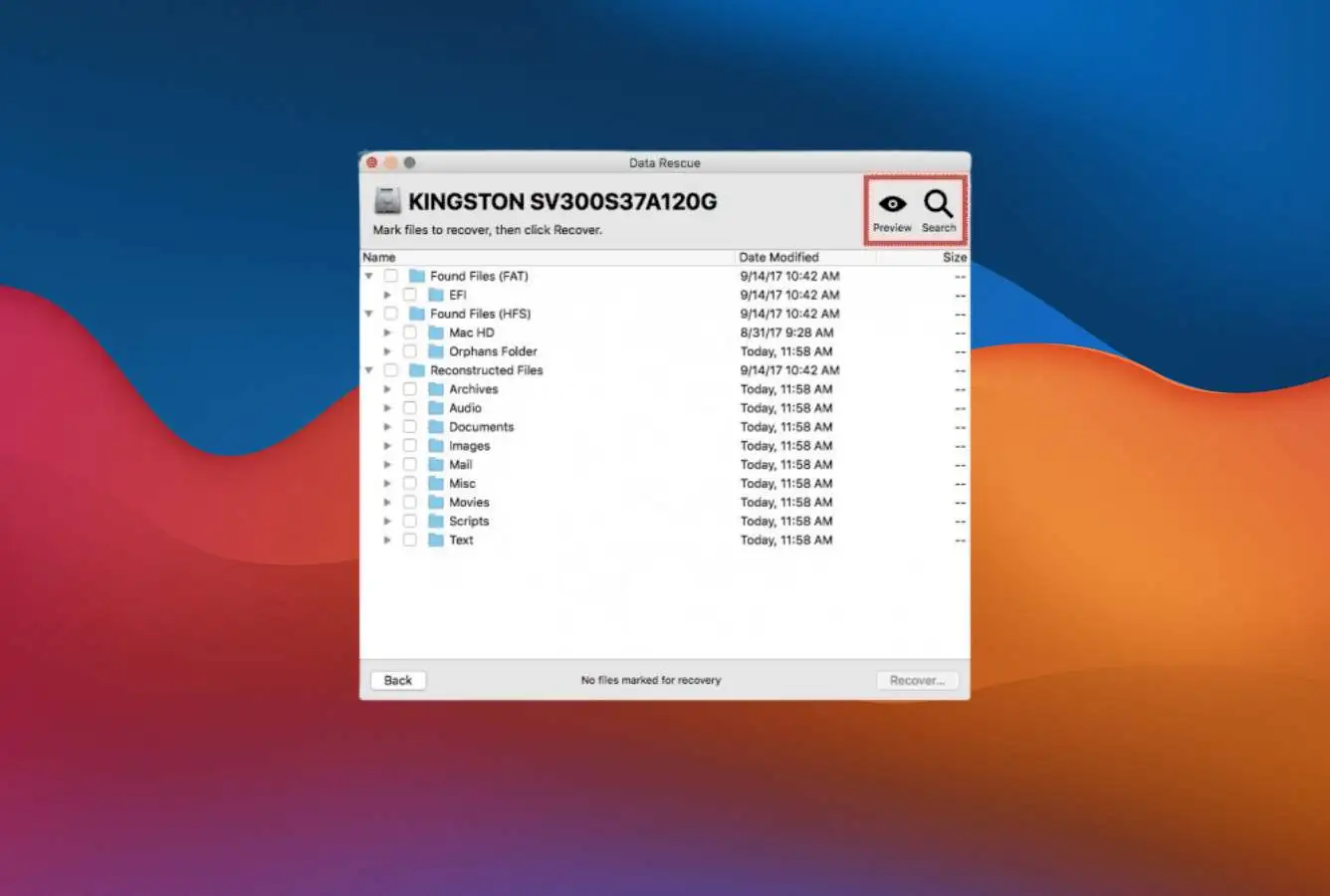
Recovered files appear in a tree view organized by file type. Right-click for preview, properties, or recover. Recovery destination must be a different drive than the source. For pay-per-file: select the specific files you want to unlock; the application will charge $19 per file unlocked. For unlimited recovery: requires Standard ($79 30-day) or Professional ($399/year) license.
Optional: Recovery Drive for crashed Macs
Use File > Create Recovery Drive to make a bootable USB. Boot the unbootable Mac from the USB and run Data Rescue from there. Important caveat: per Macworld 2024 review, the Recovery Drive feature has not received Apple Silicon Sonoma updates and may not work on newer Macs. For Apple Silicon Mac recovery, alternatives like iBoysoft (online recovery mode loads from macOS Recovery without USB) or 4DDiG bootable USB are more reliable.
Data Rescue\’s free trial allows actual recovery of up to 1 GB for new users (not just preview). This is more generous than 4DDiG\’s preview-only free tier, Disk Drill\’s preview-only Mac trial, or Cisdem\’s preview-only trial. For users with small recovery scenarios (a few documents, a handful of photos under 1 GB), Data Rescue\’s free trial may be sufficient without paying.
Who Prosoft Data Rescue 6 for Mac Is For
Data Rescue targets a specific audience: Mac users who specifically value the established Mac heritage, cross-platform license, and Recovery Drive feature, and who are willing to pay subscription pricing for these specific capabilities. Three audiences get clear value:
Mac users with simple deletion or external drive scenarios who want the Mac veteran brand. Data Rescue is one of the longest-running Mac recovery products, in continuous distribution since 2002 with 150+ industry awards. For users who specifically value the Prosoft brand or who have used Data Rescue for years and prefer to stay with a familiar tool, the product still delivers competent recovery for standard scenarios. Recovery quality on simple HFS+ deletion or external drive recovery is comparable to actively maintained competitors.
Cross-platform users who want one license for both Mac and Windows. Data Rescue\’s license covers both Mac and Windows installations. This is unusual; only Disk Drill matches this structure. For users who bounce between platforms or who need to recover from drives across both operating systems, Data Rescue\’s cross-platform license is genuinely useful. Disk Drill\’s Lifetime at $149 covers both platforms permanently versus Data Rescue\’s subscription, which makes Disk Drill the better value for most users with this need.
Users with crashed older Macs (pre-Apple Silicon) who need Recovery Drive. The Recovery Drive feature creates a bootable USB for crashed Macs and works well on macOS High Sierra through Big Sur scenarios. Users with affected older Macs (2012-2020 Intel-based MacBooks, iMacs, Mac minis) may find the Recovery Drive feature useful. Note the feature has not been updated for Apple Silicon Sonoma per the Macworld 2024 review, limiting utility on newer Macs.
Data Rescue is the wrong choice for Mac users who want native Apple Silicon performance (Disk Drill, EaseUS DRW Mac, iBoysoft, 4DDiG, Cisdem all run natively), users who want a Lifetime license (Disk Drill $149, iBoysoft $169.95, EaseUS $169.95, R-Studio $79.99 all offer perpetual licenses), users on a strict budget (R-Studio $79.99 Lifetime is half the price of Data Rescue\’s 30-day Standard), users who need RAID reconstruction (R-Studio, DMDE), users who need cloud export or iCloud/Time Machine recovery (EaseUS, Cisdem), users who need offline recovery (Data Rescue requires constant internet for license validation), and users with simple needs who want a free option (PhotoRec, EaseUS Free 2 GB, DMDE 4000 files/dir).
Prosoft Data Rescue 6 for Mac Strengths in Real-World Use
Despite vendor inactivity since 2023, Data Rescue retains specific strengths from its 22-year Mac heritage. Three patterns surface consistently in independent evaluation.
Established Mac heritage with 150+ industry awards since 2002
Prosoft Engineering has been developing Data Rescue continuously since 2002, predating most modern competitors. The product has accumulated 150+ industry awards through Macworld and other publications over two decades. For users who specifically value vendor longevity and brand recognition, Data Rescue is the most established Mac recovery product. Recovery quality on simple HFS+ deletion scenarios remains competent even with the dated codebase.
Cross-platform license covers Mac and Windows
Data Rescue 6 provides a single license that covers both Mac and Windows installations. The license code activates on either platform. This is uncommon; only Disk Drill among major Mac recovery tools matches this structure. For users who need recovery across both operating systems or who bounce between platforms, the cross-platform license eliminates needing to buy two separate products. Disk Drill\’s $149 Lifetime cross-platform license is better value than Data Rescue\’s $79 30-day subscription, but Data Rescue remains a credible alternative for users who specifically need short-term cross-platform recovery.
1 GB free trial allows actual recovery (not just preview)
Data Rescue\’s free trial allows new users to recover up to 1 GB of data, not just preview files. This is more generous than 4DDiG\’s preview-only free tier, Disk Drill\’s preview-only Mac trial, Cisdem\’s preview-only trial, or Wondershare\’s 100 MB free recovery. For small recovery scenarios (a few documents, a handful of photos under 1 GB), the free trial may be sufficient without paying. Users can verify Data Rescue\’s effectiveness on their specific scenario before committing to the paid tier.
Recovery Drive feature for crashed Macs (older macOS only)
Data Rescue includes a Recovery Drive feature that creates a bootable USB drive for recovering data from Macs that won\’t boot. This is genuinely useful for crashed Mac scenarios on older macOS versions (High Sierra through Big Sur). Note the feature has not received Apple Silicon Sonoma updates per the Macworld 2024 review, limiting utility on newer Macs. For affected older Macs, the Recovery Drive workflow is solid.
Professional mode includes hex viewer and clone-with-bad-sector handling
The Professional License unlocks Professional Mode with a hex viewer for raw drive content inspection and a Clone feature that handles bad sectors during cloning. The Clone feature is genuinely useful for failing drives where you want to image the drive before attempting recovery, preserving the original drive integrity. R-Studio and DMDE have more capable hex editors and clone tools at lower pricing, but Data Rescue\’s Pro mode delivers credible technical features for users who need them.
Pay-per-file option useful for single-file scenarios
The pay-per-file pricing at $19 per individual file unlocked is useful when you only need to recover one or two specific files (a single critical document, a particular photo). For these narrow scenarios, paying $19-38 for individual file recovery may be cheaper than the $79 Standard license. Most other Mac recovery tools don\’t offer per-file pricing, requiring a full subscription regardless of scenario size.
Where Prosoft Data Rescue 6 for Mac Falls Short
The limitations are significant and cluster around vendor inactivity, pricing model, and Apple Silicon support. Three patterns surface consistently in independent evaluation.
Software last updated July 2023 (v6.0.8) without Apple Silicon native support
Data Rescue 6 was last updated July 2023, over 18 months before this review. The application has not received native Apple Silicon support and runs only via Rosetta 2 translation. While Rosetta 2 works for most scenarios, it adds performance overhead, may have compatibility issues with newer macOS releases, and is a clear signal of stalled development. Apple has stated Rosetta 2 will eventually be deprecated, which would render Data Rescue unusable on future macOS versions. Disk Drill, EaseUS DRW Mac, iBoysoft, 4DDiG, and Cisdem all run natively on Apple Silicon as Universal Binaries with active maintenance.
Subscription-only pricing model with no Lifetime option
Data Rescue uses a subscription-only model: $79 covers only 30 days of access; $399/year is for annual unlimited recovery. There is no Lifetime perpetual license option. Most actively maintained Mac recovery competitors offer Lifetime perpetual licenses: Disk Drill $149, iBoysoft $169.95, EaseUS $169.95, 4DDiG $109.95, R-Studio $79.99, DMDE Standard $48. For users with infrequent recovery needs, paying $79 for 30 days is significantly worse value than a $109-149 Lifetime license that delivers permanent access. The Professional License at $399/year is among the most expensive subscriptions in the consumer Mac recovery category.
Requires constant internet connection for license validation
Data Rescue requires an internet connection for license validation; you cannot use the application offline. This is uncommon and limits utility in scenarios where the affected Mac has no internet connectivity. Combined with historical license server issues for older Data Rescue versions (Prosoft has reportedly disabled licensing servers for older versions in the past, requiring users to upgrade to maintain access), the constant-internet requirement creates friction and risk. Other Mac recovery tools allow offline use after initial activation.
Prosoft Data Rescue 6 Mac Capability Summary
How Prosoft Data Rescue 6 for Mac performs capability by capability:
| Capability | Tier | Notes |
|---|---|---|
| Vendor heritage (since 2002) | Excellent | 22-year Mac heritage. 150+ industry awards. Most established vendor in the category |
| Cross-platform license (Mac + Windows) | Excellent | Single license covers both platforms. Only Disk Drill matches this |
| Free trial value (1 GB actual recovery) | Very Good | 1 GB free recovery for new users beats preview-only competitors |
| Recovery Drive (older macOS) | Very Good | Bootable USB for crashed Macs on macOS High Sierra through Big Sur |
| HFS+ deleted-file recovery | Very Good | Solid HFS+ recovery from 22 years of Mac heritage |
| External drive / SD card recovery | Very Good | Strong on standard external drive scenarios |
| Pay-per-file pricing option | Very Good | $19 per file useful for single-file scenarios. Uncommon among competitors |
| Hex viewer (Professional mode) | Good | Available in Professional License. Less capable than R-Studio or DMDE |
| Clone with bad-sector handling | Good | Useful for imaging failing drives before recovery attempt |
| FileIQ custom signature learning | Good | Build custom recovery signatures from sample files. Niche utility |
| APFS recovery | Good | Basic APFS support. Less capable than Disk Drill or iBoysoft for APFS-specific scenarios |
| Apple Silicon native support | Limited | Runs via Rosetta 2 only. No native Apple Silicon. Performance overhead |
| Pricing value ($79 30-day, $399/yr Pro) | Limited | $79 covers only 30 days. $399/yr most expensive in consumer category |
| Active maintenance (last update Jul 2023) | Limited | Software has not been updated in over 18 months. Stalled development |
| Recovery Drive on Apple Silicon Sonoma+ | Limited | Has not received Apple Silicon Sonoma updates per Macworld 2024 review |
| Customer support responsiveness | Limited | Inconsistent responsiveness flagged in consumer reports |
| Lifetime license option | Not supported | Subscription-only. All major competitors offer Lifetime ($79.99-$169.95) |
| RAID reconstruction | Not supported | R-Studio at $79.99 Lifetime, DMDE at $48 perpetual handle RAID |
| Linux filesystems / Btrfs / ZFS | Not supported | R-Studio, UFS Explorer Standard, DMDE handle Linux filesystems |
| iCloud / Time Machine / cloud export | Not supported | EaseUS DRW Mac, Cisdem handle iCloud, Time Machine, cloud export |
| Bundled photo/video repair | Not supported | Stellar Premium and 4DDiG include dedicated repair modules |
| S.M.A.R.T. drive monitoring | Not supported | Disk Drill includes drive health monitoring |
| Offline use (no internet required) | Not supported | Requires constant internet for license validation |
| Internal Mac SSD with TRIM | Not supported | Apple Silicon Secure Boot. Hardware limitation affecting all recovery tools |
| Mac-native UI conventions | Limited | UI is functional but dated. No modern Mac-native conventions |
Tier scale: Excellent / Very Good / Good / Fair / Limited / Not supported. Aggregated from Prosoft product documentation, independent external evaluation, and verified user feedback (G2, Capterra, Trustpilot, Reddit), 2026.
Prosoft Data Rescue 6 for Mac Cost
Prosoft Data Rescue 6 uses a subscription-only pricing model with four tiers and pay-per-file option. There is no Lifetime perpetual license:
| Edition | Price | Type | Coverage |
|---|---|---|---|
| Free Trial | $0 | New users | Full scanning, file preview, 1 GB recovery for new users only |
| Pay-per-file | $19/file | Per-file unlock | Unlock individual files only. Useful for single-file scenarios |
| Standard License | $79 | 30-day subscription | Unlimited recovery for 30 days. Single Mac/PC. Cross-platform license |
| Professional License | $399/year | Annual subscription | Unlimited recovery for 1 year. Single Mac/PC. Hex viewer, Clone-with-bad-sector |
Pricing verified against prosofteng.com, April 2026. 30-day money-back guarantee applies. Note: Data Rescue uses a subscription-only model, no Lifetime license available. Last updated July 2023 (v6.0.8).
Data Rescue\’s pricing is among the most expensive in the consumer Mac recovery category and offers the worst value when compared to actively maintained competitors with Lifetime licenses. The $79 Standard 30-day subscription expires after 30 days; for similar money, Disk Drill at $89/year provides 12 months. The $399/year Professional License is the most expensive consumer Mac recovery subscription. By comparison: Disk Drill Lifetime $149 covers Mac and Windows permanently, iBoysoft Lifetime $169.95, EaseUS Pro Lifetime $169.95, 4DDiG Lifetime $109.95, R-Studio Lifetime $79.99, DMDE Standard $48 perpetual. For broader Mac category context, see our best data recovery software for Mac ranking; for free-first comparisons, see our best free data recovery software roundup.
Prosoft Data Rescue vs. Competitors (2026)
How Prosoft Data Rescue 6 stacks up against the most common Mac recovery alternatives:
| Tool | Apple Silicon native | Lifetime license | Free tier (actual recovery) | Last update | Cheapest tier |
|---|---|---|---|---|---|
| Data Rescue 6 ← | Rosetta 2 only | No Lifetime | 1 GB | Jul 2023 | $19/file |
| Disk Drill Mac | Native | $149 | Preview only | 2026 active | $89/year |
| iBoysoft Mac | Native | $169.95 | 1 GB | 2026 active | $89.95/mo |
| EaseUS DRW Mac | Native | $169.95 | 2 GB | 2026 active | $89.95/mo |
| 4DDiG Mac | Native | $109.95 | Preview only | 2026 active | $89.95/mo |
| R-Studio Mac | Native | $79.99 | <256 KB demo | 2026 active | $79.99 Lifetime |
Tier scale: Excellent / Very Good / Good / Fair / Limited / Not supported. Aggregated from vendor documentation and independent external evaluation, 2026.
Data Rescue\’s standout advantages are the established Mac heritage since 2002 with 150+ industry awards, the cross-platform Mac+Windows license, and the 1 GB free trial allowing actual recovery (not preview-only). Trade-offs are significant: stalled development since July 2023, no native Apple Silicon support (Rosetta 2 only), no Lifetime license option, $79 covers only 30 days, $399/year Professional is among the most expensive subscriptions in the category, requires constant internet for license validation, and Recovery Drive feature has not been updated for Apple Silicon Sonoma. For most users in 2026, Disk Drill at $149 Lifetime cross-platform delivers better value with active maintenance and native Apple Silicon support.
Data Rescue 6 Features & Tools
Data Rescue 6\’s feature set reflects its 22-year Mac heritage and its positioning as a recovery tool for both consumer and professional users. The Standard License covers core recovery features for everyday users; the Professional License unlocks advanced tools like the hex viewer, custom file signature creation (FileIQ), and Clone-with-bad-sector handling for failing drives. The trade-off is dated UI and stalled development since July 2023.
The genuine differentiators are the Recovery Drive feature for crashed Macs (older macOS versions only), FileIQ custom signature learning that allows building recovery signatures from sample files of unfamiliar formats, and the cross-platform Mac+Windows license. Filesystem coverage is consumer-focused: HFS+, FAT16/32, exFAT, and basic APFS. Apple Silicon native support is absent; the application runs only via Rosetta 2 translation.
What\’s absent: native Apple Silicon support, Lifetime license option, RAID reconstruction (R-Studio, DMDE handle this), Linux filesystem support like ext2/3/4, XFS, Btrfs, ZFS, S.M.A.R.T. drive monitoring (Disk Drill includes this), bundled photo/video repair (Stellar Premium, 4DDiG include this), iCloud or Time Machine recovery sources (EaseUS DRW Mac, Cisdem handle these), direct cloud export (EaseUS, Cisdem), and offline use (Data Rescue requires constant internet for license validation).
Alternatives to Prosoft Data Rescue 6 for Mac
Data Rescue is a niche pick for users who specifically value Mac heritage and cross-platform license. For most users in 2026, actively maintained alternatives at lower prices deliver better value:
Open Finder, navigate to the folder where files were lost, click the Time Machine icon in the menu bar, and browse to a backup before the deletion event. If Time Machine was active, this takes 2 minutes and recovers files with original names and folder structure intact, free.
Prosoft Data Rescue Mac User Reviews
Data Rescue has substantial review platform coverage with sentiment patterns dividing along vendor history familiarity and pricing sensitivity. Verified user feedback skews positive on long-time users who recovered data successfully on older Mac scenarios. Sentiment skews critical on pricing model, vendor inactivity, license server issues for older versions, and lack of Apple Silicon support. The 22-year vintage and 150+ industry awards are positive heritage signals, but stalled development since 2023 is a recurring concern.
I bought Data Rescue several years ago after we had a few issues with corrupt SD and CF cards. It has done an excellent job over the years even still running an old version. Solid for photographers.
Used Data Rescue successfully for client work for years. The Recovery Drive feature on older macOS saved me multiple times. Wish they would update for Apple Silicon and add a Lifetime license.
Solid recovery on simple HFS+ scenarios. The 1 GB free trial is genuinely useful for small recoveries. Pay-per-file option works if you only need one or two files. Not great value for larger recoveries.
$79 for 30 days is ridiculous when other tools offer Lifetime licenses for $109-149. The subscription-only model with no perpetual option makes Data Rescue overpriced for occasional use.
Bought Data Rescue 5 in January 2019. Now on launch I get failed to validate serial number. They have disabled the serial number that I paid for. Disgraceful treatment of paying customers.
Last updated July 2023. Runs via Rosetta 2 only on Apple Silicon. The brand has Mac heritage but the product is in maintenance mode. Disk Drill or iBoysoft are better choices in 2026.
Recurring themes across verified user feedback: long-time users praise the historical recovery quality and Mac heritage; recent users criticize the subscription-only pricing, no Lifetime option, vendor inactivity since 2023, license server issues for older versions, and lack of native Apple Silicon support. The product retains brand recognition from its 22-year heritage but has fallen behind actively maintained competitors. Best for users who specifically value the Mac veteran brand or who need the cross-platform license; for users who prioritize current capability and value, alternatives deliver more for less.
Frequently Asked Questions
Is Prosoft Data Rescue 6 free for Mac?+
Is Prosoft Data Rescue 6 safe on Mac?+
Does Prosoft Data Rescue 6 work on Apple Silicon Macs?+
Why does Data Rescue cost $79 for 30 days?+
Does Data Rescue work on both Mac and Windows with one license?+
What is the Recovery Drive feature?+
How does Data Rescue 6 compare to Disk Drill for Mac?+
Has Prosoft updated Data Rescue recently?+
Final Verdict
Prosoft Data Rescue 6 for Mac earns 3.5/5 as a legacy consumer Mac recovery utility from Prosoft Engineering (Pleasanton, California, since 2002, 150+ industry awards), one of the longest-running Mac recovery products predating most modern competitors. The Mac build delivers competent HFS+ deletion recovery, external drive recovery, and a Recovery Drive feature for crashed older Macs. The cross-platform license (Mac+Windows with single license) and 1 GB free trial allowing actual recovery (not preview-only) are genuine differentiators. Pay-per-file pricing at $19 per file is useful for narrow single-file scenarios.
The trade-offs are significant. Software last updated July 2023 (v6.0.8) with no native Apple Silicon support; runs only via Rosetta 2 translation. Subscription-only pricing model with no Lifetime option: $79 covers only 30 days, $399/year Professional is among the most expensive subscriptions in the consumer Mac category. Constant internet required for license validation. License server issues have historically affected purchased licenses for older Data Rescue versions. Recovery Drive feature has not received Apple Silicon Sonoma updates per Macworld 2024 review. For most users in 2026, actively maintained alternatives deliver better value: Disk Drill at $149 Lifetime cross-platform with native Apple Silicon, R-Studio at $79.99 Lifetime, iBoysoft at $169.95 Lifetime with online recovery mode, or DMDE at $48 perpetual for technical users. Data Rescue remains a niche pick for users who specifically value the Prosoft brand heritage, the 1 GB free trial, or the cross-platform Mac+Windows license. For broader Mac category context, see our best Mac data recovery software ranking.
About the Authors


This site earns revenue through affiliate links when you purchase Prosoft Data Rescue or other products through our links. This financial relationship has no influence on our tier assignments, methodology, or conclusions. All tools are evaluated independently against the same rubric and the same body of aggregated evidence. If you believe any claim is inaccurate, contact us at contact@datarecoveryfix.com.