EaseUS Data Recovery Wizard Mac Review (2026): Top-Tier Mac Recovery with Cloud Power
EaseUS Data Recovery Wizard for Mac is developed by EaseUS, a Chinese software company in business since 2004 with millions of users globally. The current Mac build is v14, supporting APFS, HFS+, FAT, exFAT, and NTFS filesystems with 1,000+ file signatures, and running natively on both Intel and Apple Silicon Macs.
EaseUS sits at the premium end of the Mac recovery category (Pro tier from $89.95/month or $169.95 Lifetime) but offers a meaningful 2 GB free recovery allowance plus features competitors lack, including iCloud scanning, direct cloud export to Dropbox/Google Drive/OneDrive, and a bootable recovery USB option. This review aggregates vendor documentation, independent external evaluation, and verified user feedback to map exactly where EaseUS DRW for Mac delivers, and where the limits start.
evaluation, user reports
macOS 10.9+
$169.95 Lifetime

EaseUS Data Recovery Wizard for Mac is consistently placed in the upper tier of independent Mac recovery rankings. The application combines strong APFS recovery, a Mac-native interface, and a meaningful 2 GB free tier that lets users verify recovery before paying. Aggregated independent evaluation places it behind Disk Drill on pure APFS depth but ahead on free-tier generosity and unique features, iCloud scanning, cloud export to Dropbox/Google Drive/OneDrive/iCloud, Time Machine and iTunes backup parsing, and a bootable recovery USB option. Trade-offs are equally clear: Pro pricing at $89.95/month or $169.95 Lifetime sits at the premium end of the Mac category, RAID reconstruction and Linux filesystem recovery are not supported, and the Lifetime tier is more expensive than Disk Drill Lifetime ($169.95 vs $149). Best fit for Mac users who want broad scenario coverage with a generous trial allowance.
✓ What We Liked
- Genuinely useful 2 GB free tier, verify recovery before any payment
- Strong APFS recovery, upper tier in independent Mac recovery rankings
- iCloud scanning for files backed up to Apple’s cloud, unique to EaseUS
- Cloud export to Dropbox, Google Drive, OneDrive, or iCloud (no competitor matches this)
- Apple Silicon native (M1/M2/M3/M4) and T2 chip Mac support
- Time Machine and iTunes backup parsing built into the scan workflow
- Bootable recovery USB option for unbootable Macs
✕ What We Didn’t
- Pro pricing at $89.95/month or $169.95 Lifetime is premium for the Mac category
- No RAID reconstruction or Linux filesystem support (ext4, XFS, Btrfs)
- Scan time estimates often optimistic, actual deep scans run longer than displayed ETA
Research Methodology
This review aggregates three evidence types for EaseUS Data Recovery Wizard for Mac (current build v14): vendor documentation (the official EaseUS Mac product page, the Free vs Pro vs Technician tier comparison, the supported filesystem matrix, and the changelog), independent external evaluation, and verified user feedback (G2, Capterra, Trustpilot, plus Reddit threads on r/datarecovery and r/mac where Mac-specific recovery scenarios are discussed). Tier assignments (Excellent / Very Good / Good / Fair / Limited / Not supported) reflect the aggregate of that evidence rather than an in-house benchmark, we do not claim independent recovery percentages. For broader Mac category context, see our ranking of the best data recovery software for Mac. Full methodology details are on our How We Test page.
Is EaseUS Data Recovery Wizard for Mac Safe?
Yes. EaseUS Data Recovery Wizard for Mac is developed by EaseUS, a Chinese software company in business since 2004 with millions of users globally and an established multi-product portfolio (Data Recovery Wizard, Todo Backup, Partition Master, MobiSaver). The Mac binary is signed and notarized by Apple, it passes Gatekeeper without warnings. The application performs all scanning in read-only mode according to vendor documentation, and recovered files are written to a destination drive that you specify, never back to the source.
Two Mac-specific safety considerations apply. First, the application requests Full Disk Access in macOS System Settings during initial setup, this is standard for any recovery tool that needs to scan protected volumes (Disk Drill, Stellar, and others all require the same permission). Second, like every Mac recovery tool, scanning the internal Macintosh HD on Apple Silicon and T2-equipped Intel Macs is constrained by Apple\’s System Integrity Protection. EaseUS provides a bootable recovery USB option for unbootable Macs as a workaround. Always download from easeus.com directly, third-party download sites occasionally distribute bundled installers with adware or worse.
How to Use EaseUS Data Recovery Wizard for Mac
EaseUS\’s Mac workflow is among the most approachable in the recovery category, a four-step process that handles most consumer scenarios without requiring filesystem knowledge.
Download and install
Download the Mac DMG from easeus.com. Open the DMG, drag the application to /Applications, then approve in System Settings → Privacy & Security if Gatekeeper prompts. Grant Full Disk Access when the application requests it on first launch, this lets EaseUS scan protected volumes including Time Machine backups.
Select the source drive or location
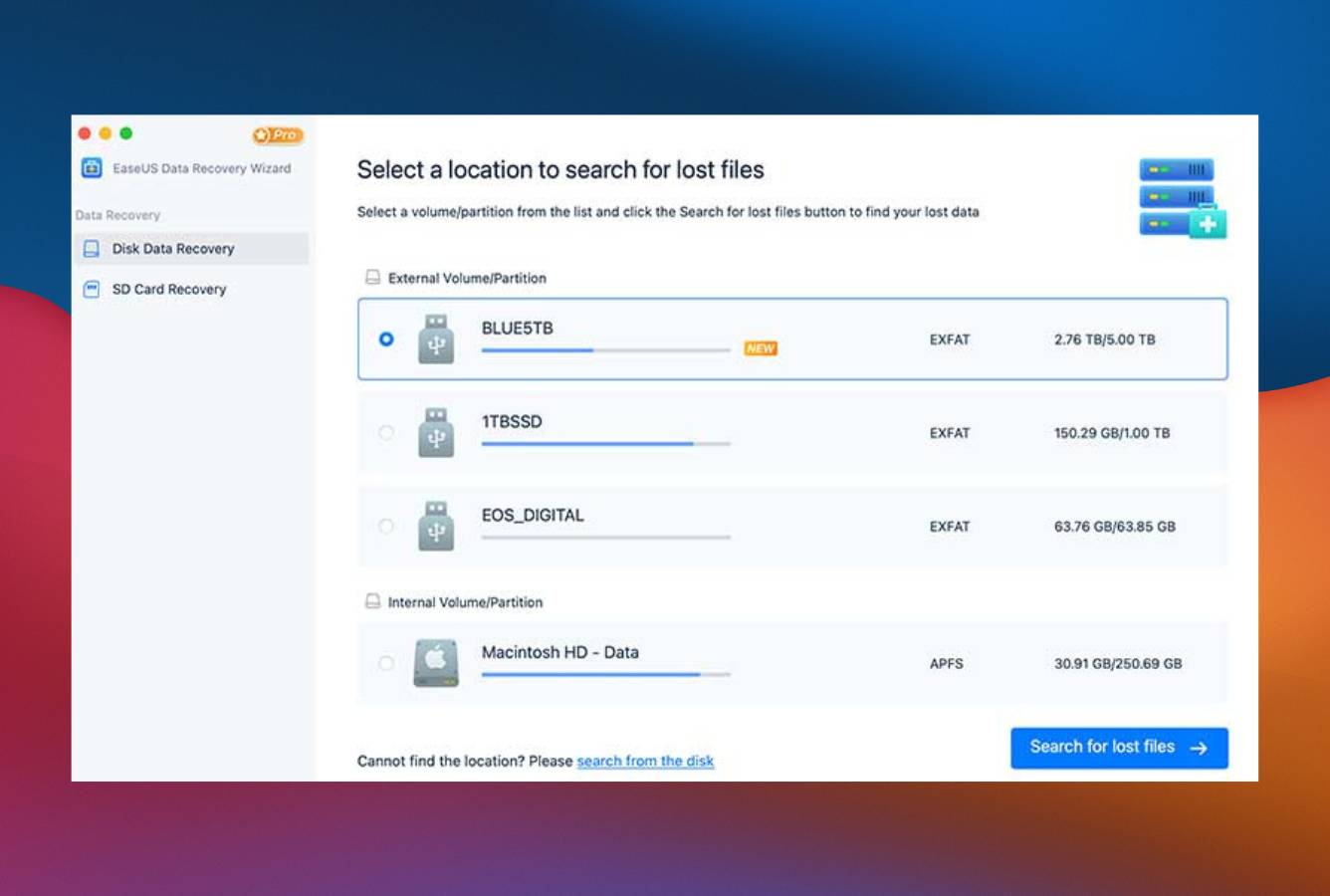
Launch the app and choose the drive, volume, or location where files were lost. The tool displays all mounted volumes (internal SSD, external HDD/SSD, USB drives, SD cards) plus iCloud Drive and Time Machine backup volumes as scannable locations. For unbootable Macs, create a bootable recovery USB from the menu first.
Scan for lost data
Click Scan. A quick scan runs first (file metadata parse for recently deleted items), followed automatically by a deep signature-based scan. You can browse early results while the deep scan continues in the background. Use the file-type filters (photos, videos, documents, audio, archives, emails) and path filters to narrow results.
Preview and recover
Preview files before recovery, supported for images, common documents, and most video formats. Select files and click Recover. Save to a different drive than the source, or directly to cloud storage (Dropbox, Google Drive, OneDrive, iCloud) if you don\’t have a second physical drive. Free tier saves up to 2 GB total; Pro tier removes the cap.
Free tier scans and previews are unrestricted, and Free tier saves up to 2 GB before requiring Pro. Recommended workflow: install, scan, browse results to confirm your specific files appear, save up to 2 GB to verify recovery quality, then upgrade to Pro only if more recovery is needed. The 2 GB allowance is genuinely useful, many recovery scenarios fit within it.
Who EaseUS DRW for Mac Is For
EaseUS Data Recovery Wizard for Mac targets the broadest consumer Mac recovery audience, users who want a polished, full-featured application with strong scenario coverage and a meaningful free trial. Three audiences get clear value:
Mac users who want to verify recovery before paying. The 2 GB Free tier is among the most generous in the consumer Mac recovery category: Disk Drill\’s Mac Free is preview-only, Stellar caps at 1 GB, Wondershare at 100 MB. For users dealing with smaller recovery scenarios (a few hundred photos, a recovered project folder, lost documents under 2 GB), the Free tier alone may resolve the situation entirely. For larger recoveries, the Free tier confirms recoverability before any payment commitment.
Mac users with mixed device and cloud workflows. EaseUS\’s Mac build includes capabilities most Mac competitors lack: iCloud scanning for files backed up to Apple\’s cloud, direct cloud export to Dropbox/Google Drive/OneDrive/iCloud (recovered files saved straight to cloud storage without staging on a local drive), Time Machine and iTunes backup parsing built into the scan workflow, and a bootable recovery USB option for unbootable Macs. For users whose data lives across multiple devices and cloud services, this breadth is genuinely useful.
Apple Silicon Mac users running modern hardware. EaseUS treats Apple Silicon as a first-class platform. The Mac build runs natively on M1, M2, M3, and M4 chips without Rosetta 2, supports T2 security chip Macs, and handles macOS 10.9 through the latest macOS release. For users on recent MacBook Pros, MacBook Airs, Mac Studios, and Mac minis, EaseUS works without compatibility friction.
EaseUS DRW for Mac is the wrong tool for users with multi-disk RAID arrays (RAID reconstruction is not supported (R-Studio handles this), users recovering from Linux-formatted disks or NAS-pulled drives (no ext4, XFS, or Btrfs support) UFS Explorer Standard handles this), users prioritizing the absolute lowest entry price (PhotoRec is genuinely free with unlimited recovery, though terminal-only on Mac), and users who specifically want a perpetual license at the lowest possible price (R-Studio at $79.99 Lifetime undercuts EaseUS\’s $169.95 Lifetime by more than half).
EaseUS DRW for Mac Strengths in Real-World Use
The strengths cluster around free-tier generosity, cloud integration, and Mac-native scenario coverage, reflecting EaseUS\’s positioning as a consumer-friendly all-rounder rather than a filesystem specialist.
Genuinely useful 2 GB free recovery tier
The 2 GB Free tier is the single most consistently praised feature across independent evaluation and verified user feedback. Unlike Disk Drill\’s Mac Free (preview-only) or PhotoRec (free but terminal-only with no filenames preserved), EaseUS Free actually saves recovered files up to a 2 GB cumulative cap. For many real-world recovery scenarios (recovered photos from an SD card, a deleted project folder, a few hundred lost documents) 2 GB resolves the situation entirely without ever requiring payment. For larger recoveries, the Free tier serves as a practical pre-purchase test: confirm files appear, confirm preview quality, then upgrade only if needed.
iCloud scanning and cloud export integration
EaseUS DRW for Mac treats iCloud as a scannable location alongside local drives, a capability genuinely unique in the consumer Mac recovery category. For files that lived in iCloud Drive and were deleted (with Recently Deleted folder past its 30-day window), EaseUS can attempt recovery directly from Apple\’s cloud rather than requiring the user to first restore from a backup. Similarly, recovered files can be exported directly to Dropbox, Google Drive, OneDrive, or iCloud, useful when the user doesn\’t have a second physical drive available for staging recovery output. Disk Drill, Stellar, and other Mac competitors lack this capability.
Time Machine and iTunes backup parsing
EaseUS\’s scan workflow includes Time Machine backup volumes and iTunes backup files as first-class scan targets. For Mac users whose Time Machine drive has corruption or whose iTunes/Finder backup file from an iPhone or iPad is partially damaged, this capability extracts recoverable data without requiring a full restore. Independent reviewers consistently flag this as a meaningful differentiator, most recovery tools treat Time Machine as opaque.
Mac-native interface with broad accessibility
The application uses native Mac UI conventions (sidebar navigation, native toolbar, file preview pane, drag-and-drop) and reads as a Mac-first product rather than a Windows port. The four-step workflow (select source, scan, preview, recover) is approachable for first-time recovery users without sacrificing depth. Independent reviewers consistently rate EaseUS\’s Mac UX in the upper tier of the consumer recovery category, behind Disk Drill but well ahead of utility-grade tools like UFS Explorer or DMDE.
Apple Silicon native and active vendor maintenance
EaseUS ships native Apple Silicon binaries (no Rosetta 2 overhead) and treats the Mac build as a first-class platform alongside Windows. Current build v14 supports macOS 10.9 through macOS 15, with regular updates tracking each macOS release. T2 chip Mac support and Apple Silicon support (M1/M2/M3/M4) are both documented and tested.
Where EaseUS DRW for Mac Falls Short
The limitations follow from product positioning. EaseUS prioritizes consumer breadth over filesystem depth or RAID specialization. Three patterns surface consistently in independent evaluation.
Premium pricing relative to Mac category competitors
EaseUS Pro at $89.95/month or $169.95 Lifetime sits at the premium end of the consumer Mac recovery category. By comparison, Disk Drill Lifetime is $149 (covering both Mac and Windows on three machines), R-Studio Lifetime is $79.99, Stellar is $79.99/year, Wondershare is $79.99/year, and UFS Explorer Standard is $64.95 perpetual. The PCWorld store does list EaseUS DRW for Mac Lifetime at $99.95 with a recurring 41% discount, but the official site MSRP is $169.95. For users price-shopping the Mac recovery category, EaseUS is rarely the cheapest option, its premium pricing is justified by the free-tier generosity and unique cloud features, not by undercutting alternatives.
No RAID reconstruction or Linux filesystem support
EaseUS DRW for Mac handles APFS, HFS+, FAT, exFAT, and NTFS, the standard Mac and Windows filesystems. It does not support Linux filesystems (ext2/3/4, XFS, Btrfs, ZFS) and cannot reconstruct RAID arrays. For Mac users dealing with a single drive pulled from a Linux server or NAS unit, EaseUS would show the disk as unreadable (UFS Explorer Standard reads them. For Mac users with multi-disk RAID arrays, EaseUS cannot reconstruct the array) R-Studio handles this. These are deliberate product positioning choices reflecting consumer audience focus, but they do constrain the scenario coverage.
APFS recovery rates trail category leader Disk Drill
For pure APFS recovery on a typical Mac drive, EaseUS DRW places in the upper tier of independent rankings but consistently behind Disk Drill. The reasons trace to engineering investment: Disk Drill\’s KEXT-level deep scan and APFS-specific snapshot handling outperform EaseUS\’s general-purpose recovery engine on pure APFS recovery scenarios. EaseUS optimizes for breadth of scenario coverage (cloud, Time Machine, iCloud, bootable recovery) rather than depth on any single capability. For users whose recovery scenario is “deleted files from my Mac\’s APFS volume,” EaseUS works competently but isn\’t class-leading. For broader scenarios involving cloud or backup integration, EaseUS becomes the stronger choice.
Optimistic scan time estimates and subscription auto-renewal concerns
Two friction points surface consistently in verified user feedback. First, deep scan time estimates shown during scanning are often optimistic compared to the actual elapsed time, particularly on multi-TB external drives. The scan completes successfully, but users planning around the displayed ETA may be caught off guard. Second, the monthly and yearly subscription tiers auto-renew by default, and Capterra/Trustpilot reviews occasionally flag confusion around cancellation policies. The Lifetime tier avoids this entirely (one-time payment, no recurring billing). For users who want predictable pricing without subscription friction, the Lifetime tier is the cleaner option despite its higher upfront cost.
EaseUS DRW for Mac Capability Summary
How EaseUS DRW for Mac performs capability by capability:
| Capability | Tier | Notes |
|---|---|---|
| Free tier value (2 GB recovery) | Excellent | Genuinely useful, most generous in consumer Mac category |
| iCloud scanning | Excellent | Scans Apple\’s cloud as a recovery source, unique to EaseUS |
| Cloud export (Dropbox, Drive, OneDrive) | Excellent | Recovered files saved direct to cloud, no Mac competitor matches |
| Time Machine backup parsing | Excellent | First-class scan target with selective extraction support |
| iTunes / Finder backup parsing | Excellent | Recovers from partially damaged iPhone/iPad backups |
| Bootable recovery USB | Excellent | For unbootable Macs, built into the application menu |
| Apple Silicon (M1/M2/M3/M4) native | Excellent | Universal Binary, no Rosetta 2 overhead |
| T2 chip Mac support | Excellent | Documented and tested workflow for T2-equipped Macs |
| UI & ease of use (Mac-native) | Very Good | Polished consumer-friendly interface; behind Disk Drill but well ahead of utility tools |
| APFS deleted-file recovery | Very Good | Upper tier in independent rankings; trails Disk Drill on pure APFS depth |
| HFS+ recovery | Very Good | Strong on legacy Mac filesystems |
| NTFS / exFAT / FAT recovery | Very Good | Reads Windows-formatted drives connected to Mac |
| Formatted-volume recovery | Very Good | Quick-format APFS and HFS+ handled well |
| SD card / camera recovery | Very Good | 1,000+ file signatures including major RAW formats (CR2, NEF, ARW, ORF, RAF, DNG) |
| External HDD / USB recovery | Very Good | Standard scenarios handled with directory structure preserved |
| Pricing value (premium tier) | Fair | $89.95/mo or $169.95 Lifetime, premium pricing in Mac category |
| Scan time estimate accuracy | Fair | Often optimistic on multi-TB external drives |
| RAID reconstruction | Not supported | Use R-Studio for multi-disk RAID arrays |
| Linux filesystems (ext4, XFS, Btrfs) | Not supported | Use UFS Explorer Standard for NAS-pulled Linux disks |
| Forensic-grade evidence export | Not supported | Use R-Studio or UFS Explorer Professional |
| Internal Mac SSD with TRIM | Not supported | Hardware limitation affecting all recovery tools |
Tier scale: Excellent / Very Good / Good / Fair / Limited / Not supported. Aggregated from EaseUS product documentation, independent external evaluation, and verified user feedback (G2, Capterra, Trustpilot, Reddit), 2026.
EaseUS Data Recovery Wizard Mac Cost
EaseUS uses a tiered pricing model on the Mac with a meaningful Free tier as the entry point. Four editions are available, ranging from $0 to $299:
| Edition | Price | Coverage | Notes |
|---|---|---|---|
| Free | $0 | 2 GB recovery cap · full scan + preview · all features | Most generous free tier in consumer Mac category |
| Pro Monthly | $89.95/month | Unlimited recovery · iCloud · cloud export · Time Machine · bootable USB | Auto-renewing subscription, verify renewal terms |
| Pro Yearly | $119.95/year | Same as Monthly · annual billing | Auto-renewing. Lifetime tier breaks even after 18 months |
| Pro Lifetime | $169.95 | Same as Pro · one-time payment · all v14 updates included | PCWorld store currently lists at $99.95 (-41% recurring discount) |
| Technician Lifetime | $299 | Pro + multi-device use across multiple client Macs | Aimed at IT shops and managed service providers |
Pricing verified against easeus.com, April 2026. Discounts of 30–60% are frequently available via official coupons. The 50% Technician coupon brings that tier to ~$149.50.
Compared to category alternatives, EaseUS sits at the premium end: Disk Drill offers Lifetime at $149 (covering Mac and Windows on three machines), R-Studio Mac Lifetime is $79.99, Stellar Mac at $79.99/year, and Wondershare Recoverit at $79.99/year. EaseUS\’s premium pricing is justified by the 2 GB Free tier (most generous in the category) and unique cloud features (iCloud scanning, Dropbox/Google Drive/OneDrive export), not by undercutting alternatives. For users who need a one-time recovery, the Free tier may resolve the situation entirely without payment. For users wanting predictable pricing, the Lifetime tier is the cleaner option despite its higher upfront cost. Compare across the full category in our best Mac data recovery software guide; for users wanting free-first options, see our best free data recovery software roundup.
EaseUS DRW Mac vs. Competitors (2026)
How EaseUS DRW for Mac stacks up against the most common Mac recovery alternatives:
| Tool | APFS recovery | Free tier | Cloud features | Filesystem breadth | Entry price |
|---|---|---|---|---|---|
| EaseUS DRW Mac ← | Very Good | 2 GB | iCloud + Dropbox/Drive/OneDrive | Good | $89.95/mo · $169.95 Lifetime |
| Disk Drill Mac | Excellent | Preview only | None | Good | $89/yr · $149 Lifetime |
| R-Studio Mac | Excellent | Preview only | None | Very Good | $79.99 Lifetime |
| Stellar Mac | Very Good | 1 GB | None | Good | $79.99/yr |
| Wondershare Recoverit | Very Good | 100 MB | None | Good | $79.99/yr |
| UFS Explorer Standard | Good | <256 KB | None | Excellent | $64.95 Lifetime |
Tier scale: Excellent / Very Good / Good / Fair / Limited / Not supported. Aggregated from vendor documentation and independent external evaluation, 2026.
EaseUS\’s standout advantages are the most generous free tier in the consumer Mac category (2 GB recovery, not preview-only) and unique cloud integration (iCloud scanning, direct cloud export to Dropbox/Drive/OneDrive). For pure APFS recovery depth, Disk Drill rates higher in independent rankings. For Linux filesystem support or NAS-pulled disks, UFS Explorer Standard fills a gap EaseUS doesn\’t address. For multi-disk RAID, R-Studio is the right tool.
Try EaseUS Data Recovery Wizard for Mac
2 GB free recovery. macOS 10.9–15 supported. Apple Silicon compatible.
EaseUS Data Recovery Wizard Mac Features & Tools
EaseUS Data Recovery Wizard for Mac positions itself as an all-in-one consumer recovery solution. The feature set goes beyond basic undelete, iCloud scanning, bootable recovery USB, video repair for corrupted MP4/MOV files, and direct cloud-destination export are all built into a polished Mac-native interface. The four-step workflow hides complexity from first-time users while remaining flexible enough for more technical scenarios.
What\’s absent in EaseUS DRW for Mac: no disk health monitoring (Disk Drill\’s S.M.A.R.T. monitoring is comparable), no proactive data protection layer (Disk Drill\’s Recovery Vault and Stellar\’s Drive Monitor cover this), no hex editor for manual filesystem inspection (DMDE handles this), and no RAID reconstruction (R-Studio handles this). Linux filesystem support (ext4, XFS, Btrfs) is not in the Mac build; UFS Explorer Standard is the right tool for those scenarios. The preview function caps at files under 100 MB, and RAW photo preview is inconsistent across camera manufacturers (independent reviewers consistently flag this).
Alternatives to EaseUS DRW for Mac
EaseUS DRW for Mac is a strong consumer all-rounder, but other tools serve specific Mac scenarios better:
Open Finder, navigate to the folder where files were lost, click the Time Machine icon in the menu bar, and browse to a backup before the deletion event. If Time Machine was active, this takes 2 minutes and costs nothing.
EaseUS Data Recovery Wizard Mac User Reviews
EaseUS Data Recovery Wizard has broad review coverage across user review platforms. With hundreds of verified reviews across G2, Capterra, and Trustpilot, it\’s one of the most reviewed recovery tools in the consumer Mac category. The sentiment pattern is consistent: praise for recovery results, the free tier, customer service, and the Mac-native interface; criticism focused on pricing, scan time estimate accuracy, and occasional auto-renewal confusion.
Great and responsive customer service. They were able to help me with my issues within an hour of email support.
The interface is straightforward, even users without prior experience can recover lost files quickly. The free tier let me confirm files were recoverable before paying.
Recovered photos from an SD card after multiple other recovery tools failed. The cloud export option was useful since I didn\’t have a second drive ready.
EaseUS Free tier saved me. Got back ~1.5 GB of family photos from a failed external drive without paying anything. Would have upgraded if I needed more.
Pricing is steep compared to alternatives. The scan time estimate was way off, said 40 minutes, took over 2 hours.
I could hardly believe it when this recovered a lot of really important photos I\’d accidentally deleted. Totally blown away.
The recurring themes across verified user feedback: praise for the genuinely useful 2 GB free tier and Mac-native interface, recognition of the unique cloud features (iCloud scanning, cloud export), criticism around premium pricing relative to category alternatives, and occasional complaints about optimistic scan time estimates and subscription auto-renewal. Customer service receives consistently positive feedback across platforms.
Frequently Asked Questions
Is EaseUS Data Recovery Wizard for Mac free?+
Is EaseUS Data Recovery for Mac safe to use?+
Can EaseUS recover files from a formatted Mac drive?+
Does EaseUS work on Apple Silicon Macs (M1/M2/M3/M4)?+
How long does an EaseUS Mac scan take?+
Can EaseUS recover photos from an SD card on Mac?+
Is EaseUS better than Disk Drill for Mac?+
Final Verdict
EaseUS Data Recovery Wizard for Mac earns 4.5/5 as the consumer Mac recovery tool with the most generous free tier and the broadest cloud integration in the category. Aggregated independent evaluation places it in the upper tier of Mac recovery rankings, strong APFS recovery, polished Mac-native interface, Apple Silicon native, T2 chip support, and a 2 GB Free recovery allowance that\’s genuinely useful for many real-world scenarios. Unique features competitors lack: iCloud scanning (Apple\’s cloud as a recovery source), direct cloud export to Dropbox/Google Drive/OneDrive/iCloud, Time Machine and iTunes backup parsing, and a bootable recovery USB option for unbootable Macs.
The trade-offs are clear-eyed. Pro pricing at $89.95/month or $169.95 Lifetime sits at the premium end of the consumer Mac category. Disk Drill\’s Lifetime at $149 covers both Mac and Windows on three machines, and R-Studio Mac is $79.99 Lifetime. APFS recovery rates trail Disk Drill in independent rankings. RAID reconstruction and Linux filesystem recovery (ext4, XFS, Btrfs) are not supported. Scan time estimates are often optimistic on multi-TB external drives, and the monthly/yearly subscription tiers auto-renew by default. For users who specifically value the 2 GB free tier or need iCloud scanning and cloud-destination recovery, EaseUS is the right pick. For pure APFS depth, Disk Drill is stronger. For multi-disk RAID, R-Studio. For Linux/NAS-pulled disks, UFS Explorer Standard. For broader Mac category context, see our best Mac data recovery software ranking; for free-first options, see our best free data recovery software guide.
About the Authors


This site earns revenue through affiliate links when you purchase EaseUS Data Recovery Wizard or other products through our links. This financial relationship has no influence on our tier assignments, methodology, or conclusions, all tools are evaluated independently against the same rubric and the same body of aggregated evidence. If you believe any claim is inaccurate, contact us at contact@datarecoveryfix.com.