Stellar Data Recovery Mac Review (2026): Recovery & Repair
Stellar Data Recovery for Mac is a feature-rich recovery application from Stellar Information Technology, an established Indian recovery and repair vendor founded in 1993. The current Mac build is v12.6.0.0, supporting APFS, APFS Encrypted, HFS+, FAT, exFAT, and NTFS filesystems with 300+ file signatures, and running natively on both Intel and Apple Silicon Macs.
Stellar’s positioning in the Mac category is the bundled feature set: alongside core data recovery, the Premium tier includes built-in photo and video repair, the Stellar Drive Monitor module tracks S.M.A.R.T. attributes and disk health, and Duplicate Finder and Speedup Mac handle storage cleanup. The 1 GB free recovery tier is genuinely useful for verifying recovery before paying. This review aggregates vendor documentation, independent external evaluation, and verified user feedback to map exactly where Stellar delivers and where the limits start.
evaluation, user reports
macOS Tahoe 26+
Premium adds repair

Stellar Data Recovery for Mac is consistently placed in the upper tier of independent Mac recovery rankings. The application combines a strong recovery engine (APFS, APFS Encrypted, HFS+, FAT, exFAT, NTFS with 300+ file signatures) with bundled utilities that competitors charge separately for: built-in photo and video repair (Premium tier), Stellar Drive Monitor for S.M.A.R.T. and disk health, Duplicate Finder, and Speedup Mac. The 1 GB Free tier is genuinely useful for verifying recovery before paying. Trade-offs: deep scan speed is consistently slower than category leaders like Disk Drill (expect 2× the scan time on the same drive), the upgrade-nag UI persists even after Pro activation, and Premium pricing reaches $99.99/year for the photo/video repair bundle. Best fit for Mac users who want recovery and repair tools in a single application from an established vendor.
✓ What We Liked
- Bundled photo and video repair (Premium tier). No other Mac recovery tool includes this
- Stellar Drive Monitor with S.M.A.R.T. attribute tracking and disk health monitoring
- 1 GB free recovery tier, among the most generous in consumer Mac category
- APFS, APFS Encrypted, HFS+, FAT, exFAT, and NTFS support with 300+ file signatures
- Apple Silicon native (M1/M2/M3/M4) and T2 chip Mac support
- Bootable recovery USB option for crashed or non-booting Macs
- Established vendor: Stellar Information Technology since 1993
- Pause and resume scans with in-progress file preview
✕ What We Didn’t
- Deep scan speed consistently slower than category leaders, typically 2× the scan time
- Persistent upgrade-nag UI even after Pro activation flagged across independent reviews
- Download requires email registration to receive the installer link
Research Methodology
This review aggregates three evidence types for Stellar Data Recovery for Mac (current build v12.6.0.0): vendor documentation (the official Stellar Mac product page, the Free / Standard / Professional / Premium / Technician tier matrix, the supported filesystem coverage, and the changelog), independent external evaluation, and verified user feedback (G2, Capterra, Trustpilot, plus Reddit threads on r/datarecovery and r/mac where Mac-specific recovery scenarios are discussed). Tier assignments (Excellent / Very Good / Good / Fair / Limited / Not supported) reflect the aggregate of that evidence rather than an in-house benchmark. We do not claim independent recovery percentages. For broader Mac category context, see our ranking of the best data recovery software for Mac. Full methodology details are on our How We Test page.
Is Stellar Data Recovery for Mac Safe?
Yes. Stellar Data Recovery for Mac is developed by Stellar Information Technology Pvt. Ltd., an Indian software company in business since 1993 with an established multi-product portfolio (Data Recovery, Photo Recovery, Email Repair, Toolkit suites for IT pros). The Mac binary is signed and notarized by Apple, and passes Gatekeeper without warnings. The application performs all scanning in read-only mode according to vendor documentation, and recovered files are written to a destination drive that you specify, never back to the source. Stellar holds a 4.7 rating on Trustpilot across thousands of verified reviews, among the highest in the consumer recovery category.
Two Mac-specific safety considerations apply. First, on macOS Catalina and later, Stellar requires installing a system extension (kext) for full startup-disk scanning. This is documented in the official setup flow and standard for any recovery tool that needs to scan the boot volume on T2 and Apple Silicon Macs. Second, like every Mac recovery tool, scanning the internal Macintosh HD on Apple Silicon Macs is constrained by Apple\’s System Integrity Protection. The bootable recovery USB option is the cleanest workaround for unbootable Macs. Always download from stellarinfo.com directly. The broader internet has cracked installers that frequently include malware given Stellar\’s commercial pricing.
How to Use Stellar Data Recovery on Mac
Stellar\’s Mac workflow is approachable for first-time recovery users with a four-step process that handles most consumer scenarios without requiring filesystem knowledge.
Download and install
Download the Mac DMG from stellarinfo.com (email registration is required to receive the download link). Open the DMG, drag the application to /Applications, and approve the system extension request in System Settings → Privacy & Security if prompted. The extension is needed for startup-disk scanning on Catalina and later.
Select what to recover
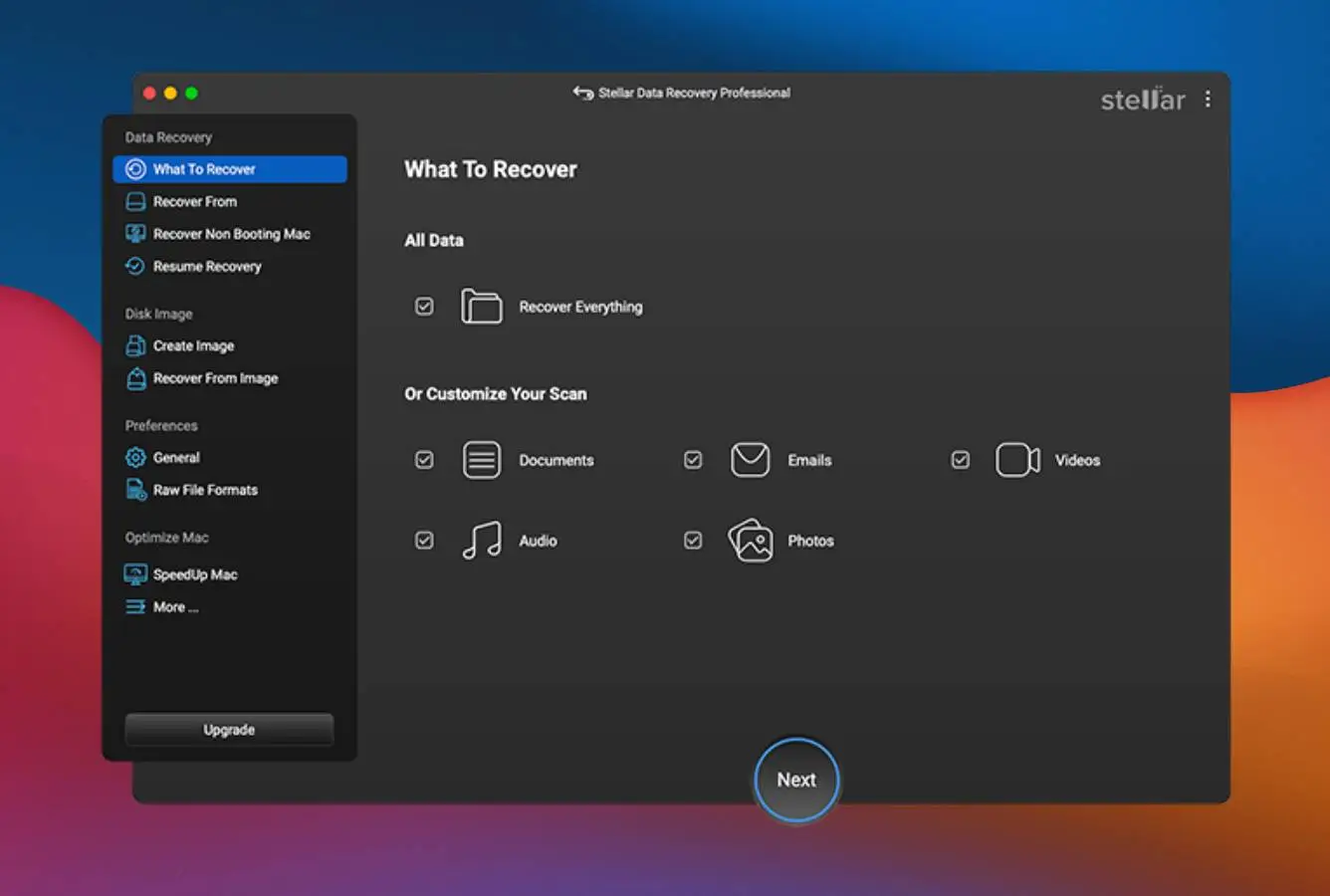
Launch the app. The “Select What to Recover” screen lets you target specific data types: Photos, Documents, Videos, Audio, Emails, or Everything. Targeting specific types speeds up the scan substantially. For unknown data loss scenarios, leave Everything selected.
Choose source and start scanning
Select the drive, volume, or location to scan from the device tree. Quick Scan runs first (filesystem metadata parse), followed automatically by Deep Scan (signature-based recovery). Deep Scan is significantly slower than category alternatives but typically more thorough on heavily damaged volumes. Pause and Resume support lets you stop and restart scans without losing progress.
Preview and recover
Preview files before recovery (supported for images, common documents, and most video formats). Use the file-type tabs (Photos, Videos, Documents, Audio, Emails) and search bar to locate specific files. Select files and click Recover. Save to a different drive than the source. Free tier saves up to 1 GB total (100 MB per file); Pro tier removes both caps.
Free tier scans and previews are unrestricted, and Free tier saves up to 1 GB before requiring Pro. Recommended workflow: install, scan, browse results to confirm your specific files appear, save up to 1 GB to verify recovery quality, then upgrade to Pro only if more recovery is needed. The 1 GB allowance fits many smaller recovery scenarios entirely.
Who Stellar Data Recovery for Mac Is For
Stellar Data Recovery targets the Mac user who values bundled features over absolute scan speed. Three audiences get clear value:
Mac users who want recovery and repair in a single application. Stellar Premium ($99.99/year, $199 Lifetime) is the only consumer Mac recovery tool that bundles photo and video repair alongside data recovery. For users who recover corrupted JPEGs, partially damaged MP4s from a failing SD card, or photos that came back from recovery in a broken state, Premium handles the entire workflow with no second tool and no separate purchase. Disk Drill, EaseUS, and other Mac competitors don\’t include comparable repair tools at any tier. Stellar Photo Recovery and Stellar Repair for Video are sold as separate products elsewhere; bundling them here is the differentiator.
Mac users who want bundled drive monitoring alongside recovery. Stellar Drive Monitor (included in Professional tier and above) tracks S.M.A.R.T. attributes, drive temperature, performance metrics, and bad-sector reports. The Clone Disk feature creates a sector-level replica before recovery, useful when working with failing hardware. Disk Drill includes basic S.M.A.R.T. monitoring; Stellar\’s monitoring module is more detailed and integrates more tightly with the recovery workflow. For Mac users who want to keep an eye on drive health proactively rather than only running recovery after data loss, Stellar\’s monitoring is a meaningful addition.
Apple Silicon Mac users with mixed filesystem scenarios. Stellar\’s Mac build is Universal Binary, native on M1/M2/M3/M4 chips, and supports T2 chip Macs and macOS Tahoe 26 plus all earlier versions back to macOS 10.13 (High Sierra). Filesystem support covers APFS, APFS Encrypted, HFS+, FAT, exFAT, and NTFS, the standard Mac and Windows filesystems. For users on recent MacBook Pros, MacBook Airs, Mac Studios, and Mac minis dealing with encrypted volumes, Stellar handles the scenario without compatibility friction.
Stellar Data Recovery for Mac is the wrong tool for users who prioritize raw scan speed (Disk Drill scans roughly 2× faster on the same drive), users with multi-disk RAID arrays (RAID reconstruction requires the Technician tier at $199/year or $299 Lifetime; the consumer Pro/Premium tiers don\’t include it. R-Studio is the cleaner choice), users recovering from Linux-formatted disks or NAS-pulled drives (no ext4/XFS/Btrfs in consumer tiers; Technician adds Linux filesystem support, but UFS Explorer Standard at $64.95 Lifetime is a more focused option), and users wanting a perpetual license at the lowest entry price (R-Studio at $79.99 Lifetime undercuts Stellar Pro Lifetime\’s $149).
Stellar Data Recovery\’s Strengths in Real-World Use
The strengths cluster around bundled features and vendor maturity, both reflecting Stellar Information Technology\’s 30+ year market presence and multi-product portfolio.
Built-in photo and video repair (Premium tier)
Stellar Premium for Mac at $99.99/year ($199 Lifetime) includes photo and video repair tools alongside data recovery, a combination no other consumer Mac recovery application matches. After recovering a partially damaged JPEG, MP4, or MOV, Premium can repair the file rather than leaving it as broken bytes on disk. Stellar sells these as standalone products elsewhere (Stellar Photo Recovery, Stellar Repair for Video), and the bundle pricing in Premium is meaningfully cheaper than buying recovery + repair separately. For Mac users dealing with failing SD cards, partially overwritten media, or recovered files that come back corrupted, Premium handles the entire workflow.
Stellar Drive Monitor module with S.M.A.R.T. tracking
Included in Professional tier and above, Stellar Drive Monitor tracks S.M.A.R.T. attributes (reallocated sectors, pending sectors, read error rate, drive temperature), performance metrics, and overall health status for all connected drives. The Scan Disk module reports bad sectors and recommends cloning when thresholds are exceeded. The Clone Disk feature creates a sector-level replica to a destination drive. Running recovery on the clone protects the original from further degradation. Disk Drill includes basic S.M.A.R.T. monitoring; Stellar\’s implementation is more detailed and integrates directly into the recovery workflow.
Generous 1 GB free recovery tier
Stellar Free for Mac saves up to 1 GB of recovered data with a 100 MB per-file cap, among the most generous free allowances in the consumer Mac recovery category. By comparison, Disk Drill\’s Mac Free is preview-only, Wondershare Recoverit caps at 100 MB total, and PhotoRec is genuinely free but terminal-only. For smaller recovery scenarios (recovered photos from an SD card, a deleted project folder, lost documents under 1 GB), Free may resolve the situation entirely without payment. For larger recoveries, Free serves as a practical pre-purchase test: confirm files appear, confirm preview quality, then upgrade only if needed.
Apple Silicon native, T2 chip support, macOS Tahoe ready
Stellar v12.6 ships as a Universal Binary running natively on M1/M2/M3/M4 Macs without Rosetta 2, supports T2 security chip Macs, and is compatible with macOS Tahoe 26 plus all earlier versions back to macOS 10.13 (High Sierra). Vendor updates track each major macOS release closely. The Mac build is treated as a first-class platform alongside Windows, uncommon for tools whose primary user base is on Windows.
Established vendor with 30+ year track record
Stellar Information Technology has operated since 1993, over three decades of continuous data recovery and repair software development. The company holds a 4.7 rating on Trustpilot across thousands of verified reviews and ships a multi-product portfolio (Data Recovery, Photo Recovery, Repair for Excel/Word/PowerPoint, Outlook PST/OST tools, MSSQL repair, Toolkit suites for IT pros). For users who value vendor longevity and ongoing support over startup-tier feature aggression, Stellar\’s market position is a meaningful trust signal.
Where Stellar Data Recovery for Mac Falls Short
The limitations follow from product architecture and pricing strategy. Three patterns surface consistently in independent evaluation.
Deep scan speed consistently slower than category leaders
Stellar\’s deep scan is the most consistently flagged friction point in independent reviews. On equivalent hardware and drives, Stellar typically takes roughly 2× the deep scan time of Disk Drill or EaseUS. A 2-hour deep scan on Disk Drill becomes a 4-hour scan on Stellar. For users on a deadline (recovering files before a meeting, restoring data on a borrowed Mac), this gap matters. For users who can leave a scan running overnight on stable hardware, the speed difference is less critical, but it remains a real architectural difference between Stellar\’s scan engine and faster competitors.
Persistent upgrade-nag UI even after Pro activation
Multiple independent reviews flag a UI pattern where Stellar continues to display “Upgrade” prompts and badges in the main interface even after a Professional or Premium license has been activated. The behavior is not a bug; it\’s the application surfacing the higher tier (Premium prompts shown to Professional users, Technician prompts shown to Premium users). For users who have already paid, this reads as ongoing nagware. Verified user feedback on Capterra and Trustpilot consistently calls this out as the dominant post-purchase complaint.
RAID and Linux filesystem support gated behind Technician tier
Stellar Technician at $199/year ($299 Lifetime) is the only tier that includes RAID 0/5/6 reconstruction, virtual machine recovery, and Linux filesystem support (ext2/3/4, JFS, ReiserFS). Pro and Premium tiers (the consumer-targeted price points) do not include these. For users who buy Premium expecting bundled multi-disk RAID recovery alongside the photo/video repair, this is a costly surprise. R-Studio Lifetime at $79.99 includes RAID reconstruction in its base product and undercuts Stellar Technician\’s Lifetime by significantly more than half. UFS Explorer Standard at $64.95 Lifetime handles Linux filesystems for considerably less. For RAID or Linux scenarios, Stellar Technician is rarely the value pick.
File-bundle recovery limitations on Photos library and DevonThink
Like all Mac recovery competitors, Stellar handles macOS file bundles (Photos library, DevonThink databases, .pages and .key Office equivalents) at the contained-file level rather than reconstructing the bundle wrapper. Verified user feedback consistently flags this specifically. Recovered photos can be retrieved from a deleted Photos library, but the library structure itself isn\’t restored. This is a category-wide limitation rather than a Stellar-specific issue, but Stellar\’s tech support documentation isn\’t always upfront about the limitation when users ask about it directly. For users dealing with bundle-format data, manual reconstruction after recovery is typically required.
Stellar Data Recovery Mac Capability Summary
How Stellar Data Recovery for Mac performs capability by capability:
| Capability | Tier | Notes |
|---|---|---|
| Photo & video repair (Premium tier) | Excellent | Unique in consumer Mac category. No competitor bundles repair at this price |
| Stellar Drive Monitor (S.M.A.R.T.) | Excellent | S.M.A.R.T. attributes, temperature, bad-sector reports, Clone Disk module |
| Free tier value (1 GB recovery) | Excellent | Among most generous in Mac category. 100 MB per-file cap |
| Apple Silicon (M1/M2/M3/M4) native | Excellent | Universal Binary, no Rosetta 2 overhead |
| T2 chip Mac support | Excellent | Documented and tested workflow for T2-equipped Macs |
| macOS Tahoe 26 compatibility | Excellent | Current build v12.6 ships with Tahoe support; vendor tracks each macOS release |
| Bootable recovery USB | Excellent | Built into application menu. For crashed or non-booting Macs |
| Vendor longevity | Excellent | Stellar Information Technology operating since 1993, 30+ years |
| APFS deleted-file recovery | Very Good | Upper tier in independent rankings; trails Disk Drill on pure APFS depth |
| APFS Encrypted recovery | Very Good | Handles password-protected APFS volumes when password is known |
| HFS+ recovery | Very Good | Strong on legacy Mac filesystems |
| NTFS / exFAT / FAT recovery | Very Good | Reads Windows-formatted drives connected to Mac |
| Formatted-volume recovery | Very Good | Quick-format APFS and HFS+ handled well |
| SD card / camera RAW recovery | Very Good | 300+ file signatures including major RAW formats (CR2, CR3, NEF, ARW, ORF, RAF, DNG) |
| UI & ease of use | Very Good | Mac-native interface; behind Disk Drill but ahead of utility tools |
| Pricing value (Pro tier) | Good | $89.99/yr or $149 Lifetime. Mid-range in Mac category |
| Deep scan speed | Fair | Consistently 2× slower than Disk Drill on equivalent drives |
| Upgrade-nag UI after activation | Fair | Persistent prompts even after Pro/Premium license activation |
| RAID reconstruction (Pro/Premium) | Not supported | Technician tier only ($199/yr or $299 Lifetime). R-Studio is better value |
| Linux filesystems (Pro/Premium) | Not supported | Technician tier only. UFS Explorer Standard is better value |
| File-bundle reconstruction (Photos library) | Limited | Recovers contained files; bundle wrapper not reconstructed (category-wide limitation) |
| Internal Mac SSD with TRIM | Not supported | Hardware limitation affecting all recovery tools |
Tier scale: Excellent / Very Good / Good / Fair / Limited / Not supported. Aggregated from Stellar product documentation, independent external evaluation, and verified user feedback (G2, Capterra, Trustpilot, Reddit), 2026.
Stellar Data Recovery for Mac Cost
Stellar offers a tiered pricing model with five editions for Mac. Both annual subscription and Lifetime perpetual options are available at every paid tier:
| Edition | Annual | Lifetime | Coverage |
|---|---|---|---|
| Free | $0 | — | 1 GB recovery cap · 100 MB per file · full scan + preview unrestricted |
| Standard | $69.99/yr | $99.99 Lifetime | Recovery + Time Machine extraction + iTunes backup parsing |
| Professional | $89.99/yr | $149 Lifetime | Standard + lost partition recovery + crashed system recovery + Stellar Drive Monitor |
| Premium (Best Value) | $99.99/yr | $199 Lifetime | Professional + photo & video repair tools (Stellar\’s differentiator) |
| Technician | $199/yr | $299 Lifetime | Premium + RAID 0/5/6 reconstruction + virtual machine recovery + Linux filesystems |
Pricing verified against stellarinfo.com, April 2026. Discounts of 30–50% are frequently available via official coupons. Free upgrades to higher tier are available; pay only the price difference. 30-day money-back guarantee on all paid tiers.
At $89.99/year ($149 Lifetime) for Professional, Stellar sits mid-range in the consumer Mac recovery category. For context, Disk Drill charges $89/yr or $149 Lifetime (covering both Mac and Windows), R-Studio Mac is $79.99 Lifetime, EaseUS Mac is $89.95/month or $169.95 Lifetime, and UFS Explorer Standard is $64.95 Lifetime. Stellar\’s value pitch is the bundled feature set rather than absolute price. Premium at $99.99/year is the cheapest way to get recovery + photo and video repair in a single application. For broader Mac category context, see our best Mac data recovery software ranking; for free-first options, see our best free data recovery software roundup.
Stellar vs. Competitors (2026)
How Stellar Data Recovery for Mac stacks up against the most common Mac recovery alternatives:
| Tool | APFS recovery | Bundled repair | Drive monitoring | Free tier | Entry price |
|---|---|---|---|---|---|
| Disk Drill Mac | Excellent | None | Basic | Preview only | $89/yr · $149 Lifetime |
| R-Studio Mac | Excellent | None | None | Preview only | $79.99 Lifetime |
| EaseUS DRW Mac | Very Good | None | None | 2 GB | $89.95/mo · $169.95 Lifetime |
| Stellar Mac (Premium) ← | Very Good | Photo + video | S.M.A.R.T. | 1 GB | $99.99/yr · $199 Lifetime |
| Wondershare Recoverit | Very Good | Video only | None | 100 MB | $79.99/yr |
| UFS Explorer Standard | Good | None | None | <256 KB | $64.95 Lifetime |
Tier scale: Excellent / Very Good / Good / Fair / Limited / Not supported. Aggregated from vendor documentation and independent external evaluation, 2026.
Stellar\’s standout advantages are the Premium tier\’s bundled photo and video repair (no other Mac recovery tool includes this in a single application) and Stellar Drive Monitor with detailed S.M.A.R.T. tracking. For pure APFS recovery depth, Disk Drill rates higher in independent rankings. For multi-disk RAID, R-Studio is the cleaner choice. For Linux/NAS-pulled disks, UFS Explorer Standard fills a gap Stellar\’s consumer tiers don\’t address.
Try Stellar Data Recovery for Mac Free
Recover up to 1 GB. No license key required.
Stellar Data Recovery for Mac Features & Tools
Stellar Data Recovery for Mac goes beyond basic recovery with a suite of integrated utilities (drive health monitoring, media repair, and crash recovery) that competing tools either don\’t include or sell as separate products. The Professional tier and above bundle features typically found only in dedicated maintenance applications, which is the core value pitch.
The recovery engine offers two scan modes: Quick Scan parses the filesystem catalog (APFS or HFS+) for recently deleted entries (fast but limited to intact filesystems). Deep Scan bypasses the catalog and scans raw sectors for file signatures, necessary for formatted or corrupted volumes. The engine supports 300+ file signatures out of the box, with custom signature support via sample files. Pause and Resume lets you save scan progress and come back later, essential when deep scans on multi-TB drives stretch past the 3-hour mark.
What\’s absent in Stellar consumer tiers: RAID reconstruction (Technician tier only), Linux filesystem support (Technician tier only), iCloud scanning as a recovery source (EaseUS handles this), and direct cloud export to Dropbox/Google Drive (EaseUS handles this). For broader Mac category alternatives, see our best photo recovery software guide for dedicated photo-first options.
Alternatives to Stellar Data Recovery for Mac
Stellar Data Recovery for Mac is a strong all-rounder for users who want bundled recovery + repair, but other tools serve specific Mac scenarios better:
Open Finder, navigate to the folder where files were lost, click the Time Machine icon in the menu bar, and browse to a backup before the deletion event. If Time Machine was active, this takes 2 minutes and costs nothing.
Stellar Data Recovery for Mac User Reviews
Stellar has extensive review coverage across user platforms, with over 5,000 verified Trustpilot reviews putting it among the most reviewed Mac recovery tools in the consumer category. The 4.7/5 Trustpilot average is the highest in the Mac recovery space. The sentiment pattern is consistent: strong praise for successful recoveries, the bundled feature set, and customer service responsiveness; criticism focused on scan speed, the upgrade-nag UI after activation, and occasional friction around bundle-format file recovery (Photos library, DevonThink).
I had a hard drive crash and this program saved me. Easy to use, did a great job, and not expensive.
The Premium tier with photo repair saved a wedding shoot. Recovered the JPEGs from a failing SD card and repaired the corrupted ones in one app.
Drive Monitor helped me catch a failing SSD before it died completely. Cloned to a new drive, recovered the data. The bundled monitoring justifies the cost alone.
The 1 GB free tier let me recover ~600 MB of photos without paying. Wouldn\’t have known if recovery would work otherwise. Genuinely useful trial.
Deep scans take forever on large drives. 2× the time of competitors. And the upgrade prompts in the UI never go away even after I bought Pro.
Reliable recovery from a corrupted external drive. Customer service responded within an hour and walked me through the workflow. Been in business since 1993; feels solid.
The recurring themes across verified user feedback: praise for the bundled photo/video repair (unique to Stellar Premium), Drive Monitor utility, and the genuinely useful 1 GB free tier; criticism around slow deep scan speeds (consistently flagged as 2× slower than competitors) and the persistent upgrade-nag UI even after Pro activation. Trustpilot 4.7/5 across 5,000+ verified reviews is the highest in the consumer Mac recovery category.
Frequently Asked Questions
Is Stellar Data Recovery for Mac free?+
Is Stellar Data Recovery safe on Mac?+
Does Stellar Data Recovery work on Apple Silicon Macs?+
Can Stellar recover data from formatted Mac drives?+
How long does a Stellar deep scan take on Mac?+
Can Stellar recover photos from an SD card on Mac?+
Is Stellar Data Recovery for Mac better than Disk Drill?+
Final Verdict
Stellar Data Recovery for Mac earns 4.5/5 as the consumer Mac recovery tool with the most distinctive bundled feature set in the category. Aggregated independent evaluation places it in the upper tier of Mac recovery rankings: strong APFS recovery, Mac-native interface, Apple Silicon native binary, T2 chip support, and macOS Tahoe 26 compatibility. The 1 GB Free tier is genuinely useful for verifying recovery before payment. Stellar Premium ($99.99/year, $199 Lifetime) is the only consumer Mac recovery tool that bundles photo and video repair alongside data recovery, a meaningful differentiator for users who recover corrupted JPEGs or damaged MP4s. Stellar Drive Monitor (Pro tier and above) adds detailed S.M.A.R.T. tracking and Clone Disk for proactive drive health management. Stellar Information Technology has operated since 1993 (over 30 years of continuous development) and holds a 4.7/5 Trustpilot rating across 5,000+ verified reviews.
The trade-offs are clear-eyed. Deep scan speed is consistently slower than category leaders. Expect roughly 2× the scan time of Disk Drill on the same drive. The upgrade-nag UI persists even after Pro/Premium activation, flagged across independent reviews. RAID reconstruction and Linux filesystem support are gated behind the Technician tier ($199/year, $299 Lifetime). R-Studio at $79.99 Lifetime is significantly cheaper for RAID, and UFS Explorer Standard at $64.95 Lifetime is the value pick for Linux filesystems. For pure APFS recovery polish, Disk Drill rates higher. For broader Mac category context, see our best Mac data recovery software ranking; for free-first options, see our best free data recovery software guide.
About the Authors


This site earns revenue through affiliate links when you purchase Stellar Data Recovery or other products through our links. This financial relationship has no influence on our tier assignments, methodology, or conclusions. All tools are evaluated independently against the same rubric and the same body of aggregated evidence. If you believe any claim is inaccurate, contact us at contact@datarecoveryfix.com.