R-Studio Mac Review (2026): Pro-Grade Recovery
R-Studio for Mac is the consumer-tier disk recovery utility from R-Tools Technology, a Canadian software company in business since 2000. The Mac build supports the broadest filesystem coverage in the consumer Mac recovery category outside UFS Explorer: APFS, HFS+, HFS, FAT12/16/32, exFAT, NTFS, ReFS, UFS1/UFS2, ext2/3/4, and XFS read on a single license, with native Apple Silicon support via Universal Binary. The current build is v7.5 (build 191716), released March 2026.
R-Studio Standard is $79.99 perpetual (one-time, no subscription), making it the cheapest Lifetime entry point in the technical-tier Mac recovery market. The product\’s positioning is pro-grade depth: RAID 0/1/4/5/6 reconstruction with parameter detection plus nested RAID configurations, network recovery via R-Studio Agent, hex editor, byte-to-byte disk imaging, and forensic mode (Technician tier). This review aggregates vendor documentation, independent external evaluation, and verified user feedback to map exactly where R-Studio delivers and where the limits start.
evaluation, user reports
macOS Tahoe 26+
Demo <256 KB free
R-Studio for Mac is the technical-tier disk recovery utility that bundles RAID reconstruction, network recovery, hex editor, and broad filesystem support (APFS, HFS+, NTFS, ReFS, ext2/3/4, XFS, UFS) on a $79.99 perpetual license. Aggregated independent evaluation places R-Studio as the clear value pick for users with multi-disk RAID arrays, Linux/NAS-pulled drives, or network recovery scenarios; it costs significantly less than Stellar Technician ($199/yr or $299 Lifetime) for comparable RAID capability. Trade-offs: the interface is dense and assumes prior data recovery experience (steepest learning curve in the consumer Mac category), preview support is limited (RAW photos not previewable), and the 256 KB per-file demo cap makes pre-purchase evaluation difficult beyond text files. Internal Mac SSD scanning on Apple Silicon and T2 Macs is restricted by Apple\’s security architecture (a hardware limitation affecting all third-party recovery tools). Best fit for technically capable Mac users with RAID, multi-platform, or forensic acquisition needs.
✓ What We Liked
- $79.99 one-time perpetual license. Cheapest Lifetime entry point in technical-tier Mac recovery
- RAID 0/1/4/5/6 reconstruction with automatic parameter detection. Plus nested RAID 10/1E/5E/5EE/6E configurations
- Broad filesystem support: APFS, HFS+, NTFS, ReFS, ext2/3/4, XFS, UFS1/UFS2, FAT/exFAT
- Network recovery via R-Studio Agent. Recover from remote Macs, Windows, or Linux machines over LAN
- Hex editor for low-level disk analysis and manual filesystem repair
- Byte-to-byte disk imaging with compressed, split, and password-protected images
- Apple Silicon native (M1/M2/M3/M4), T2 chip support, macOS Tahoe 26 compatible
- Established vendor: R-Tools Technology operating since 2000
✕ What We Didn’t
- Steepest learning curve in consumer Mac category. Dense interface assumes prior data recovery experience
- 256 KB per-file demo cap makes pre-purchase evaluation difficult beyond text files
- Limited preview support (RAW photos not previewable). No bundled photo or video repair
Research Methodology
This review aggregates three evidence types for R-Studio for Mac (current build v7.5, build 191716): vendor documentation (the official R-Studio Mac product page, Demo / Standard / Corporate / Technician tier matrix, supported filesystem coverage, and changelog), independent external evaluation, and verified user feedback (G2, Capterra, Trustpilot, plus Reddit threads on r/datarecovery and r/datahoarder where pro-tier and RAID recovery scenarios are discussed). Tier assignments (Excellent / Very Good / Good / Fair / Limited / Not supported) reflect the aggregate of that evidence rather than an in-house benchmark, so we do not claim independent recovery percentages. For broader Mac category context, see our ranking of the best data recovery software for Mac. Full methodology details are on our How We Test page.
Is R-Studio for Mac Safe?
Yes. R-Studio for Mac is developed by R-Tools Technology Inc., a Canadian software company in business since 2000 with over two decades of continuous development across Windows, Mac, and Linux. The Mac binary is signed and notarized by Apple, passing Gatekeeper without warnings. The application performs all scanning in read-only mode according to vendor documentation, and recovered files are written to a destination drive that you specify, never back to the source. R-Studio is the data recovery tool of choice for many professional cleanroom data recovery services and forensic examiners, which serves as a meaningful trust signal beyond standard consumer reviews.
Two Mac-specific safety considerations apply. First, R-Studio cannot scan the internal Macintosh HD on Apple Silicon and T2-equipped Intel Macs due to Apple\’s Secure Boot and hardware-level encryption (a hardware restriction affecting all third-party recovery software, not an R-Studio limitation). The R-Studio Emergency bootable USB option (Technician tier) is the cleanest workaround. Second, on macOS Catalina and later, R-Studio requests Full Disk Access permission in System Settings, which is standard for any tool that scans protected volumes. Always download from r-studio.com directly, as commercial recovery tools at R-Studio\’s technical tier are common targets for cracked installers carrying malware.
How to Use R-Studio on Mac
R-Studio\’s Mac workflow assumes prior data recovery experience, with an interface focused on technical depth rather than approachability. The workflow below covers a typical recovery scenario:
Download and install
Download the Mac DMG from r-studio.com. Open the DMG, drag the application to /Applications. On first launch, R-Studio requests Full Disk Access permission in System Settings, which is necessary for scanning protected volumes. The application starts in Demo mode, allowing unlimited scanning and previewing but capping recovery at files smaller than 256 KB.
Connect the source drive and select it
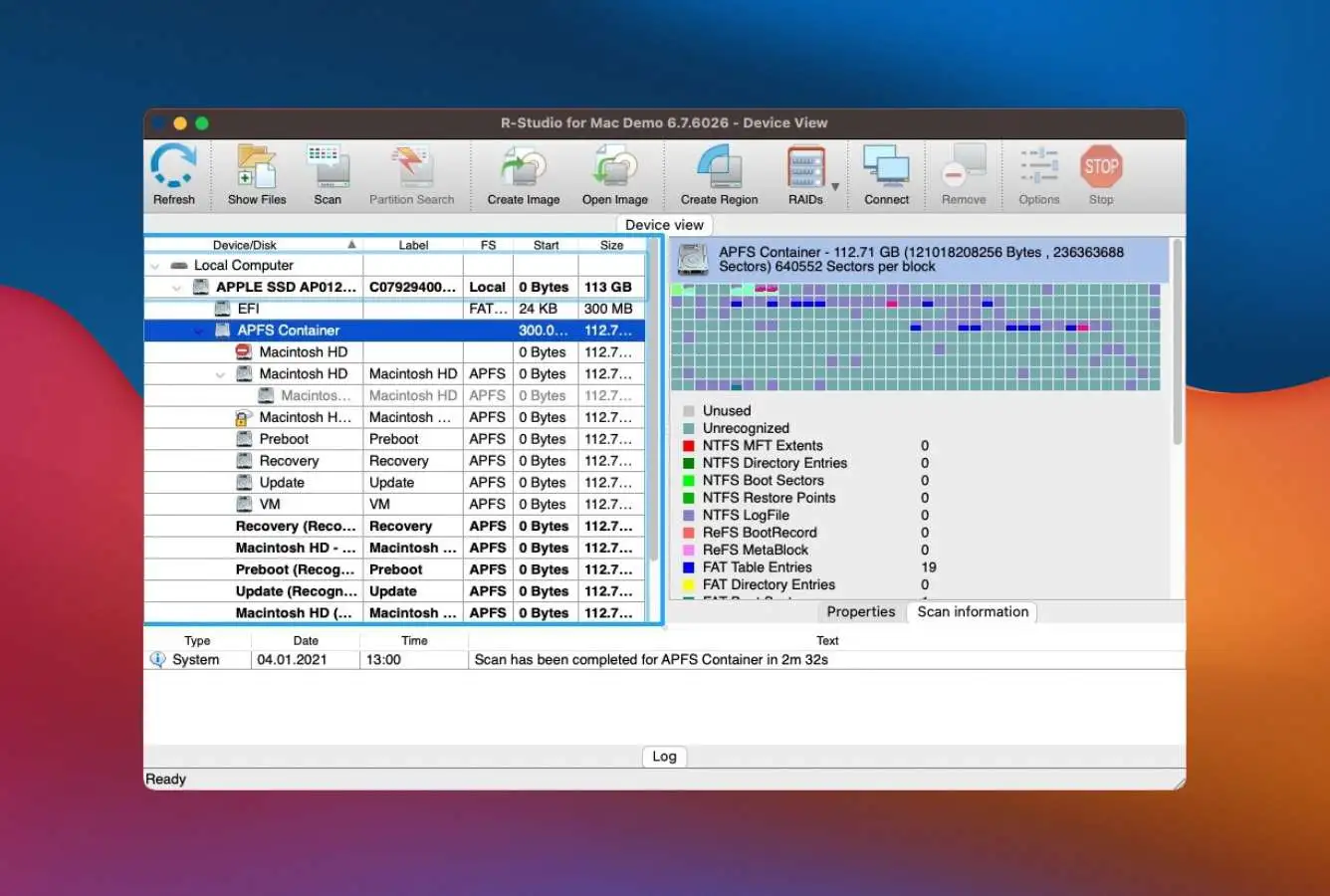
Connect the external HDD, USB drive, SD card, or NAS-pulled disk via USB dock. R-Studio\’s left panel displays the device tree with all attached storage and partitions, including drive geometry information (cylinders, heads, sectors) typical of pro-tier tools. Select the partition or whole-disk that contains the lost data. For RAID arrays, use Create Virtual Volume Set or Create Virtual RAID and configure parameters (or use automatic RAID parameter recognition for RAID 5/6).
Scan with appropriate mode
Click Scan. R-Studio offers Basic Scan (filesystem catalog parse, fastest) and Detailed Scan (signature-based deep recovery on top of filesystem-aware parsing). For corrupted partitions or formatted volumes, Detailed Scan with custom file signatures is the right choice. Save scan results to a project file so you can resume the workflow later without re-scanning. Pause is supported but resume requires reopening the project file.
Browse, preview, and recover
R-Studio displays results in a Files tab (recovered file/folder structure), Extra Found Files (signature-recovered files without filenames), and a Marker view for tagging files for batch recovery. Preview is supported for common formats but not RAW photos. Mark files for recovery and click Recover Marked. Save to a different drive than the source. Demo mode caps per-file recovery at 256 KB, and Standard tier removes the cap for $79.99 perpetual.
R-Studio Standard handles single-disk RAID member analysis but creating Virtual RAID volumes from multiple physical disks requires Standard or higher (most consumer recovery tools do not support this at any tier). Network recovery via R-Studio Agent requires the Corporate tier ($179.99) or Technician tier ($899) for commercial-use licensing across multiple operating systems. R-Studio Agent installs on the remote computer to expose its drives over TCP/IP for recovery from a different machine.
Who R-Studio for Mac Is For
R-Studio for Mac targets technically capable users with specific recovery scenarios that consumer-tier tools cannot handle. Three audiences get clear value:
Mac users with multi-disk RAID arrays. R-Studio is the cheapest option in the Mac recovery category that includes RAID 0/1/4/5/6 reconstruction at the entry tier. R-Studio Standard at $79.99 perpetual handles RAID workflows that require Stellar Technician ($199/year or $299 Lifetime) or higher in alternatives, with automatic parameter recognition for RAID 5 and 6 arrays. For Mac users dealing with a failed RAID 5 array from a small NAS, a degraded hardware RAID, or virtual RAID configurations from VMware or VirtualBox VMs, R-Studio is the value pick. Disk Drill, EaseUS, and Wondershare Recoverit do not support RAID at any tier.
Mac users recovering from Linux servers, BSD systems, or NAS units. R-Studio for Mac reads ext2/3/4, XFS, UFS1/UFS2, and ReFS filesystems directly, alongside the standard Mac (APFS, HFS+) and Windows (NTFS, FAT, exFAT) filesystems. For users with a single drive pulled from a Linux web server, a FreeBSD database server, or an unmountable Windows NAS, R-Studio is one of two consumer Mac tools that can read the disk directly. UFS Explorer Standard ($64.95 Lifetime) is the only cheaper alternative with comparable filesystem breadth, but R-Studio includes RAID and network recovery features that UFS Explorer Standard lacks (those require UFS Explorer\’s separate $209.95 RAID Recovery edition).
IT professionals, technicians, and forensic examiners. R-Studio Technician at $899 includes commercial-use licensing across Windows, Mac, and Linux in a single package, plus R-Studio Portable (run from a USB drive on customer machines), R-Studio Emergency (bootable for non-booting systems), forensic mode with detailed audit logs, network recovery via R-Studio Agent, and chain-of-custody documentation for investigative work. For freelance data recovery professionals, IT consulting firms, and law enforcement digital forensic units, R-Studio Technician is the standard tool. R-Studio T80+ ($80 for 80 days) provides the same Technician feature set on a time-limited basis, useful for one-off recovery projects.
R-Studio is the wrong choice for Mac users who prioritize ease of use (the interface assumes prior data recovery experience and has the steepest learning curve in the consumer Mac category, so Disk Drill or Stellar are better fits), users who need bundled photo/video repair (Stellar Premium at $99.99/year is the right pick), users wanting iCloud scanning or direct cloud export (EaseUS DRW for Mac is the only consumer Mac tool with these), and casual users dealing with a single deleted file scenario (Disk Drill\’s Mac UX is significantly cleaner for that workflow).
R-Studio for Mac Strengths in Real-World Use
The strengths cluster around technical depth, RAID capability, and pricing value. Each reflects R-Studio\’s positioning as the consumer-tier entry point into pro-grade recovery rather than a consumer-friendly all-rounder.
Pro-grade RAID reconstruction at consumer pricing
R-Studio Standard at $79.99 perpetual includes RAID 0, 1, 4, 5, and 6 reconstruction plus nested configurations (RAID 10, 1E, 5E, 5EE, 6E) with automatic parameter recognition for RAID 5 and 6 arrays. This combination of capability and price has no direct competitor in the consumer Mac recovery market. Stellar Technician requires $199/year or $299 Lifetime to unlock RAID. Disk Drill, EaseUS, Wondershare, and Cisdem do not support RAID at any tier. UFS Explorer\’s base Standard edition does not include RAID either (RAID Recovery edition is a separate $209.95 license). For Mac users with multi-disk arrays, R-Studio is the only consumer-tier value pick.
Network recovery via R-Studio Agent
R-Studio Agent installs on a remote computer (Mac, Windows, or Linux) to expose its connected drives over TCP/IP, allowing R-Studio on another machine to scan and recover those drives without physically relocating them. For IT consultants servicing client systems, enterprise environments where physical access is impractical, or forensic acquisition workflows that require working from a clean examination machine, this capability is genuinely useful. The Corporate tier ($179.99) is required for network recovery licensing, and Technician ($899) extends it across Windows, Mac, and Linux in one package.
Hex editor and forensic capabilities
The built-in hex editor lets technical users inspect raw disk sectors, manually patch filesystem structures (boot sectors, partition tables, MFT entries), and recover from filesystem corruption that signature scanning cannot resolve. Forensic mode (Technician tier) generates detailed audit logs covering scanned files, hardware configuration, and recovery operations, formatted for chain-of-custody documentation. Custom file signatures can be added by providing sample files. For users dealing with rare file formats or specialized recovery scenarios, R-Studio\’s extensibility is the deepest in the consumer Mac category.
Broad filesystem support across platforms
R-Studio for Mac reads APFS, HFS+, HFS, FAT12/16/32, exFAT, NTFS, ReFS, UFS1/UFS2, ext2/3/4, and XFS directly. The cross-platform coverage means a Mac user can recover from a Windows NTFS drive, a Linux ext4 partition from a web server, a FreeBSD UFS volume from a backup system, or a ReFS-formatted Storage Spaces array, all without additional software or rebooting into another OS. Btrfs and ZFS are not supported (UFS Explorer fills this gap), but R-Studio\’s coverage handles the majority of multi-platform scenarios that consumer Mac users encounter.
Cheapest perpetual license in technical-tier Mac recovery
R-Studio Standard at $79.99 is a one-time perpetual purchase with no subscription, no auto-renewal, and free updates within the major version. By comparison, Disk Drill Lifetime is $149 (without RAID), Stellar Pro Lifetime is $149 (without RAID, RAID requires Technician at $299), EaseUS Pro Lifetime is $169.95 (without RAID), and Wondershare Recoverit does not offer Lifetime. For Mac users who want a one-time payment with technical depth, R-Studio is unmatched on price.
Apple Silicon native and active vendor maintenance
R-Studio v7.5 ships as a Universal Binary running natively on M1/M2/M3/M4 Macs without Rosetta 2, supports T2 chip Macs, and is compatible with macOS Tahoe 26 plus all earlier versions back to macOS 10.14 Mojave. Vendor updates track each major macOS release, and Apple Silicon support has been first-class since R-Studio 8.x. For users on recent MacBook Pros, MacBook Airs, Mac Studios, and Mac minis, R-Studio works without compatibility friction (subject to the Apple Silicon internal-drive Secure Boot restriction that affects all third-party recovery tools).
Where R-Studio for Mac Falls Short
The limitations follow from product positioning. R-Studio prioritizes technical depth over consumer accessibility, and four patterns surface consistently in independent evaluation.
Steepest learning curve in consumer Mac recovery category
R-Studio\’s interface is dense, dated, and assumes prior data recovery experience. The main scan window displays drive geometry (cylinders, heads, sectors), filesystem hierarchy, scan progress, hex preview, and project file management simultaneously, which is overwhelming for first-time users. Independent reviewers consistently flag the learning curve as the dominant friction point. For a casual user dealing with a deleted Photos library or a corrupted SD card, Disk Drill\’s single-screen workflow or Stellar\’s four-step wizard is significantly more approachable. R-Studio rewards investment in learning the tool but is not a fit for users who need a recovery solution that just works on first launch.
256 KB demo cap makes pre-purchase evaluation difficult
R-Studio\’s Demo mode allows unlimited scanning and previewing but caps actual recovery at files smaller than 256 KB on the Mac. For text files or small documents, this works as a recoverability test. For typical Mac scenarios (recovering JPEGs, MP4s, PDF documents, RAW photos, video footage), the cap is too small to verify recovery quality before paying. By comparison, Stellar Free recovers up to 1 GB, EaseUS Free recovers up to 2 GB, and PhotoRec is unlimited (terminal-only on Mac). The 256 KB cap effectively requires R-Studio buyers to commit to the $79.99 license sight-unseen on most real recovery scenarios, an acceptable trade-off for users who already trust R-Studio\’s reputation but a barrier for first-time users evaluating the tool.
No bundled photo or video repair
R-Studio focuses purely on recovery and does not include the bundled file repair tools that Stellar Premium offers. Recovered JPEGs, CR2/CR3, NEF, ARW RAW photos, MP4 and MOV videos that come back damaged or partially corrupted cannot be repaired within R-Studio. For Mac users dealing with failing SD cards, partially overwritten media, or recovered files that need post-recovery repair, separate tools are required (Stellar Photo Recovery and Stellar Repair for Video are sold separately at $49.99 and $59.99 respectively, and bundled in Stellar Premium for Mac at $99.99/year). For recovery + repair workflows in a single application, Stellar Premium is the cleaner choice.
Limited preview and no Mac-native UI conventions
Preview support inside R-Studio is limited to common formats (text, common image formats, basic video formats). RAW photo preview is not supported at all, making it difficult to assess recovery quality of camera files before saving them. The application does not use native Mac UI conventions (sidebar navigation, native toolbar, file preview pane via QuickLook), instead presenting a cross-platform interface that reads as a Windows port on macOS. For Mac users who value the platform\’s design language, R-Studio is jarring; for users who care only about recovery capability, the cross-platform interface is functional but never feels at home on macOS.
R-Studio Mac Capability Summary
How R-Studio for Mac performs capability by capability:
| Capability | Tier | Notes |
|---|---|---|
| RAID reconstruction (0/1/4/5/6 + nested) | Excellent | Cheapest RAID-capable consumer Mac tool. Auto parameter recognition for RAID 5/6 |
| Network recovery (R-Studio Agent) | Excellent | TCP/IP recovery from remote Mac, Windows, or Linux machines |
| Hex editor & forensic tools | Excellent | Manual filesystem inspection, custom signatures, audit logs (Technician tier) |
| Filesystem breadth | Excellent | APFS, HFS+, NTFS, ReFS, ext2/3/4, XFS, UFS1/UFS2, FAT/exFAT |
| Pricing value (Lifetime $79.99) | Excellent | Cheapest perpetual license in technical-tier Mac recovery category |
| Apple Silicon (M1/M2/M3/M4) native | Excellent | Universal Binary, no Rosetta 2 overhead |
| T2 chip Mac support | Excellent | External drives only (Apple Silicon Secure Boot affects all tools) |
| Disk imaging (byte-to-byte) | Excellent | Compressed, split, and password-protected images. Scan from image protects original |
| APFS deleted-file recovery | Very Good | Strong on standard scenarios. Trails Disk Drill on pure APFS depth |
| HFS+ recovery | Very Good | Solid coverage of legacy Mac filesystems |
| NTFS / exFAT / ReFS recovery | Very Good | Full support including Storage Spaces and ReFS+ extensions |
| Linux filesystems (ext2/3/4, XFS) | Very Good | Reads Linux server and NAS drives directly from Mac |
| UFS1/UFS2 (FreeBSD, Solaris) | Very Good | Rare in consumer Mac category. Useful for legacy Unix systems |
| Formatted-volume recovery | Very Good | Detailed Scan with signature-based recovery on top of filesystem-aware parsing |
| SD card / camera recovery | Very Good | Recovery works well, but no RAW preview limits pre-save verification |
| UI & ease of use | Fair | Steepest learning curve in consumer Mac category. Dense, dated interface |
| Pre-purchase evaluation (256 KB demo) | Fair | Demo recovers files under 256 KB only. Most Mac scenarios need more |
| Photo / video repair | Not supported | Stellar Premium is the cleaner choice for recovery + repair workflows |
| Btrfs / ZFS filesystems | Not supported | UFS Explorer Standard at $64.95 Lifetime fills this gap |
| iCloud scanning / cloud export | Not supported | EaseUS DRW for Mac is the only Mac tool with iCloud scanning |
| Internal Mac SSD with TRIM | Not supported | Apple Silicon Secure Boot. Hardware limitation affecting all recovery tools |
| Native Mac UI conventions | Limited | Cross-platform interface, not Mac-native. Functional but not Mac-idiomatic |
Tier scale: Excellent / Very Good / Good / Fair / Limited / Not supported. Aggregated from R-Studio product documentation, independent external evaluation, and verified user feedback (G2, Capterra, Trustpilot, Reddit), 2026.
R-Studio for Mac Cost
R-Studio for Mac uses a perpetual license model with no subscriptions. Four tiers are available, each a one-time purchase except T80+ (time-limited):
| Edition | Price | Type | Coverage |
|---|---|---|---|
| Demo | $0 | Free | Unlimited scan and preview, recovery capped at files <256 KB. For verifying recoverability of text files only |
| Standard (Best for individuals) | $79.99 | Lifetime perpetual | Full local recovery, all filesystems, RAID reconstruction, hex viewer, disk imaging, S.M.A.R.T. monitoring. One Mac |
| Corporate | $179.99 | Lifetime perpetual | Standard + network recovery via R-Studio Agent. One Mac, commercial use within own organization |
| Technician | $899 | Lifetime perpetual | Corporate + multi-platform (Win+Mac+Linux), portable USB version, R-Studio Emergency, full hex editor, forensic mode with audit logs, commercial use across third-party customers |
| T80+ | $80 | 80-day time-limited | Full Technician feature set, time-limited. $1/day equivalent. Exchangeable for full Technician at price difference before expiration |
Pricing verified against r-studio.com, April 2026. All paid tiers include free updates within the major version. Mac, Windows, and Linux licenses are not interchangeable except in the Technician package which covers all three platforms.
At $79.99 perpetual, R-Studio Standard is the cheapest Lifetime entry point in the technical-tier Mac recovery category. By comparison, Disk Drill Lifetime is $149 (covers Mac and Windows), Stellar Pro Lifetime is $149 (Mac only, no RAID), EaseUS Pro Lifetime is $169.95, UFS Explorer Standard is $64.95 Lifetime (no RAID, separate $209.95 RAID Recovery edition), and Wondershare Recoverit does not offer Lifetime. R-Studio\’s value pitch is the combination of perpetual licensing and pro-grade RAID + filesystem support. For broader Mac category context, see our best data recovery software for Mac ranking; for free-first options, see our best free data recovery software roundup.
R-Studio vs. Competitors (2026)
How R-Studio for Mac stacks up against the most common Mac recovery alternatives:
| Tool | RAID | Linux FS | Network recovery | UI / ease of use | Entry price |
|---|---|---|---|---|---|
| R-Studio Mac (Standard) ← | Excellent | Excellent | Corporate tier | Fair | $79.99 Lifetime |
| Disk Drill Mac | None | None | None | Excellent | $89/yr · $149 Lifetime |
| Stellar Mac (Pro/Premium) | Technician only | Technician only | None | Very Good | $89.99/yr · $149 Lifetime |
| EaseUS DRW Mac | None | None | None | Very Good | $89.95/mo · $169.95 Lifetime |
| UFS Explorer Standard | RAID Recovery edition only | Excellent | Pro edition only | Fair | $64.95 Lifetime |
| Wondershare Recoverit | None | None | None | Very Good | $79.99/yr |
Tier scale: Excellent / Very Good / Good / Fair / Limited / Not supported. Aggregated from vendor documentation and independent external evaluation, 2026.
R-Studio\’s standout advantages are RAID reconstruction at consumer-tier pricing (no other Mac tool offers RAID under $200 except UFS Explorer\’s separate edition), broadest filesystem coverage in technical-tier consumer Mac recovery, and the cheapest Lifetime perpetual license in the category. Trade-offs: significantly steeper learning curve than Disk Drill or Stellar, no bundled photo/video repair (Stellar Premium fills this gap), no iCloud scanning (EaseUS DRW Mac is the only option), and the 256 KB demo cap limits pre-purchase evaluation.
Download R-Studio for Mac
Scan and preview free. $79.99 lifetime for full recovery.
R-Studio for Mac Features & Tools
R-Studio is the most feature-dense recovery tool in the consumer Mac category. Where consumer tools focus on simplicity, R-Studio provides granular control over every aspect of the recovery process from low-level disk analysis to automated RAID reconstruction. The trade-off is complexity, but for users who need these capabilities, nothing else at this price point on macOS comes close.
R-Studio supports standard RAID levels (0, 1, 4, 5, 6) and nested configurations (10, 1E, 5E, 5EE, 6E) with automatic parameter detection for RAID 5 and 6. The virtual RAID module assembles arrays from individual disk images, making it possible to recover data even when the original RAID controller has failed. The Technician license includes a full-featured hex editor that supports HFS/HFS+ data forks, resource forks, and NTFS file attribute editing, plus custom data structure templates for forensic analysis. The Standard license includes a hex viewer (read-only) that still provides useful insight into disk structures.
What\’s absent in R-Studio: bundled photo and video repair (Stellar Premium fills this gap), iCloud scanning as a recovery source (EaseUS DRW Mac is the only consumer Mac tool with this), direct cloud export to Dropbox/Google Drive/OneDrive (EaseUS again), and Btrfs/ZFS filesystem support (UFS Explorer Standard handles these). For photographers who prioritize media repair over technical depth, our best photo recovery software guide covers dedicated photo-first options.
Alternatives to R-Studio for Mac
R-Studio for Mac is the technical-tier value pick for users with RAID, multi-platform, or forensic needs. Other tools serve specific Mac scenarios better:
Open Finder, navigate to the folder where files were lost, click the Time Machine icon in the menu bar, and browse to a backup before the deletion event. If Time Machine was active, this takes 2 minutes and costs nothing.
R-Studio for Mac User Reviews
R-Studio has extensive coverage on professional review platforms and forums. The sentiment pattern across verified user feedback is consistent: strong praise for technical depth, RAID capability, and the perpetual licensing model; criticism focused on the steep learning curve and dense interface. Note that many generic review platforms confuse R-Studio (the data recovery tool) with RStudio (the R programming language IDE), so the reviews below are filtered for actual data recovery feedback only.
The ability to image seemingly dead hard drives and restore data is powerful. Also the ability to connect to remote systems is another great feature.
A reliable and effective tool for recovering lost data. Supports a wide range of filesystems and recovers files in many different formats.
R-Studio is what most pros recommend when you have a RAID failure. The $79.99 Lifetime is genuinely the cheapest way to get RAID 5/6 reconstruction in a Mac tool.
It can be little slow and glitchy at sometimes but most of the time its does not disappoint. Decent training is required to use the advanced features.
Recovered data from a failed RAID 5 array on a Synology NAS. The automatic parameter detection worked first try. Saved hours of manual configuration.
The interface is dated and dense. Took me an hour of reading docs before I felt comfortable starting a scan. But once you understand it, it does things no other tool can.
Recurring themes across verified user feedback: strong praise for RAID reconstruction, network recovery, and broad filesystem coverage; the perpetual licensing model is universally cited as excellent value. Criticism focuses on the steep learning curve, dense interface, and limited preview support. R-Studio rewards technical investment but is rarely recommended for first-time recovery users (Disk Drill or Stellar are the consumer-friendlier picks).
Frequently Asked Questions
Is R-Studio for Mac free?+
Is R-Studio safe to use on Mac?+
Does R-Studio work on Apple Silicon Macs?+
Can R-Studio recover RAID arrays on Mac?+
What file systems does R-Studio for Mac support?+
How does R-Studio compare to Disk Drill for Mac?+
Why can\’t R-Studio recover from internal Mac SSDs?+
Final Verdict
R-Studio for Mac earns 4.0/5 as the technical-tier recovery utility for Mac users with RAID, multi-platform, or forensic acquisition needs. Aggregated independent evaluation places R-Studio Standard at $79.99 Lifetime as the cheapest entry point in consumer Mac recovery that includes RAID 0/1/4/5/6 reconstruction (no other consumer Mac tool offers RAID at any price under Stellar Technician\’s $199/year or $299 Lifetime). Filesystem coverage spans APFS, HFS+, NTFS, ReFS, ext2/3/4, XFS, UFS1/UFS2, and FAT/exFAT, the broadest in the consumer Mac recovery category outside UFS Explorer. Network recovery via R-Studio Agent (Corporate tier and above) and the hex editor + forensic mode (Technician tier) extend the toolset to IT consultants, freelance recovery professionals, and forensic examiners. R-Tools Technology has operated since 2000, over two decades of continuous development across Windows, Mac, and Linux platforms.
The trade-offs are clear-eyed. The interface is dense, dated, and assumes prior data recovery experience, the steepest learning curve in the consumer Mac category. The 256 KB per-file demo cap makes pre-purchase evaluation difficult beyond text files. There is no bundled photo or video repair (Stellar Premium fills this gap), no iCloud scanning (EaseUS DRW Mac is the only consumer Mac tool with this capability), and no Btrfs/ZFS support (UFS Explorer Standard fills this gap). The Apple Silicon internal-drive Secure Boot restriction affects all third-party recovery tools, not R-Studio specifically. For first-time recovery users, Disk Drill or Stellar are significantly more approachable. For broader Mac category context, see our best Mac data recovery software ranking; for free-first options, see our best free data recovery software guide.
About the Authors


This site earns revenue through affiliate links when you purchase R-Studio or other products through our links. This financial relationship has no influence on our tier assignments, methodology, or conclusions. All tools are evaluated independently against the same rubric and the same body of aggregated evidence. If you believe any claim is inaccurate, contact us at contact@datarecoveryfix.com.