UFS Explorer Standard for Mac Review (2026): Broadest Filesystem Support
UFS Explorer Standard Recovery is SysDev Laboratories’ cross-platform recovery utility, a $64.95 perpetual-license tool whose distinguishing feature is the broadest filesystem support in the consumer recovery category. APFS, HFS+, NTFS, FAT, exFAT, ReFS, ext2/3/4, XFS, JFS, ReiserFS, UFS, Btrfs, and simple ZFS all read on a single Mac license, with native Apple Silicon support via Universal Binary.
The current build is v10.19. This review aggregates vendor documentation, independent external evaluation, and verified user feedback to map exactly where Standard delivers, and where the limits start (RAID arrays and network NAS recovery require the separate Professional edition).
evaluation, user reports
Apple Silicon native
256 KB free trial

UFS Explorer Standard Recovery occupies a unique position in the Mac data recovery market: aggregated independent evaluation places it as the consumer recovery tool with the broadest filesystem support available: APFS, HFS+, NTFS, FAT, exFAT, ReFS, ext2/3/4, XFS, JFS, ReiserFS, UFS, Btrfs, and simple ZFS volumes are all readable on a single $64.95 perpetual license. The Mac build is Universal Binary, native on Apple Silicon. Trade-offs are equally clear: APFS recovery is competent but trails category leaders like Disk Drill in independent rankings, the interface assumes prior data recovery experience, and the 256 KB trial cap makes pre-purchase evaluation difficult beyond text files. RAID and network NAS recovery are not in Standard, those require the separate Professional ($629.95) or RAID Recovery ($209.95) editions. Best fit for technically capable Mac users dealing with disks pulled from Linux servers or NAS units.
✓ What We Liked
- Broadest filesystem support in consumer Mac recovery, ext4, XFS, Btrfs, ZFS, ReiserFS, UFS all readable
- Reads disks pulled from Linux servers and NAS units that other consumer Mac tools cannot parse
- Professional-grade disk imaging with multi-pass reading and bad block handling built in
- Universal Binary, runs natively on Apple Silicon without Rosetta 2
- IntelliRAW custom signature rules for defining recovery patterns on proprietary file formats
- Perpetual $64.95 license, among the lowest one-time costs in the category
- Active vendor (SysDev Laboratories) with regular updates, current build v10.19 dated February 2026
✕ What We Didn’t
- APFS recovery rates trail category leaders (Disk Drill, EaseUS) in independent rankings
- Interface feels utilitarian and assumes prior data recovery experience, steep learning curve
- 256 KB trial cap saves only text files; pre-purchase evaluation of larger files is preview-only
UFS Explorer Alternatives
Brief selection Here’s a quick shortlist of our top alternative picks based on testing. |
Best Alternative

EaseUS Data Recovery Wizard
Best overall · 2 GB free
|

Stellar Data Recovery
Best for photos · 1 GB free
|

Wondershare Recoverit
Best for video · 100 MB free
|
|---|---|---|---|
| Deep Scan | ✓ | ✓ | ✓ |
| Formatted Drive Recovery | ✓ | ✓ | ✓ |
| RAW Photo Support | Broad | Broad | Limited |
| File Repair | ✓ | ✓ | Video only |
| Free Tier | 2 GB | 1 GB | 100 MB |
Research Methodology
This review aggregates three evidence types for UFS Explorer Standard Recovery (current Mac build v10.19, dated February 2026): vendor documentation (the official SysDev Laboratories product page, the supported filesystem matrix, the editions comparison between Standard / RAID Recovery / Network Recovery / Professional, and the changelog), independent external evaluation, and verified user feedback (Trustpilot, Capterra, plus Reddit threads on r/datarecovery and r/homelab where Linux/NAS recovery scenarios are discussed). Tier assignments (Excellent / Very Good / Good / Fair / Limited / Not supported) reflect the aggregate of that evidence rather than an in-house benchmark, we do not claim independent recovery percentages. For broader Mac recovery comparisons, see our ranking of the best data recovery software for Mac. Full methodology details are on our How We Test page.
Is UFS Explorer Safe to Use on Mac?
Yes. UFS Explorer is developed by SysDev Laboratories LLC, a recognized data recovery software vendor with a multi-product portfolio (Standard Recovery, RAID Recovery, Network Recovery, Professional Recovery, plus the Recovery Explorer line) actively maintained for over a decade. The Mac binary is signed and notarized by Apple. The application performs all scanning in read-only mode, the official documentation explicitly states no changes are made to the source storage. Recovered files are written to a separate destination drive that you specify.
Two Mac-specific safety considerations apply. First, the Standard installer warns against installing the software on the same drive being recovered from, a sensible default that prevents the install writes from overwriting recoverable data. Second, like every Mac recovery tool, scanning the internal Macintosh HD on Apple Silicon and T2-equipped Intel Macs is constrained by Apple\’s System Integrity Protection and requires Recovery Mode workflows. UFS Explorer\’s documentation walks through this, but it is more cumbersome than tools like Disk Drill that have invested in KEXT-based deep scan alternatives. Always download from the official sysdevlabs.com site; the broader internet has cracked installers that frequently include malware given UFS Explorer\’s commercial pricing.
How to Use UFS Explorer Standard on Mac
UFS Explorer\’s Mac workflow is technical compared to consumer-friendly alternatives, there is no wizard, no drag-and-drop. The structure is: select source storage from the device tree, choose a scan profile, browse results, save what you need.
Download and install
Download the Mac DMG from sysdevlabs.com. The installer is roughly 18.6 MB. Drag the application to /Applications, then approve the install in System Preferences if Gatekeeper prompts. Install on a different drive than the one being recovered, the installer warns about this explicitly.
Connect the source drive and select it
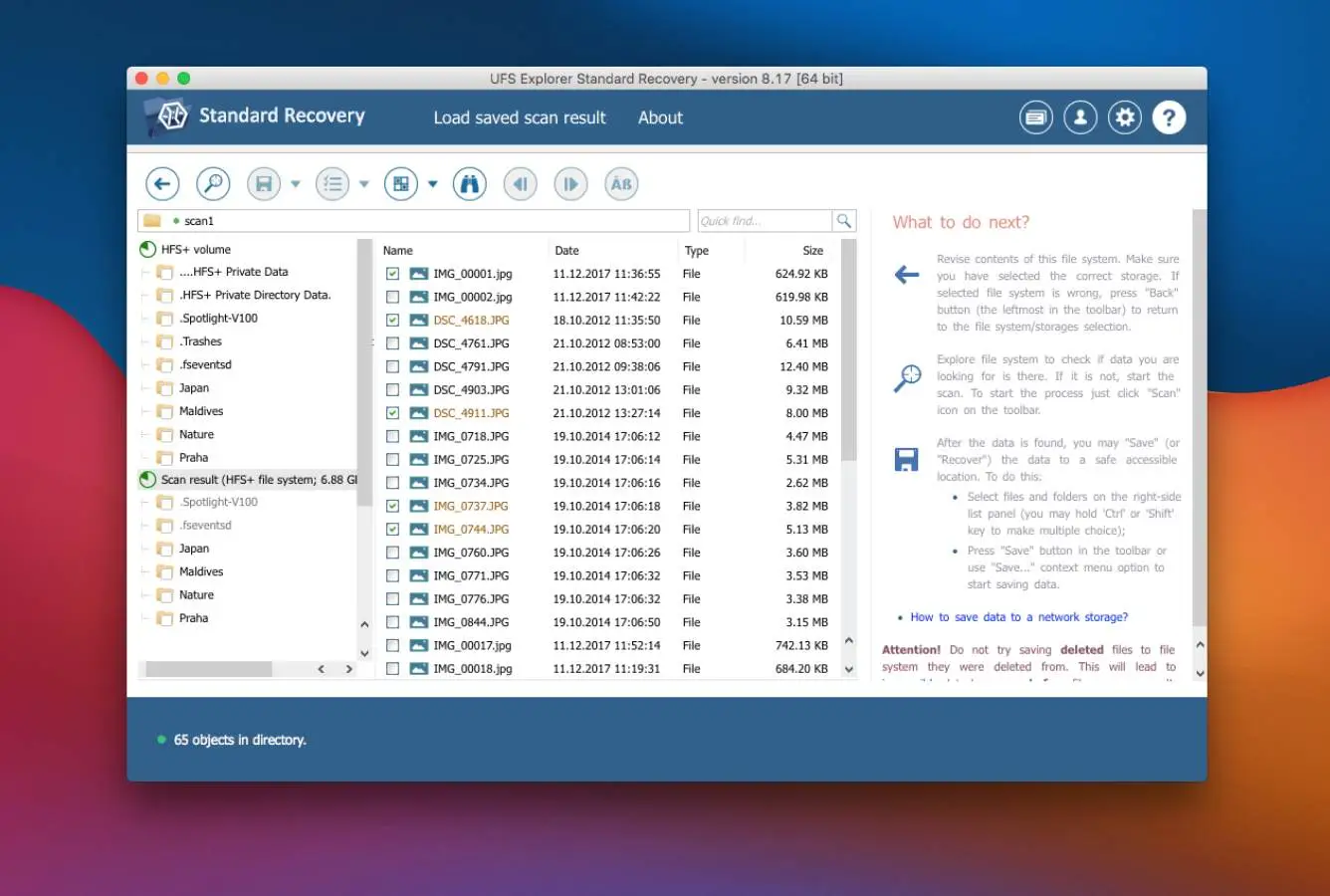
Connect the external HDD, USB drive, SD card, or NAS-pulled disk via USB dock. UFS Explorer\’s left panel displays the device tree with all attached storage and partitions. Select the partition or whole-disk that contains the lost data. For NAS drives running Linux filesystems (ext4, XFS, Btrfs), the Mac would normally show “this disk is unreadable”, but UFS Explorer reads them directly.
Choose a scan profile and start
Standard offers Quick scan (parses filesystem metadata for recently deleted files), Full scan (deep signature-based scan for formatted or damaged volumes), and a focused scan that targets only the unallocated free space. For most use cases, Quick first, then Full if needed. IntelliRAW custom signatures can be loaded for proprietary file formats.
Review and recover
Results appear in a hierarchical tree mirroring the original directory structure when filesystem metadata survives. Preview is supported for images, PDFs, and text files. Use the search bar and filters (by name, size, date) to locate specific files. Select files, click Save, and choose a destination on a different drive. Save is gated by license. Free trial saves only files smaller than 256 KB.
The Free trial scans and previews are unrestricted. Workflow most users follow: install, scan, browse the results to confirm your specific files appear, then purchase the $64.95 Standard license to actually save them. The 256 KB save cap is too small for media files but useful for confirming text recovery.
Who UFS Explorer Standard Is For
UFS Explorer Standard serves a narrower audience than mainstream Mac recovery tools, it\’s the right pick when filesystem breadth matters and the wrong pick when it doesn\’t. Three audiences get clear value:
Mac users dealing with disks pulled from Linux servers or NAS units. Single drives from Synology, QNAP, TerraMaster, or DIY NAS units running ext4, XFS, or Btrfs filesystems are unreadable by macOS natively. Disk Utility shows them as “this disk is unreadable.” UFS Explorer Standard reads the filesystems directly via USB dock and recovers files with original directory structure intact. This is the single largest use case where Standard outperforms every consumer Mac alternative, and the use case where most users find their way to it.
Multi-platform households or small studios with mixed Mac/Windows/Linux storage. Standard reads NTFS and ReFS partitions on Mac, ext2/3/4 partitions, exFAT, and legacy filesystems like ReiserFS or JFS. A single $64.95 perpetual license handles most cross-platform recovery scenarios that would otherwise require separate Mac and Windows tools. The perpetual licensing (no subscription) suits users who want to keep a recovery tool in the toolbox for occasional use rather than paying yearly.
Technically capable users comfortable with a utility-grade interface. The UI assumes prior data recovery experience: device tree, scan profiles, partition manipulation, IntelliRAW custom signatures. For users who already understand filesystems and partitions, this depth is a feature, the interface stays out of the way. For users who don\’t, the same interface is a barrier compared to Disk Drill or EaseUS.
UFS Explorer Standard is the wrong tool for first-time recovery users who want a graphical wizard (Disk Drill or EaseUS are far more approachable), users primarily recovering APFS or HFS+ data on a typical Mac drive (Disk Drill rates higher in independent APFS rankings and has a much cleaner UX), users with multi-disk RAID arrays (RAID reconstruction requires the separate UFS Explorer RAID Recovery edition at $209.95 or Professional at $629.95. Standard alone cannot reconstruct a RAID), and users who need forensic-grade evidence acquisition with chain-of-custody export (Professional Recovery at $629.95 includes EnCase/AFF4 forensic image format support; Standard does not).
UFS Explorer Standard\’s Strengths in Real-World Use
The strengths cluster around filesystem breadth and pricing, both reflect SysDev Laboratories\’ core market position rather than UI polish or APFS depth.
Broadest filesystem support in the consumer Mac recovery category
No other consumer-grade Mac recovery tool matches Standard\’s filesystem coverage on a single license. Apple filesystems (APFS, HFS+) plus Microsoft (NTFS, ReFS, FAT, exFAT) plus Linux/BSD (ext2/3/4, XFS, JFS, ReiserFS, UFS/UFS2, Btrfs, simple ZFS) all read on the Mac build. For users who genuinely need cross-platform filesystem access (recovering data from a Linux server disk, a NAS drive, or a dual-boot system) this is the single largest competitive advantage in the category, and the reason most independent reviews call out Standard as a specialist tool worth keeping in the toolbox even when it\’s not the primary recovery option.
Perpetual licensing at a competitive entry price
$64.95 (€59.95) is among the lowest one-time perpetual costs in the recovery category. By comparison, Disk Drill\’s Lifetime Pro is $149, R-Studio Lifetime is $79.99, EaseUS sits at $99.95/year subscription, and Stellar at $79.99/year. Standard\’s pricing reflects SysDev Laboratories\’ positioning as a filesystem specialist rather than a consumer brand investing in marketing, the savings show up in the price. All updates within v10.x are free for license holders.
Professional-grade disk imaging built into Standard
Multi-pass disk imaging with bad block handling (typically a feature gated behind professional-tier products in other tools) is included in Standard at no extra cost. The imaging tool can pause, resume, retry failed blocks with adjustable parameters (read timeout, block size, direction), and produce maps of defective sectors. For users dealing with failing hardware, this lets them image the drive once and work from the image, protecting the original from further degradation. Disk Drill and EaseUS include similar imaging in their Pro tiers; UFS Explorer Standard includes it at the entry price.
Apple Silicon native and active vendor maintenance
UFS Explorer ships as a Universal Binary running natively on both Intel and Apple Silicon Macs since version 9. The vendor publishes updates regularly, current build v10.19 is dated February 2026, with previous versions tracking each macOS release closely. The Mac build is treated as a first-class platform alongside Windows and Linux, not as a Windows port, uncommon for filesystem-specialist tools.
Where UFS Explorer Standard Falls Short
The limitations follow from product positioning. Standard is a filesystem-breadth specialist, not a polished consumer tool. Three patterns surface consistently in independent evaluation.
256 KB free trial cap is too restrictive for meaningful pre-purchase evaluation
The trial scans drives and previews recoverable files unrestricted, but saves only files smaller than 256 KB. For text files this is enough; for almost any other file type (JPEGs, RAW photos, MP4 videos, Office documents, PDFs over a few pages) the cap blocks the actual recovery action. Compared to Disk Drill\’s Free tier (preview-only on Mac but unlimited preview) or PhotoRec\’s genuinely free recovery, this cap creates real purchase friction. Independent reviewers consistently flag it: users have to commit $64.95 essentially blind on whether the saved files will be usable.
APFS recovery rates trail category leaders in independent rankings
For pure APFS recovery on a typical Mac drive, UFS Explorer Standard places below tools like Disk Drill in independent rankings. The reasons trace to engineering investment: Disk Drill\’s KEXT-level deep scan and APFS-specific snapshot handling outperform Standard\’s general-purpose filesystem parser. SysDev Laboratories optimizes for filesystem breadth across many filesystems rather than depth on any single one. For users whose recovery scenario is “deleted files from my Mac\’s external SSD,” Standard works competently but isn\’t the best-in-class option. Most independent evaluations recommend running Standard\’s Free trial in parallel with Disk Drill\’s Free trial for APFS scenarios and choosing whichever surfaces more files.
No RAID reconstruction or network NAS recovery in Standard tier
This is the single biggest source of confusion around UFS Explorer pricing. Standard reads filesystems on a single drive (even one pulled from a NAS unit) but cannot reconstruct a RAID array. Multi-disk recovery (RAID 0/1/5/6/10/50/60, Drobo BeyondRAID, Synology Hybrid RAID, ZFS RAID-Z, Microsoft Storage Spaces) requires the dedicated RAID Recovery edition at $209.95 or the full Professional edition at $629.95. Network recovery (accessing NAS volumes over LAN without removing disks) also requires Professional or Network Recovery editions. For users who Google “UFS Explorer NAS recovery” and assume Standard handles it, this is the gotcha. The vendor\’s editions matrix is explicit, but the marketing positioning is occasionally muddy.
Utilitarian interface with steep learning curve
UFS Explorer\’s interface is consistently flagged in independent evaluation as the dominant friction point for non-specialist users. The device tree, scan profile selection, partition manipulation tools, and IntelliRAW custom signatures expose more depth than first-time users need. Compared to Disk Drill\’s single-screen workflow or EaseUS\’s wizard, Standard\’s UI assumes prior data recovery experience. This isn\’t a bug (SysDev Laboratories targets the filesystem specialist market) but it is a real barrier for the consumer Mac audience that finds Standard via search results without understanding the audience fit.
UFS Explorer Standard Capability Summary
How UFS Explorer Standard performs capability by capability:
| Capability | Tier | Notes |
|---|---|---|
| Filesystem breadth (Mac) | Excellent | 14+ filesystems on a single license, broadest in consumer category |
| Linux filesystem support (ext2/3/4, XFS, Btrfs) | Excellent | Reads NAS-pulled disks Mac alternatives cannot parse |
| Cross-platform compatibility (NTFS, ReFS, exFAT) | Excellent | Strong NTFS/ReFS support; reads Windows Storage Spaces |
| Apple Silicon native binary | Excellent | Universal Binary since v9, no Rosetta 2 overhead |
| Disk imaging (multi-pass) | Excellent | Bad block handling, pause/resume, configurable timeouts |
| IntelliRAW custom signatures | Excellent | Define custom recovery patterns for proprietary formats |
| Perpetual licensing value | Very Good | $64.95 one-time, among lowest in category, free v10.x updates |
| NTFS / exFAT recovery | Very Good | Strong on Windows-formatted drives connected to Mac |
| External HDD / USB recovery | Very Good | Standard scenarios handled with directory structure preserved |
| SD card / camera recovery | Good | Competent but lacks dedicated RAW format library of specialist tools |
| APFS / HFS+ recovery | Good | Competent on deletions; trails Disk Drill in independent rankings |
| Free trial value (256 KB save cap) | Fair | Scan + preview unlimited; saves only files under 256 KB |
| UI & ease of use | Fair | Utilitarian; assumes prior data recovery experience |
| RAID reconstruction | Not supported | Requires UFS Explorer RAID Recovery ($209.95) or Professional ($629.95) |
| Network NAS recovery (over LAN) | Not supported | Requires UFS Explorer Network Recovery or Professional editions |
| Forensic export (EnCase, AFF4) | Not supported | Available in Professional edition ($629.95) only |
| F2FS / complex ZFS | Not supported | Requires Professional edition |
| File repair (corrupted media) | Not supported | Use dedicated repair tools like Stellar Repair for damaged files |
| Internal Mac SSD with TRIM | Not supported | Hardware limitation affecting all recovery tools |
Tier scale: Excellent / Very Good / Good / Fair / Limited / Not supported. Aggregated from SysDev Laboratories\’ product documentation, independent external evaluation, and verified user feedback (Trustpilot, Capterra, Reddit), 2026.
UFS Explorer Standard Recovery Cost
UFS Explorer uses a perpetual one-time license model, pay once, keep it. SysDev Laboratories offers four editions tiered by capability, with RAID and network recovery split into dedicated products rather than bundled with Standard.
| Edition | Price | Coverage | Notes |
|---|---|---|---|
| Free trial | $0 | Unlimited scan + preview · saves files under 256 KB only | Useful for confirming recoverability; not for production recovery |
| Standard Recovery | $64.95 | 14+ filesystems · disk imaging · IntelliRAW · single-disk recovery | Perpetual license, free v10.x updates, platform-specific (Mac, Windows, or Linux) |
| RAID Recovery | $209.95 | Standard + RAID 0/1/5/6/10/50/60 reconstruction · NAS array recovery | Required for multi-disk NAS arrays (Synology, QNAP, Drobo, etc.) |
| Professional Recovery | $629.95 | RAID + network recovery over LAN + DeepSpar DDI + EnCase/AFF4 forensic export | Aimed at data recovery technicians and forensic services |
Pricing verified against sysdevlabs.com, April 2026. €59.95 EUR equivalent. Each license is platform-specific; cross-platform users need separate Mac + Windows + Linux licenses.
For Mac users, $64.95 is among the lowest perpetual entry points in the recovery category. Compared to subscription-only competitors at $79.99–$99.95/year, Standard breaks even after the first year and saves money in every year after. The trial cap of 256 KB is the main friction point, it lets you confirm files appear in the scan but not save anything beyond text. For broader Mac category context, see our ranking of Mac data recovery tools; for users wanting a free-first approach, see our best free data recovery software guide.
UFS Explorer vs. Mac Competitors (2026)
How UFS Explorer Standard stacks up against the most common Mac recovery alternatives:
| Tool | APFS recovery | Formatted volume | Linux FS support | Mac free tier | Entry price |
|---|---|---|---|---|---|
| Disk Drill Mac | Excellent | Very Good | None | Free preview | $89/yr · $149 Lifetime |
| R-Studio Mac | Excellent | Very Good | ext2/3/4, XFS | Preview only | $79.99 Lifetime |
| EaseUS DRW Mac | Very Good | Good | None | Up to 2 GB | $99.95/yr |
| Stellar Mac | Very Good | Good | None | Up to 1 GB | $79.99/yr |
| Wondershare Recoverit | Very Good | Very Good | None | 100 MB | $79.99/yr |
| UFS Explorer Standard ← | Good | Fair | Excellent | <256 KB files | $64.95 Lifetime |
| PhotoRec (Mac) | Fair | Fair | ext2/3/4 | Unlimited | Free |
Tier scale: Excellent / Very Good / Good / Fair / Limited / Not supported. “Linux FS support” reflects ability to read and recover from Linux file systems on macOS. Aggregated from vendor documentation and independent external evaluation, 2026.
The comparison highlights Standard\’s fundamental trade-off: filesystem breadth is best-in-class) ext4, XFS, Btrfs, ZFS, ReiserFS, UFS all readable on Mac, but APFS recovery trails category leaders. If your data is on an APFS or HFS+ Mac drive, Disk Drill or EaseUS deliver stronger results. If your data is on a Linux-formatted disk pulled from a NAS or server, Standard is the only consumer Mac-native option that reads it.
Try UFS Explorer Standard Recovery
Scan drives & preview recoverable files. Full saving requires a $64.95 license.
UFS Explorer Features & Mac-Specific Tools
UFS Explorer\’s feature set reflects its heritage as a cross-platform recovery tool that happens to run on macOS. Strengths are engineering-depth features (multi-format filesystem parsing, low-level disk imaging, custom signature definition) rather than the consumer polish of Mac-first competitors.
The filesystem engine is the standout capability: APFS, HFS+, FAT12/16/32, exFAT, NTFS, ReFS, ext2/3/4, XFS, JFS, ReiserFS, Btrfs, UFS/UFS2, and simple ZFS all read natively on macOS without third-party drivers. This breadth is the broadest in the consumer Mac recovery category and the primary reason most users find their way to Standard.
What\’s absent in Standard: no dedicated camera recovery mode with fragmented-video reassembly (Disk Drill\’s Advanced Camera Recovery covers this), no file repair capability for corrupted photos or videos (Stellar Repair handles this), no drive health monitoring dashboards, no backup or data protection tools, and no RAID reconstruction or network NAS recovery (those require Professional or RAID Recovery editions). For specialized recovery scenarios, tools in our photo recovery software guide are better suited.
UFS Explorer User Reviews
UFS Explorer receives less mainstream review coverage than consumer-focused Mac tools, but has a dedicated following among IT professionals, NAS users, and Linux administrators. The sentiment pattern across Capterra, Trustpilot, and Reddit is clear: praise for filesystem breadth and recovery on Linux/NAS scenarios, criticism for the dated UI and the restrictive 256 KB trial cap.
Great data recovery software. Outstanding knowledge of filesystems implemented, fast, smooth, and reliable work with logical-based cases of data recovery.
Used UFS Explorer to pull files off a dead Synology NAS drive on my Mac. Nothing else could even see the ext4 partition.
Excellent for specialized recovery but the learning curve is steep. Not recommended for users without technical background.
The only program I could find to read XFS. It copied all data off my 1T Seagate drive easily and fast.
I lost a RAID5 array on my Buffalo NAS. Just a couple of minutes ago, I bought UFS Explorer, followed the online manual step-by-step and within 5 minutes I got my data back.
If you have a NAS or Linux box and lose data on a Mac, this is the tool. Steep learning curve but worth it.
The recurring themes across verified user feedback: filesystem breadth is the dominant praise (Linux/NAS recovery on Mac is uniquely served), the dated UI and 256 KB trial cap are the dominant criticisms, and learning curve concerns are flagged consistently for non-specialist users. Most users who chose Standard did so specifically because no other Mac tool could read their Linux-formatted drives.
Alternatives to UFS Explorer Standard
UFS Explorer Standard excels in a specific niche, multi-platform filesystem recovery. For other Mac scenarios, these alternatives are stronger:
Open Finder, navigate to the folder where files were lost, click the Time Machine icon in the menu bar, and browse to a backup before the deletion event. If Time Machine was active, this takes 2 minutes and costs nothing.
Frequently Asked Questions
Can UFS Explorer Standard Recovery recover files on Mac for free?+
Does UFS Explorer work on Apple Silicon Macs?+
What file systems does UFS Explorer Standard support on Mac?+
Can UFS Explorer recover data from a NAS drive on Mac?+
How does UFS Explorer Standard compare to R-Studio on Mac?+
Is UFS Explorer Standard Recovery worth it for Mac users?+
How long does UFS Explorer take to scan a drive on Mac?+
Final Verdict
UFS Explorer Standard Recovery earns 3.5/5 as the consumer Mac recovery tool with the broadest filesystem support available. Its ability to read ext4, XFS, Btrfs, ZFS, and a dozen other filesystems directly on macOS makes it irreplaceable for users recovering data from NAS-pulled disks, Linux workstations, or multi-platform storage. The $64.95 perpetual licensing is among the lowest entry points in the category, professional-grade disk imaging is included at no extra cost, and the Universal Binary runs natively on Apple Silicon. SysDev Laboratories has shipped this tool for over a decade and updates it regularly, current build v10.19 dated February 2026.
The trade-offs are equally clear. APFS recovery trails category leaders like Disk Drill in independent rankings. The utility-grade interface assumes prior data recovery experience and presents a real barrier for first-time users. The 256 KB trial save cap is the most restrictive in the category, making pre-purchase evaluation impractical for media files. RAID reconstruction and network NAS recovery require separate paid editions ($209.95 RAID Recovery, $629.95 Professional). For Linux-formatted NAS-pulled disks or cross-platform filesystem recovery on Mac, UFS Explorer Standard is the right tool. For typical APFS or HFS+ recovery on a Mac drive, see our best Mac data recovery software ranking for better-suited alternatives.
About the Authors


This site earns revenue through affiliate links when you purchase UFS Explorer or other products through our links. This financial relationship has no influence on our tier assignments, methodology, or conclusions, all tools are evaluated independently against the same rubric and the same body of aggregated evidence. If you believe any claim is inaccurate, contact us at contact@datarecoveryfix.com.