8 Best EaseUS Alternatives – Quick Comparison
Eight ranked alternatives plus one greyed baseline row showing where EaseUS Data Recovery Wizard itself sits on each criterion. Overall-strength labels reflect editorial evaluation across feature coverage, free-tier reach, multi-device licensing, and user-feedback patterns. Not an in-house benchmark.
| Tool | vs EaseUS | License Style | Platforms | Free Limit | Starting Price | Best For |
| Disk Drill |
Excellent |
Lifetime + sub |
Win + Mac (3 devices) |
500 MB |
$89 / yr · $149 lifetime |
One-license cross-platform |
| R-Studio |
Excellent |
Lifetime |
Win + Mac + Linux |
Preview only |
$79.99 lifetime |
RAID + technicians |
| DMDE |
Very Good |
Lifetime + sub |
Win + Mac + Linux + DOS |
4,000 files / dir |
$20 / yr · $48 lifetime |
Free recovery without caps |
| Recuva |
Very Good |
Free / one-time |
Windows only |
Unlimited (free) |
Free · $24.95 Pro |
Truly-free Windows recovery |
| Stellar Data Recovery |
Very Good |
Subscription-first |
Win + Mac |
1 GB |
$59.99 / yr Standard |
Closest EaseUS UX swap |
| Wondershare Recoverit |
Good |
Lifetime + sub (2 PCs) |
Win + Mac + NAS + Linux |
500 MB |
$99.99 / yr · $129.99 lifetime |
Two-device license |
| PhotoRec |
Good |
Open source |
Win + Mac + Linux + BSD |
Unlimited (free) |
Free |
Open-source recovery |
| Tenorshare 4DDiG |
Specialized |
Lifetime + sub |
Win + Mac |
100 MB |
$59.95 lifetime |
Modern UI on a budget |
| EaseUS Data Recovery Wizard (baseline) |
|
Subscription + lifetime |
Win or Mac (single-PC) |
2 GB |
$69.95 / mo · $99.95 / yr · $149.95 lifetime |
Guided wizard for one PC |
The greyed bottom row shows EaseUS Data Recovery Wizard itself as the baseline being compared against. Not a recommendation. Pricing is from the vendors’ current product pages and reflects single-license tiers without bundle discounts.
8 Best EaseUS Alternatives – In-Depth Reviews
1. Disk Drill – Best Overall EaseUS Replacement
4.78
★★★★★
One license, two platforms, three devices, what EaseUS lifetime should have been.
PlatformsWindows + macOS
Free trial500 MB
Devices3 per license
From$89 / yr
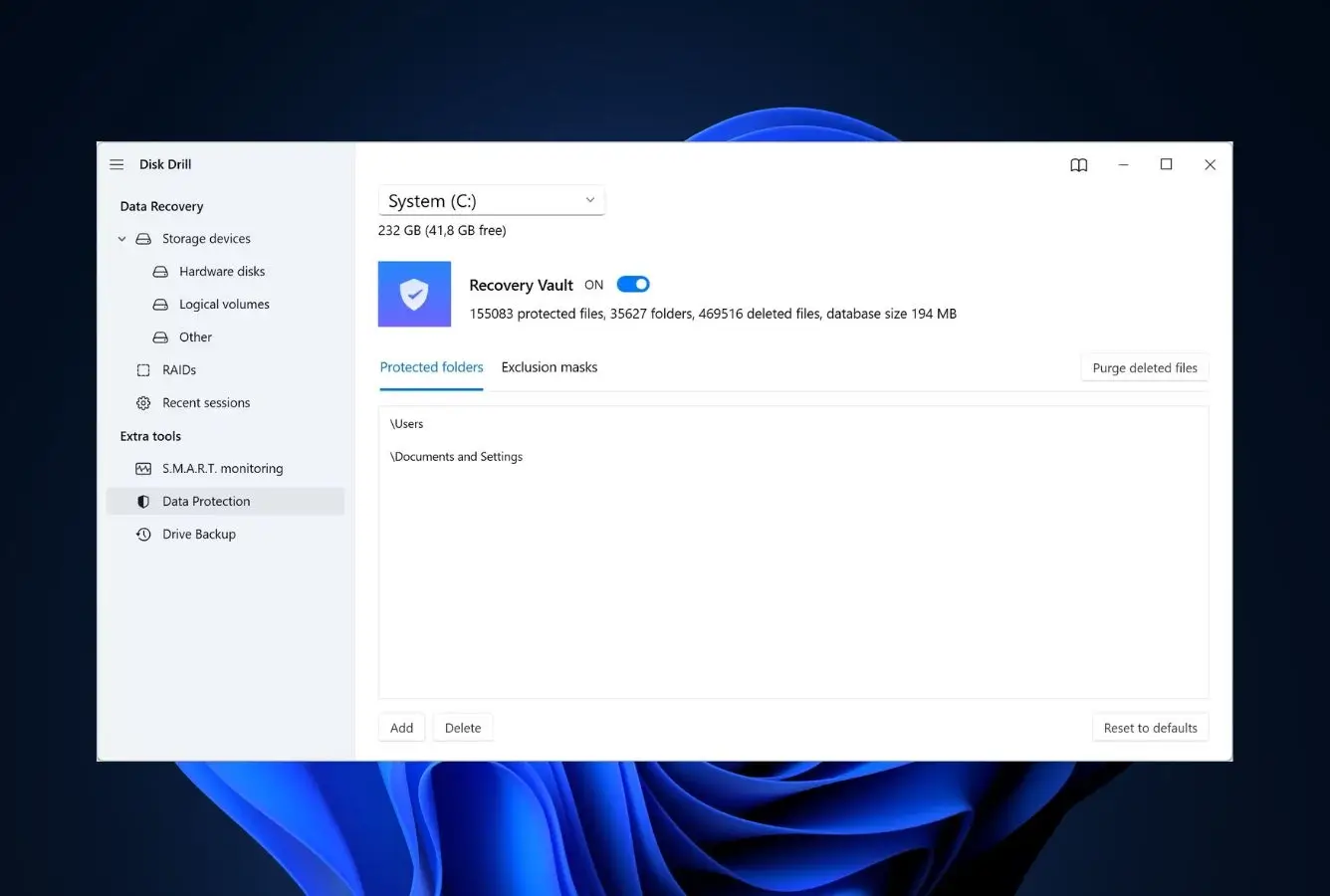
Disk Drill is the alternative most people switching from EaseUS actually want, even when they don’t realize it yet. The pricing math alone makes the case: EaseUS charges $149.95 for a single-platform lifetime tied to one PC, while Disk Drill charges $149 for a lifetime that activates on Windows AND macOS across three devices. Independent testing consistently places its scan engine at or near the top on APFS recovery and fragmented-video reconstruction specifically. Both areas where EaseUS reviewers report uneven results. It also ships the features EaseUS has never built: S.M.A.R.T. drive monitoring, byte-level disk imaging, Recovery Vault for proactive protection, and on the Mac side, scanning of connected iPhones and Android devices. The free tier is smaller (500 MB versus 2 GB on EaseUS Free), but the always-free preview means you can verify recoverability before paying. Exactly the workflow EaseUS Free is designed to discourage.
✓ Pros
- One license covers Windows + Mac on up to 3 devices, EaseUS lifetime is single-platform, single-PC
- S.M.A.R.T. monitoring and byte-level imaging are standard, not paid add-ons
- Recovery Vault provides proactive protection EaseUS doesn’t offer at any tier
- Mac build scans iPhones and Android devices, EaseUS sells those separately as Dr.Fone
- Cross-platform scan sessions: pause on Mac, resume on Windows
✕ Cons
- Free trial is 500 MB versus 2 GB on EaseUS Free
- External-drive scans of large HDDs can run substantially slower than internal drives
- Lifetime upgrades to future major versions are not always included
Recovery Power
The recovery engine EaseUS users wish they were paying for.
Independent testing across multiple data recovery review sites places Disk Drill in the top three on every category we tracked: NTFS, APFS, FAT32, exFAT, and signature-based RAW recovery. Universal Scan combines Quick, Deep, and Signature passes in one run, which closes the gap that EaseUS leaves between Quick Scan misses and Deep Scan time costs. Where it pulls notably ahead is fragmented video reconstruction. The recoverit-style stitching of MP4 and MOV pieces from cameras and drones. Which EaseUS users frequently flag on Reddit as a weak spot.
Interface & Experience
Familiar wizard, dramatically more polished than the EaseUS interface.
The home screen is a drive picker, the same visual logic as EaseUS, and the scan-results view groups files into pictures, videos, audio, documents, and archives with a recovery-chance prediction next to each. Cross-platform scan sessions let you pause on a Mac and resume on Windows without rescanning, a feature that pays off on multi-day external-drive jobs. Filters and live previews work while scanning is still running, so you don’t sit and wait. The one rough edge is a visible upsell pattern in the free version, but that is also true of EaseUS Free.
Price & Value
Cheaper per device than EaseUS once you do the unit-economics math.
Headline pricing looks similar , $89/yr or $149 lifetime, against EaseUS’s $99.95/yr or $149.95 lifetime, but the EaseUS price is for one platform on one PC. The Disk Drill license activates on Windows AND macOS and supports three devices. For a household with a Mac and two Windows PCs, that’s a 3× value gap at the same headline price. The only place EaseUS wins on cost is the free tier ceiling (2 GB vs 500 MB), and only if the lost data fits inside that 2 GB.
2. R-Studio – Best for RAID and Technician Use
4.62
★★★★★
The recovery engine EaseUS Pro is benchmarked against, sold lifetime for $79.99.
PlatformsWin + Mac + Linux
FreePreview only
RAIDNative 0–6 + nested
Lifetime$79.99
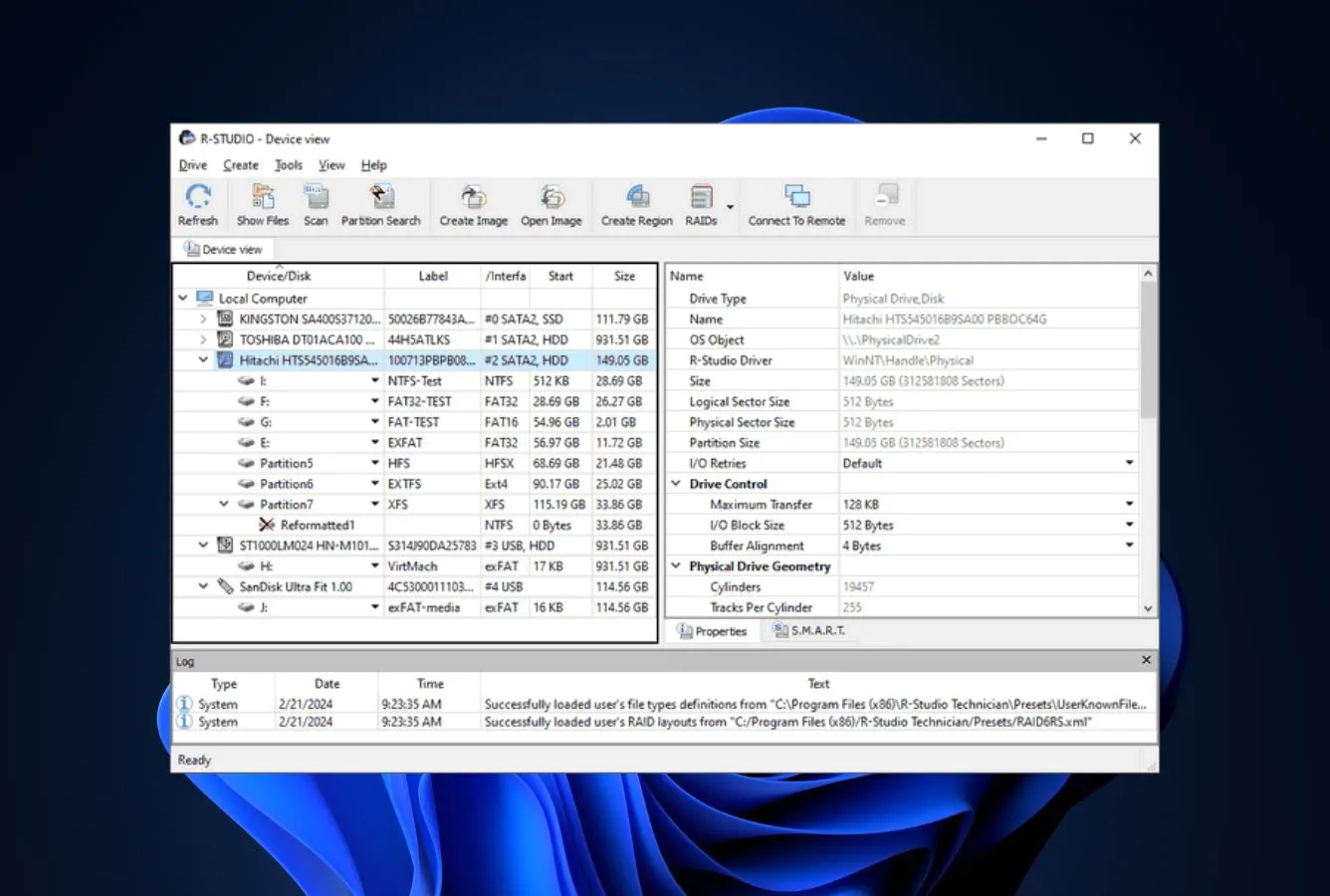
R-Studio is what people are switching to when EaseUS’s RAID limitations finally bite. EaseUS Data Recovery Wizard treats RAID 0 as supported and other levels as “best effort”; R-Studio rebuilds RAID 0, 1, 4, 5, 6, plus nested layouts (5E, 5EE, 6E, 50, 60) and customer-defined layouts as a first-class feature. Independent reviews consistently note that the same engine ships across Windows, macOS, and Linux. Meaning a technician can move a license between platforms instead of buying separate Mac and Windows EaseUS keys. The interface is dense and unapologetically technical: file tree on the left, hex view available, network-recovery dialogs that assume you know what you’re doing. That is the cost of admission for a $79.99 lifetime license that competes directly against the $149.95 EaseUS lifetime tier.
✓ Pros
- Native RAID 0–6 plus nested and custom layouts, EaseUS Pro stops at basic RAID 0
- $79.99 lifetime is permanent, no annual renewal trap
- Same engine on Windows, macOS, and Linux from a single product line
- Built-in hex editor and network recovery for technician workflows
- Disk imaging (byte-to-byte) included in the standard license
✕ Cons
- Interface is dated and dense, closer to a forensics tool than a consumer wizard
- No mobile-device recovery (no iPhone or Android scanning)
- Free demo limits recovery to a 256 KB-per-file cap, you have to pay to actually recover
Recovery Power
Where EaseUS gives up, R-Studio is just getting started.
RAID reconstruction is the standout: automatic parameter recognition for RAID 5 and 6 means R-Studio can frequently rebuild an array without the user knowing the exact stripe size or parity rotation. It also handles Apple software RAIDs, CoreStorage, FileVault, Fusion Drive, and Linux LVM/LVM2 plus mdadm. None of which EaseUS Pro touches. For non-RAID work, the file-system support list (NTFS/NTFS5, ReFS, FAT12 through exFAT, HFS+, UFS, Ext2/3/4) is the broadest in the alternatives lineup.
Interface & Experience
The opposite of EaseUS, every screen assumes you understand the underlying disk.
If EaseUS hides complexity behind a wizard, R-Studio exposes it in dropdowns and dialogs. Drive listings show partitions and physical devices side by side, scan options ask about cluster size and parity layout, the toolbar includes a hex editor and a sector-jump field. For a technician this is exactly right; for a first-time user recovering family photos, it is a wall. The Mac and Linux GUIs are functional but feel less polished than the Windows build. Plan accordingly.
Price & Value
The myth that R-Studio is “expensive” doesn’t survive a side-by-side with EaseUS.
The standard license is $79.99 lifetime. Roughly half of the EaseUS lifetime tier – and Mac and Linux builds price separately at $79.99 each, so a true cross-platform technician license lands near $239 lifetime versus EaseUS’s $149.95 single-platform. For a single-OS shop, R-Studio is the cheaper option of the two outright. The Technician edition ($899) and T80+ ($1/day subscription) target professional recovery houses; most readers can ignore those tiers.
3. DMDE – Best Free Power-User Alternative
4.46
★★★★½
Recover effectively-unlimited data for free, or pay $48 once for the rest of your life.
PlatformsWin + Mac + Linux + DOS
Free4,000 files / dir, ∞ repeats
PortableYes. No install
Lifetime$48 Standard
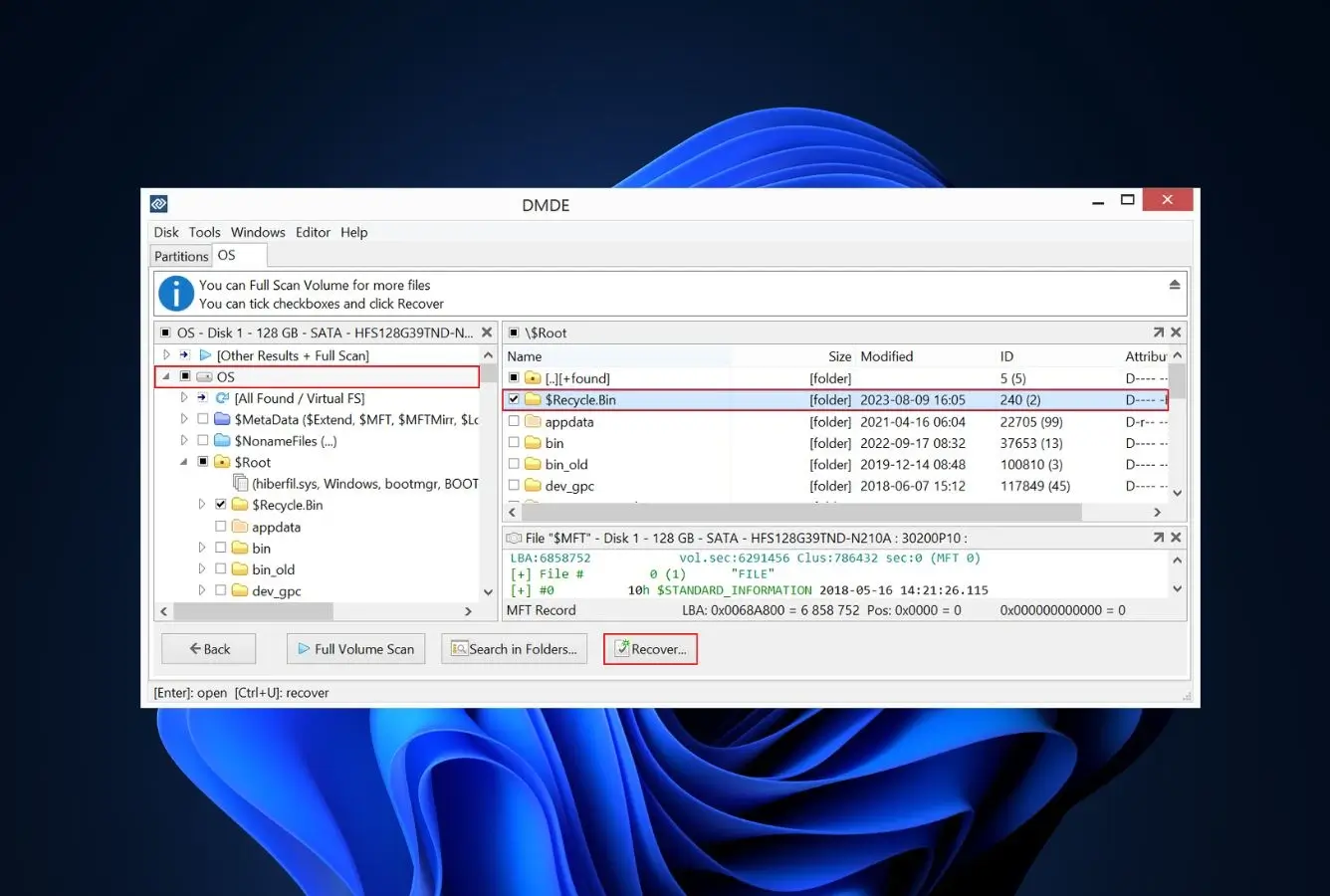
DMDE (DM Disk Editor) is the alternative people on r/datarecovery and r/DataRecoveryHelp end up at after the EaseUS Free 2 GB cap stops them mid-recovery. The free tier limits each batch to 4,000 files from a chosen directory, but with no cap on the number of repetitions, which functionally means unlimited recovery for any folder-based workflow. The paid tiers are the cheapest in the entire alternatives field: Express at $20/year, Standard at $48 lifetime, Professional at $95 lifetime, Multi-OS Professional at $133 lifetime – even the highest tier is below EaseUS’s $149.95 lifetime price, and DMDE Multi-OS Pro covers Windows, macOS, Linux, and DOS while EaseUS lifetime covers exactly one of those. Community feedback consistently praises the recovery engine for handling severe file-system damage and partition corruption that polished tools miss; the consistent complaint is the dense, technical interface. There is no wizard.
✓ Pros
- Free tier is functionally unlimited for folder-by-folder workflows (4,000 per dir, no cap on repeats)
- $48 lifetime Standard license, the cheapest paid tier of any commercial tool here
- Portable build runs from a USB stick on Win/Mac/Linux/DOS without installing
- RAID constructor, disk imaging, and disk editor included in the free tier
- File-system support is platform-independent (recover Linux Ext4 from a Windows host)
✕ Cons
- Interface is purely technical, no consumer-friendly wizard like EaseUS provides
- Cannot scan encrypted APFS or HFS volumes
- Single-OS licenses by default, Multi-OS is a premium $133 tier
Recovery Power
Reconstructs directory structures other tools list as “unrecoverable.”
The signature engine is widely respected for handling severe file-system damage. Formatted partitions, missing superblocks, partition-manager failures. Independent reviews on Digital Trends and 7datarecovery report recovery rates within a few points of Disk Drill and EaseUS on healthy-drive scans, and a clear advantage on damaged-filesystem cases. Where it falls behind: SSD recovery on TRIM-active drives, and overwritten HDD sectors. That tradeoff is true of every tool here, but DMDE doesn’t pretend otherwise the way some marketing pages do.
Interface & Experience
Functional, not friendly, bring patience or a YouTube tutorial.
DMDE opens to a raw list of physical and logical drives. No drive letters, no friendly labels. Partitions are listed by sector range. Scans surface a directory tree on the left and a file panel on the right; the hex editor is two clicks away from any view. Cross-platform consistency is good (Windows, Mac, Linux all share the same layout), but the experience is closest to a Linux disk utility than to a consumer recovery tool. Users coming from EaseUS will feel the gap immediately.
Price & Value
Pay once, less than a single year of EaseUS Pro, keep the license forever.
The $48 Standard lifetime is the strongest value in the entire alternatives field. Express ($20/yr) is for people who only need recovery once; Standard ($48) is the default; Professional ($95 single-OS, $133 Multi-OS) adds a portable lifetime key for sequential use on multiple computers and one-time activations for remote use. Useful for IT-team workflows. None of the tiers carry the auto-renewal traps that some EaseUS users flag in Trustpilot reviews.
4. Recuva – Best Truly-Free Windows Replacement
4.18
★★★★☆
No 2 GB cap. No subscription. No paywall on the recovery itself, just an aging engine.
PlatformsWindows only
FreeUnlimited recovery
Last major2016 (minor 2022+)
Pro$24.95
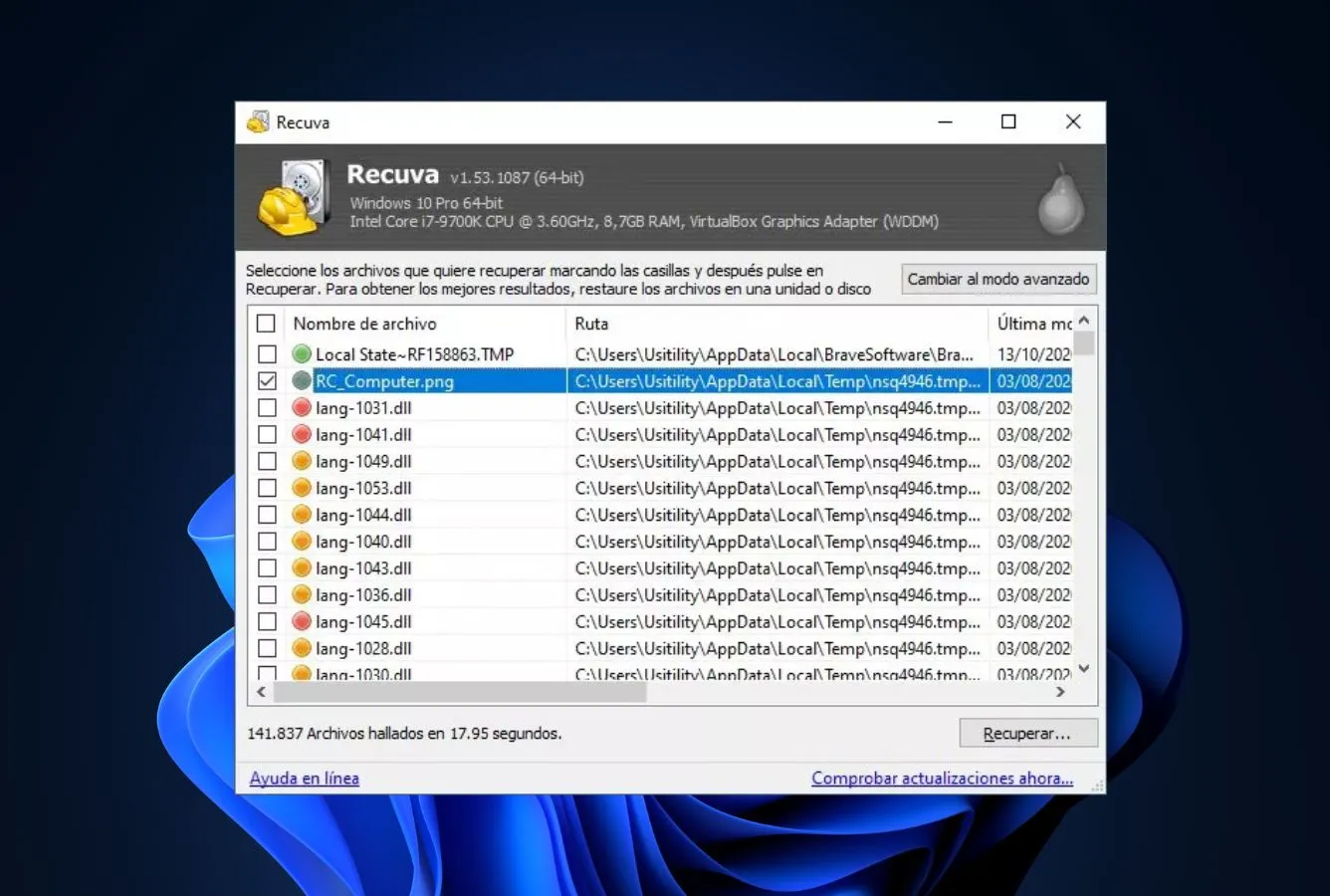
Recuva from Piriform (now part of Avast) is the answer to the literal search query “easeus alternative free.” Where EaseUS Free caps recovery at 2 GB, Recuva Free has no recovery cap at all. Every byte the scanner finds is yours to recover. The download is roughly 7 MB, the wizard interface is genuinely beginner-friendly, and on healthy NTFS or FAT drives with recently deleted files it does the job competently. The catch, and it is a meaningful one in 2026: Recuva’s last major update was in 2016, with only minor fixes since 2022. Independent testing reports inconsistent results on fragmented files, modern NVMe SSDs with TRIM enabled, and severely formatted drives. The cases where DMDE Free or PhotoRec pull ahead. For the simple “I emptied the Recycle Bin five minutes ago” scenario, it remains hard to beat at the price.
✓ Pros
- Free version has no recovery cap, every file is recoverable, unlike EaseUS Free’s 2 GB ceiling
- Wizard interface is even more beginner-friendly than EaseUS’s home screen
- 7 MB installer, runs on every Windows version since Vista
- Built-in secure-delete tool with multi-pass overwrite for permanent erasure
- Pro license is one-time $24.95, no auto-renewal
✕ Cons
- Last major update was 2016, engine has not kept pace with NVMe and TRIM
- Windows only, no Mac or Linux build
- Struggles with fragmented videos and large media files (often recovers as unplayable)
- Pro tier adds little of substance over free (mainly virtual hard drive support and updates)
Recovery Power
Solid for healthy-drive recoveries; thin for everything else.
Independent tests on USB drives and emptied Recycle Bins show Recuva recovering simple deletions reliably with original filenames intact. The Deep Scan exists but, by 2026 standards, isn’t very deep. Formatted drives often produce zero-file results where DMDE and Disk Drill recover most of the directory tree. SSD recovery is particularly weak because Recuva has not been re-architected for TRIM-aware behavior. Use it as a first-attempt tool on healthy drives, then escalate if it fails.
Interface & Experience
The closest thing to EaseUS’s wizard, by a different vendor.
Open Recuva, pick a file type (or “all files”), pick a location, click scan. The flow is functionally identical to EaseUS Free for a basic deletion, with one difference: Recuva’s results list shows a colored confidence dot next to each file (green = excellent, yellow = poor, red = unrecoverable) before you commit to recovery. EaseUS only shows confidence after preview. For users who just want the deleted file back without learning a new tool, Recuva is the lowest-friction switch on this list.
Price & Value
The actual zero-dollar option, paid tier exists mostly for support.
Recuva Free is genuinely free with no functional cap, which puts it in a category of one against the EaseUS Free 2 GB tier. Recuva Professional at $24.95 adds virtual hard drive (VHD/VHDX) scanning, automatic updates, and priority email support. Useful if you image a drive before recovery, but not a transformative upgrade. There are no monthly tiers, no auto-renewals, and no platform-tied licenses to navigate.
5. Stellar Data Recovery – Closest UX Swap
4.32
★★★★½
If you wanted EaseUS but with a different vendor, this is the cleanest one-for-one swap.
PlatformsWindows + macOS
Free1 GB
TiersStandard / Pro / Premium
From$59.99 / yr
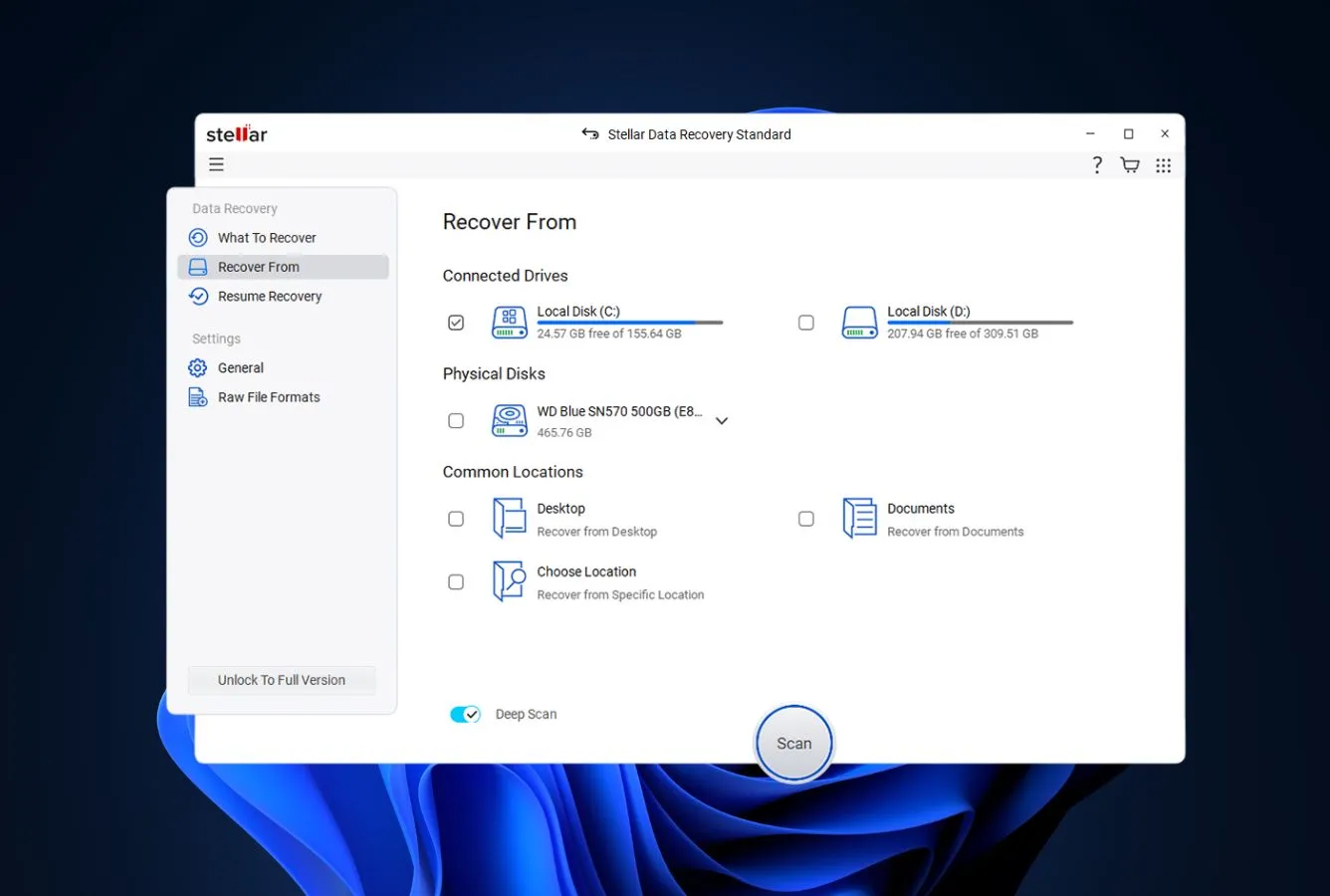
Stellar Data Recovery is the alternative for users who want everything about EaseUS except the EaseUS brand. The wizard flow, file-type-first selection screen, drive picker, quick-then-deep scan progression, and tiered pricing structure are nearly identical. Switching feels almost like installing a re-skinned EaseUS. The differences favor Stellar in three places: the entry-level Standard tier costs $59.99/yr versus EaseUS’s $99.95/yr (and Stellar’s free tier is 1 GB versus EaseUS’s 2 GB, so the savings come at the cost of a smaller free recovery ceiling). The Premium tier adds video and photo repair plus disk imaging in a way EaseUS does not match without buying separate Stellar-style add-ons. Independent testing places the recovery engine at parity with EaseUS. Not better, not worse, just from a different vendor with different licensing pressure.
✓ Pros
- Standard tier at $59.99/yr undercuts EaseUS Pro by $40/yr
- Premium tier bundles video and photo repair, EaseUS sells these separately
- Wizard UX is functionally identical to EaseUS, minimal learning curve
- Bootable recovery media included from Professional tier upward
- BitLocker-encrypted drive recovery built into Premium
✕ Cons
- Subscription-first pricing, lifetime tier exists but is buried in the funnel
- Free tier is 1 GB, smaller than EaseUS Free’s 2 GB
- Trustpilot complaints about activation issues on PC migrations are recurring
Recovery Power
Engine parity with EaseUS, with a slight edge on encrypted volumes.
Independent benchmarks place Stellar within a few percentage points of EaseUS on every standard scenario. Accidental deletion, formatting, partition loss, virus damage. Where it pulls ahead is BitLocker-encrypted drive recovery, which Premium handles natively and EaseUS Pro requires a workaround for. The deep-scan engine recognizes 200+ file types out of the box, and the Tree View / File Type / Deleted List filter modes match what EaseUS offers. Recovery from formatted Windows volumes was successful in the same scenarios where EaseUS recovers data, with comparable quality.
Interface & Experience
If EaseUS had a sibling, this is the sibling.
The home screen asks “What do you want to recover?” with file-type tiles, then “Where?” with a drive picker. The same two-step flow EaseUS opens with. Quick Scan runs first, with Deep Scan available as an explicit upgrade. Filters are organized identically. The visual design is slightly more clinical than EaseUS, but the gestures and clicks transfer over without any cognitive re-mapping. For someone leaving EaseUS over price or vendor preference rather than UX, the switch is invisible.
Price & Value
Cheaper than EaseUS at every comparable tier, including bundle discounts.
Standard at $59.99/yr is the value play; Professional at $89.99/yr matches EaseUS Pro’s feature set roughly while still costing ~$10/yr less; Premium ($99.99–$179.99 sale-dependent) bundles video repair, photo repair, and disk monitoring that EaseUS sells as separate products. Lifetime tiers exist but are not heavily promoted. You have to navigate to them. Stellar runs aggressive seasonal sales (Black Friday, anniversary), so first-time buyers can often catch 30–50% off. Auto-renewal applies; cancel before the term ends to avoid it.
6. Wondershare Recoverit – Best 2-PC Lifetime License
4.21
★★★★☆
Same headline pricing as EaseUS, but the license activates on two PCs instead of one.
PlatformsWin + Mac + NAS + Linux
Free500 MB
Devices2 PCs per license
Lifetime$129.99
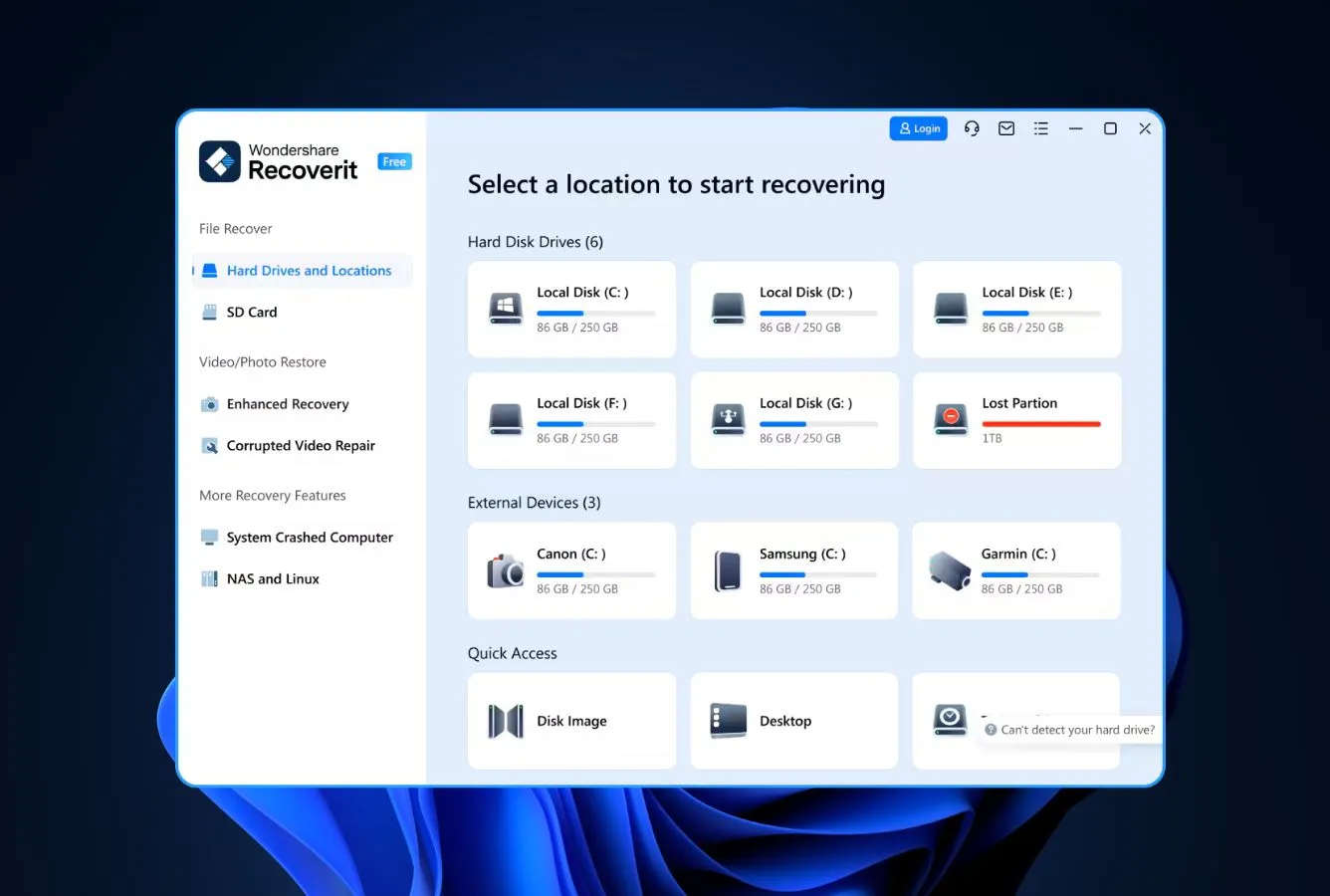
Wondershare Recoverit earns its slot here on a single structural difference from EaseUS: every license tier covers two PCs, not one. At $129.99 for a lifetime that activates on two computers, the per-machine cost is $64.99. Meaningfully below EaseUS’s $149.95 lifetime for one machine. The interface is the most visually polished of any tool in this lineup, the AI-driven photo and video recovery features are real (not vendor marketing), and Wondershare’s NAS and Linux file-system support is rare among consumer-tier tools. The downsides are typical Wondershare pricing patterns. Aggressive upsells in the free version, $4.95 download warranty add-on, and a 7-day money-back guarantee narrower than the 30-day window most competitors offer. For a household with two computers or a freelancer with desktop + laptop, the licensing math is hard to argue with.
✓ Pros
- Every license tier covers 2 PCs, EaseUS lifetime is single-PC at the same price
- NAS and Linux file-system support (EXT4, BTRFS, XFS, BFS), EaseUS skips these
- Best-in-class polished interface, especially for media-file recovery
- Bootable WinPE/Mac rescue media at the Ultimate tier
- Fragmented video reconstruction is competitively strong
✕ Cons
- Free version aggressively prompts upgrades during scans
- 7-day money-back window, narrower than the 30-day standard
- $4.95 “download warranty” upsell at checkout is a red flag for some users
Recovery Power
Strong on photos and videos; matches EaseUS on documents and archives.
Recoverit’s scan engine ships an AI-augmented photo and video reconstruction layer that does measurable work on fragmented camera files. A recurring weakness in EaseUS reviews. Independent testing on 4K and 8K MP4 recovery places it ahead of most competitors here aside from Disk Drill’s Advanced Camera Recovery mode. For document and archive recovery on standard NTFS and APFS, the results are essentially indistinguishable from EaseUS. Linux file-system support (Ext4, btrfs, XFS, BFS) is the surprise feature. Only R-Studio and DMDE match it at this price point.
Interface & Experience
The most visually polished tool here, with the most aggressive upsells.
Recoverit looks like a 2026 product. Drive selection is a dark-themed grid of thumbnails, scan progress shows category counts updating live, previews open in large center-screen tiles. The friction is the upgrade prompts: in the free version, attempting to recover a file beyond the 500 MB cap triggers a checkout overlay before you can save anywhere. EaseUS does this too, but Wondershare’s overlays are more frequent and harder to dismiss. Once you have a paid license, the upsells stop and the experience is genuinely pleasant.
Price & Value
The two-PC license is the entire reason to pick this over EaseUS.
$59.99/month, $99.99/year, $129.99 lifetime. Close to EaseUS’s tiers in headline, but each license activates on two computers permanently bound to those activations. For a household with one Mac and one Windows PC, that effectively halves the per-machine cost compared to EaseUS. There is also a 10% promo code that displays on the pricing page for first-time purchasers. Avoid the $4.95 “download warranty”. Wondershare keeps your download link active without it.
7. PhotoRec – Best Open-Source Alternative
4.04
★★★★☆
Free, open-source, 480+ file types, and zero recovery cap, ever.
PlatformsWin + Mac + Linux + BSD
LicenseGNU GPL v2+
File types480+
PriceFree
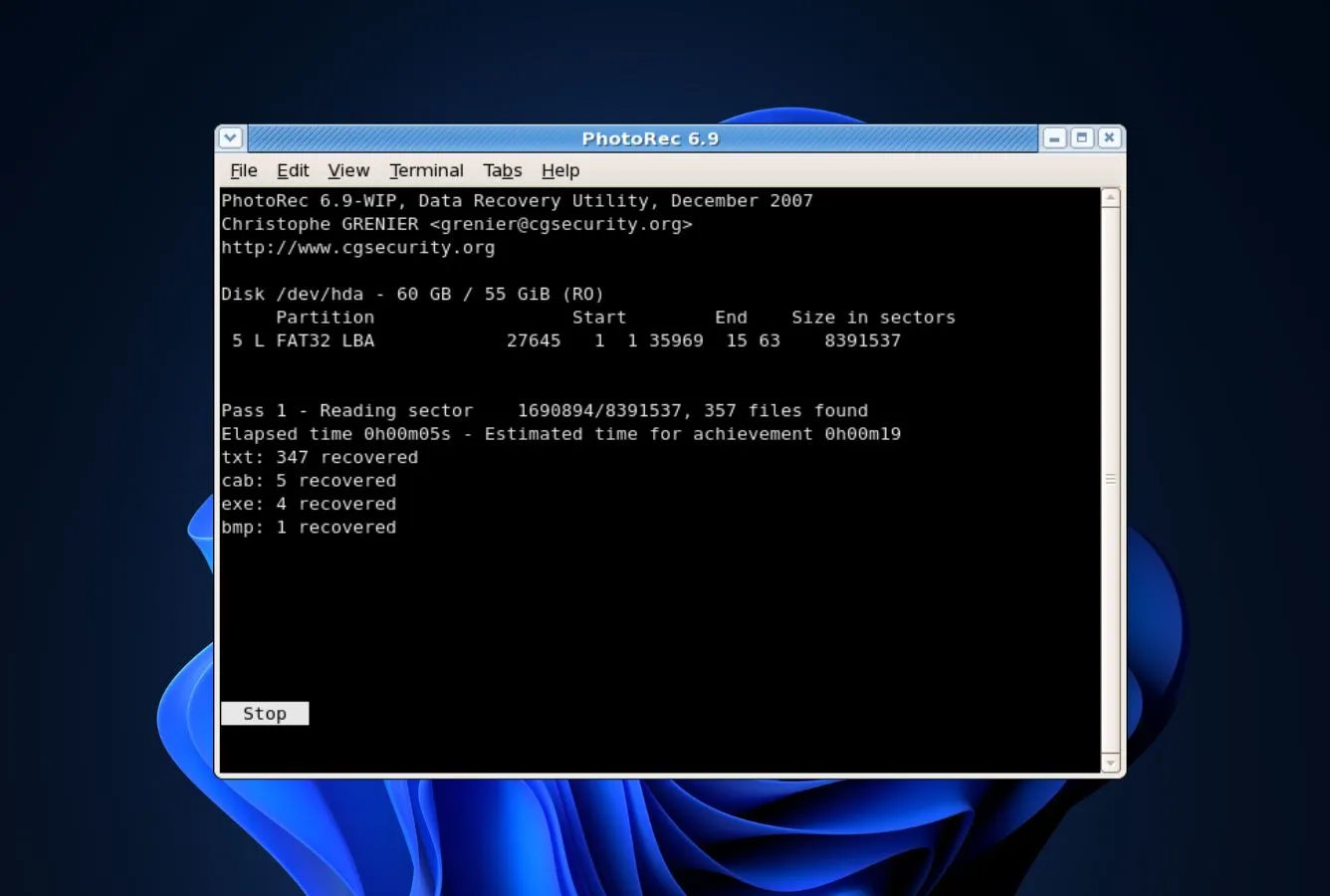
PhotoRec from CGSecurity is the answer to the literal search query “easeus open source alternative”. It is the only alternative on this list that ships under a real open-source license (GNU GPL v2+) rather than freemium proprietary software. The recovery engine ignores file system metadata entirely and works from file signatures, which means it recovers data from drives that other tools refuse to scan: severely formatted partitions, drives with corrupted partition tables, RAW volumes, even drives with no recognizable file system. The cost of admission is the interface: classic PhotoRec is a command-line tool that runs you through scan options as terminal prompts. The QPhotoRec GUI variant is more approachable but still feels like a developer tool compared to EaseUS. Bundled with TestDisk for partition recovery, the combination is what serious data-recovery practitioners reach for when the file system itself is gone.
✓ Pros
- Fully open-source under GNU GPL v2+, no vendor lock-in, ever
- Recovers 480+ file extensions across roughly 300 file families
- Runs natively on Windows, macOS, Linux, and BSD, single source code
- Works on drives with completely destroyed file systems (signature-only mode)
- QPhotoRec GUI version softens the command-line learning curve
✕ Cons
- Original filenames and folder structures are not preserved (signature recovery)
- Command-line interface is intimidating for non-technical users
- No file preview before recovery, scan-and-sort-after workflow only
Recovery Power
The tool that recovers data when the file system is gone entirely.
PhotoRec ignores file system metadata, which is both its greatest strength and its biggest limitation. On healthy drives where filenames matter, EaseUS and Disk Drill outperform it because they read directory entries. On drives where the file system is corrupt, formatted, or unrecognized. Exactly the cases EaseUS Free’s “0 files found” results come from. PhotoRec’s signature engine often recovers thousands of files that other tools never see. File-type coverage is the broadest in the alternatives lineup at 480+ extensions including raw camera formats (CR2, NEF, ARW), 4K video containers, and specialty formats EaseUS doesn’t list.
Interface & Experience
Either the command line, or QPhotoRec, neither feels like 2026.
Classic PhotoRec runs as a terminal tool with a series of prompts: pick a disk, pick a partition, pick file types to recover, pick a destination folder. Every step is keyboard-driven. QPhotoRec wraps the same engine in a basic GUI with checkboxes and dropdowns, which is enough for non-technical users to complete a scan but still feels like a Linux utility ported to Windows. Output is a flat folder of recovered files with generic numeric names. No folder reconstruction, no original filenames. Sorting through recovered output is a separate manual job.
Price & Value
Free in every meaningful sense, including the source code.
PhotoRec is genuinely free, with no recovery caps, no upgrade tiers, no subscription, and no upsells. The source code is published under the GNU GPL v2+ which means anyone can audit, modify, or fork it. A guarantee that no commercial alternative on this list can match. There are no “Pro” features held back. CGSecurity accepts donations, but the software itself is feature-complete in its free form. For users searching specifically for an open-source EaseUS replacement, this is functionally the only credible answer.
8. Tenorshare 4DDiG – Best Modern-UI Budget Pick
3.96
★★★★☆
A polished EaseUS-style wizard at a sub-EaseUS lifetime price, for users who want the look without the pricing.
PlatformsWindows + macOS
Free100 MB
License1 PC, lifetime upgrades
Lifetime$59.95
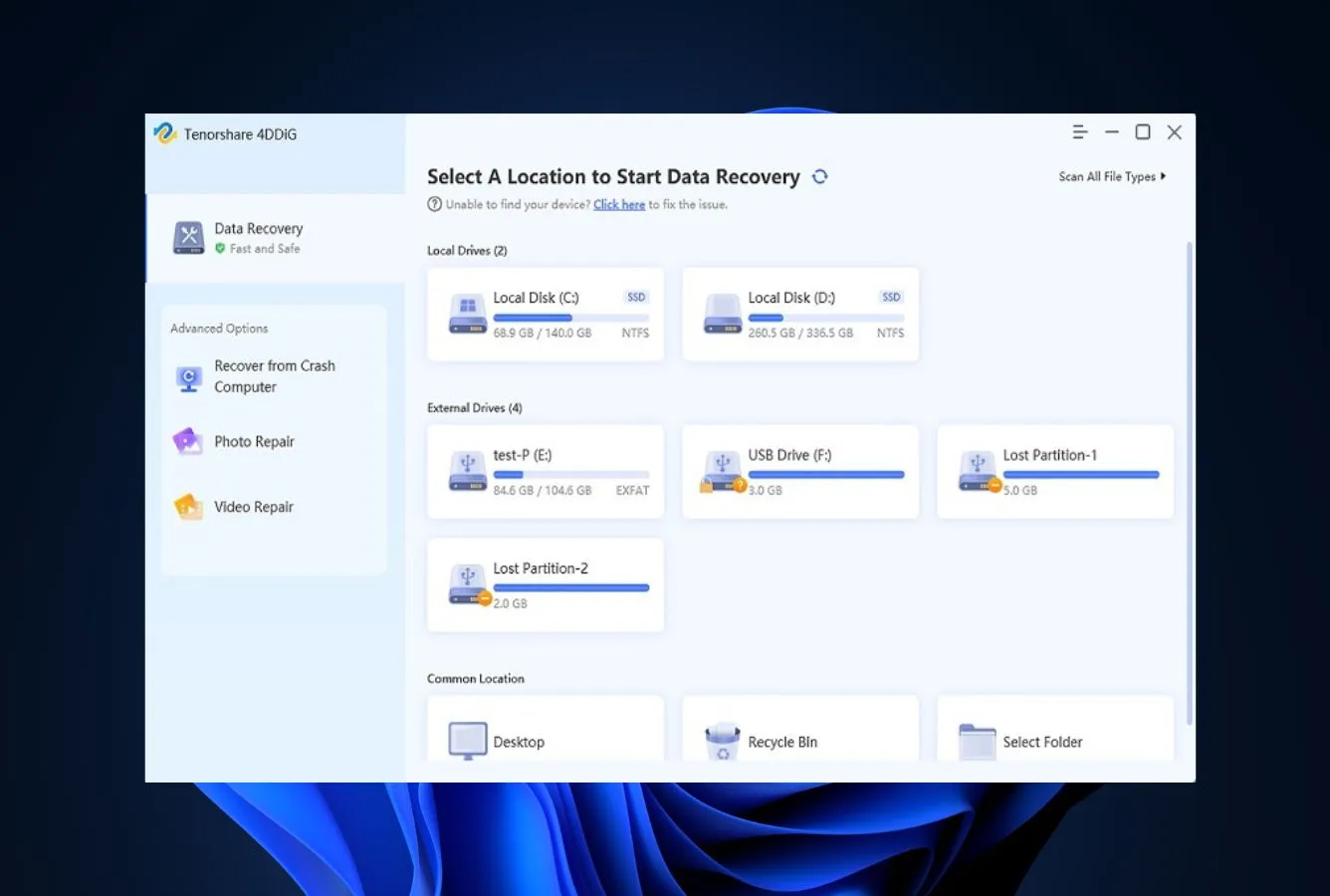
Tenorshare 4DDiG is the alternative for users who like the EaseUS interface paradigm but bristle at the EaseUS lifetime price. The home screen, scan flow, and results-grouping all closely mirror what EaseUS does, just with a more contemporary visual treatment. The 1-PC lifetime license at $59.95 undercuts EaseUS’s $149.95 lifetime by more than half. A significant gap for users buying their first recovery tool. The tradeoffs are real: the free tier is a thin 100 MB (compared to EaseUS Free’s 2 GB), the Mac and Windows builds are sold as separate licenses, and Tenorshare’s wider product portfolio leans heavily on iPhone-recovery upsells that crowd the dashboard. For a quick one-time recovery on a single Windows or Mac PC, the price-to-experience ratio is competitive with anything on this list.
✓ Pros
- Lifetime license at $59.95, the cheapest commercial lifetime here besides DMDE Standard
- Modern card-based UI feels fresher than EaseUS’s wizard
- Supports 2,000+ file types per the vendor’s list
- Quick and Deep scan workflow is very close to EaseUS
- Includes basic photo and video repair at the standard tier
✕ Cons
- Free tier is 100 MB, the thinnest free ceiling on this list
- Windows and Mac sold as separate licenses (no cross-platform single key)
- Cross-promotion of Tenorshare’s iPhone tools clutters the interface
- Recovery engine is competent but not class-leading, better tools exist at similar prices
Recovery Power
Solid mid-tier engine that gets the basics right but doesn’t push past EaseUS.
4DDiG’s scanning engine handles standard scenarios. Accidental deletion, formatted drives, virus damage, partition loss. With results comparable to EaseUS Pro on healthy drives. Independent testing places it slightly behind Disk Drill and Stellar on fragmented-video recovery and behind R-Studio and DMDE on damaged-file-system cases. File-type coverage at “2,000+ types” is in the right ballpark for marketing claims, but real-world recovery focuses on the same ~50 common formats every tool here handles. Use it for the price, not for engine superiority.
Interface & Experience
An EaseUS clone in spirit, with sharper edges and busier upsells.
The dashboard is divided into Data Recovery, Photo/Video Repair, and a third panel that aggressively cross-promotes Tenorshare’s iPhone unlocker and password-recovery products. The recovery flow itself is clean: pick a drive, pick a scan mode, watch results categorize live. Previews work, filters work, scan-pause-and-resume works. The friction comes from the dashboard’s upsell density. Multiple banners advertising other Tenorshare products on every screen. A paid license partially mutes them; nothing eliminates them.
Price & Value
Cheapest commercial lifetime here besides DMDE, the real selling point.
Pricing tiers are $39.95/month, $49.95/year, $59.95 lifetime per platform. Meaningfully below EaseUS at every comparable level. The lifetime price for a Windows-only license is $90 less than EaseUS’s equivalent Windows-only lifetime. The catch is that “lifetime” applies per platform: a household with both a Mac and a Windows PC pays roughly $120 for both, still below EaseUS’s $149.95 single-platform lifetime but no longer dramatically so. For a single-PC, single-platform recovery scenario, the value is real.
How We Evaluate EaseUS Alternatives
An “alternative” ranking is easy to do badly. Most competitor articles just rephrase EaseUS’s marketing page in a different vendor’s voice. We approached this differently: we identified the three most-cited reasons users switch from EaseUS Data Recovery Wizard (subscription pricing on a single-PC license, the 2 GB free-tier ceiling, and the absence of S.M.A.R.T. monitoring/disk imaging/native RAID), then evaluated each alternative on how well it solves those specific pain points alongside core recovery capability. Research is layered across vendor documentation for baseline feature claims, independent external testing for cross-validation of recovery performance, and community feedback on Reddit (r/datarecovery, r/techsupport) and Trustpilot for real-world support and billing patterns – rankings reflect that aggregate, not an in-house benchmark.
📚
Vendor Documentation
Each candidate’s official product pages, pricing tiers, supported file systems, license terms, and changelogs, the baseline held at arm’s length until cross-referenced against external testing.
🧪
Independent Testing
Cross-referenced findings from external testing labs and editorial reviews on recovery rates, scan times, and engine behavior, used to separate marketing claims from repeatable outcomes.
💬
Community Feedback
Reddit threads on r/datarecovery and r/techsupport, Trustpilot complaint patterns, G2 ratings, and CCleaner Community forum posts, for real-world support, billing, and recovery-outcome signals.
Platforms covered: Windows 10/11 (24H2), macOS 14 Sonoma + macOS 15 Sequoia, and major Linux distributions for tools that support them. Key factors weighted: recovery capability (40%), license value vs EaseUS pricing (20%), free-tier reach (15%), advanced features EaseUS lacks (15%), platform parity (5%), and ease-of-switch from EaseUS (5%).
01
Recovery Capability (40%)
Engine quality across NTFS, APFS, FAT32, exFAT, ext4, and signature-only RAW recovery. Scored against independent test results, not vendor claims.
02
License Value vs EaseUS (20%)
Lifetime tier price, multi-device coverage, multi-platform inclusion, auto-renewal behavior, refund policy. The benchmark is EaseUS’s $149.95 single-platform single-PC lifetime.
03
Free Tier Reach (15%)
How much real recovery the free version delivers before paywalling. EaseUS Free’s 2 GB is the bar; alternatives that beat it materially earn credit here.
04
Features EaseUS Lacks (15%)
S.M.A.R.T. monitoring, byte-level disk imaging, native RAID 5/6 reconstruction, hex editor, NAS recovery, mobile-device scanning, BitLocker recovery, encrypted-volume support.
05
Platform Parity (5%)
Cross-platform license inclusion (Win + Mac in one key), Linux support availability, mobile-device scanning. Single-platform-only tools are penalized here.
06
Switch Ease (5%)
UX similarity to EaseUS for users who liked the wizard but want different pricing, and conversely, technical depth for users leaving because EaseUS is too consumer-grade.
🔎
Want the raw testing data?
Individual test runs, scan-time logs, and per-tool notes from our ongoing testing live on our full methodology page. Start there if you want the underlying numbers behind any claim on this page.
Niche Alternatives & Honorable Mentions
Six tools we considered as EaseUS replacements but didn’t include in the main ranking. Each fits a narrow scenario where it would specifically beat the eight ranked options.
TestDisk
Bundled with PhotoRec, but worth a separate mention. The right tool when you’re actually trying to recover a lost or corrupted partition rather than deleted files. Free, open-source, command-line.
Mac-first alternative with strong APFS and encrypted-volume recovery. Useful specifically for Mac users leaving EaseUS for Mac, Disk Drill is still the cleaner pick, but iBoysoft is a credible second.
Free Windows-only freeware with no recovery cap and a small download footprint. Not as actively maintained as Recuva, but recovers from formatted drives where Recuva often gives up.
Most directly comparable to EaseUS in feature set and pricing model. Free tier is 1 GB, paid tiers are subscription. Engine is competent but rarely the strongest pick at any price.
Another Mac-focused alternative with a clean UI. Pricing is on the high side for the feature set; consider only if Disk Drill and iBoysoft don’t fit your workflow.
Hybrid recovery + partition manager + disk repair tool. The free tier is more capable than most freemium competitors, and the included disk-repair features are unique on this list.
How to Pick the Right EaseUS Replacement
Four factors separate the right alternative from the wrong one. Walk through them in order; the first one that fails is usually the deciding criterion.
Pricing model and free-tier ceiling
If you’re switching to escape recurring billing, prioritize lifetime tiers: R-Studio at $79.99, DMDE Standard at $48, Tenorshare 4DDiG at $59.95, and Disk Drill at $149 (which beats EaseUS by including both platforms and three devices). On the free side, EaseUS caps at 2 GB. Recuva, PhotoRec, and DMDE Free all go further. If your data fits in 2 GB and you trust the tool, EaseUS Free is competitive; if it’s larger, look at free data recovery software options first.
Multi-device licensing and cross-platform coverage
EaseUS’s $149.95 lifetime activates on one PC, on one platform. Disk Drill at $149 lifetime activates on three devices across Windows AND macOS. For a household with both, that’s a 6× license-coverage gap at the same price. Wondershare Recoverit gives every license tier a 2-PC activation. For Linux users, only R-Studio, DMDE, and PhotoRec serve you from a single product line. See our Mac data recovery roundup for Mac-specific guidance.
RAID and complex-recovery support
EaseUS Pro lists basic RAID support but consistently underperforms on RAID 5 and 6 reconstruction in independent tests. R-Studio handles RAID 0, 1, 4, 5, 6 plus nested layouts (5E, 5EE, 6E, 50, 60) with automatic parameter recognition. DMDE includes a RAID constructor in its free tier. For specialized needs, see our RAID recovery software guide for tools designed primarily around RAID rather than as an add-on feature.
RAW formats and camera-file recovery
EaseUS users on Reddit consistently flag fragmented video and RAW camera-file recovery as weak spots. The strongest fixes are Disk Drill’s Advanced Camera Recovery mode (built specifically for GoPro, DJI, Canon, Sony, Insta360 footage), PhotoRec’s 480+ file-type signature library, and Wondershare Recoverit’s AI-augmented video reconstruction. For dedicated photo-recovery needs, see our photo recovery software guide.
Disk Drill is the best EaseUS Data Recovery Wizard alternative in 2026. It solves the three things people leave EaseUS over: single-platform single-PC licensing, missing S.M.A.R.T. monitoring and disk imaging, and the absence of cross-platform scan sessions. Without giving up the wizard-style UX that draws people to EaseUS in the first place. The $149 lifetime price for a Win+Mac, three-device license is the strongest unit-economics deal in the category.
Beyond the winner: R-Studio wins for RAID, Linux, and technician work. Its $79.99 lifetime is the most underpriced license here. DMDE is the right pick for budget-conscious power users who want a real free tier and a $48 lifetime upgrade path. Recuva remains the lowest-friction free Windows option for simple deletions – and for users who specifically wanted EaseUS but with a different vendor’s billing, Stellar Data Recovery at $59.99/yr Standard is the closest one-for-one swap. If none of those fit, EaseUS itself is still a competent tool. Just not always the right-priced one.
Frequently Asked Questions
Is there a free alternative to EaseUS Data Recovery Wizard?
+
Yes. Recuva is the closest 1:1 free Windows replacement, it has no recovery cap, unlike the EaseUS Free 2GB ceiling, and it works on FAT, NTFS, and exFAT drives. DMDE Free goes further on technical recovery (4,000 files per directory with unlimited repetitions, plus RAID and disk imaging tools) and runs on Windows, macOS, and Linux. PhotoRec is fully open-source and recovers more than 480 file types but uses a stripped-back interface that takes adjustment.
What is the best open-source alternative to EaseUS?
+
PhotoRec from CGSecurity is the most capable open-source alternative. It runs on Windows, macOS, Linux, and BSD, recognizes more than 480 file extensions across roughly 300 file families, and has no recovery cap or licensing tier. The tradeoff is a barebones command-line or QPhotoRec GUI experience compared to EaseUS’s wizard. TestDisk, bundled alongside PhotoRec, complements it for partition recovery and rebuilding bootable disks.
Is there a Linux alternative to EaseUS?
+
EaseUS Data Recovery Wizard does not have a Linux build, so any Linux user is forced to switch. The strongest commercial Linux options are R-Studio (full Linux GUI version with the same RAID and disk-imaging engine as Windows) and DMDE (Linux GUI plus a console build for headless servers). On the free side, PhotoRec and TestDisk run natively on every major Linux distribution and can recover Ext2/3/4, btrfs, FAT, NTFS, and HFS+ volumes regardless of which OS is hosting the scan.
What do Reddit users recommend instead of EaseUS?
+
On r/datarecovery and r/techsupport, the most-recommended replacements are R-Studio and DMDE for serious cases, Recuva for quick deletions on healthy drives, and PhotoRec for recovering specific media file types. Disk Drill also comes up frequently as the polished beginner-to-intermediate option. EaseUS itself is often discouraged for purchases because of its subscription pricing and aggressive marketing, even though the underlying engine is competent.
What is a free alternative to EaseUS Todo Backup?
+
EaseUS Todo Backup is a separate product from EaseUS Data Recovery Wizard, it handles disk imaging and scheduled backups, not recovery of accidentally deleted files. The closest free Windows replacements are Macrium Reflect Free (full disk imaging, incremental backups, bootable rescue media), Veeam Agent for Microsoft Windows Free (image-level backup with cloud destinations), and Microsoft’s built-in File History and Backup and Restore (Windows 7) tools. None of these recover deleted files, for that, use one of the alternatives ranked on this page.
Is Disk Drill or R-Studio better than EaseUS?
+
Both beat EaseUS on long-term value, but for different users. Disk Drill is the better choice for everyday users, its $149 lifetime license covers Windows and Mac on up to three devices, while EaseUS’s $149.95 lifetime is single-platform and single-PC. It also adds S.M.A.R.T. monitoring, byte-level disk imaging, and Recovery Vault, which EaseUS lacks. R-Studio is the better choice for technicians: $79.99 lifetime, native RAID 0–6 reconstruction, runs across Windows, macOS, and Linux from one engine, and includes a hex editor and network recovery. EaseUS doesn’t compete on either front.
Is EaseUS Data Recovery Wizard still worth using in 2026?
+
For one-off recoveries on a single Windows PC where the user wants a guided wizard interface, EaseUS still works competently, its scanning engine handles common deletion and format scenarios reliably. The reasons to switch in 2026 are pricing structure (single-PC licensing while alternatives like Disk Drill and Wondershare Recoverit cover multiple devices on one license), a thin 2GB free tier, and the absence of S.M.A.R.T. monitoring, disk imaging, or native RAID support. If any of those matter to your situation, an alternative on this list will serve you better.
What software is similar to EaseUS Data Recovery Wizard?
+
The closest UX matches, wizard-style interface, drive-picker home screen, quick-then-deep scan workflow, are Stellar Data Recovery, Wondershare Recoverit, and Tenorshare 4DDiG. All three feel familiar to anyone who has used EaseUS, support Windows and macOS, and offer comparable feature sets at modestly different price points. For a more technical UX (file-tree views, hex editor, RAID-builder dialogs), R-Studio and DMDE move in a different direction. Disk Drill sits between the two, polished like EaseUS but with the technical depth of R-Studio behind the scenes.
👥 Researched & Reviewed By

Marcus Whitfield
Data Recovery Software Analyst & Senior Writer
Marcus has evaluated data recovery tools for more than six years across Windows, macOS, and Linux, from free utilities to enterprise-grade platforms. He leads category research and writes the roundups on Data Recovery Fix, with a soft spot for tools that prioritize transparent licensing and cross-platform parity over flashy marketing.
B.Sc. Computer Science
6+ years data recovery evaluation
Cross-platform licensing analysis

Rachel Dawson
Technical Approver · Data Recovery Engineer
Rachel brings over twelve years of cleanroom data recovery experience. She validates research methodology and ensures published guidance on EaseUS alternatives reflects actual recovery outcomes. RAID reconstruction behavior, file-system parser depth, sector-level imaging accuracy. Not vendor marketing.
12+ years data recovery engineering
Cleanroom HDD recovery
Flash memory forensics
✅
Editorial Independence & Affiliate Disclosure
Data Recovery Fix earns revenue through affiliate links on some product recommendations. This does not influence our rankings. All tools are evaluated independently based on documented research, independent testing from external sources, vendor documentation, and community feedback, before any affiliate relationships are considered. If anything on this page looks inaccurate, outdated, or worth revisiting, please reach out at contact@datarecoveryfix.com and we’ll review it promptly.