UFS Explorer Standard Recovery Review (2026): Professional Tools at a Consumer Price
UFS Explorer comes from SysDev Laboratories, a team of data recovery specialists who have been building forensic-grade recovery tools since the early 2000s. The Standard Recovery edition packs features you'd normally find in professional suites — 13+ file system support, a configurable disk imager with S.M.A.R.T. monitoring, BitLocker and APFS decryption, and native support for virtual disks — all for a one-time €59.95 (~$65) personal license. Our review aggregates vendor documentation, independent external evaluation, and community feedback for v10 to evaluate where the tool's strengths and limits actually lie.
tests, user reports
Windows / macOS / Linux
v10.0

A specialist tool that punches at a professional tier for a consumer price. Independent evaluation places UFS Explorer Standard Recovery in the upper tier for cross-platform file system support, corrupted-partition recovery, and disk imaging with S.M.A.R.T. monitoring. The 13+ supported file systems span NTFS, APFS, HFS+, ext2/3/4, XFS, JFS, ReiserFS, Btrfs, and ZFS — the broadest coverage of any consumer-priced tool. Trade-offs: the interface has a steep learning curve, the free trial is limited to files under 768 KB, and there's no file repair. For the right user, exceptional value at $65 one-time.
✓ What We Liked
- Broadest file system support of any consumer-priced tool — 13+ including Btrfs, XFS, ZFS, ReFS, APFS
- One-time ~$65 personal license — no annual subscription, no recurring fees
- Professional disk imager with multi-pass imaging, defective block handling, and S.M.A.R.T. monitoring
- Cross-platform — runs natively on Windows, macOS, and Linux
- BitLocker and APFS encryption decryption built into the Standard edition
- IntelliRAW custom signature rules for advanced content-aware scanning
✕ What We Didn’t
- Interface has a steep learning curve — not designed for casual users
- Free trial limited to files under 768 KB — too small for real evaluation
- No RAID reconstruction in Standard edition (requires RAID Recovery or Professional)
- No file repair capabilities for corrupted photos or videos
- Limited online community — fewer user guides and tutorials than mainstream competitors
UFS Explorer Standard Recovery Alternatives
Brief selection A quick shortlist of our top alternative picks, based on aggregated independent research. | Best Alternative  EaseUS Data Recovery Wizard Best overall · 2 GB free |  Stellar Data Recovery Best for photos · 1 GB free |  Wondershare Recoverit Best for video · 100 MB free |
|---|---|---|---|
| Deep Scan | ✓ | ✓ | ✓ |
| Formatted Drive Recovery | ✓ | ✓ | ✓ |
| RAW Photo Support | Broad | Broad | Limited |
| File Repair | ✓ | ✓ | Video only |
| Free Tier | 2 GB | 1 GB | 100 MB |
Research Methodology
This review aggregates three evidence sources for v10: vendor documentation (the official SysDev Laboratories product page, version history, supported file systems list, pricing pages), independent external evaluation (cross-referenced across multiple data-recovery review publications, forensic-tool listings, and professional recovery service writeups), and community feedback (Reddit r/datarecovery, longstanding professional forum discussions, Trustpilot, G2). Tier assignments — Excellent, Very Good, Good, Fair, Limited, Not supported — reflect the aggregate of that evidence per capability. Where independent testing diverges sharply from vendor claims, we follow the independent evidence. Full methodology details are on our How We Test page.
Is UFS Explorer Safe?
UFS Explorer is a forensic-grade tool with strong safety properties built in. SysDev Laboratories has been operating since the early 2000s, the software is digitally signed, and the disk imager actively encourages working from a clone rather than the source drive. Read-only operation is the default. The main concerns surfaced in independent evaluation relate to the licensing layer (one license tied to one machine; transferring licenses requires a support ticket) and the limited free trial — not the recovery operation itself.
How to Use UFS Explorer
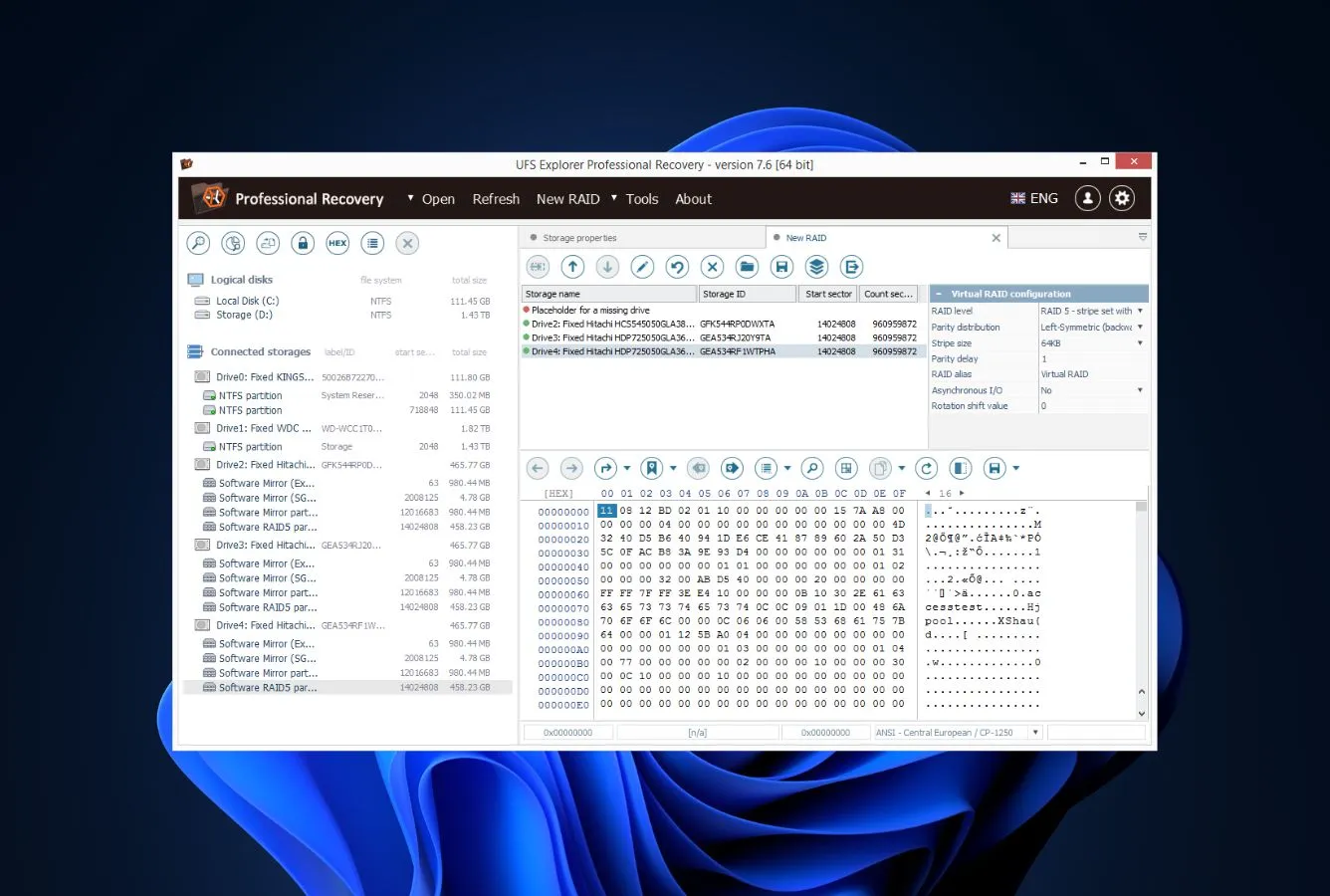
UFS Explorer uses a multi-panel forensic-style interface. The flow is more involved than consumer tools: connect, image (recommended), select partition, scan, browse, recover.
Download and install
Download from ufsexplorer.com. Native installers for Windows, macOS, and Linux. The free trial activates on first run with a 768 KB per-file recovery cap.
Image the source drive (recommended)
For any non-trivial recovery, use the built-in Disk Image module to create a byte-by-byte clone before scanning. The imager handles bad blocks, monitors S.M.A.R.T. status, and produces a stable image you can rescan as many times as needed without further wear on the source drive.
Select partition and scan mode
UFS Explorer detects all partitions across all 13+ supported file systems automatically. Pick the partition (or rebuild from raw if the partition table is gone) and choose Quick or Detailed scan. IntelliRAW custom signatures can be defined here for content-aware scanning.
Browse and recover
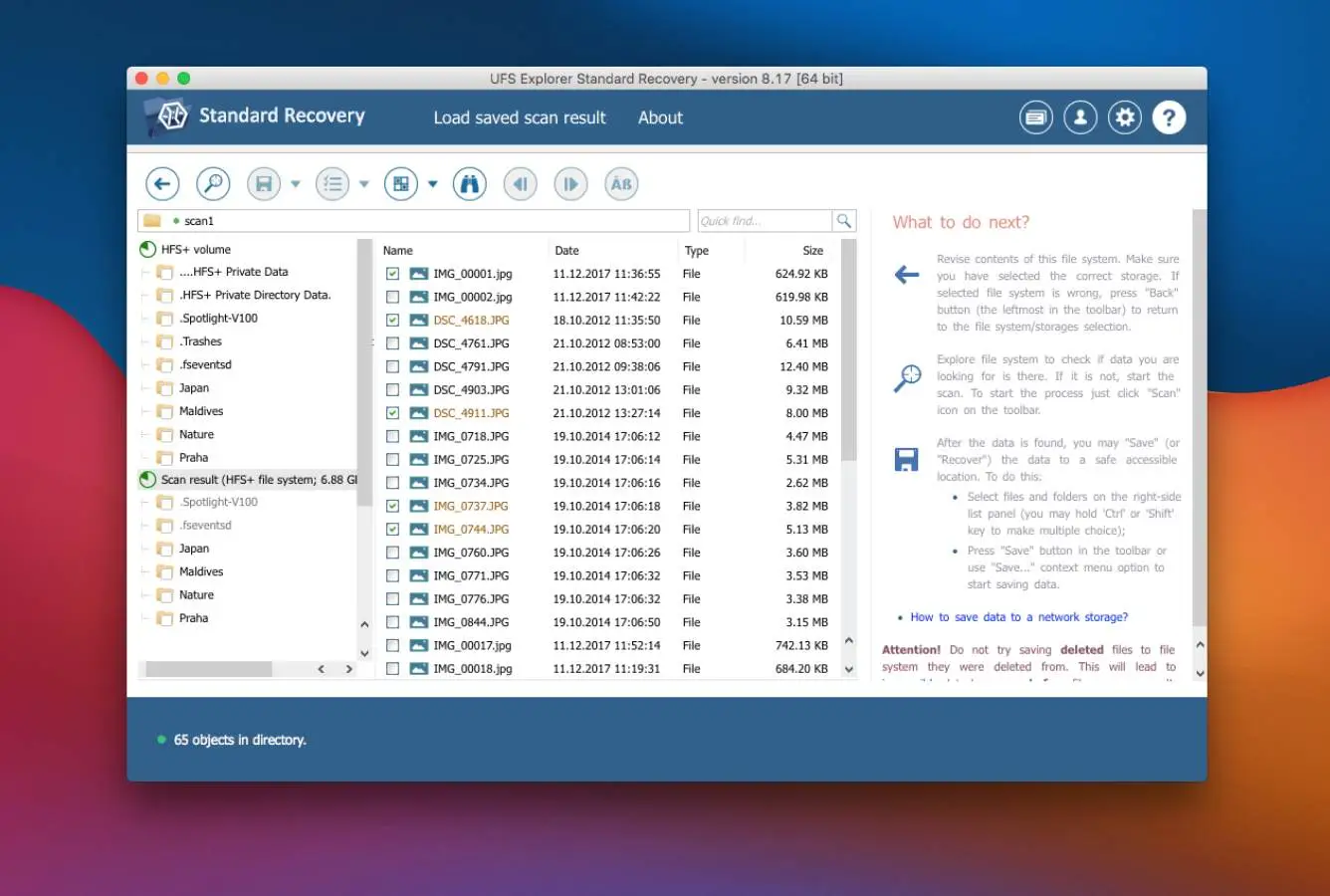
Results appear in a forensic-style tree with metadata panel, hex preview, and content preview. Use Define Selection to mark files for recovery, then Save Selection to copy them out. Always save to a different drive than the source.
UFS Explorer's real strength is the integrated disk imager. If the source drive is showing S.M.A.R.T. warnings, clicks, or read errors, image it first — further scanning a failing drive risks losing the data permanently. For complex RAID or NAS scenarios, see R-Studio or UFS Explorer's own RAID Recovery edition (sold separately).
Who UFS Explorer Is For
UFS Explorer Standard Recovery fits the technically-comfortable user who needs broad file-system support, professional-grade disk imaging, or encryption recovery, and is willing to invest time learning the interface. Independent evaluation places it in the upper tier for cross-platform recovery and corrupted-partition scenarios — areas where consumer tools fall short.
A practical example: a Linux sysadmin whose Btrfs array has degraded and needs to recover files from a snapshot fragment. Or a Mac user whose APFS drive needs recovery from a Windows machine. Or anyone whose drive is failing and needs to image it before a single additional read. UFS Explorer covers these scenarios in one tool, where most consumer tools cover none of them.
If your situation is a simple Windows undelete and you don't need cross-platform support or disk imaging — the next section explains why UFS Explorer is overkill.
UFS Explorer's Strengths in Real-World Use
UFS Explorer's strengths cluster around capabilities that consumer tools simply don't offer.
13+ file system support, all from one binary
NTFS, FAT12/16/32, exFAT, ReFS on Windows; APFS and HFS+ on macOS; ext2/3/4, XFS, JFS, ReiserFS, Btrfs, and UFS on Linux; simple ZFS volumes on BSD/Solaris. This is the broadest file system coverage of any tool in the consumer-priced category. Vendor documentation lists the full set; independent evaluation consistently confirms the implementations are mature, not just check-the-box. For users who work across Windows, macOS, and Linux, this eliminates the need for multiple recovery tools.
Professional disk imager with S.M.A.R.T. monitoring
The Disk Image module is the kind of feature you'd expect in a $500 forensic suite, not a $65 consumer tool. Multi-pass imaging with adaptive bad-block handling, S.M.A.R.T. status monitoring during the image, and the ability to resume interrupted images. Independent evaluation and professional forum sentiment consistently flag this as the single most valuable feature in the Standard edition for anyone working with failing drives.
BitLocker and APFS encryption decryption built in
Most consumer recovery tools either fail on encrypted drives or require a separate decryption step. UFS Explorer Standard reads BitLocker-encrypted Windows drives and APFS-encrypted Mac drives natively when you provide the unlock key (password or recovery key). For users with encrypted personal drives, this is a genuine differentiator.
IntelliRAW custom signature rules
The IntelliRAW system lets you define content-aware signature rules for files that aren't in the default library. Particularly useful for proprietary file formats or rare camera RAW formats. This is closer to a forensic-tool feature than a consumer one, and at $65 it's exceptional value if you need it.
Where UFS Explorer Falls Short
UFS Explorer's positioning is technical-user-first. The honest evaluation of where it falls short for general use is below.
Steep learning curve for the interface
The multi-panel forensic-style interface is information-dense. Hex view, metadata panel, partition browser, content preview — all visible at once. For experienced users this is a power-tool advantage; for casual users it's overwhelming. Independent evaluation and verified user feedback consistently flag this as the primary friction point. EaseUS or Disk Drill are dramatically easier to use for typical scenarios.
Free trial cap is too small for real evaluation
The free trial allows recovery of files up to 768 KB each — enough for small documents and thumbnails but not for full-size photos, videos, or anything else most users care about. Other tools (EaseUS 2 GB, Stellar 1 GB) offer evaluation tiers that actually let you confirm the tool works on your data. With UFS Explorer, you have to pay to find out.
No RAID in the Standard edition, no file repair anywhere
For RAID arrays beyond simple spanned volumes, you need UFS Explorer RAID Recovery (~$95) or the Professional edition. The Standard edition handles single drives and basic spanned configurations only. Additionally, none of the editions offer file repair for corrupted photos or videos — if your scenario is a partially-overwritten JPEG that needs repair, EaseUS or Wondershare Recoverit are better fits.
UFS Explorer Capability Summary
How UFS Explorer performs, capability by capability, based on aggregated independent evaluation:
| Capability | Tier | Notes |
|---|---|---|
| Deleted-file recovery (NTFS) | Very Good | Strong; not quite Disk Drill or EaseUS tier |
| Deleted-file recovery (APFS/HFS+) | Excellent | Mac filesystems from Windows |
| Deleted-file recovery (ext/XFS/Btrfs) | Excellent | Linux filesystems from any platform |
| Formatted-drive recovery | Very Good | Quick and Detailed scan modes |
| Corrupted-partition recovery | Excellent | Core strength; rebuilds across 13+ FS |
| Encrypted drive recovery (BitLocker) | Excellent | Native; needs unlock key |
| Encrypted drive recovery (APFS) | Excellent | Native; needs unlock key |
| RAID 0/1/5 reconstruction | Limited | Spanned only; full RAID needs separate edition |
| Network RAID / NAS | Not supported | Standard edition; needs Network RAID edition |
| Disk imaging (built-in) | Excellent | Multi-pass with S.M.A.R.T. monitoring |
| IntelliRAW custom signatures | Excellent | Rare in consumer-priced tools |
| SD card recovery | Very Good | All supported file systems |
| USB / external HDD recovery | Very Good | Same engine as internal drives |
| SSD recovery (TRIM disabled) | Very Good | Standard operation |
| TRIM-active NVMe SSD | Not supported | Hardware limitation across all tools |
| JPEG / MP4 repair | Not supported | No file repair in any edition |
| File preview | Good | Hex and content preview; not as polished as consumer tools |
| Free tier capacity | Limited | 768 KB per file |
| License model | Excellent | ~$65 one-time; no subscription |
Tier scale: Excellent / Very Good / Good / Fair / Limited / Not supported. Aggregated from independent testing and community feedback, 2026.
UFS Explorer Cost
UFS Explorer Standard Recovery is a one-time purchase: €59.95 (~$65) for a personal license, €119.95 (~$130) for a commercial license, and €179.95 (~$195) for a corporate license. Free minor version updates are included; major version upgrades are typically discounted for existing license holders.
For more demanding scenarios, SysDev Laboratories sells separate editions: UFS Explorer RAID Recovery (~$95) for full RAID reconstruction, UFS Explorer Network RAID (~$295) for NAS arrays, and UFS Explorer Professional (~$745) for forensic and service-provider use. Each edition is a superset of the lower one in capability.
For a one-time purchase that fits the Standard edition's capability profile (cross-platform recovery, disk imaging, encryption support, single-drive scenarios), $65 is exceptional value. The closest equivalent at this price is GetDataBack Pro at $79 lifetime — narrower capability profile but easier to use. For a category-wide view, see our best Windows data recovery software guide.
Try UFS Explorer Free
Free trial recovers files up to 768 KB. Standard license is ~$65 one-time.
UFS Explorer vs. Competitors
How UFS Explorer Standard Recovery compares against the four mandatory baseline competitors. Tiers are aggregated from independent testing and community feedback.
| Tool | Deleted-file Recovery | Formatted Drive | Corrupted Drive | Free Tier | Price |
|---|---|---|---|---|---|
| Disk Drill | Excellent | Excellent | Very Good | 500 MB | $89/yr |
| EaseUS DRW | Excellent | Very Good | Very Good | 2 GB | $99.95/yr |
| UFS Explorer Standard Recovery ← | Very Good | Very Good | Excellent | 768 KB/file | $65 one-time |
| Stellar Data Recovery | Very Good | Good | Good | 1 GB | $79.99/yr |
| Recuva | Good | Fair | Not supported | Unlimited | Free / $24.95 |
Tier labels reflect aggregated independent evaluation, 2026.
UFS Explorer Features & Tools
UFS Explorer Standard Recovery has a forensic-grade feature set at consumer pricing. The features below define its tier placement.
UFS Explorer User Reviews
UFS Explorer has a smaller user-review footprint than mass-market consumer tools, but a strong reputation in professional and technical circles.
My go-to for anything cross-platform. The disk imager alone is worth the $65. Steep learning curve but pays off.
Recovered files from a corrupted Btrfs array on Linux from my Windows machine. No other consumer-priced tool could do this.
Great value for technical users. The interface is dense but the capability is real. BitLocker decryption built in is a major plus.
Professional-grade recovery at consumer price. The S.M.A.R.T.-aware disk imager is the standout feature.
Use this in IT for failing drives. Image-first workflow has saved data multiple times where running other tools directly would have killed the drive.
Interface took me a week to get comfortable with. Free trial cap is too small to really evaluate — had to commit to the license to know.
Community sentiment is consistently positive among technical users for the breadth of file system support and the disk imager. Sentiment is consistently mixed-to-negative on the interface complexity and the free trial limitations. Most users frame it as a tool for technical users, not for casual recovery.
When to Choose Something Else
UFS Explorer Standard Recovery is a specialist tool. If your scenario doesn't need its specific capabilities, here are easier or differently-positioned alternatives:
Frequently Asked Questions
Is UFS Explorer free?+
How well does UFS Explorer recover NTFS files?+
Does UFS Explorer work on Windows 11?+
What file systems does UFS Explorer support?+
How much does UFS Explorer cost?+
Is UFS Explorer safe?+
Can UFS Explorer recover RAID arrays?+
Final Verdict
UFS Explorer Standard Recovery is genuinely exceptional value for the right user. Independent evaluation places it in the upper tier for cross-platform file system support, corrupted-partition recovery, and disk imaging with S.M.A.R.T. monitoring — capabilities that consumer tools at the same price simply don't offer. The 13+ file system coverage, native BitLocker and APFS decryption, and IntelliRAW custom signatures are forensic-tool features at a consumer price.
Choose UFS Explorer if you need cross-platform recovery, work with failing drives that need professional imaging, or have a corrupted-partition scenario across non-Windows file systems. Choose something else if you want an easy-to-use tool for typical Windows recoveries (EaseUS or Disk Drill), if you need full RAID reconstruction (UFS Explorer RAID Recovery edition, or R-Studio), or if you need file repair for corrupted photos or videos. For a category-wide view, see our best Windows data recovery software guide.
About the Authors


Our reviews are based on aggregated independent research — vendor documentation, third-party testing, and verified user feedback. We may earn a commission when you purchase through links on this page, at no extra cost to you. Affiliate relationships do not influence ratings or rankings; tier assignments reflect the evidence on hand. Have a correction or a tip? Email contact@datarecoveryfix.com.