8 Best Recuva Alternatives – Quick Comparison
Eight ranked alternatives plus one greyed baseline row showing where Recuva itself sits on each criterion. The “vs Recuva” column reflects editorial evaluation of how decisively each alternative addresses Recuva’s specific limitations: Mac/Linux support, RAW and partition recovery, signature breadth, and engine modernity. Not an in-house benchmark.
| Tool | vs Recuva | Mac Support | Platforms | Free Limit | Starting Price | Best For |
| EaseUS Data Recovery Wizard |
Excellent |
Yes (separate license) |
Win + Mac |
2 GB |
$99.95 / yr · $149.95 lifetime |
Recuva users moving to Mac |
| Disk Drill |
Excellent |
Yes (3 devices, one license) |
Win + Mac (3 devices) |
500 MB |
$89 / yr · $149 lifetime |
Mac users + camera footage |
| PhotoRec |
Very Good |
Yes (free) |
Win + Mac + Linux + BSD |
Unlimited (free) |
Free (GPL v2+) |
Free unlimited cross-platform |
| R-Studio |
Excellent |
Yes (separate license) |
Win + Mac + Linux |
Files < 256 KB |
$79.99 lifetime |
RAID, RAW, technicians |
| Stellar Data Recovery |
Very Good |
Yes (separate license) |
Win + Mac |
1 GB |
$59.99 / yr Standard |
Modern UI replacement |
| MiniTool Power Data Recovery |
Very Good |
Yes (separate license) |
Win + Mac |
1 GB |
$69 / yr · $89 lifetime |
Bootable rescue media |
| DMDE |
Very Good |
Yes (multi-OS license) |
Win + Mac + Linux + DOS |
4,000 files / dir |
$20 / yr · $48 lifetime |
Free power-user recovery |
| Wondershare Recoverit |
Good |
Yes (2 PCs, one license) |
Win + Mac + NAS + Linux |
100 MB |
$99.99 / yr · $129.99 lifetime |
AI video recovery |
| Recuva (baseline) |
|
No |
Windows only |
Unlimited (free) |
Free · $24.95 Pro |
Simple Recycle Bin recoveries |
The greyed bottom row shows Recuva itself as the baseline being compared against. Not a recommendation. Pricing is from the vendors’ current product pages and reflects single-license tiers without bundle discounts.
8 Best Recuva Alternatives – In-Depth Reviews
1. EaseUS Data Recovery Wizard – Best Overall Recuva Alternative
4.74
★★★★★
The familiar wizard UX, plus the Mac support and modern engine Recuva never built.
PlatformsWindows + macOS
Free recovery2 GB
LicenseSub or lifetime
From$99.95 / yr
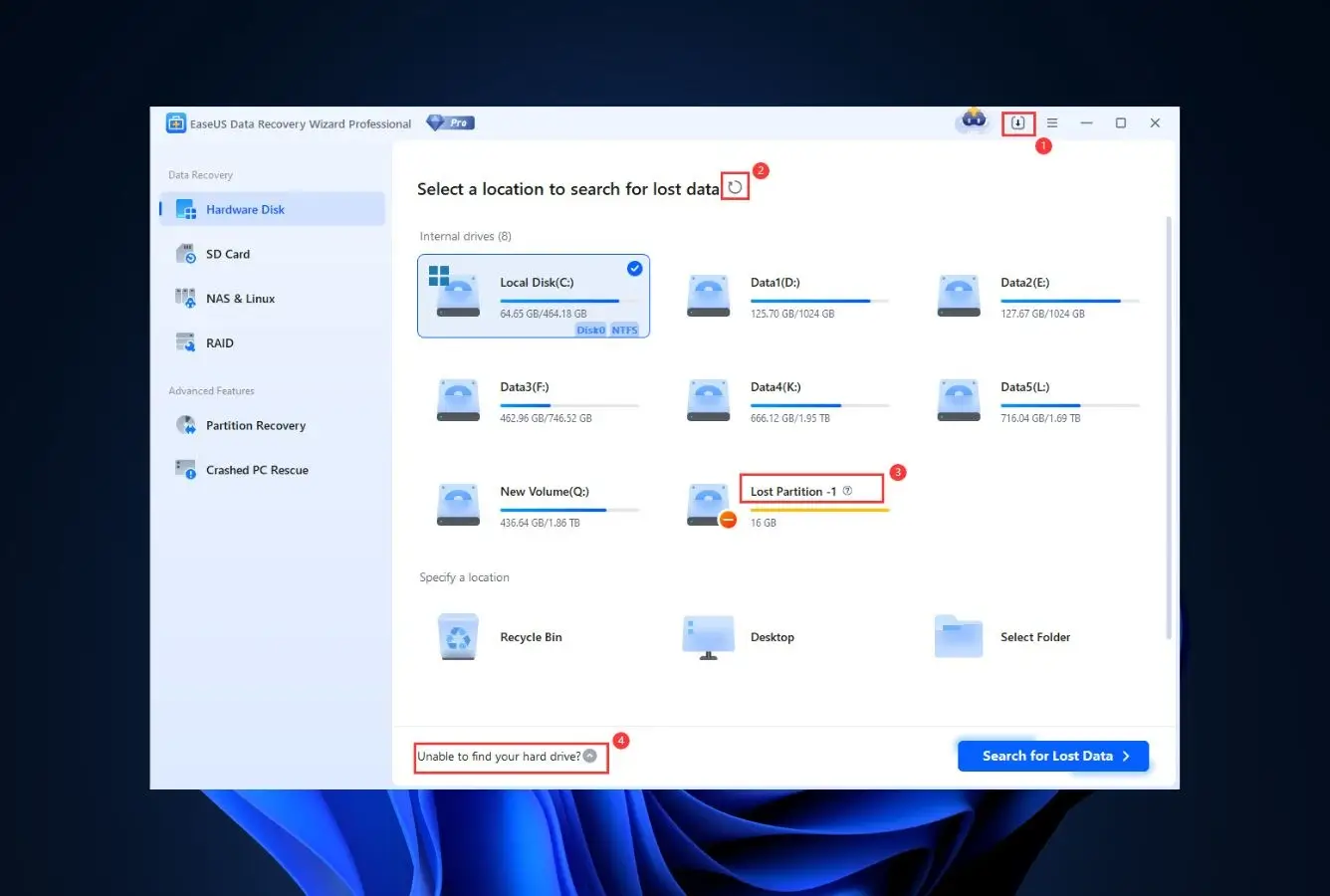
EaseUS Data Recovery Wizard is the most direct upgrade path for someone who is comfortable with Recuva but has hit a wall, usually because they bought a Mac, because their drive showed up as RAW, or because Recuva’s deep scan returned nothing useful on a formatted volume. The wizard-style workflow is essentially identical to Recuva: pick a drive, pick a scan mode, browse results in a tree view. What’s different is what happens when the scan starts. EaseUS reads APFS, HFS+, exFAT, NTFS, FAT, and ReFS where Recuva reads only FAT, NTFS, and exFAT on Windows. It scans formatted, RAW, and BitLocker-encrypted drives that Recuva refuses to open, and the file-signature library covers a much broader range of fragmented multimedia formats. The 2 GB free recovery (after a one-time social-share prompt) covers most everyday scenarios before any paid upgrade comes into play.
✓ Pros
- Native macOS build, fixes Recuva’s biggest single limitation
- Scans formatted, RAW, and BitLocker volumes Recuva can’t open
- Wizard-style UX is the closest UX match to Recuva on this list
- Broader file-signature library handles more multimedia formats
- Active development cycle versus Recuva’s 2023-frozen engine
- 2 GB free recovery without a permanent water-marked file ceiling
✕ Cons
- Subscription pricing pushed harder than the lifetime tier
- Single-PC license, no household or multi-device option at base tier
- Aggressive in-app upsells during free-tier scans
Recovery Power
Closes the four scenarios where Recuva runs out of road.
Recuva fails on RAW drives, lost partitions, severely formatted volumes, and unsupported file systems. EaseUS handles all four. It rebuilds NTFS, APFS, and HFS+ metadata where Recuva needs the file system intact. It scans drives with corrupted partition tables. Its signature database is broader and updated more often, which matters specifically for the modern fragmented MP4, MOV, RAW (CR3, NEF, ARW), and PSD files that show up in 2026 photo and video workflows. None of this comes free of tradeoffs. Deep scans take longer than Recuva’s because there’s more file-system parsing involved, but on the cases where Recuva returns nothing, EaseUS regularly finds files.
Interface & Experience
The closest UX match to Recuva on this list.
The wizard flow is so similar to Recuva’s that the muscle memory transfers immediately: drive picker on the home screen, scan-mode selector, file-tree results view with quick filter and preview pane. There are two real UX differences. First, the scan results actually show recovery-chance estimates (good/poor/unrecoverable) where Recuva uses a green/yellow/red dot. Second, EaseUS surfaces an upsell modal as soon as you try to recover past 2 GB on the free tier. More aggressive than Recuva’s single Pro pop-up but functionally similar. For Recuva veterans, the learning curve is roughly fifteen minutes.
Price & Value
Free tier is 2 GB versus Recuva’s unlimited, but Recuva can’t recover what EaseUS can.
The honest comparison is not “Recuva Free is unlimited and EaseUS Free is 2 GB.” It’s “Recuva Free returns nothing on the scenarios most people end up in.” If your drive is healthy, your file system is intact, and the deletion was recent, Recuva’s free tier wins on raw GB throughput. The moment any of those three change, EaseUS Free’s 2 GB ceiling becomes the right tradeoff – because something is recoverable, where Recuva returned an empty list. Paid tiers run $99.95/yr or $149.95 lifetime; the lifetime is genuinely lifetime including major version upgrades, which makes it the better unit economics over three or more years.
2. Disk Drill – Best for Mac Users
4.68
★★★★★
The Mac-first Recuva replacement, one license covers Windows + macOS.
PlatformsWindows + macOS
Free trial500 MB
Devices3 per license
From$89 / yr
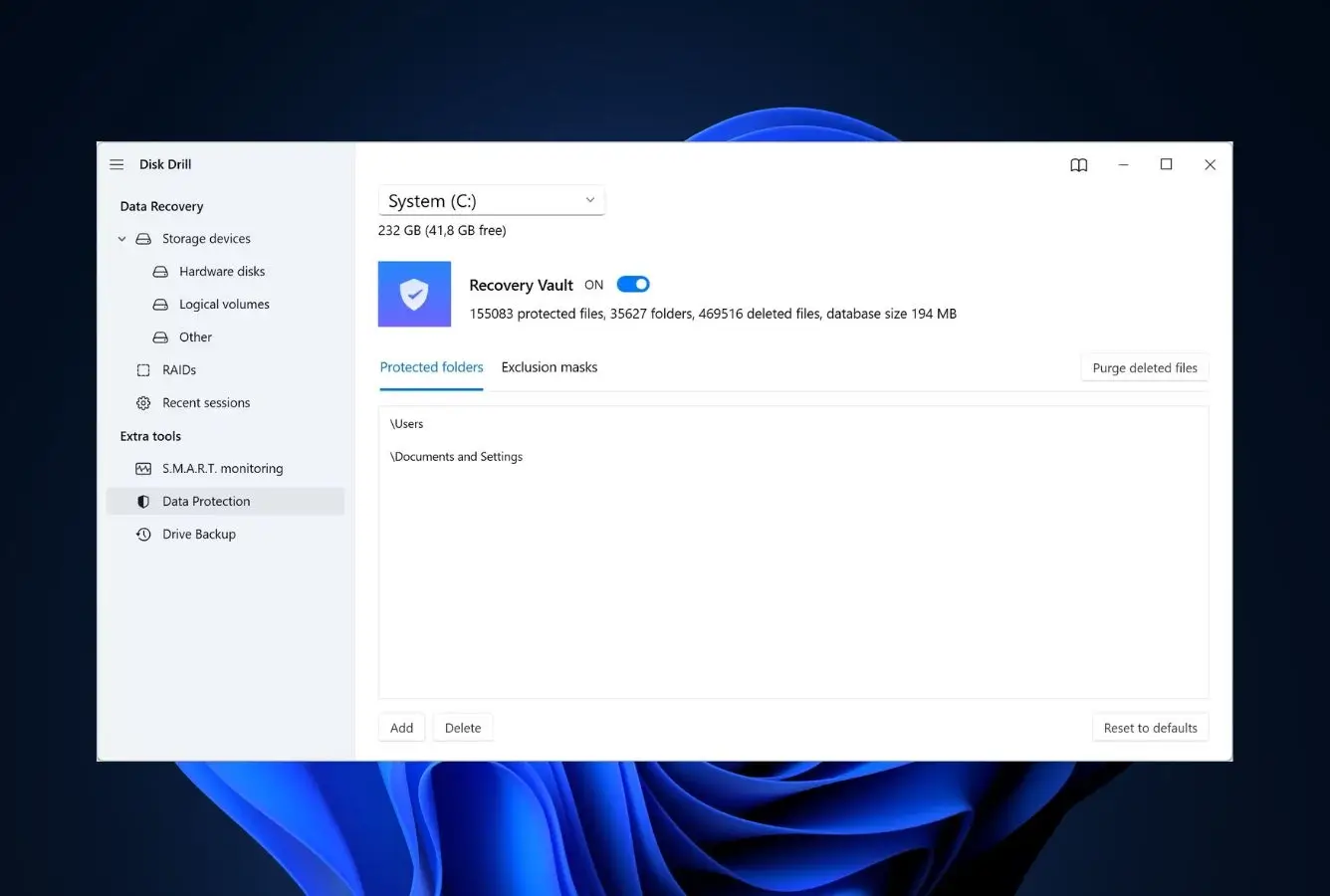
Disk Drill is the right pick for the largest single group of Recuva refugees: people who switched to Mac and discovered Recuva doesn’t run there at all. CleverFiles built Disk Drill macOS-first, then ported the engine to Windows, which is the inverse of how most data recovery tools were architected, and the difference shows in APFS support. The lifetime license covers both platforms across three devices, which makes it especially attractive for households where one person uses Windows and another uses macOS. Beyond the cross-platform story, Disk Drill ships several features Recuva has never had: byte-level disk imaging for safe scanning of failing drives, S.M.A.R.T. monitoring that warns of imminent drive failure, Recovery Vault for proactive metadata backups, and Advanced Camera Recovery for fragmented GoPro, DJI, Canon, and Sony footage. The 500 MB free trial is smaller than Recuva’s unlimited free tier on Windows, but the always-free preview mode lets you verify recoverability before spending anything.
✓ Pros
- Native macOS build with first-class APFS, HFS+, and Fusion Drive support
- One license activates on Windows + Mac across 3 devices
- S.M.A.R.T. monitoring, byte-level imaging, Recovery Vault, all standard
- Advanced Camera Recovery for fragmented multimedia files
- Mac build scans connected iPhones and Android devices
✕ Cons
- Free trial is 500 MB versus Recuva’s unlimited free recovery on Windows
- Annual subscription is the default purchase path; lifetime is less prominent
- Major version upgrades sometimes require a paid step-up from older lifetime keys
Recovery Power
Reads volumes Recuva refuses to open, APFS, RAW, and fragmented camera footage.
Disk Drill’s Universal Scan combines Quick, Deep, and Signature passes in one run, which is the workflow Recuva splits across separate scan modes. Independent testing places it consistently in the top three for APFS, NTFS, and FAT recovery on healthy drives, and it pulls notably ahead on two specific scenarios: RAW partitions (where Recuva can’t even start) and fragmented multimedia (where Recuva reassembles corrupted files). Advanced Camera Recovery is built specifically for action camera, drone, and DSLR formats. Exactly the files Recuva users most often complain about coming back broken.
Interface & Experience
More polished than Recuva but less wizard-driven.
The home screen is a drive list rather than Recuva’s wizard prompt, which is faster for repeat users but slightly less hand-holding for first-timers. Scan results group files into pictures, videos, audio, documents, and archives, with a recovery-chance prediction next to each. The same color-coded confidence indicator Recuva uses, but with more granular reasoning behind it. Filters and live preview work during the scan, so you don’t sit waiting like you do in Recuva’s deep-scan mode. The free version surfaces upsells more visibly than Recuva’s quieter Pro nudges.
Price & Value
Costs more than Recuva Pro upfront, but covers two platforms and three devices.
Recuva Pro is $24.95 lifetime for one Windows PC. Disk Drill is $89/yr or $149 lifetime for Windows and Mac across three devices. The math only favors Disk Drill if you actually need cross-platform or multi-device coverage. For a single Windows PC user with simple recovery needs, Recuva Pro’s $24.95 wins on price. Where Disk Drill earns its premium is on Mac coverage (Recuva has none) and on the additional features (imaging, S.M.A.R.T., Recovery Vault) that Recuva doesn’t offer at any price.
3. PhotoRec – Best Free Open-Source Replacement
4.42
★★★★½
Genuinely free, genuinely cross-platform, genuinely better at RAW recovery.
PlatformsWin + Mac + Linux + BSD
Free recoveryUnlimited
LicenseGPL v2+
FromFree
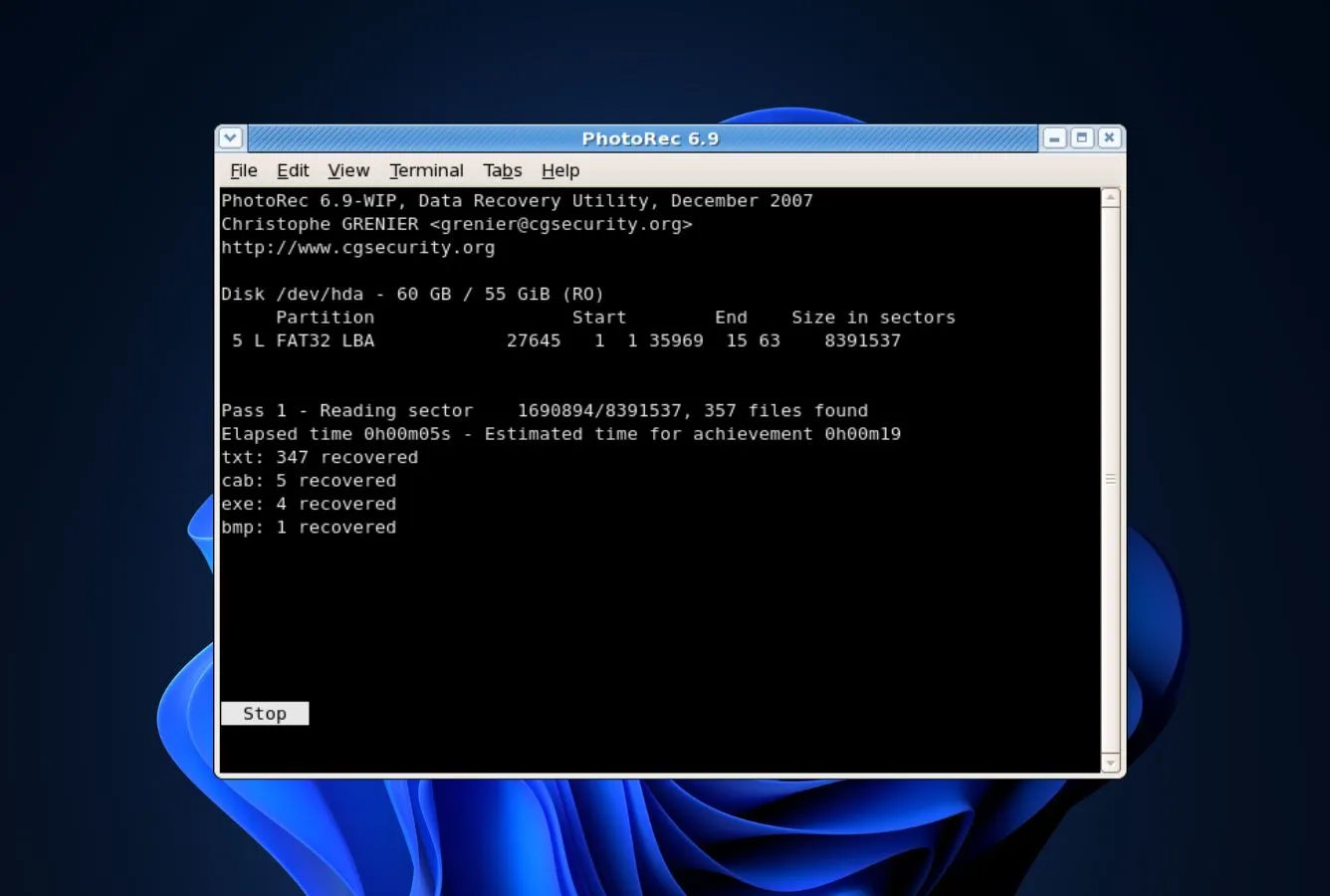
PhotoRec from CGSecurity is the answer to the literal question “is there a free alternative to Recuva that runs on Mac or Linux.” It is the only entry on this list released under a real open-source license (GNU GPL v2+), which means no recovery cap, no upgrade prompts, no Pro tier, ever. The recovery engine is fundamentally different from Recuva’s: instead of reading file-system metadata, PhotoRec performs a block-by-block scan looking for known file signatures. That difference matters specifically in the scenarios where Recuva fails: RAW partitions, severely corrupted file systems, drives where the partition table is gone. PhotoRec doesn’t need any of that to find files. The signature library covers more than 480 file extensions across roughly 300 file families, which is substantially broader than Recuva’s. Bundled with TestDisk for partition recovery, the combination handles every weak spot in Recuva’s coverage.
✓ Pros
- Truly free, GPL v2+ open-source, no caps, no nag screens, no paid tier
- Native Windows, macOS, Linux, and BSD builds from one codebase
- Reads RAW drives, missing partitions, and severely formatted volumes
- 480+ file types versus Recuva’s smaller signature library
- TestDisk bundled for partition recovery and bootable disk repair
✕ Cons
- Command-line interface, significantly less approachable than Recuva’s wizard
- QPhotoRec GUI is barebones compared to Recuva’s polished Windows UI
- Recovered files lose their original names and folder structure
Recovery Power
Outperforms Recuva specifically on the cases where Recuva returns nothing.
The signature-based engine ignores file-system metadata entirely, which is exactly the workflow needed when a drive shows as RAW or the partition table is corrupted. Both Recuva failure modes. The 480+ supported file types is the broadest free signature library in this category. On healthy drives with intact file systems, Recuva is actually faster and returns better-organized results (real filenames, real folders); but the moment the file system is damaged, PhotoRec recovers files Recuva won’t see. For RAW camera files specifically (CR2, NEF, ARW, CR3) the depth of PhotoRec’s signature support meaningfully exceeds what Recuva ships.
Interface & Experience
The single biggest tradeoff against Recuva, there is no friendly wizard.
Classic PhotoRec is a command-line utility that walks you through scan options as terminal prompts. QPhotoRec adds a graphical front-end on Windows and Linux, but it’s a developer-tool aesthetic. Buttons, checkboxes, file-type filter. Not Recuva’s beginner-friendly wizard flow. The first scan typically takes ten to fifteen minutes of fumbling through choices that Recuva makes invisible behind defaults. For one-time recoveries on otherwise healthy drives, Recuva’s UX advantage matters; for repeat use or for cases where Recuva fails, PhotoRec’s UX cost is the price of admission.
Price & Value
Both are free, but PhotoRec’s free is meaningfully different from Recuva’s free.
Recuva Free has no recovery cap on Windows but doesn’t run on Mac or Linux at all. PhotoRec is free across every platform forever. No upgrade tier exists because the project is volunteer-maintained under GPL. For users who want a fully-free alternative on macOS or Linux specifically, PhotoRec is the only credible option ranked here. The unit-economics question becomes “is your time worth the UX downgrade”, and that depends entirely on how often you expect to run recovery.
4. R-Studio – Best for Serious & RAID Recovery
4.62
★★★★★
When Recuva returns nothing and the data actually matters.
PlatformsWin + Mac + Linux
FreeFiles < 256 KB
LicenseLifetime
From$79.99 lifetime
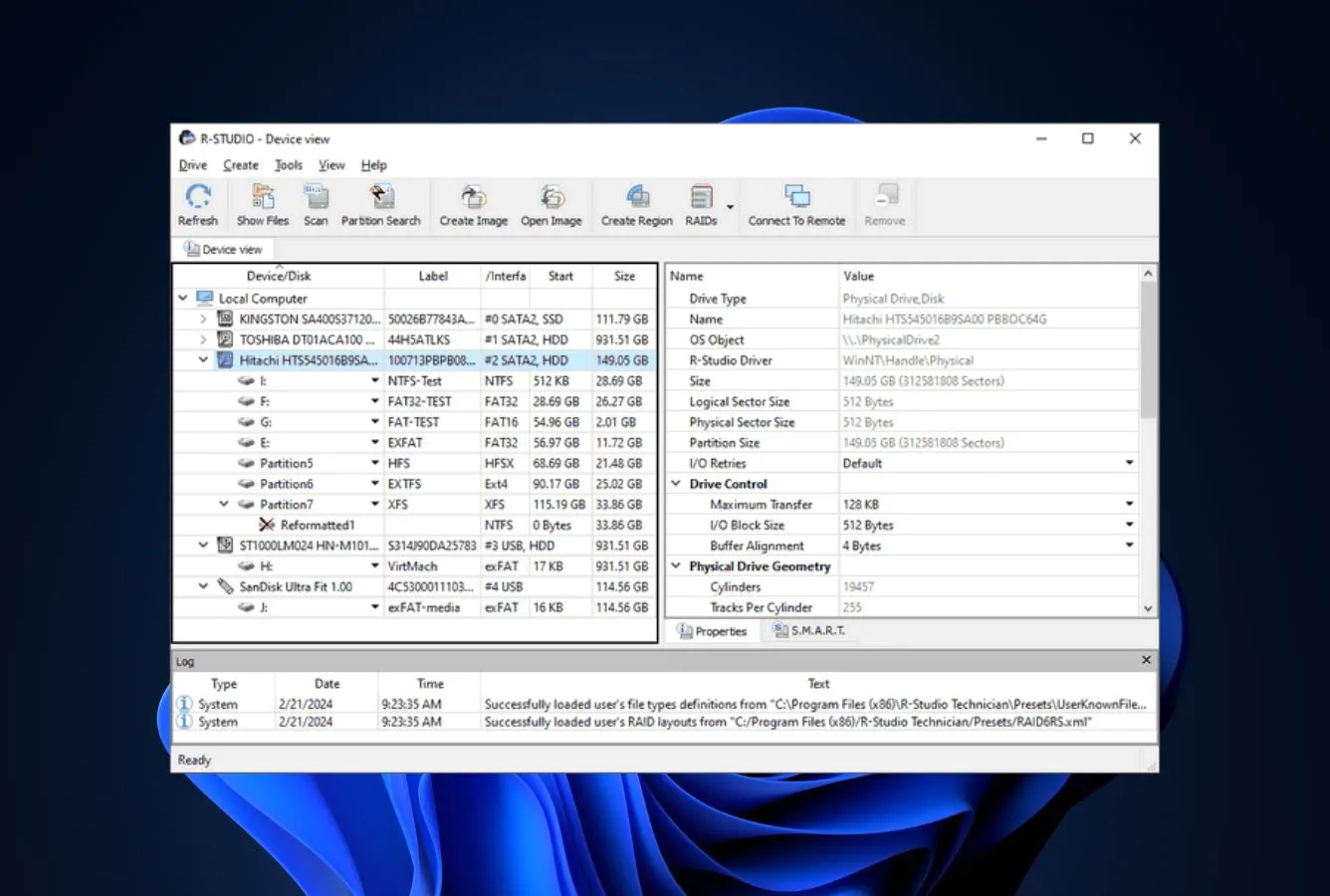
R-Studio is what people switch to when Recuva genuinely couldn’t help and the lost data is too important to give up on. R-Tools Technology built the engine for forensic and professional data recovery, and it shows in three areas where Recuva is conspicuously thin: RAID reconstruction (R-Studio handles 0, 1, 4, 5, 6, plus nested layouts and customer-defined arrays. Recuva has no RAID support at all), severely corrupted file systems (R-Studio parses NTFS, APFS, ext4, ReFS, and HFS+ with deeper recovery than the metadata-dependent Recuva engine), and remote/network recovery (R-Studio can scan a network drive across SMB or its own agent, while Recuva is local-only). The interface is dense and unapologetically technical, which is the cost of admission. The same engine ships across Windows, macOS, and Linux from one codebase, so a technician can move a license between platforms instead of rebuying.
✓ Pros
- Native RAID 0, 1, 4, 5, 6 plus nested layouts (5E, 5EE, 6E, 50, 60)
- Same engine runs on Windows, macOS, and Linux from one codebase
- Built-in hex editor and disk imaging tools, Recuva ships neither
- Network and agent-based recovery across LAN connections
- Handles severely corrupted NTFS, APFS, ext4, and ReFS volumes
✕ Cons
- Interface is dense and technical, opposite of Recuva’s wizard simplicity
- Free tier only recovers files smaller than 256 KB, basically preview-only
- Steeper learning curve than any other tool on this list
Recovery Power
The most capable scan engine ranked here, by a meaningful margin.
R-Studio’s parser support reaches further into damaged volumes than anything else on this list, and the RAID reconstruction is genuinely first-class. Automatic parameter recognition for RAID 5/6, manual layout builder for non-standard arrays, and support for software RAID (Apple CoreStorage, Linux mdadm, Windows Storage Spaces). The hex editor and disk imaging tools mean technicians can image a failing drive and run scans against the image rather than the failing hardware, which Recuva forces you to skip entirely. On healthy drives with simple deletions, Recuva is faster and easier; on anything beyond that, R-Studio is the right tool.
Interface & Experience
Built for technicians. Recuva users will need an adjustment period.
The home screen is a file tree with the drive list on the left, the file system view in the middle, and metadata panes on the right. The same dense layout you’d see in a forensic tool. There is a hex editor available alongside the file browser, network-recovery dialogs that assume you already know what you want, and RAID-builder windows with parity-block ordering controls. Nothing about it feels like Recuva’s wizard. For Recuva users, the first hour is unfamiliar; by the third recovery, the depth becomes the reason to use it.
Price & Value
$79.99 lifetime is the most underpriced license on this list.
R-Studio at $79.99 lifetime competes against Recuva Pro’s $24.95, but the comparison breaks immediately: R-Studio adds RAID, network recovery, hex-level inspection, three-platform support, and a substantially deeper recovery engine. For a one-time use on a healthy Windows drive, Recuva Pro at $24.95 is genuinely cheaper and faster. For technicians, RAID work, or anyone who handles serious recoveries more than once a year, $79.99 lifetime is unit-economics that Recuva simply doesn’t compete with, because Recuva can’t do what R-Studio does at any price.
5. Stellar Data Recovery – Best Modern UI Replacement
4.48
★★★★½
The “Recuva but maintained” option, modern engine, active development, real Mac build.
PlatformsWindows + macOS
Free recovery1 GB
LicenseAnnual sub
From$59.99 / yr
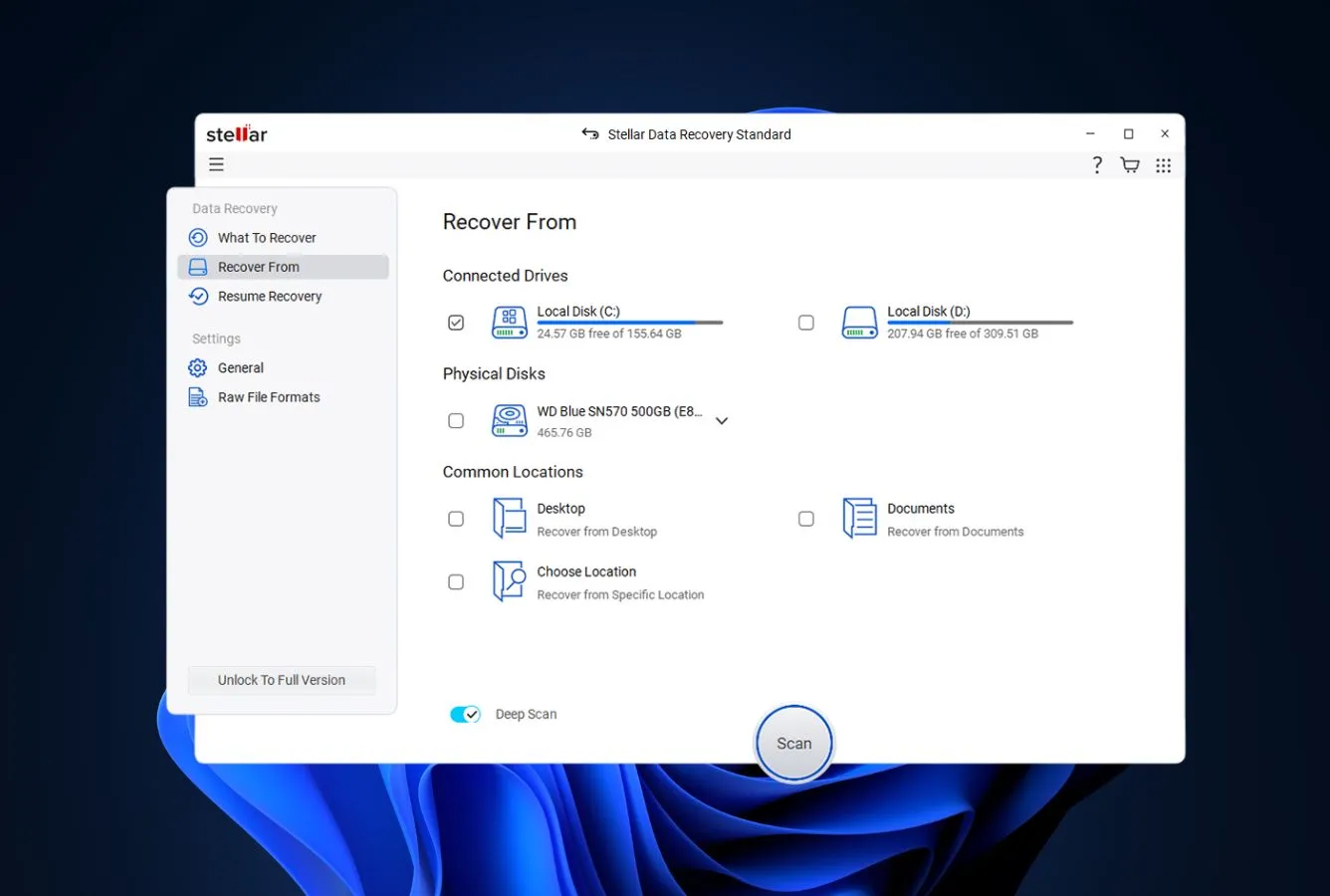
Stellar Data Recovery is the right pick for users who liked Recuva’s general approach but want a tool with a 2026 release schedule and a real macOS build. Stellar’s interface is wizard-style like Recuva’s: pick what you lost, pick where you lost it from, scan, browse – but the engine underneath is meaningfully more capable. It supports NTFS, FAT/FAT32, exFAT, ext2/3/4, HFS+, and APFS file systems where Recuva covers only Windows-side filesystems. It scans formatted, BitLocker-encrypted, and unbootable drives that Recuva refuses to open, and the development cycle is active rather than the 2023-frozen state Recuva has been in. The Standard tier at $59.99/yr is the cheapest paid option here that still includes a real Mac build, undercutting both EaseUS and Disk Drill on entry-tier annual cost.
✓ Pros
- Wizard-style UX is closest to Recuva’s original visual logic
- Native macOS build with full APFS and HFS+ support
- Cheapest paid tier here with a real Mac edition ($59.99/yr Standard)
- Active development cycle versus Recuva’s 2023-frozen engine
- 1 GB free recovery before any paid upgrade is required
✕ Cons
- Subscription-first pricing, no lifetime tier at the Standard level
- Higher tiers (Pro, Premium) needed for RAID and video repair features
- Mac and Windows are sold as separate licenses, not one combined key
Recovery Power
Modern engine that handles every case Recuva chokes on.
Stellar reads APFS, HFS+, ext4, NTFS, FAT, and exFAT. Every file system Recuva covers, plus the Mac and Linux ones it doesn’t. It scans formatted drives, BitLocker-encrypted volumes, and unbootable systems, all of which Recuva either skips entirely or returns empty results from. The signature library is broader than Recuva’s and includes the modern fragmented MP4, MOV, and RAW (CR3, NEF, ARW) formats that Recuva users frequently report as broken on recovery. The Pro and Premium tiers add RAID reconstruction and video file repair, neither of which exist in Recuva at any tier.
Interface & Experience
The wizard you remember, with 2026 design language.
The home screen asks “what did you lose” with file-type cards (documents, photos, videos, audio, emails). Exactly the wizard logic Recuva pioneered, but rebuilt with modern visuals and a smoother flow. The drive picker is the second step rather than the first, which sometimes feels backwards to Recuva veterans but lands well for first-time users. Scan results show recovery-quality estimates next to each file, with live preview during the scan rather than after. The transition from Recuva to Stellar is the smoothest UX migration on this list.
Price & Value
Cheapest entry-tier annual that ships a real Mac build.
$59.99/yr Standard undercuts EaseUS ($99.95/yr) and Disk Drill ($89/yr) at the entry tier, and the 30-day money-back window protects against buyer’s remorse. The catch is the subscription model. Stellar pushes annual renewals harder than lifetime, and the lifetime equivalent isn’t offered at Standard tier (you’d need to step up to Pro at $89.99/yr). For one-shot use, set a calendar reminder for the renewal. For ongoing use, the lifetime tier of EaseUS or Disk Drill is better unit economics over three years.
6. MiniTool Power Data Recovery – Best for Unbootable Systems
4.36
★★★★½
Bootable rescue media for the times when Windows itself won’t start.
PlatformsWindows + macOS
Free recovery1 GB
LicenseSub or lifetime
From$69 / yr
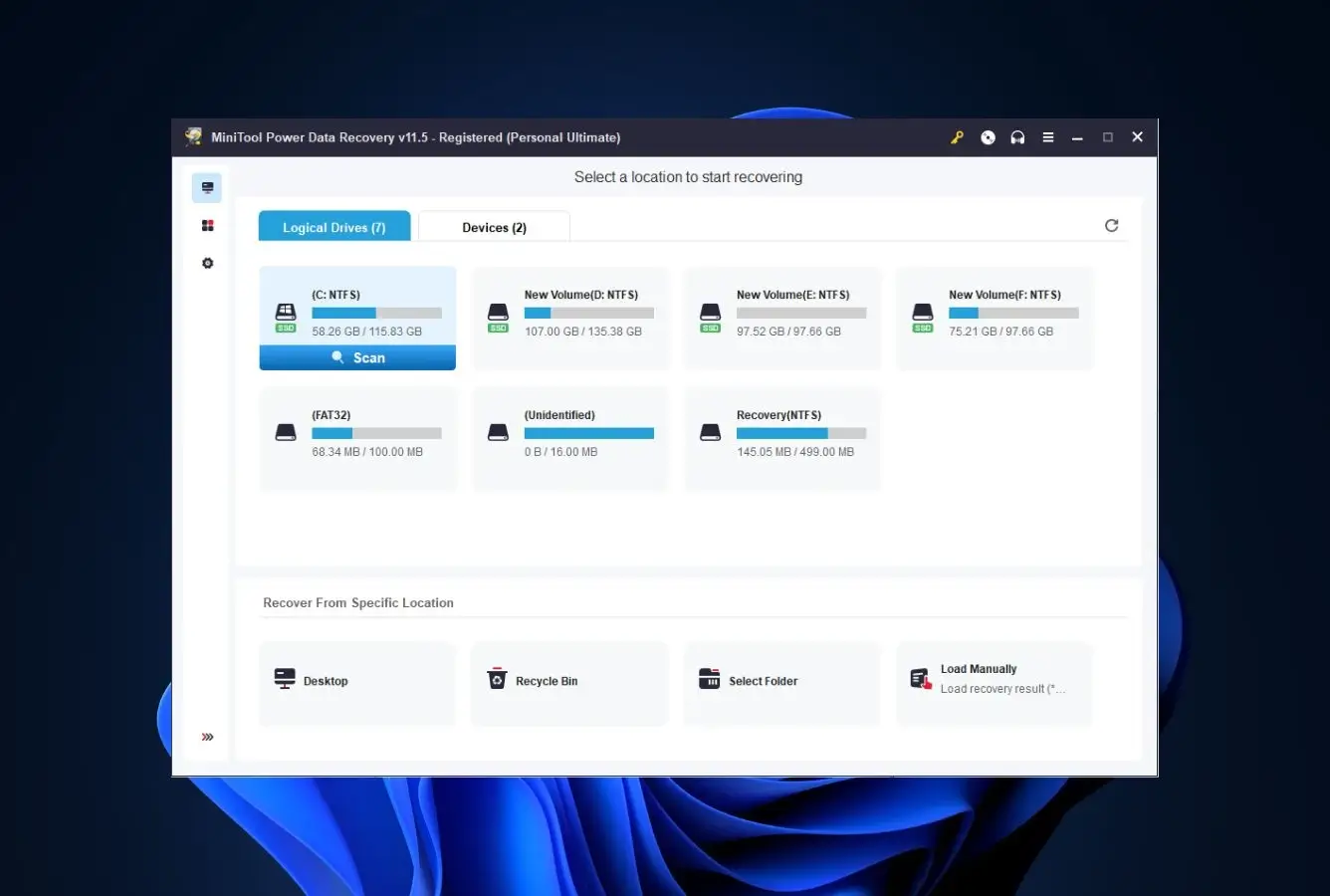
MiniTool Power Data Recovery is the right pick for the specific scenario where Recuva is most painfully limited: the system drive failed and Windows itself won’t boot. Recuva runs as a Windows application, which means it requires a working Windows installation to run at all. Useless when the very drive you need to recover from is the one preventing the OS from starting. MiniTool’s higher tiers ship bootable WinPE rescue media that boots from USB independently of the failed system, which lets you scan and recover before reinstalling Windows. Beyond that headline feature, the engine handles software RAID, supports ReFS in addition to NTFS/FAT/exFAT, and can image drives byte-by-byte for safer scanning of failing hardware: three capabilities Recuva entirely lacks. The 1 GB free tier is comparable to Stellar’s, and the Personal Deluxe lifetime at $89 includes the bootable media tools.
✓ Pros
- Bootable WinPE rescue media for unbootable systems (Personal Deluxe and up)
- Software RAID support, Recuva has none
- Native macOS edition for cross-platform users
- Byte-level disk imaging for safer scans of failing drives
- 1 GB free recovery before any paid upgrade is needed
✕ Cons
- Interface is functional but visually busier than Recuva’s wizard
- Bootable media is locked behind the paid tier, not the free version
- Subscription pricing pushed harder than lifetime in checkout flow
Recovery Power
Solves the one scenario Recuva is structurally incapable of handling.
If the system drive has failed and Windows won’t start, Recuva is offline by definition. There’s no Windows installation to run it on. MiniTool’s bootable WinPE media solves this exact case: boot from USB, run the recovery engine independent of the broken Windows install, scan the failing drive, recover to external media, then reinstall Windows. The recovery engine itself is competent across NTFS, FAT, exFAT, and ReFS; supports software RAID arrays Recuva doesn’t see; and includes byte-level imaging for the safe-scan workflow that failing drives require.
Interface & Experience
Workmanlike rather than wizard-driven.
The home screen presents a drive list with scan options grouped by recovery scenario (deleted recovery, lost partition, deep scan), which is denser than Recuva’s wizard but more flexible. The bootable media creator is a separate utility within the paid tier. Straightforward but not trivial; you’ll need a USB stick and roughly fifteen minutes of setup. Once running from USB, the recovery interface itself feels like a stripped-down version of the desktop UI. For Recuva users, expect a 30-minute adjustment period before the workflow becomes second nature.
Price & Value
$89 lifetime for bootable rescue media is genuinely cheap insurance.
Personal Deluxe at $89 lifetime includes the bootable WinPE rescue media. A feature you can’t get from Recuva at any tier. For households with an aging primary PC where drive failure is a real concern, $89 lifetime is roughly the cost of an external SSD and significantly cheaper than the data-loss alternative. The 1 GB free tier is enough for most everyday recoveries, so the upgrade decision is genuinely about the bootable-media use case rather than recovery volume.
7. DMDE – Best Free Power-User Alternative
4.46
★★★★½
Free tier that genuinely outperforms Recuva on partition and RAID recovery.
PlatformsWin + Mac + Linux + DOS
Free4,000 files / dir
LicenseLifetime + sub
From$20 / yr · $48 lifetime
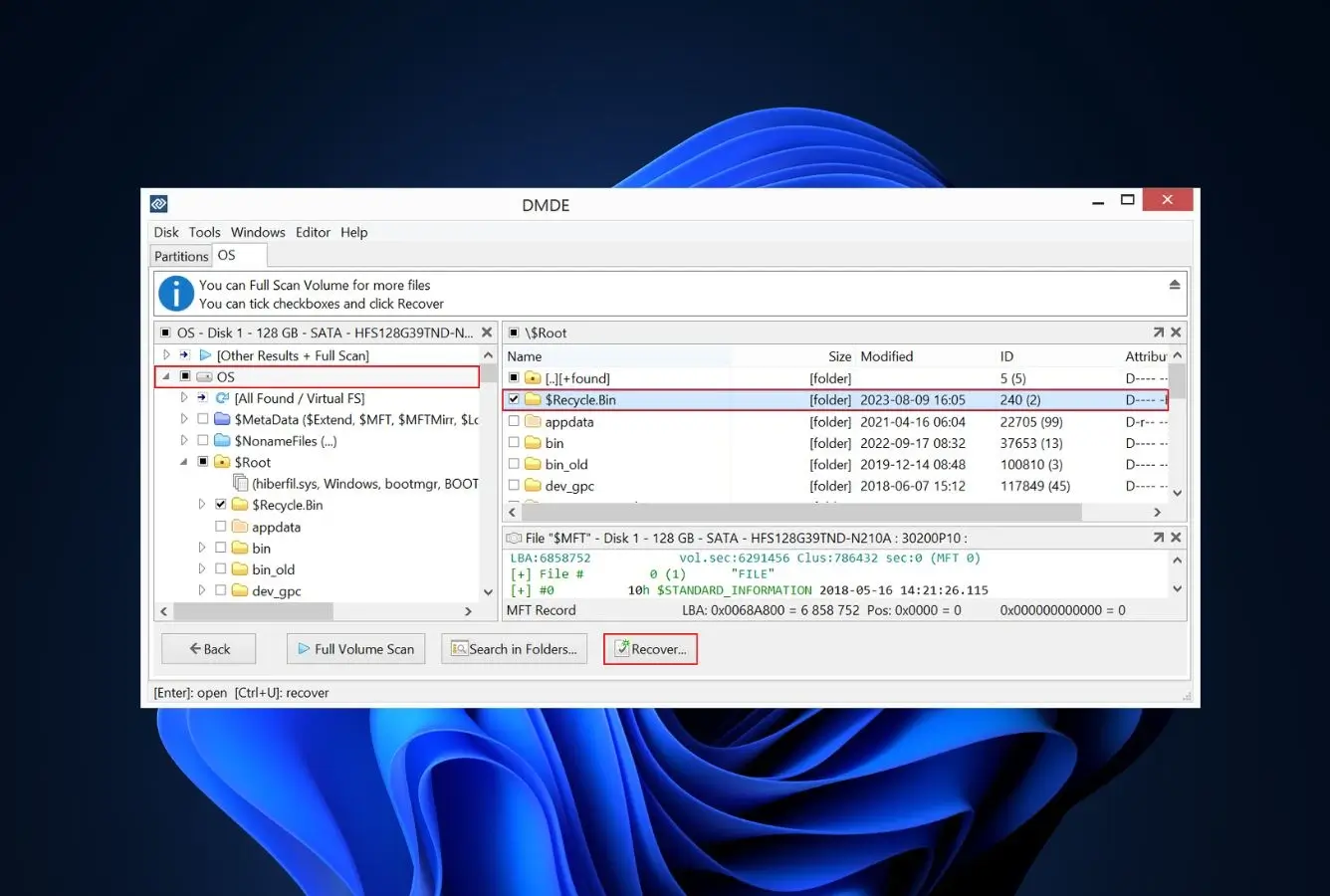
DMDE (DM Disk Editor and Data Recovery) is the answer for users who want a genuinely capable free tier without Recuva’s specific limitations. Where Recuva Free is unlimited but caps you at FAT/NTFS/exFAT on Windows only, DMDE Free recovers up to 4,000 files per directory with unlimited repetitions across Windows, macOS, Linux, and DOS, and includes RAID construction and partition recovery in the free version. Features Recuva doesn’t ship at any price. The 4,000-files-per-directory ceiling sounds restrictive in writing but is functionally unlimited for most workflows because you can repeat the recovery as many times as needed, working through directory after directory. The Standard paid tier at $48 lifetime opens unlimited recovery and is half the price of EaseUS Pro’s annual cost. The interface is dense and technical (closer to R-Studio than Recuva), but the recovery engine reads volumes the wizard-style tools won’t open.
✓ Pros
- Free tier includes RAID constructor and partition recovery, Recuva has neither
- 4,000 files per directory free, with unlimited repetitions
- $48 lifetime Standard is the cheapest paid lifetime ranked here
- Cross-platform: Windows, macOS, Linux, and DOS console
- Disk editor and partition undelete in the free tier
✕ Cons
- Interface is technical, not for users coming from Recuva’s wizard simplicity
- 4,000 files per directory cap on free tier requires manual repetition
- Documentation assumes prior data-recovery vocabulary
Recovery Power
Free tier covers RAID and partition recovery scenarios Recuva can’t touch.
DMDE’s standout free-tier capability is its RAID constructor. For users with RAID arrays who need to rebuild parameters and recover, this is the only free tool ranked here that handles that case. The partition-undelete tools recover deleted and corrupted partitions that Recuva has no module for. The disk editor lets advanced users inspect raw sectors. The recovery engine itself reads NTFS, ReFS, FAT, exFAT, ext2/3/4, HFS+, and APFS, which makes it the broadest cross-platform free option here. None of this comes with Recuva’s wizard hand-holding.
Interface & Experience
Technical interface, closer to R-Studio than to Recuva.
The home screen lists physical and logical drives with detailed parameters (sector count, file system signature, partition table type), and the scan dialog asks about file system type rather than scan mode. There is a hex editor available alongside the file-tree view. For Recuva veterans, this is a significant downshift in approachability. The same gap as moving from a wizard car-rental kiosk to a rental-truck depot. The flip side is that for repeat users or technicians, the depth becomes the reason to use it.
Price & Value
$20/yr or $48 lifetime is the cheapest serious-tier paid license here.
$48 lifetime for Standard, $95 for Professional, $133 for Multi-OS – even Professional is meaningfully cheaper than Recuva Pro plus a Stellar Mac license combined, and includes RAID, network recovery, and cross-platform support. For users who want a paid lifetime upgrade path with no subscription pressure, DMDE Standard at $48 is the unit-economics winner among ranked alternatives. The catch is the interface. For casual users coming from Recuva, the UX cost may exceed the dollar savings.
8. Wondershare Recoverit – Best for Video & RAW Recovery
4.32
★★★★½
AI-augmented video recovery for the multimedia files Recuva fragments.
PlatformsWin + Mac + NAS + Linux
Free trial100 MB
Devices2 PCs per license
From$99.99 / yr
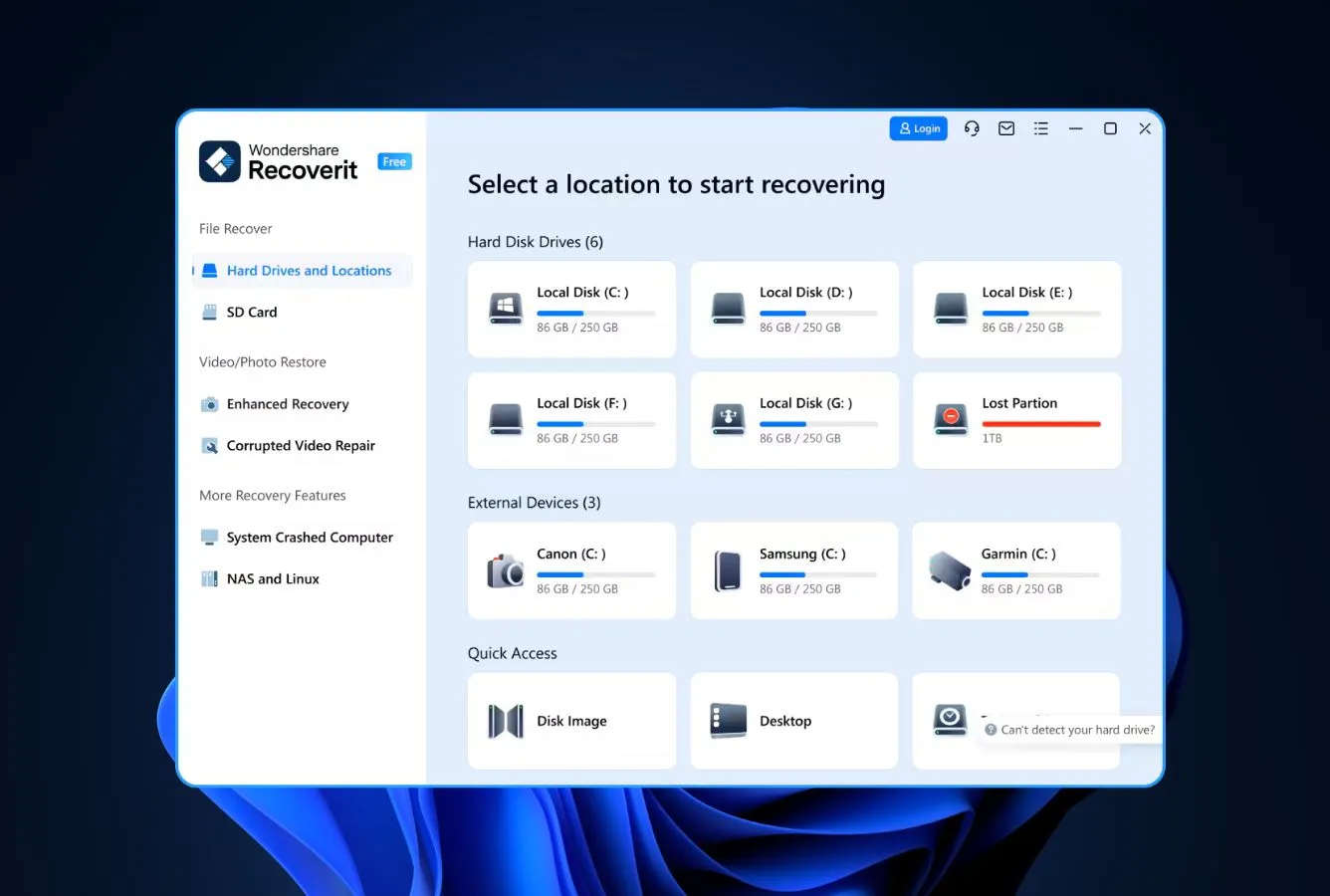
Wondershare Recoverit earns its spot on this list specifically for users whose Recuva complaint is video and RAW camera-file recovery. Fragmented MP4 stitches that come back broken, RAW files (CR3, NEF, ARW) that recover with corrupted metadata, action-camera footage from GoPro and DJI that won’t play after recovery. Wondershare built an AI-augmented video reconstruction engine specifically for these formats, which sets it apart from the more generic signature-based engines Recuva and EaseUS use. Beyond video, every license tier includes a 2-PC activation. Meaningfully better than the single-PC limit on most paid alternatives, and the Linux-and-NAS file-system support is unusual at this price point. The 100 MB free tier is the most restrictive on this list, but the AI video features are unique enough to justify a paid evaluation if multimedia recovery is the use case.
✓ Pros
- AI-augmented video reconstruction for fragmented MP4, MOV, and camera footage
- Every paid tier includes 2-PC activation, most other tools are single-PC
- NAS and Linux file-system support unusual at this price tier
- Native macOS build with full APFS support
- Lifetime license at $129.99 for two PCs is competitive long-term
✕ Cons
- 100 MB free trial is the smallest on this list
- Pricier annual subscription than Stellar or Disk Drill at entry tier
- AI features are paid-tier only, free version doesn’t preview them
Recovery Power
The video and RAW recovery story is genuinely differentiated.
For one specific case. Fragmented multimedia recovery. Wondershare’s AI engine performs noticeably better than Recuva’s generic signature scanner and competitive with Disk Drill’s Advanced Camera Recovery. The engine reassembles MP4 and MOV files from cameras and drones where Recuva returns playable-but-corrupted output, and the RAW-format support spans CR2, CR3, NEF, ARW, RAF, and ORF with newer cameras supported. Outside multimedia, the recovery is competent but not differentiated. Comparable to Stellar or EaseUS for documents, photos, and standard file types.
Interface & Experience
Modern and friendly, closer to Recuva’s wizard logic than to R-Studio’s depth.
The home screen splits into Hard Drives, External Devices, NAS, and Linux as separate scan targets, which is actually clearer than Recuva’s single drive-list view. Scan results group files into categories with previews, and the AI video preview shows reconstruction quality before you commit a recovery slot. For Recuva users, the UX migration is straightforward. No command-line, no hex editor, no RAID-builder dialogs to learn. Free-tier upsell pressure is roughly comparable to EaseUS.
Price & Value
$99.99/yr or $129.99 lifetime for 2 PCs is competitive long-term.
Headline pricing is higher than Stellar ($59.99/yr) or Disk Drill ($89/yr) at entry tier, but the 2-PC activation across all paid tiers is a real differentiator. For households with two computers, Wondershare’s $129.99 lifetime is competitive with or cheaper than two single-PC licenses elsewhere. The free tier at 100 MB is the smallest on this list and unsuitable for most real-world recoveries; the upgrade decision is genuinely paid-or-don’t-use rather than free-then-upgrade.
How We Evaluate Recuva Alternatives
An “alternative” ranking is easy to do badly. Most competitor articles just rank tools the author already sells in a different order. We approached this differently: we identified the four most-cited reasons users switch from Recuva (no Mac or Linux build, no RAW or partition recovery, no byte-to-byte imaging, and an engine that hasn’t seen meaningful development since 2023), then evaluated each alternative on how well it solves those specific gaps alongside core recovery capability. Research is layered across vendor documentation for baseline feature claims, independent external testing for cross-validation of recovery performance, and community feedback on Reddit (r/datarecovery, r/techsupport) and Trustpilot for real-world support and billing patterns – rankings reflect that aggregate, not an in-house benchmark.
📚
Vendor Documentation
Each candidate’s official product pages, pricing tiers, supported file systems, license terms, and changelogs, the baseline held at arm’s length until cross-referenced against external testing.
🧪
Independent Testing
Cross-referenced findings from external testing labs and editorial reviews on recovery rates, scan times, and engine behavior, used to separate marketing claims from repeatable outcomes.
💬
Community Feedback
Reddit threads on r/datarecovery and r/techsupport, Trustpilot complaint patterns, G2 ratings, and CCleaner Community forum posts, for real-world support, billing, and recovery-outcome signals.
Platforms covered: Windows 10/11 (24H2), macOS 14 Sonoma + macOS 15 Sequoia, and major Linux distributions for tools that support them. Key factors weighted: recovery capability (40%), platform reach beyond Recuva (20%), features Recuva lacks (15%), free-tier substance (10%), license value (10%), and switch ease from Recuva (5%).
01
Recovery Capability (40%)
Engine quality across NTFS, APFS, FAT32, exFAT, ext4, and signature-only RAW recovery, specifically on the failure modes (formatted, RAW, lost-partition) where Recuva returns nothing.
02
Platform Reach Beyond Recuva (20%)
macOS support (Recuva has none), Linux support, mobile-device scanning, and cross-platform license coverage. Single-platform Windows-only tools are penalized here.
03
Features Recuva Lacks (15%)
RAW drive scanning, partition recovery, byte-level disk imaging, RAID reconstruction, S.M.A.R.T. monitoring, BitLocker decryption, broader file-signature coverage.
04
Free Tier Substance (10%)
What the free version actually delivers. Recuva’s unlimited Windows free tier is the bar; alternatives that go cross-platform or add capability free earn credit here.
05
License Value (10%)
Lifetime tier price, multi-device coverage, multi-platform inclusion, auto-renewal behavior, refund policy. Recuva Pro at $24.95 lifetime is the price-point bar.
06
Switch Ease (5%)
UX similarity to Recuva for users who liked the wizard but need more capability, and conversely, technical depth for users leaving because Recuva is too thin.
🔎
Want the raw testing data?
Individual test runs, scan-time logs, and per-tool notes from our ongoing testing live on our full methodology page. Start there if you want the underlying numbers behind any claim on this page.
Niche Alternatives & Honorable Mentions
Six tools we considered as Recuva replacements but didn’t include in the main ranking. Each fits a narrow scenario where it would specifically beat the eight ranked options.
TestDisk
Bundled with PhotoRec. The right tool when the lost data is on a deleted or corrupted partition rather than from a deletion. Recuva has no partition recovery, TestDisk is the canonical free fix. Command-line, cross-platform.
Mac-first alternative with strong APFS and encrypted-volume recovery. A credible second pick for Mac users leaving Recuva, Disk Drill is the cleaner choice, but iBoysoft handles BitLocker and FileVault scenarios well.
Free Windows-only freeware with no recovery cap and a small download footprint. The closest direct comparison to Recuva Free, but recovers from formatted drives where Recuva often gives up.
Modern card-based UI with a $59.95 lifetime per platform. The friendliest UX upgrade from Recuva for users who want a polished feel without going to enterprise pricing. Smaller free tier (100 MB) is the catch.
Mac-focused alternative with a clean UI. Pricing is on the high side for the feature set; consider only if Disk Drill and iBoysoft don’t fit your specific workflow.
Hybrid recovery + partition manager + disk repair tool. Free tier caps recovery at files smaller than 64 KB, which is restrictive, but the partition repair tools are unique on this list and useful for scenarios Recuva can’t handle.
How to Pick the Right Recuva Replacement
Four factors separate the right Recuva alternative from the wrong one. Walk through them in order; the first one that fails is usually the deciding criterion.
Platform: are you on Mac, Linux, or Windows?
If you’re on Mac, Recuva is a non-starter and your shortlist is Disk Drill, EaseUS Data Recovery Wizard, Stellar – or PhotoRec for free. Linux users have fewer options: R-Studio, DMDE – and PhotoRec. Windows users have the full menu but should still check whether they might switch platforms in the next year. Buying Disk Drill or EaseUS now means coverage if you do. See our Mac data recovery roundup for Mac-specific guidance.
Free tier: what does Recuva Free not give you?
Recuva Free is unlimited on Windows but doesn’t cover Mac, RAW drives, missing partitions, or many modern multimedia formats. PhotoRec is the only fully-free unlimited cross-platform option, with broader signature support too. DMDE Free adds RAID and partition recovery to the mix at 4,000 files per directory. EaseUS Free at 2 GB is smaller in volume but reads file systems Recuva can’t open. For a survey of free options beyond Recuva, see our free data recovery roundup.
Recovery scenarios Recuva can’t handle
Recuva fails on RAW drives, lost partitions, severely formatted volumes, and unsupported file systems. If your scenario falls in any of those categories, the right alternatives are EaseUS (formatted/RAW with a familiar UX), R-Studio (severely corrupted file systems and RAID), or PhotoRec (signature-based scanning that ignores the file system entirely). For RAID specifically, see our RAID recovery software guide.
Multimedia and camera-file recovery
Recuva users frequently report fragmented video and RAW camera-file recovery as weak spots. Incomplete MP4 stitches, RAW files (CR3, NEF, ARW) that recover with corrupted metadata. The strongest fixes are Disk Drill’s Advanced Camera Recovery mode (built specifically for GoPro, DJI, Canon, Sony, Insta360 fragmented footage), PhotoRec’s 480+ file-type signature library, and Wondershare Recoverit’s AI-augmented video reconstruction. For dedicated photo-recovery needs, see our photo recovery software guide.
EaseUS Data Recovery Wizard is the best Recuva alternative in 2026. It keeps the wizard-style approachability that made Recuva popular, adds the macOS support Recuva entirely lacks, ships a much broader file-signature database, and handles RAW, formatted, and BitLocker-encrypted drives that Recuva refuses to open. For most Recuva users, it’s the smoothest possible upgrade path: same workflow, materially more capability.
Beyond the winner: Disk Drill is the right pick for users whose primary need is Mac recovery. The cross-platform license activates on Windows and macOS across three devices for $149 lifetime. PhotoRec is the only free unlimited cross-platform option, especially valuable when Recuva can’t read a RAW or unmountable drive. R-Studio wins for RAID and technician-tier work at $79.99 lifetime. Stellar Data Recovery at $59.99/yr Standard is the modern-UI Recuva replacement with the cheapest paid Mac edition. If your scenario is a simple Recycle-Bin deletion on a healthy Windows drive, Recuva itself is still hard to beat at zero – but for everything else, an alternative on this list will give you better odds.
Frequently Asked Questions
What is the best Recuva alternative for Mac?
+
Recuva does not have a Mac version, so any Mac user is forced to switch. Disk Drill is the strongest pick, it’s macOS-native, supports APFS, HFS+, and exFAT, and offers a 500 MB free trial before paid recovery starts. Stellar Data Recovery is the runner-up with a $59.99/yr Mac edition and 1 GB free recovery. For technical users, R-Studio ships a full macOS GUI build that handles RAID and damaged volumes that Disk Drill won’t touch. PhotoRec runs on Mac as a free open-source option but uses a command-line interface.
Is there a free alternative to Recuva that recovers more data?
+
Recuva Free already has no recovery cap on Windows, so the upgrade path isn’t about more data, it’s about more capability. PhotoRec is fully open-source, recovers 480+ file types versus Recuva’s smaller signature library, and works on Mac and Linux. DMDE Free recovers 4,000 files per directory with unlimited repetitions and adds RAID, partition recovery, and disk imaging that Recuva entirely lacks. Both are free upgrades from Recuva that handle scenarios where Recuva’s scan returns nothing.
Can Recuva recover files from a RAW or unmountable drive?
+
No. Recuva requires a readable file system (FAT, NTFS, or exFAT) to operate, drives that show up as RAW in Disk Management or refuse to mount are invisible to Recuva’s scan engine. The strongest alternatives for RAW and unmountable drives are PhotoRec (signature-based scanning ignores the file system entirely), DMDE (rebuilds damaged file systems and reads partition table backups), and R-Studio (parses corrupted NTFS, APFS, ext4, and ReFS volumes). Disk Drill’s deep scan also reads RAW partitions when its quick scan can’t see the volume.
Why is Recuva not finding my files?
+
Recuva commonly fails on four scenarios: drives that show as RAW (no readable file system), formatted volumes (Recuva struggles even with deep scan enabled), SSDs where TRIM has fired (data is permanently zeroed), and missing or deleted partitions (Recuva has no partition recovery module). It also has a smaller file-signature database than alternatives like PhotoRec, so uncommon file types may be missed entirely. If Recuva’s deep scan returned nothing useful, switch to PhotoRec, DMDE, or Disk Drill, all three handle scenarios Recuva can’t.
Is Disk Drill better than Recuva?
+
For everyday Windows recoveries on healthy drives, Recuva and Disk Drill are roughly equivalent, both recover deleted files quickly. Disk Drill pulls ahead in three specific scenarios: macOS recovery (Recuva has no Mac version), formatted and RAW drives (Disk Drill’s deep scan reads volumes Recuva can’t open), and fragmented multimedia files (Disk Drill’s Advanced Camera Recovery handles GoPro, DJI, and DSLR footage that Recuva fragments incorrectly). The tradeoff is price: Recuva Free is unlimited; Disk Drill is $89/yr or $149 lifetime after the 500 MB free trial.
What do Reddit users recommend instead of Recuva?
+
On r/datarecovery and r/techsupport, the most-recommended Recuva alternatives are PhotoRec for free unlimited recovery (especially when Recuva can’t read a RAW drive), R-Studio and DMDE for serious or technical work, and Disk Drill for users who want a polished UI without losing capability. Recuva itself is still recommended for simple Recycle-Bin-empty deletions on healthy NTFS drives, where its lightweight, no-cap free version remains hard to beat. The complaint that comes up repeatedly: Recuva hasn’t seen a meaningful update since 2023 and feels frozen in time.
Is Recuva still worth using in 2026?
+
For accidental deletions on healthy Windows drives, Recycle Bin emptied, USB stick file removed, camera card photo deleted, Recuva remains a competent, free option that’s hard to beat at its price point of zero. The reasons to switch in 2026 are the absence of a Mac or Linux version, no RAW drive support, no partition recovery, no byte-to-byte disk imaging, and a scan engine that hasn’t seen meaningful development since 2023. If your data loss is anything more than a simple deletion on a working drive, an alternative on this list will give you better odds.
What is the best free open-source alternative to Recuva?
+
PhotoRec from CGSecurity is the standout open-source Recuva alternative. Released under the GNU GPL v2+ license, it runs on Windows, macOS, Linux, and BSD from one codebase, and recognizes more than 480 file extensions across 300 file families, far broader than Recuva’s signature library. The tradeoff is the interface: classic PhotoRec is a command-line tool, with a barebones QPhotoRec GUI as the more approachable option. Bundled with TestDisk for partition recovery, the combination handles every scenario where Recuva fails: RAW drives, missing partitions, severely formatted volumes, and unsupported file systems.
👥 Researched & Reviewed By

Marcus Whitfield
Data Recovery Software Analyst & Senior Writer
Marcus has evaluated data recovery tools for more than six years across Windows, macOS, and Linux, from free utilities to enterprise-grade platforms. He leads category research and writes the roundups on Data Recovery Fix, with a soft spot for tools that prioritize transparent licensing and cross-platform parity over flashy marketing.
B.Sc. Computer Science
6+ years data recovery evaluation
Cross-platform licensing analysis

Rachel Dawson
Technical Approver · Data Recovery Engineer
Rachel brings over twelve years of cleanroom data recovery experience. She validates research methodology and ensures published guidance on Recuva alternatives reflects actual recovery outcomes. File-system parser depth on RAW and formatted drives, RAID reconstruction behavior, sector-level imaging accuracy. Not vendor marketing.
12+ years data recovery engineering
Cleanroom HDD recovery
Flash memory forensics
✅
Editorial Independence & Affiliate Disclosure
Data Recovery Fix earns revenue through affiliate links on some product recommendations. This does not influence our rankings. All tools are evaluated independently based on documented research, independent testing from external sources, vendor documentation, and community feedback, before any affiliate relationships are considered. If anything on this page looks inaccurate, outdated, or worth revisiting, please reach out at contact@datarecoveryfix.com and we’ll review it promptly.