DMDE Review (2026): Professional Recovery at Budget Prices
DMDE (DM Disk Editor and Data Recovery Software) is the tool data recovery professionals quietly recommend on Reddit when mainstream consumer apps run out of road. Developed by Dmitry Sidorov since 2006, it bundles a hex-level disk editor, RAID constructor, partition manager, and recovery engine into a 2.5 MB portable package supporting 13 file systems — for a $48 perpetual license, or free for up to 4,000 files per directory. Our review aggregates vendor documentation, independent external evaluation, and community feedback for v4.4.4.842 to map where the tool’s strengths and limits actually lie.
evaluation, user reports
v4.4.4.842
per directory free
v4.4.4.842

Aggregated independent evaluation places DMDE in the upper tier for filesystem-aware recovery — particularly partition reconstruction and directory-tree rebuilds on formatted or corrupted volumes. The 13 supported file systems, the free RAID constructor, and the 4,000-files-per-directory free tier make this one of the most capability-rich tools at any price. The trade-off: an interface designed for filesystem engineers, thin RAW camera coverage, and no built-in repair for corrupted media. For technically comfortable users, few tools offer this much per dollar.
✓ What We Liked
- Strong filesystem-aware recovery on intact NTFS — deletes, formats, and corrupted partitions
- Excellent directory-structure reconstruction from backup MFT and boot-sector copies
- Supports 13 file systems including NTFS, ReFS, FAT12/16/32, exFAT, Ext2/3/4, HFS+, APFS, btrfs
- Fully portable — 2.5 MB extracted ZIP, no installer, no registry, no background services
- 4,000 files per directory free with unlimited request repetitions — genuinely usable
- $48 perpetual Standard license — strong value among professional-grade recovery tools
- Built-in RAID constructor, hex disk editor, disk cloning, partition manager — included free
✕ What We Didn’t
- Interface assumes filesystem-engineering knowledge — no wizard, no drag-and-drop
- RAW camera signature database skews legacy — CR3, ARW, ORF, DNG, RAF, RW2 not recognized
- No built-in repair module for corrupted recovered photos or videos
DMDE Alternatives
Brief selection A quick shortlist of our top alternative picks, based on aggregated independent research. |
Best Alternative  EaseUS Data Recovery Wizard Best overall · 2 GB free |
 Stellar Data Recovery Best for photos · 1 GB free |
 Wondershare Recoverit Best for video · 100 MB free |
|---|---|---|---|
| Deep Scan | ✓ | ✓ | ✓ |
| Formatted Drive Recovery | ✓ | ✓ | ✓ |
| RAW Photo Support | Broad | Broad | Limited |
| File Repair | ✓ | ✓ | Video only |
| Free Tier | 2 GB | 1 GB | 100 MB |
Research Methodology
This review aggregates three evidence types for v4.4.4.842: vendor documentation (the official DMDE site, changelogs, supported-filesystem lists, license matrix), independent external evaluation (cross-referenced across multiple long-running data-recovery editorial sources), and verified user feedback from communities where DMDE users actually congregate — Reddit’s r/datarecovery and r/sysadmin, SourceForge user reviews, and the public testimonials on dmde.com. Tier assignments (Excellent / Very Good / Good / Fair / Limited / Not supported) reflect the aggregate of that evidence per capability. Where independent evaluation diverges from vendor claims, we follow the independent evidence and note the discrepancy. Full methodology details are on our How We Test page.
Is DMDE Safe?
Yes — DMDE is one of the most conservatively designed recovery tools we’ve evaluated. The vendor documentation confirms a global read-only mode, on by default, that prevents accidental writes to the source drive while scanning. Volume locking goes further by preventing the OS from interfering with sectors during analysis. The software is fully portable: a 2.5 MB extracted ZIP with no installer, no registry entries, and no background services — which means setup itself can’t overwrite recoverable data, a genuine best practice few competitors follow. Developed by Dmitry Sidorov since 2006, DMDE has a long, clean security record. Always download from the official dmde.com rather than third-party mirrors.
How to Use DMDE
DMDE’s workflow is logical once you’ve internalized its filesystem vocabulary. The interface is dense, but each step has a clear purpose:
Download and extract
Download the ZIP build from dmde.com/download.html. Extract anywhere — including a USB stick. Run dmde.exe as Administrator. No installation, no registry changes.
Select the target disk
Choose from physical disks, logical volumes, or disk images. For missing or corrupted partitions, select the underlying physical disk so the partition manager can scan boot sectors and superblocks across the whole device.
Run the appropriate scan
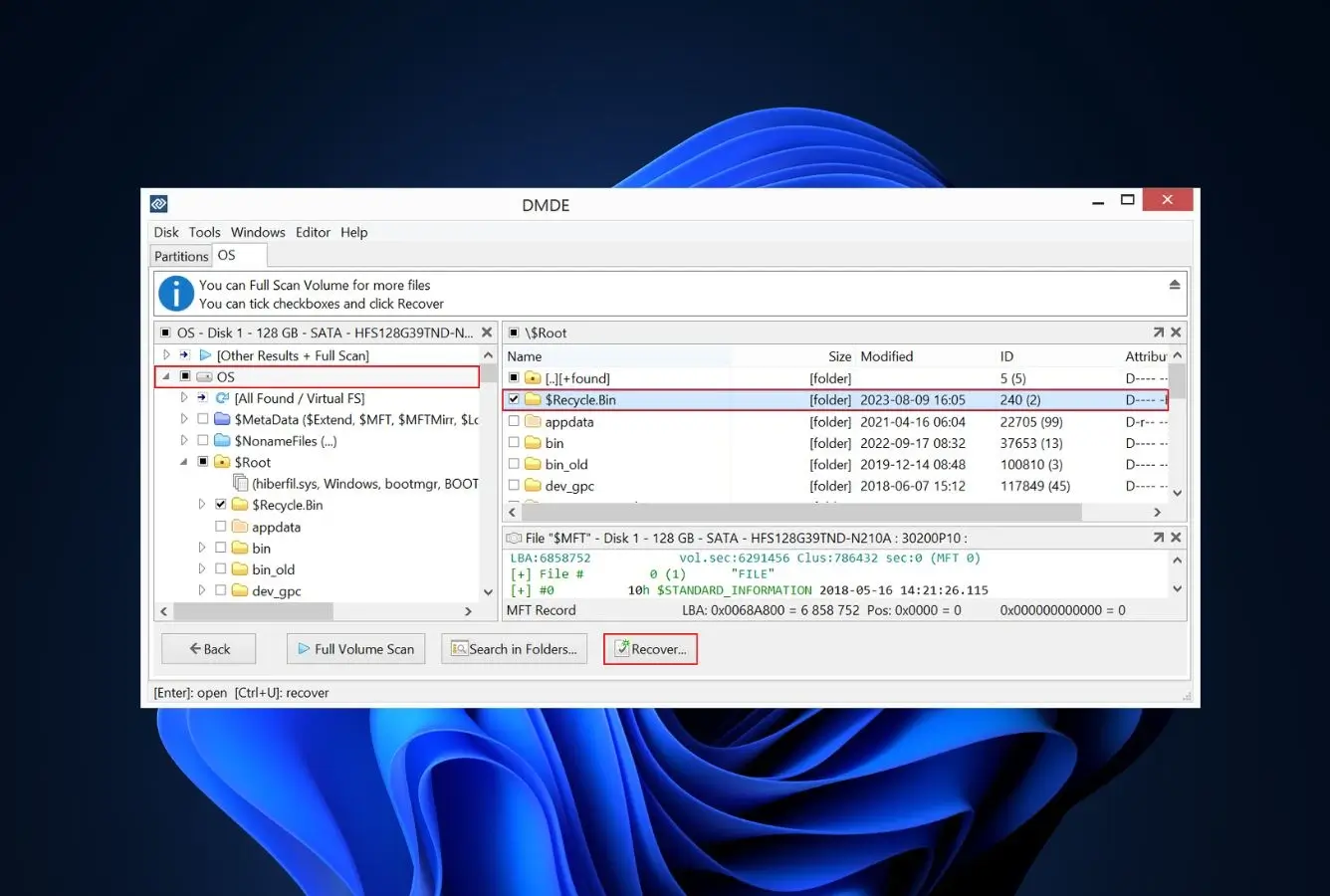
For recently deleted files on intact NTFS, open the volume and run Quick Scan — DMDE parses the MFT directly. For formatted or corrupted drives, run Full Scan to detect lost partitions and rebuild directory trees from backup metadata.
Navigate and recover
Browse the reconstructed file tree. Per-file recovery prediction indicators flag likelihood of success. Select files, click Recover, and always save to a different drive than the source. Free edition: up to 4,000 files per directory per request, unlimited requests.
If terms like MFT, GPT, boot sector, or backup superblock are unfamiliar, the learning curve is real. Beginners are better served by a wizard-driven tool — see the alternatives further down for friendlier options.
Who DMDE Is For
DMDE is built for the user who already speaks filesystem. That includes IT professionals running ad-hoc recovery for clients or colleagues, sysadmins resurrecting failed RAID arrays, data-recovery hobbyists who want professional-grade capability at sub-pro prices, and technically curious power users who’d rather understand what a tool is doing than be shown a green checkmark. The free edition’s 4,000-files-per-directory limit, with unlimited request repetitions, is also genuinely usable for one-off home recoveries — provided you’re willing to navigate directories one at a time.
A concrete example user: a Windows admin whose external 8 TB drive suddenly shows as unallocated after a power failure, who wants to scan the physical disk for the original NTFS partition, recover the directory tree from backup MFT copies, and image the drive in parallel — all in one tool, without paying $300 for an enterprise license.
If your situation is simpler — one accidentally deleted folder on a working laptop — or much more specialized — fragmented 4K video recovery, RAW camera files from a recent mirrorless body — the next two sections explain where DMDE’s design choices push you toward a different tool.
DMDE’s Strengths in Real-World Use
Aggregated independent evaluation and community feedback consistently surface the same four areas where DMDE outperforms its price tier.
Filesystem-aware recovery on intact NTFS
DMDE parses the Master File Table directly rather than relying on signature scanning, which means deleted files on a still-mounted NTFS volume come back with their original names, paths, and timestamps intact. Independent external evaluation places DMDE in the upper tier for deleted-file recovery on NTFS, and verified user reports on r/datarecovery frequently cite the speed of Quick Scan as a standout — minutes, not hours, for typical recently deleted folders.
Partition reconstruction from backup metadata
This is DMDE’s home territory. Full Scan analyzes boot sectors, backup superblocks, and orphaned MFT records to detect lost partitions across all 13 supported file systems — then reconstructs the directory tree from the backup metadata copies. Aggregated independent evaluation consistently rates this capability as Excellent, particularly on NTFS partitions corrupted by a damaged GPT, accidental quick-format, or a partition-table overwrite. Few tools at any price preserve directory structure as completely on a formatted volume.
Free RAID constructor and disk imaging
DMDE ships with a virtual RAID constructor supporting RAID-0, RAID-1, RAID-4, RAID-5, RAID-6, JBOD, delayed parity, and custom striping — with auto-detection of common parameters. Most competitors lock RAID reconstruction behind their highest pricing tier; DMDE includes it in the free edition. The same is true of disk cloning with I/O error handling, multi-pass sector reads, and resume-from-disconnect — capabilities essential when a drive is physically failing. Verified r/sysadmin feedback frequently cites the RAID module as the single feature that justified keeping DMDE in their toolkit.
Capability-per-dollar at a price point nothing matches
Vendor documentation confirms the Standard tier is a $48 perpetual license with free updates — not a yearly subscription. Express runs $20/year. The free edition has no time limit and no expiry. Aggregated independent evaluation across long-running editorial sources consistently flags the same conclusion: DMDE delivers professional-grade depth at a fraction of competitor pricing. If you’re comparing across our best Windows data recovery software list, nothing else matches this capability mix at this price.
Where DMDE Falls Short
The same architectural choices that make DMDE powerful for filesystem-aware work create three predictable gaps for everyone else.
An interface designed for filesystem engineers
DMDE has no wizard, no drag-and-drop, no animated progress indicators, and no single-click “scan my drive” button. Vendor documentation makes clear the design priority is granular control, not approachability — and verified user feedback consistently flags the learning curve as the single biggest barrier. The default disk-selection screen lists physical devices rather than drive letters, the menus assume you know what an MFT or superblock is, and the visual design has not been refreshed in over a decade. Capable users adapt; casual users abandon.
Limited RAW camera format coverage
DMDE’s signature database for RAW camera formats skews toward legacy types. Common modern RAW formats — Canon CR3, Sony ARW, Olympus ORF, Adobe DNG, Fujifilm RAF, Panasonic RW2 — are not recognized out of the box. Custom signatures can be added if you have known-good sample files, but the workflow requires hex-level knowledge most photographers don’t have. Consumer-focused tools ship with broader signature databases by default, which makes them a better fit for camera-card recovery — see our best photo recovery software roundup for tools designed around photographer workflows.
No built-in repair for corrupted media
DMDE recovers files; it does not repair them. There’s no module for fixing corrupted JPEG headers, broken MP4 moov atoms, or fragmented video reassembly. Once a file is back from the disk, what you get is what you get. Tools targeting photo and video recovery typically bundle a repair engine; DMDE does not, by design. For workflows where a partially overwritten or fragmented video matters more than directory structure, that gap is decisive.
No live preview during scanning
DMDE will not let you recover files while a scan is still running — you wait for the scan to complete (or pause it) before browsing results. On large multi-terabyte drives, that delay is real. Aggregated independent evaluation flags this as a meaningful workflow friction point relative to competitors that allow concurrent scan-and-recover. It’s a defensible choice — concurrent scanning can complicate metadata analysis — but it costs the user time on long jobs.
DMDE Capability Summary
How DMDE performs, capability by capability, based on aggregated independent evaluation and vendor documentation:
| Capability | Tier | Notes |
|---|---|---|
| Deleted-file recovery (NTFS) | Excellent | Direct MFT parsing preserves names, paths, timestamps |
| Formatted-drive recovery | Very Good | Rebuilds tree from backup metadata where available |
| Corrupted-partition recovery | Excellent | Boot-sector and superblock analysis across 13 file systems |
| RAID reconstruction | Excellent | RAID-0/1/4/5/6, JBOD, delayed parity, custom striping; free |
| Disk imaging & cloning | Excellent | I/O error handling, multi-pass, resume-from-disconnect |
| Hex-level disk editor | Excellent | MBR, GPT, boot sectors, MFT — with templates |
| exFAT support | Good | Supported, but less algorithmic depth than NTFS |
| FAT32 support | Good | Solid for deletes and formats; limited fragmentation handling |
| HFS+ / APFS support | Good | Read-supported across platforms; encrypted volumes excluded |
| Ext2/3/4 support | Good | Cross-platform Linux filesystem coverage |
| USB / external HDD recovery | Very Good | Works on mountable and unmountable removable drives |
| SD card recovery | Fair | FAT/exFAT supported; weak on RAW camera formats |
| RAW camera format support | Limited | Legacy formats only; no CR3, ARW, ORF, DNG, RAF, RW2 |
| File preview during scan | Not supported | Must wait for scan completion or pause |
| Photo / video repair | Not supported | No repair module; recovery only |
| Ease of use | Limited | Designed for filesystem engineers; no wizard or guidance |
| Free edition usability | Very Good | 4,000 files per directory, unlimited requests, no time limit |
| Cross-platform OS support | Excellent | Windows (98–11), macOS, Linux, DOS — GUI and console builds |
Tier scale: Excellent / Very Good / Good / Fair / Limited / Not supported. Aggregated from independent evaluation and verified user feedback, 2026.
DMDE Cost
DMDE has the most straightforward pricing structure in the professional recovery category. Three paid editions sit above the free tier: Express at $20/year ($9.95/month also available) for personal one-off use on a single OS family; Standard at $48 as a perpetual one-time license with lifetime free updates, valid for personal and internal business use; and Professional at $95 single-OS or $133 multi-OS for commercial recovery work, adding a portable USB activation key, file-list HTML export, recovery reports with logs and checksums, E01 disk-image read support, and resume-capable disk copying. Volume discounts scale up to 80% on bulk purchases of 20+ Standard or Professional copies.
The Standard tier at $48 is the standout. It’s a perpetual one-time payment with free updates — not a subscription. By comparison, R-Studio Standard runs $79.99 one-time, EaseUS Data Recovery Wizard Pro is $99.95/year, Disk Drill Pro is $89/year, and Stellar Data Recovery Standard is $79.99/year. The Express tier at $20/year is also the cheapest paid option in the entire category. The free edition’s 4,000-files-per-directory limit, with unlimited request repetitions and no time cap, is sufficient for many one-off home recoveries without paying anything. For broader pricing context, see our best PC data recovery software comparison.
DMDE vs. Competitors (2026)
| Tool | Deleted-file Recovery | Formatted Drive | Corrupted Drive | Free Tier | Price |
|---|---|---|---|---|---|
| Disk Drill | Excellent | Excellent | Very Good | 100 MB | $89/yr |
| R-Studio | Excellent | Very Good | Excellent | <256 KB | $79.99 one-time |
| DMDE ← | Excellent | Very Good | Excellent | 4,000 files/dir | $48 one-time |
| EaseUS DRW | Very Good | Very Good | Very Good | 2 GB | $99.95/yr |
| Stellar | Very Good | Good | Good | 1 GB | $79.99/yr |
| Recuva | Good | Fair | Not supported | Unlimited | Free / $24.95 |
Tier assignments based on aggregated independent evaluation and verified user feedback. 2026.
Try DMDE Free
Recover up to 4,000 files per directory. No time limit. Portable — no installer.
DMDE Features & Tools
DMDE’s feature set is built around filesystem-level control. Where consumer tools abstract complexity behind wizards, DMDE exposes it — direct access to MFT entries, boot sectors, and raw disk data. The bundled hex editor, RAID constructor, partition manager, and disk cloner make it more of a multi-tool for recovery specialists than a single-purpose app.
What’s most striking is what ships free. Vendor documentation confirms the RAID constructor, disk cloning with I/O error handling, partition manager, and hex disk editor are all available in the free edition — features competitors typically reserve for premium tiers. The 4,000-files-per-directory recovery limit is the only meaningful free-tier gate.
DMDE User Reviews
DMDE’s reputation is strongest in technical communities. SourceForge user reviews, dmde.com testimonials, and Reddit discussions on r/datarecovery and r/sysadmin form the bulk of sourced feedback. Sentiment is consistent across sources: praise for capability and price, candid acknowledgment of the steep interface.
One of the best software to recover and restore folders and volumes. Incredible features, quick recovery, up-to-date algorithms.
My 12 TB external drive lost its partition. DMDE found it, name and directory structure intact. I bought a license and copied everything to a new drive.
Pretty poor interface, reasonable tech support, absence of knowledge base. Developer should improve UI. But the recovery itself works.
DMDE is the tool you reach for when the consumer apps give up. Free version is generous enough that I rarely need to pay.
The RAID constructor alone earns a permanent slot in my recovery toolkit. Has saved me on multiple degraded arrays.
Even when the drive disconnected mid-operation, the program automatically resumed when reconnected. Worked through a heavily damaged drive.
Sentiment across SourceForge, Reddit, and vendor testimonials is unusually consistent: users describe DMDE as one of the most capable recovery tools at any price, but acknowledge the interface as a barrier. Negative feedback concentrates almost entirely on UX rather than recovery performance — a useful signal that the architecture works.
When to Choose Something Else
DMDE excels at filesystem-aware recovery for technically comfortable users. When that’s not your situation, a different tool fits better:
Frequently Asked Questions
Is DMDE free?+
How does DMDE compare to R-Studio?+
Can DMDE recover RAW camera photos?+
Does DMDE work on Windows 11?+
Is DMDE safe?+
Why is the DMDE interface so technical?
Can DMDE recover RAID arrays?+
Final Verdict
DMDE delivers professional-grade depth at a fraction of competitor pricing. Aggregated independent evaluation places it in the upper tier across deleted-file recovery, partition reconstruction, and corrupted-drive scanning, with a free RAID constructor, hex disk editor, and disk cloner thrown in. The Standard tier at $48 perpetual is the most cost-effective serious recovery license available, and the free edition’s 4,000-files-per-directory limit handles many one-off home situations without paying anything. The trade-offs are predictable: an interface designed for filesystem engineers, thin RAW camera signature coverage, and no built-in repair for corrupted media.
Choose DMDE if you’re an IT professional, recovery hobbyist, or technically comfortable user who values depth and value over polish. Choose something else if you want a wizard-driven workflow, broad modern RAW format support, or built-in photo and video repair — see the alternatives above for better-fit options. For broader context across the category, see our best data recovery software roundup.
About the Authors


DMDE does not operate an affiliate program — there are no affiliate links in this review. This review reflects independent research with no commercial relationship with DMDE Software. If you believe any claim is inaccurate, contact us at contact@datarecoveryfix.com.