
Disk Drill Mac Review (2026): Best Overall Recovery
Disk Drill is CleverFiles’ flagship recovery application for macOS, a single-screen scanner that reads APFS, HFS+, FAT, exFAT, and NTFS natively on Apple Silicon, with 400+ supported file signatures and a KEXT-level deep scan that cooperates with macOS to access internal drives.
The current build is v6.2.2219, and the licensing is $89/year subscription or $149 one-time Lifetime, both covering up to three Mac/Windows activations. This review aggregates vendor documentation, independent external evaluation, and verified user feedback to map exactly where Disk Drill 6 delivers and where the limits start.
evaluation, user reports
macOS 10.15.7+
Free preview

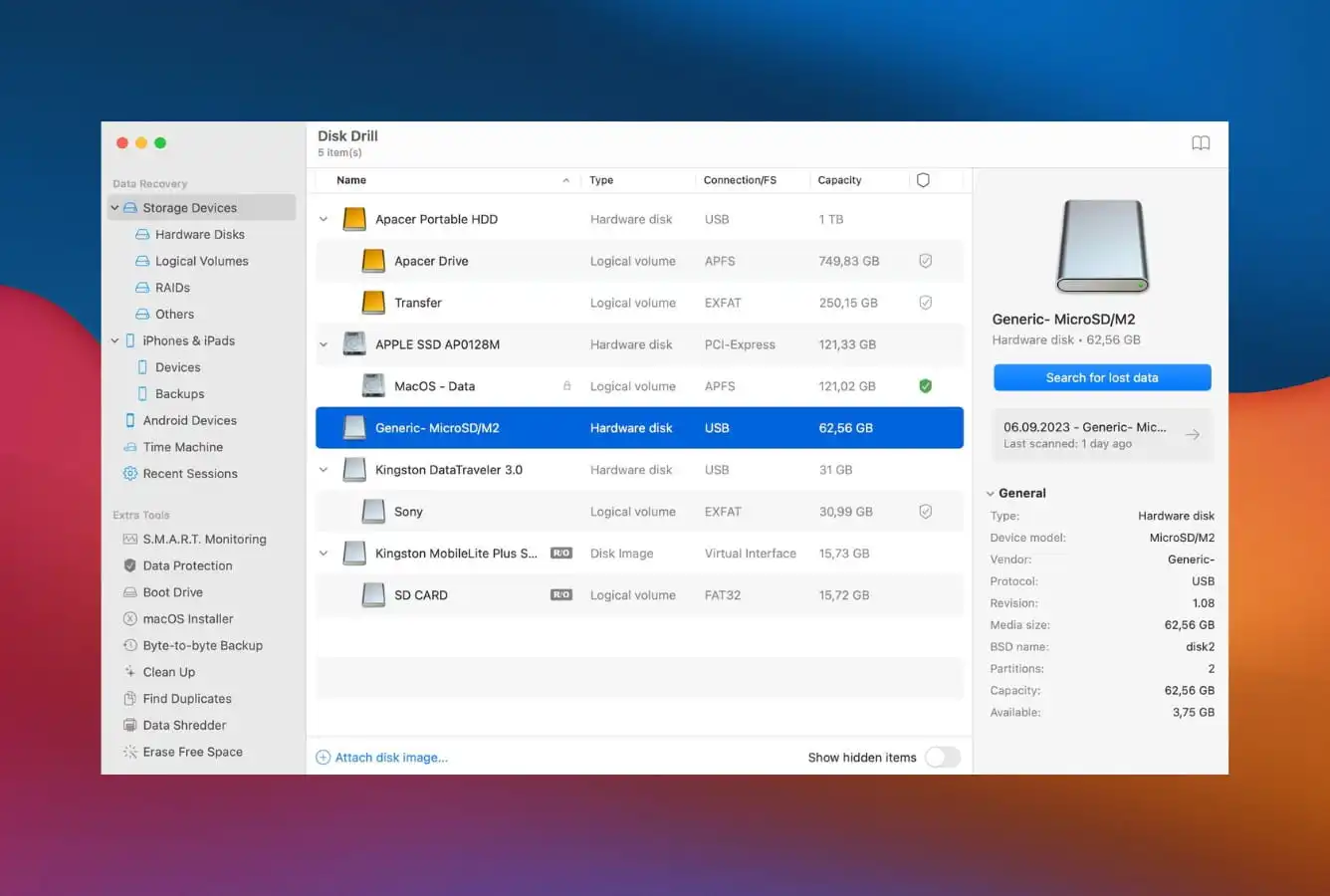
Disk Drill is consistently placed at the top of independent recovery rankings for macOS. The recovery engine handles APFS, HFS+, FAT, exFAT, and NTFS natively, the interface is the cleanest in the category (no learning curve from competing consumer tools), and the binary is Apple Silicon native, no Rosetta overhead. The Free tier scans and previews every recoverable file before you pay, keeping financial risk low. The main caveat on Mac: the Free tier is preview-only, saving requires the Pro license ($89/year subscription or $149 Lifetime). Right tool for accidental deletions, formatted volumes, corrupted memory cards, and external drive failures; wrong tool for RAID reconstruction, Linux file systems, or forensic-grade work.
✓ What We Liked
- Class-leading APFS recovery, top of independent rankings for macOS
- Cleanest UX in the category, no learning curve from consumer tools
- Apple Silicon native binary, runs on M1, M2, M3, M4 without Rosetta
- 400+ file signatures including modern RAW (CR3, ARW, ORF, NEF, DNG)
- Advanced Camera Recovery (Pro) reassembles fragmented GoPro/DJI footage
- Free tier scans and previews, verify recovery before paying a cent
- Single license covers both Mac and Windows, three activations per license
✕ What We Didn’t
- Free tier on Mac is preview-only, saving requires paid Pro tier
- No RAID reconstruction or Linux file system support (ext4, XFS, Btrfs)
- External HDD scans on multi-TB drives can take 10+ hours per TB
Disk Drill Alternatives
Brief selection Here’s a quick shortlist of our top alternative picks based on testing. |
Best Alternative  EaseUS Data Recovery Wizard Best overall · 2 GB free |
 Stellar Data Recovery Best for photos · 1 GB free |
 Wondershare Recoverit Best for video · 100 MB free |
|---|---|---|---|
| Deep Scan | ✓ | ✓ | ✓ |
| Formatted Drive Recovery | ✓ | ✓ | ✓ |
| RAW Photo Support | Broad | Broad | Limited |
| File Repair | ✓ | ✓ | Video only |
| Free Tier | 2 GB | 1 GB | 100 MB |
Research Methodology
This review aggregates three evidence types for Disk Drill 6 for Mac (current build 6.2.2219): vendor documentation (CleverFiles’ official product page, the editions comparison, the supported file system list, and Disk Drill\’s release notes), independent external evaluation, and verified user feedback (G2, Capterra, Trustpilot, plus Reddit threads on r/datarecovery and r/mac). Tier assignments (Excellent / Very Good / Good / Fair / Limited / Not supported) reflect the aggregate of that evidence rather than an in-house benchmark, we do not claim independent recovery percentages. For broader Mac recovery comparisons, see our ranking of the best data recovery software for Mac. Full methodology details are on our How We Test page.
Is Disk Drill Safe to Use on Mac?
Yes. Disk Drill is developed by CleverFiles, a U.S.-based software company that has been producing data recovery utilities since 2010. The Mac binary is signed and notarized by Apple, distributed exclusively through cleverfiles.com, there is no Mac App Store version. The application performs read-only scanning on source drives during recovery; recovered files are written to a destination location you specify. There is no telemetry beyond standard crash reporting (which can be disabled in preferences), and no account required to use the Free tier.
There are two Mac-specific safety considerations worth knowing. First, on Apple Silicon and T2-equipped Intel Macs, scanning the internal system drive requires booting into macOS Recovery and granting Full Disk Access, a stronger requirement than competing tools that work entirely from within macOS but cannot read the system volume. This is an Apple-imposed security boundary, not a Disk Drill limitation. Second, Disk Drill installs a kernel extension (KEXT) for its deep scan capability, required because Apple has been progressively phasing out KEXTs, and the legacy capability gives Disk Drill an edge on internal drive access that newer System Extension-based tools lack. The KEXT prompts standard macOS approval at install time. Always download from the official cleverfiles.com site; cracked installers from third-party sites are routinely Trojan-laden given Disk Drill\’s commercial pricing.
How to Use Disk Drill on Mac
Disk Drill\’s Mac workflow is designed around a single-screen wizard, drive selection, scan, browse, recover. Here\’s the step-by-step process:
Download and install
Download from cleverfiles.com. The installer is approximately 100 MB. Grant the Full Disk Access permission when prompted, and approve the kernel extension if you want deep scan capability. Install Disk Drill on a different drive than the one you\’re trying to recover from.
Select the source drive and start scan
The single-screen interface shows all attached drives in the left panel. Click the target drive, then click Search for lost data. Disk Drill picks the appropriate scan method automatically. Quick Scan first, then Deep Scan if needed. You can review found items as the scan progresses; it\’s not necessary to wait for completion before browsing.
Browse and preview recoverable files
Results are organized by file type with thumbnail previews for images and video stills. Use the Recovery chances filter (High / Average / Low) to focus on files most likely to recover successfully. Click any file to preview before committing to recovery, the Free tier supports unlimited preview without payment.
Recover to a different drive
Select files to recover, then click Recover. Disk Drill will refuse to save to the same drive being scanned, choose a different external or internal location. Saving requires the Pro license ($89/year subscription or $149 Lifetime). For complex cases like fragmented camera footage, enable Advanced Camera Recovery in the source drive\’s settings before scanning.
To scan the internal Macintosh HD on Apple Silicon or T2-equipped Intel Macs, restart into macOS Recovery (hold Power button on Apple Silicon; Cmd+R on Intel), open Terminal from Utilities, and follow CleverFiles\’ Recovery Mode workflow. This is required by Apple\’s security architecture, not a Disk Drill limitation.
Who Disk Drill for Mac Is For
Disk Drill serves a broader audience than most Mac data recovery tools, its general-purpose engine is strong enough for everyday recovery, and its UX is approachable enough that first-time recovery users complete the workflow without external help. Three audiences get clear value:
Mac users facing a typical data loss scenario. Accidental deletions from the Trash, a formatted external drive, a corrupted SD card from a camera, a USB stick that suddenly shows as RAW. Disk Drill\’s scan-and-preview workflow lets users verify recoverable files exist before committing to the $89/year or $149 Lifetime purchase. The Free tier is genuinely useful as diagnostic, you can confirm whether your specific files are recoverable, then decide whether to pay. Independent evaluation consistently places Disk Drill\’s Mac engine at the top of recovery rankings for this audience.
Photographers and videographers using mirrorless, DSLR, or action cameras. Disk Drill recognizes 400+ file signatures, including modern RAW formats (CR3, ARW, ORF, NEF, DNG, RAF, RW2). Pro tier includes Advanced Camera Recovery, a module that reassembles fragmented MP4/MOV footage from action cams (GoPro, DJI) and drones, where dedicated SD card recovery tools often produce unplayable fragments. For users in this audience, the Lifetime license at $149 frequently saves a single shoot\’s worth of footage.
Mac + Windows households or small studios that want one license covering both platforms. Disk Drill\’s Pro license activates on three machines and covers both macOS and Windows from a single purchase. Compared to separate Mac + Windows licenses from competing tools, the cross-platform license meaningfully improves total cost of ownership for users with mixed environments.
Disk Drill is the wrong choice for users who need RAID reconstruction (R-Studio is the category leader here), Linux file system recovery (ext4, XFS, Btrfs are not supported; DMDE or R-Studio handle these), forensic-grade evidence acquisition with chain-of-custody export (R-Studio Technician or specialized forensic tools), or a single-purchase license cheaper than $89/year (DMDE at $48 or R-Studio at $79.99 Lifetime are cheaper but considerably less polished.
Disk Drill\’s Strengths in Real-World Use
Disk Drill\’s strengths cluster around three themes: a strong recovery engine for the common scenarios, the cleanest UX in the category, and broader device coverage than competing Mac tools.
Class-leading APFS recovery on macOS
Aggregated independent evaluation places Disk Drill in the upper tier for APFS recovery, strong on accidental deletions, formatted volumes, lost partitions, and HFS+ catalog rebuild. The deep scan leverages a kernel extension (KEXT) that cooperates with macOS to access internal drives, a meaningful advantage now that Apple has been progressively phasing out KEXTs in favor of System Extensions. Scan results land with original filenames and folder structure preserved when MFT-equivalent metadata survives, which matters because signature-only tools dump recovered files into flat folders that require manual sorting.
The cleanest UX in the Mac recovery category
Disk Drill\’s single-screen workflow is consistently flagged as the most approachable in the category. Drive selector on the left, scan controls in the middle, recoverable files on the right, no wizards, no menu hunting, no preference panels to configure before scanning. Recoverable files appear with thumbnail previews for images and video stills, and a Recovery chances column (High / Average / Low) helps users focus on files most likely to recover successfully. Independent reviewers consistently call out the interface as best-in-class; first-time recovery users complete the scan-to-preview workflow without external help.
Broad device and file format coverage
Disk Drill recognizes 400+ file signatures and reads APFS, HFS+, FAT12/16/32, exFAT, NTFS, plus iOS and iPadOS device backups. Cross-platform recovery covers Mac, Windows, Linux RAIDs, virtual hard drives, and Windows Storage Spaces. iPhone, iPad, and Android recovery is included via device imaging. The breadth means Disk Drill handles meaningfully more scenarios than competing pure-Mac tools, and the Pro license covering three Mac/Windows activations is unusually generous for a $89/year subscription.
Free tier that actually previews recoverable files
Unlike competitors that gate scanning behind a paid tier or limit the scan depth in Free, Disk Drill\’s Free tier scans drives in full and previews every recoverable file (file size, type, recovery confidence) before any payment. Users verify recovery feasibility for their specific scenario before committing $89/year or $149 Lifetime. The trade-off compared to Windows is clear: the Mac Free tier does not include the 500 MB recovery quota that the Windows version offers. Saving on Mac requires Pro. But for diagnostic purposes (confirming whether the data exists at all) Free is genuinely useful.
Where Disk Drill for Mac Falls Short
The limitations are clear-eyed and worth knowing before committing to a license. Three patterns surface consistently in independent evaluation and user feedback.
Mac Free tier is preview-only, not recovery
This is the single biggest friction point in Mac user feedback. The Windows version of Disk Drill includes a 500 MB free recovery allowance. Mac does not. Mac users can scan, preview every recoverable file, and verify their data exists, but cannot save a single byte without the Pro license. The pricing change has caught users coming from the Windows tier off-guard. CleverFiles\’ rationale appears to be Mac-specific licensing economics, but the result is meaningful purchase friction. Independent reviewers consistently flag this; Capterra reviews include several “I like the fact that Disk Drill is able to uncover deleted or lost files… I do not like the fact that they offer this by default on Mac and yet you have to pay for it to recover anything at all” sentiments.
External HDD scans on multi-TB drives can be very slow
Independent testing places Disk Drill\’s external HDD scan speed in the Fair tier. 1 TB of external HDD content can take 10+ hours to deep-scan, considerably slower than several competing tools that finish similar scans in 4–6 hours. Internal drive scans are fast (typically 600 GB in 5 minutes per independent evaluation), but external multi-TB drive scenarios are a known weakness. The mitigation is that scan progress can be browsed in real time (users don\’t need to wait for completion before recovering) but if all the files needed are deep in the scan, the wait is real.
No RAID reconstruction, Linux filesystems, or forensic export
Three professional-grade capabilities that competing tools include in Pro tiers are absent from Disk Drill. RAID reconstruction (RAID 0/1/5/6/10 with parameter detection) is not supported; R-Studio is the clear choice for users with multi-disk arrays. Linux file system recovery (ext2/3/4, XFS, Btrfs) is not supported, which matters for dual-boot systems and Linux server administrators recovering from Mac; DMDE and R-Studio handle these. Forensic evidence export with chain-of-custody metadata is unavailable in Pro (Enterprise tier, $499 Lifetime, adds DFXML forensic data export). For users in any of these three audiences, Disk Drill is not the right tool.
Disk Drill for Mac Capability Summary
How Disk Drill performs capability by capability:
| Capability | Tier | Notes |
|---|---|---|
| APFS deleted-file recovery | Excellent | Top tier in independent rankings; filenames + folder structure preserved |
| UI & ease of use | Excellent | Cleanest single-screen workflow in the Mac recovery category |
| Apple Silicon native binary | Excellent | Runs natively on M1, M2, M3, M4, no Rosetta overhead |
| RAW camera format support | Excellent | 400+ signatures including CR3, ARW, ORF, NEF, DNG, RAF, RW2 |
| Formatted-volume recovery | Very Good | Strong on quick-format scenarios; deep scan handles full format |
| HFS+ recovery | Very Good | Catalog rebuild + KEXT-level deep scan for legacy Mac volumes |
| SD card / camera recovery | Very Good | Pro tier Advanced Camera Recovery reassembles fragmented MP4/MOV |
| iOS / iPad backup recovery | Very Good | Recover from iTunes/Finder backups; iOS 18 supported |
| USB / external SSD recovery | Very Good | Standard formats handled; free preview validates before payment |
| Time Machine backup parsing | Very Good | Detects backup disks + local snapshots; scan with one click |
| Cross-platform license value | Very Good | Single Pro license covers Mac + Windows, three activations |
| Free tier (preview) | Good | Scans + previews unlimited; saving requires Pro on Mac |
| Free tier (recovery) | Limited | 0 MB free recovery on Mac (Windows: 500 MB) |
| External HDD scan speed | Fair | 10+ hours per TB on multi-TB drives; internal drives fast |
| RAID reconstruction | Not supported | Use R-Studio for RAID 0/1/5/6/10 with parameter detection |
| Linux file systems (ext4, XFS, Btrfs) | Not supported | Use DMDE or R-Studio for cross-platform Linux recovery |
| Forensic export (DFXML) | Not supported | Available in Enterprise tier ($499 Lifetime) only |
| File repair (corrupted media) | Not supported | Use Stellar Repair for Photo/Video for damaged media files |
| Internal Mac SSD with TRIM | Not supported | Hardware limitation affecting all recovery tools, not Disk Drill specific |
Tier scale: Excellent / Very Good / Good / Fair / Limited / Not supported. Aggregated from CleverFiles\’ product documentation, independent external evaluation, and verified user feedback (G2, Capterra, Trustpilot), 2026.
Disk Drill for Mac Cost
Disk Drill uses a tiered Pro licensing model with both subscription and Lifetime options. The Free tier scans drives and previews every recoverable file but cannot save recovered files on Mac, saving requires the Pro tier. There are no caps on scan size, scan depth, or preview functionality in Free.
| Edition | Price | Coverage | Notes |
|---|---|---|---|
| Basic (Free) | $0 | Unlimited scan + preview · S.M.A.R.T. monitoring · Recovery Vault · Mac cleanup · Disk imaging | Saving recovered files not included on Mac (Windows: 500 MB) |
| Pro (1-year subscription) | $89/year | Free + unlimited recovery · Advanced Camera Recovery · 3 Mac/Windows activations | Updates included for the subscription period |
| Pro (Lifetime) | $149 one-time | Pro features · 3 Mac/Windows activations · lifetime updates | Best long-term value for users keeping the tool 2+ years |
| Enterprise (Lifetime) | $499 one-time | Pro + DFXML forensic export · priority support · enterprise activation | For IT shops and forensic services |
All paid tiers cover both macOS and Windows builds. 50% loyalty discount available for upgrades from older Disk Drill versions. Pricing verified against cleverfiles.com, April 2026.
The Lifetime tier is the headline value play. Compared to subscription competitors charging $79–100/year, Disk Drill\’s $149 Lifetime breaks even after roughly two years and saves money in every year after. For category context, see our ranking of the best Mac recovery tools, and for users wanting a free-first approach, our best free data recovery software guide.
Disk Drill for Mac vs. Competitors (2026)
How Disk Drill stacks up against the most common Mac recovery alternatives:
| Tool | APFS recovery | Formatted volume | Mac free tier | UI | Entry price |
|---|---|---|---|---|---|
| Disk Drill ← | Excellent | Very Good | Scan/preview only | Excellent | $89/yr · $149 Lifetime |
| R-Studio Mac | Excellent | Very Good | Preview only | Technical | $79.99 Lifetime |
| EaseUS DRW Mac | Very Good | Good | Up to 2 GB | Very Good | $99.95/yr |
| Stellar Mac | Very Good | Good | Up to 1 GB | Good | $79.99/yr |
| Wondershare Recoverit | Very Good | Very Good | 100 MB | Good | $79.99/yr |
| UFS Explorer Mac | Good | Fair | <256 KB | Technical | $64.95 |
| PhotoRec (Mac) | Fair | Fair | Unlimited | CLI only | Free |
Tier scale: Excellent / Very Good / Good / Fair / Limited / Not supported. Aggregated from vendor documentation and independent external evaluation, 2026.
Try Disk Drill Free for Mac
Scan & preview recoverable files at no cost. Pay only if you find what you’re looking for.
Disk Drill Features & Mac-Specific Tools
Disk Drill\’s feature set on Mac is focused squarely on recovery and drive protection, it doesn\’t try to be a general-purpose disk utility. The recovery engine is the centerpiece: 400+ file signatures, native APFS snapshot handling, and the only consumer-grade fragmented-video reassembly module on macOS.
Beyond recovery, the tool includes S.M.A.R.T. drive monitoring (less detailed than dedicated tools like DriveDx, but sufficient for early warnings), byte-to-byte disk imaging for failing drives, and Recovery Vault, a proactive metadata layer that makes future recoveries near-guaranteed, even on TRIM-enabled SSDs.
What\’s absent: no RAID reconstruction, no forensic evidence export in Pro tier (Enterprise tier $499 adds DFXML), no Linux file system support (ext4, XFS, Btrfs), no file repair capability for corrupted photos/videos, and no network recovery. If you need cross-platform file system access on Mac, DMDE or tools in our NAS recovery guide are better suited.
Disk Drill User Reviews
Disk Drill for Mac has extensive review coverage across user platforms: Capterra, G2, Trustpilot, and Reddit threads on r/datarecovery and r/mac. Sentiment splits clearly: praise for recovery performance and interface design, criticism for the Mac-specific Free-tier limitation (preview-only, no saving) and the slow scan speed on multi-TB external HDDs.
Funcionalidad perfecta, recuperación de documentos, fotos, archivos en iOS, Mac Pro, Android y hasta Windows.
Used Disk Drill to recover 400+ photos from a formatted SD card. Everything came back intact, including the folder structure.
Recovered files I thought were gone forever after emptying Trash. Worth every penny.
I like the fact that Disk Drill is able to uncover deleted or lost files. I do not like the fact that they offer this by default on Mac and yet you have to pay for it to recover anything at all.
The Mac free version only lets you preview, not save. Had to buy the license. Annoying but the recovery worked perfectly.
Disk Drill makes Mac data recovery super easy. In just a few simple clicks, you can scan your device and display a list of files that can be restored.
The recurring themes across verified user feedback: praise for recovery performance and the clean Mac UI, criticism for the Mac Free-tier preview-only limitation (users coming from the Windows version expect 500 MB free saving), and concern about external HDD scan duration on multi-TB drives. Professional data recovery technicians tend to prefer R-Studio for complex multi-disk cases but recommend Disk Drill for consumer use.
When to Choose Something Else
Disk Drill is our top overall pick, but there are cases where an alternative performs better:
Open Finder, navigate to the folder where files were lost, click the Time Machine icon in the menu bar, and browse to a backup before the deletion event. If Time Machine was active, this takes 2 minutes and costs nothing.
Frequently Asked Questions
Can Disk Drill recover files on Mac for free?+
Does Disk Drill work on Apple Silicon Macs?+
How well does Disk Drill recover APFS data on Mac?+
Can Disk Drill recover data from a Mac SSD?+
What is the difference between Disk Drill Free and Pro on Mac?+
Does Disk Drill support macOS Sequoia?+
Is Disk Drill worth it for Mac users?+
Final Verdict
Disk Drill earns 4.5/5 as the strongest combination of recovery engine and user experience available for macOS. Aggregated independent evaluation places it at the top of Mac recovery rankings, class-leading APFS recovery, the cleanest single-screen workflow in the category, broad device coverage including iOS backups and Time Machine snapshots, and an Apple Silicon native binary that runs without Rosetta. The Pro license at $89/year subscription or $149 Lifetime covers three Mac/Windows activations, which is unusually generous for the category.
The trade-offs are clear-eyed. The Mac Free tier is preview-only, saving requires Pro, unlike the Windows version’s 500 MB free saving allowance. External multi-TB HDD scans can run 10+ hours per terabyte. RAID reconstruction, Linux file systems (ext4/XFS/Btrfs), and forensic-grade evidence acquisition are not supported in Pro tier. For accidentally emptied Trash, reformatted external drives, corrupted camera cards, and USB sticks that stopped mounting, Disk Drill is the default recommendation. For RAID-attached storage or Linux filesystem recovery, R-Studio or DMDE are stronger choices. For users wanting a completely free option with no caps, see our best free data recovery software guide.
About the Authors


This site earns revenue through affiliate links when you purchase Disk Drill or other products through our links. This financial relationship has no influence on our tier assignments, methodology, or conclusions, all tools are evaluated independently against the same rubric and the same body of aggregated evidence. If you believe any claim is inaccurate, contact us at contact@datarecoveryfix.com.




